
app.config未加载在.Net核心MSTests项目中
我正在做一个项目,如果我试图将几个库从.NET Framework4.5.2移植到.NET Core2,我将面临一些问题,试图在单元测试中读取遗留app.config应用程序设置。为了将问题减少到最低限度的再现场景,我在VS2017中创建了以下项目:
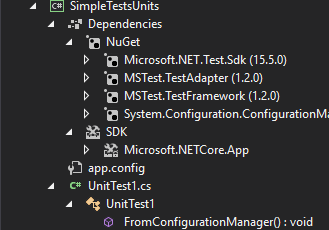
我有app.config文件:
<?xml version="1.0" encoding="utf-8"?>
<configuration>
  <appSettings>
    <add key="TestKey" value="20" />
  </appSettings>
  <configSections>
  </configSections>
</configuration>
以及UnitTest1.cs文件:
using Microsoft.VisualStudio.TestTools.UnitTesting;
using System.Configuration;

namespace SimpleTestsUnits
{
    [TestClass]
    public class UnitTest1
    {
        [TestMethod]
        public void FromConfigurationManager()
        {
            Assert.AreEqual("20", ConfigurationManager.AppSettings["TestKey"]);
        }
    }
}
在构建该项目时,生成SimpleTestsUnits.dll,并在SimpleTestsUnits.dll.config文件的同一个文件夹中创建app.config文件的内容。
因此,当我使用VS2017运行单元测试时,"TestKey“的值总是为null,如果我调试到ConfigurationManager.AppSettings中,那里就没有加载键。
抛出的异常:'Microsoft.VisualStudio.TestTools.UnitTesting.AssertFailedException‘in Microsoft.VisualStudio.TestPlatform.TestFramework.dll -- 'Microsoft.VisualStudio.TestTools.UnitTesting.AssertFailedException’类型的异常发生在Microsoft.VisualStudio.TestPlatform.TestFramework.dll中,但未在用户代码Assert.AreEqual中处理,失败。Expected:<20>。Actual:<(null)>
我在这里错过了什么?这不管用吗?
回答 3
Stack Overflow用户
发布于 2017-12-11 13:00:18
执行测试时,条目程序集不是带有测试的程序集。您可以通过在测试中添加以下行并对其进行调试来检查它:
var configLocation = Assembly.GetEntryAssembly().Location;
就我而言,configLocation是c:\Users\myusername\.nuget\packages\microsoft.testplatform.testhost\15.3.0-preview-20170628-02\lib\netstandard1.5\testhost.dll
因此,ConfigurationManager希望在指定目录中的testhost.dll.config中找到app.config。我已经将它复制到这个位置,测试通过了ok (在对配置进行了轻微修改之后,请参见下面)。
另一个问题是您的app.config不完全正确。configSections元素应该是<configuration>根中的第一个元素。因此,只需删除configSections元素,因为它是空的,或者以以下方式调整app.config:
<?xml version="1.0" encoding="utf-8"?>
<configuration>
  <configSections>
  </configSections>
  <appSettings>
    <add key="TestKey" value="20" />
  </appSettings>
</configuration>当然,在testhost.dll附近放置配置文件是一种糟糕的方法。您可以更改ConfigurationManager使用ConfigurationManager.OpenExeConfiguration调用加载应用程序配置的路径:
[TestMethod]
public void UnitTest1()
{
    //  Put your Test assembly name here
    Configuration configuration = ConfigurationManager.OpenExeConfiguration(@"SimpleTestsUnits.dll");

    Assert.AreEqual("20", configuration.AppSettings.Settings["TestKey"].Value);
}
但不幸的是,这种方法需要修改正在测试的代码。
Stack Overflow用户
发布于 2019-02-24 20:52:23
MSTest以"testhost.dll“的形式运行,这意味着ConfigurationManager在.NET内核下执行时从"testhost.dll.config”读取设置。它将查找"testhost.dll.config“位于"testhost.dll”的位置,但也会在测试dll的位置查找"testhost.dll.config“。
因此,将资源管理器中的配置文件复制或重命名为"testhost.dll.config“将解决问题。
您可以通过将下面的MSBuild步骤添加到“MSTest .csproj”标记中的MSTest.csproj文件的末尾来轻松地实现自动化。
<Target Name="CopyAppConfig" AfterTargets="Build" DependsOnTargets="Build">
    <CreateItem Include="$(OutputPath)$(AssemblyName).dll.config">
         <Output TaskParameter="Include" ItemName="FilesToCopy"/>
    </CreateItem>
    <Copy SourceFiles="@(FilesToCopy)" DestinationFiles="$(OutputPath)testhost.dll.config" />
</Target>资料来源:(https://github.com/Microsoft/testfx/issues/348#issuecomment-454347131)
Stack Overflow用户
发布于 2020-12-17 07:39:43
您可以试一下这个类的大小。
public static class AppConfig
{
    const string Filename = "app.config";

    static readonly Configuration Configuration;

    static AppConfig()
    {
        try
        {
            Configuration = ConfigurationManager.OpenExeConfiguration(ConfigurationUserLevel.None);

            if (!Configuration.HasFile)
                throw new ConfigurationErrorsException();
        }
        catch
        {
            try
            {
                var configmap = new ExeConfigurationFileMap
                {
                    ExeConfigFilename = Filename
                };

                Configuration = ConfigurationManager.OpenMappedExeConfiguration(configmap, ConfigurationUserLevel.None);
            }
            catch
            {
            }
        }
    }

    public static string Get(string key, string @default = "")
    {
        return Configuration?.AppSettings?.Settings[key]?.Value ?? @default;
    }
}https://stackoverflow.com/questions/47752271
复制相似问题
腾讯云开发者

Copyright © 2013 - 2026 Tencent Cloud. All Rights Reserved. 腾讯云 版权所有
深圳市腾讯计算机系统有限公司 ICP备案/许可证号:粤B2-20090059  粤公网安备44030502008569号
腾讯云计算(北京)有限责任公司 京ICP证150476号 | 京ICP备11018762号