
“溢出:隐藏”不以绝对位置工作
“溢出:隐藏”不以绝对位置工作
提问于 2018-04-15 12:37:31
目前,我正在为我的音乐项目开发一个简单网页,并希望导航栏始终保持在所有其他方面的首位。我已经设置了一个绝对位置,z索引和溢出:隐藏,但我似乎找不到我的问题的微小原因。
有更多的人有类似的问题,我尝试了更多的解决方案,但我只是找不到我的错误。当我调整窗口的大小时,我的元素仍然相互混合:
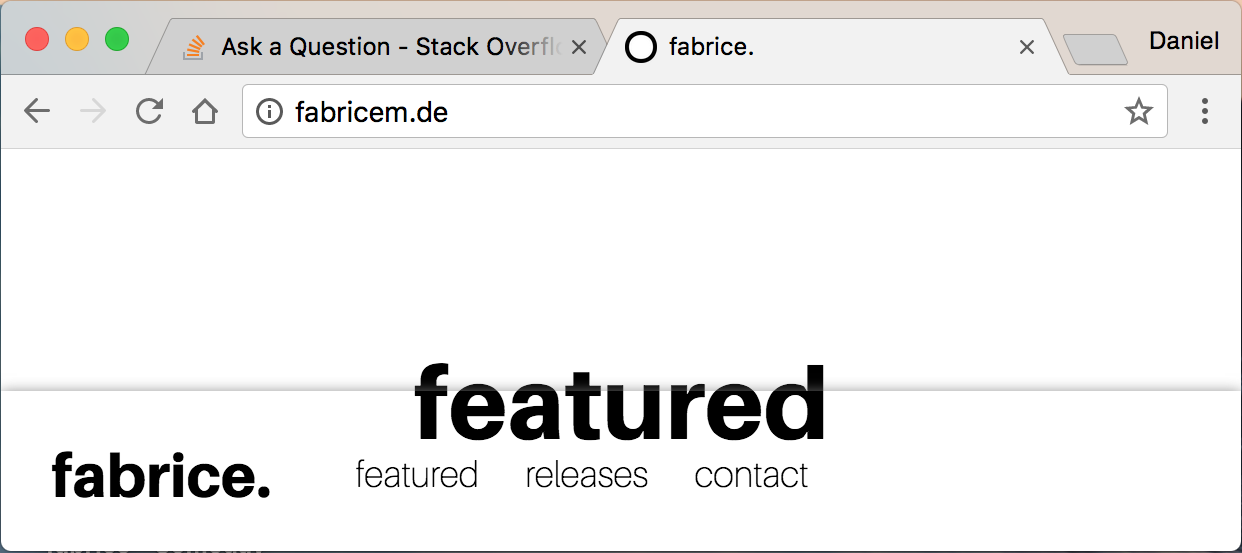
我把我的全部代码附在下面:
<html>

<head>

    <!-- Basic Page Needs
    –––––––––––––––––––––––––––––––––––––––––––––––––– -->
    <meta charset="utf-8">
    <title>fabrice.</title>
    <meta name="description" content="fabrice - official website">
    <meta name="author" content="Daniel Pölzgutter">

    <!-- Mobile Specific Metas
    –––––––––––––––––––––––––––––––––––––––––––––––––– -->
    <meta name="viewport" content="width=device-width, initial-scale=1">

    <!-- CSS
    –––––––––––––––––––––––––––––––––––––––––––––––––– -->
    <link rel="stylesheet" type="text/css" href="/style.css">

    <!-- favicon
    –––––––––––––––––––––––––––––––––––––––––––––––––– -->
    <link rel="shortcut icon" type="image/png" href="/res/icons/favicon.png"/>

</head>


<body>


    <!-- PAGES
    –––––––––––––––––––––––––––––––––––––––––––––––––– -->

    <!--featured-->
    <div id="js_featured" class="page">
        <div class="container">


            <div class="row">

                <div class="twelve columns" style="margin-top: 5%">
                    <h4 align="center" style="font-family: aileron-heavy; font-size: 50px">featured</h4>
                </div>

                <div class="twelve columns">
                    <p align="center" style="font-family: aileron-thin; font-size: 25px">...</p>
                </div>

            </div>


        </div>
    </div>


    <!--releases-->
    <div id="js_music" class="page" style="display:none">
        <div class="container">


            <div class="row">

                <div class="twelve columns" style="margin-top: 5%">
                    <h4 align="center" style="font-family: aileron-heavy; font-size: 50px">releases</h4>
                </div>

                <div class="twelve columns">
                    <p align="center" style="font-family: aileron-thin; font-size: 25px">...</p>
                </div>

            </div>


        </div>
    </div>


    <!--contact-->
    <div id="js_contact" class="page" style="display:none">
        <div class="container">


            <div class="row">

                <div class="twelve columns" style="margin-top: 5%">
                    <h4 align="center" style="font-family: aileron-heavy; font-size: 50px">contact</h4>
                </div>

                <div class="twelve columns">
                    <p align="center" style="font-family: aileron-thin; font-size: 25px">...</p>
                </div>

            </div>


        </div>
    </div>


    <!-- NAVIGATION BAR
    –––––––––––––––––––––––––––––––––––––––––––––––––– -->

    <div id="navbar_box">
        <div class="navbar">

            <div id="brand_box">
                <div class="brandtext">fabrice.</div>
            </div>

            <div id="textbutton_box">
                <button class="textbutton" onclick="openPage('js_featured')">featured</button>
                <button class="textbutton" onclick="openPage('js_music')">releases</button>
                <button class="textbutton" onclick="openPage('js_contact')">contact</button>
            </div>

            <div id="icon_box">
                <a href="https://www.facebook.com/danielfabricem/" class="icon" id="facebook" target="_blank"></a>
                <a href="https://twitter.com/danielfabricem" class="icon" id="twitter" target="_blank"></a>
                <a href="https://www.instagram.com/danielfabricem/" class="icon" id="instagram" target="_blank"></a>
                <a href="https://www.snapchat.com/add/danielfabricem" class="icon" id="snapchat" target="_blank"></a>
                <a href="https://www.youtube.com/channel/UCNGXQlfrPtou-CpHSJDiicQ" class="icon" id="youtube" target="_blank"></a>
                <a href="https://open.spotify.com/artist/4qpNXA2Fz4VjjzPAvoK9Uc" class="icon" id="spotify" target="_blank"></a>
                <a href="https://soundcloud.com/danielfabricem" class="icon" id="soundcloud" target="_blank"></a>
            </div>

        </div>
    </div>


    <!-- JAVASCRIPT
    –––––––––––––––––––––––––––––––––––––––––––––––––– -->

    <script>
        /*switch sites*/
        function openPage(name) {
            var i;
            var x = document.getElementsByClassName("page");

            for (i = 0; i < x.length; i++) {
                x[i].style.display = "none";
            }

            document.getElementById(name).style.display = "block";
        }
    </script>


</body>
回答 2
Stack Overflow用户
回答已采纳
发布于 2018-04-15 12:49:15
你想要这个吗?https://jsfiddle.net/cCrul/a4g3ghLt/
我刚删除了这个:
.navbar{
    background-color: white;
}
并添加背景颜色:白色;添加到#navbar_box样式:
#navbar_box {
    background-color: white;
    (...)
}Stack Overflow用户
发布于 2018-04-15 12:43:45
您是否尝试了“位置:固定”,并且不要使用“溢出”属性
页面原文内容由Stack Overflow提供。腾讯云小微IT领域专用引擎提供翻译支持
原文链接:
https://stackoverflow.com/questions/49841985
复制相关文章
相似问题
腾讯云开发者

Copyright © 2013 - 2026 Tencent Cloud. All Rights Reserved. 腾讯云 版权所有
深圳市腾讯计算机系统有限公司 ICP备案/许可证号:粤B2-20090059  粤公网安备44030502008569号
腾讯云计算(北京)有限责任公司 京ICP证150476号 | 京ICP备11018762号