
Excel在使用C#导出到Excel时一般处理日期列
Excel在使用C#导出到Excel时一般处理日期列
提问于 2018-05-17 06:05:29
我使用EPPlus库在Excel中导出报表。其中一列为日期类型,但导出到Excel后,当我打开该文件时,它将该列视为“常规”,除非我右键单击该列并将其类型设置为" date“。
以下是我的代码:
private void ExportToExcel(DataTable dataTable)
{
    //Althought the column type is already date in dataTable but even if I use following line Excel doesn't treat it as Date
    dataTable.Columns["Created On"].DataType = typeof(DateTime);

    foreach (DataRow row in dataTable.Rows)
    {
        row["Created On"] = Convert.ToDateTime(row["Created On"].
 ToString()).ToString("yyyy-MM-dd");
    }

    ExcelPackage excel = new ExcelPackage();
    var workSheet = excel.Workbook.Worksheets.Add("MyReport");
    var totalCols = dataTable.Columns.Count;
    var totalRows = dataTable.Rows.Count;
    string fileName = "MyReport[" + DateTime.Now.ToString("yyyy-MM-dd") + "].xlsx";

    for (var col = 1; col <= totalCols; col++)
    {
        workSheet.Cells[1, col].Value = dataTable.Columns[col - 1].ColumnName;
        workSheet.Cells[1, col].Style.Font.Bold = true;
    }

    for (var row = 1; row <= totalRows; row++)
    {
        for (var col = 0; col < totalCols; col++)
        {
            workSheet.Cells[row + 1, col + 1].Value = dataTable.Rows[row - 1][col];
        }
    }
    workSheet.Cells.Style.Font.Size = 11;
    workSheet.Cells.AutoFitColumns();

//Rest of the code

}
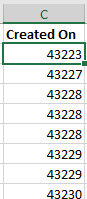
下面是关于此列在Excel中的样子的截图。
如何确保Excel将我的日期列视为日期?
回答 1
Stack Overflow用户
回答已采纳
发布于 2018-05-17 06:20:39
若要在epplus中将文本设置为DateTime格式,需要设置单元格的格式类型。
例:
1)对于简单的短日期模式
workSheet.Cells[row, 3].Style.Numberformat.Format = DateTimeFormatInfo.CurrentInfo.ShortDatePattern;2)如果您想要特定的格式,比如日期时间和时间,时间等等
workSheet.Column(dateColIndex).Style.Numberformat.Format = "mm/dd/yyyy hh:mm:ss AM/PM";页面原文内容由Stack Overflow提供。腾讯云小微IT领域专用引擎提供翻译支持
原文链接:
https://stackoverflow.com/questions/50384379
复制相关文章
相似问题
腾讯云开发者

Copyright © 2013 - 2026 Tencent Cloud. All Rights Reserved. 腾讯云 版权所有
深圳市腾讯计算机系统有限公司 ICP备案/许可证号:粤B2-20090059  粤公网安备44030502008569号
腾讯云计算(北京)有限责任公司 京ICP证150476号 | 京ICP备11018762号