
git-askpass.exe:没有这样的文件或目录无法读取用户名
我想我已经对这个问题做了相当一部分的研究,但我一直未能找到相应的问题/解决办法。
正在努力实现什么
将解决方案从VS 2017发布到Microsoft Visual Studio Team Services (VSTS)。
可复制示例
创建了一个带有"GitExample“项目"ExampleProject”的新解决方案(/w“创建新的Git存储库”)。
在窗口中,我在“”部分下选择"Publish“。我选择我的帐户和域名,并按下“发布库”。
下面的错误信息是从Git打印的。
Opening repositories:
c:\users\SampleUser\source\repos\PythonApplication4
Commit e3b04515 created locally in repository c:\users\SampleUser\source\repos\PythonApplication4
Error encountered while pushing branch to the remote repository: Git failed with a fatal error.
ArgumentNullException encountered.
   Value cannot be null.
Parameter name: path
ArgumentNullException encountered.
   Value cannot be null.
Parameter name: path
cannot spawn /C/Program Files/Microsoft Visual Studio/2017/Enterprise/Common7/IDE/CommonExtensions/Microsoft/TeamFoundation/Team Explorer/Git/mingw32/libexec/git-core/git-askpass.exe: No such file or directory
could not read Username for 'https://repodomain.visualstudio.com': terminal prompts disabled
Pushing to https://repodomain.visualstudio.com/_git/PythonApplication4

A new Git repository has been created for you in C:\Users\SampleUser\source\repos\GitExample.
Opening repositories:
C:\Users\SampleUser\source\repos\GitExample
Commit 5d8765b7 created locally in repository C:\Users\SampleUser\source\repos\GitExample
Opening repositories:
C:\Users\SampleUser\source\repos\GitExample
The calling thread cannot access this object because a different thread owns it.
Error encountered while pushing branch to the remote repository: Git failed with a fatal error.
ArgumentNullException encountered.
   Value cannot be null.
Parameter name: path
ArgumentNullException encountered.
   Value cannot be null.
Parameter name: path
cannot spawn /C/Program Files/Microsoft Visual Studio/2017/Enterprise/Common7/IDE/CommonExtensions/Microsoft/TeamFoundation/Team Explorer/Git/mingw32/libexec/git-core/git-askpass.exe: No such file or directory
could not read Username for 'https://repodomain.visualstudio.com': terminal prompts disabled
Pushing to https://repodomain.visualstudio.com/_git/GitExample这个问题似乎与Git凭证管理器在Windows中的应用有关。但是,Windows凭据管理器正确地列出了具有正确用户名和密码组合的git:repodomain.visualstudio.com。
做了什么::
- 卸载Windows的git并在没有Windows凭据管理器的情况下重新安装。从GitHub回购安装Windows凭据管理器。
- 修复Visual 2017安装。
- 删除和创建凭据管理器中的登录
我很感谢你花时间和精力研究这个问题。
回答 3
Stack Overflow用户
发布于 2018-07-11 07:30:26
请通过团队资源管理器中的管理连接从您的电子邮件地址检查到VSTS帐户的连接。具体步骤如下:
在VS -> Team Explorer -> Manage Connections ->连接到项目->中,检查是否可以连接到VSTS帐户/域(https://repodomain.visualstudio.com)。
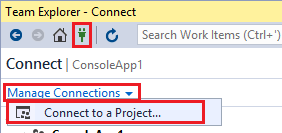
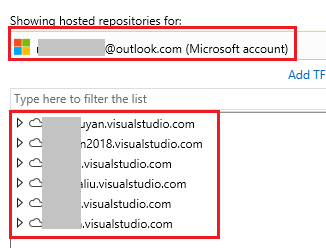
此外,还请检查您是否拥有在VSTS帐户 https://repodomain.visualstudio.com中创建新项目的权限。检查权限的步骤如下:
在VSTS (设置/安全) ->中,选择您在->中的组,检查是否允许创建新项目。

Stack Overflow用户
发布于 2021-08-03 14:14:03
我在Visual 2019中得到了错误:
cannot spawn /c/program files (x86)/microsoft visual studio/2019/enterprise/common7/ide/commonextensions/microsoft/teamfoundation/team explorer/Git/mingw32/libexec/git-core/git-askpass.exe在我的例子中,解决方案是不同的。问题是Visual 2019附带的内置git没有正确处理两步身份验证。
解决办法:
-First make sure you close all visual studio instances.
-Delete all generic credentials in windows credential manager related to git, devops, azure, SSO_POP_Device, virtualapp/didlogical, etc
-Delete the GitCredentialManager\\tenant.cache in the %appdata% folder
-Bring up the default web browser and open your repository.  In my case, I just had to open up the following site:

https://dev.azure.com/myDevOpsSite
这样,您将被提示输入用户/密码,然后在您的手机上进行两步身份验证。在此之后,凭据将被正确存储,您现在可以打开visual studio并在visual studio中推送/拉扯,而不会出现任何错误。
Stack Overflow用户
发布于 2022-02-07 06:49:12
我通过重置Git代理来解决VS2019中的这个错误: Close VS。以管理员身份运行CMD并执行此cmd: git配置--全局http.proxy http://proxy:8080 Start VS。
https://stackoverflow.com/questions/51267735
复制相似问题
腾讯云开发者
