
重新组织表/csv文件中的数据- Excel
我有一个.csv文件(还有更多类似它的文件),它们没有很好的组织。下面是一个示例文件
Number,A1Name,A1DoVote,A1Vote,A2Name,A2DoVote,A2Vote,A3Name,A3DoVote,A3Vote,Solution
1,One,true,0,Two,false,50,Three,true,100,50.0
2,One,true,0,Two,false,50,Three,true,100,50.0
3,Two,true,100,One,true,0,Three,false,100,50.0
4,Two,true,100,One,true,0,Three,false,100,50.0
5,Three,true,100,One,true,0,Two,false,50,50.0
6,Three,false,100,One,true,0,Two,true,100,50.0
7,Three,true,100,One,true,0,Two,false,50,50.0
8,Three,false,100,One,true,0,Two,true,100,50.0
9,Two,false,50,Three,true,100,One,true,0,50.0
10,Two,true,100,Three,false,100,One,true,0,50.0
11,Three,true,100,Two,false,50,One,true,0,50.0
12,Three,false,100,Two,true,100,One,true,0,50.0
我在Excel中导入了它,但问题是,我需要按名称组织数据,所以“一”、“二”、“三”而不是行数。是否有一种好的方法可以让数据总是先显示“一”,然后在右边显示相邻的两列,然后显示“二”,然后显示“三”(再次显示相邻的两列)?行是一组数据,所以它们需要保持这种状态,我只想让列在周围切换。
如果有什么不清楚,请评论,我会尽快修复它。
这就是上面的.csv代码在Excel中的样子
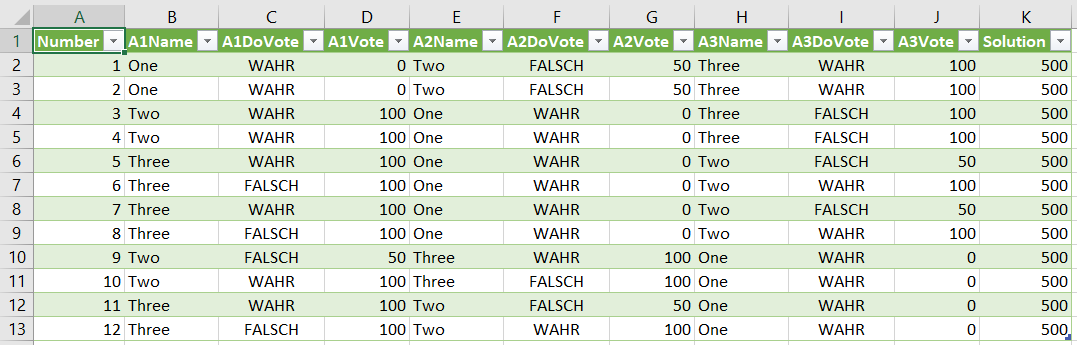
以下是我想要的:
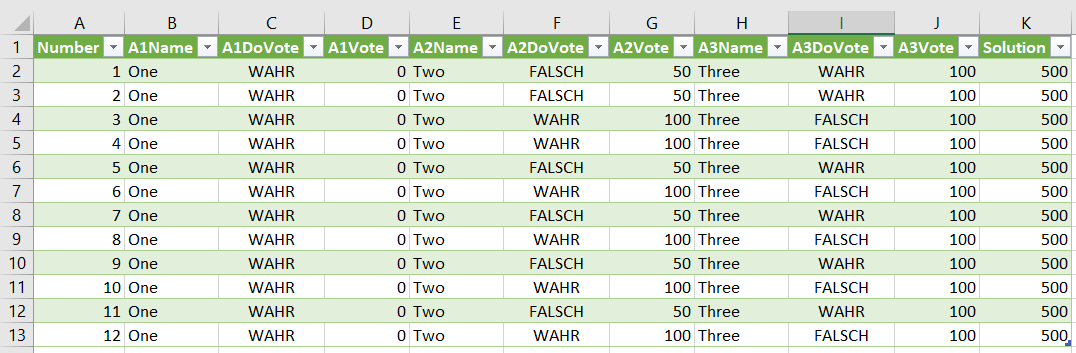
正如您所看到的,“一”、“二”和“三”都在相同的列中,而两个右边的值仍然与它们相邻。(瓦赫尔是真的,假的是假的)
回答 3
Stack Overflow用户
发布于 2018-09-06 15:41:39
你应该发现这很管用。所有范围等都是动态确定的,因此这将适用于长数据文件或短数据文件。数据被临时复制到数据范围的右侧(从M列到U列),然后剪切并复制回来。
Sub VoteSortbyRow()

Dim lRow As Long, lCol As Long
Dim LR As Long, a1data As Long, a2data As Long, a3data As Long
Dim a1name As Long, a2name As Long, a3name As Long
Dim namecount As Long


    ' assign a value for the number of voyter name columns
    namecount = 3

    ' assign column number for left hand column of the three name ranges
    a1name = 2
    a2name = 5
    a3name = 8

    ' assign column number for left hand column of the three temporary data ranges (out to the right of the data)
    a1data = 13
    a2data = 16
    a3data = 19

    ' get the active sheet name
    MySheet = ActiveSheet.Name

    'Find the last non-blank cell in column B
    LR = Cells(Rows.Count, 2).End(xlUp).Row

    ' Select cell B2
    Cells(2, 2).Select


    For a1loop_ctr = 2 To LR
        'Statements to be executed inside the loop
        ' evaluate column B for value = One, Two or Three; copy data across to respective data ramge on the same row.
        If Cells(a1loop_ctr, a1name) Like "One" Then
            ActiveSheet.Range(Cells(a1loop_ctr, a1name), Cells(a1loop_ctr, (a1name + 2))).Copy Destination:=Cells(a1loop_ctr, a1data)
        ElseIf Cells(a1loop_ctr, a1name) Like "Two" Then
            ActiveSheet.Range(Cells(a1loop_ctr, a1name), Cells(a1loop_ctr, (a1name + 2))).Copy Destination:=Cells(a1loop_ctr, a2data)
        ElseIf Cells(a1loop_ctr, a1name) Like "Three" Then
            ActiveSheet.Range(Cells(a1loop_ctr, a1name), Cells(a1loop_ctr, (a1name + 2))).Copy Destination:=Cells(a1loop_ctr, a3data)
        Else
            'Error message and exist in case the cell is invalid
            MsgBox "VALIDATION ERROR: Cell " & Replace(Replace(Cells(1, a1name).Address, "1", ""), "$", "") & a1loop_ctr & " does not contain a valid voter Name"
            Exit Sub
        End If


    Next a1loop_ctr
    For a2loop_ctr = 2 To LR
        'Statements to be executed inside the loop
        ' evaluate column E for value = One, Two or Three; copy data across to respective data ramge on the same row.
        If Cells(a2loop_ctr, a2name) Like "One" Then
            ActiveSheet.Range(Cells(a2loop_ctr, a2name), Cells(a2loop_ctr, (a2name + 2))).Copy Destination:=Cells(a2loop_ctr, a1data)
        ElseIf Cells(a2loop_ctr, a2name) Like "Two" Then
            ActiveSheet.Range(Cells(a2loop_ctr, a2name), Cells(a2loop_ctr, (a2name + 2))).Copy Destination:=Cells(a2loop_ctr, a2data)
        ElseIf Cells(a2loop_ctr, a2name) Like "Three" Then
            ActiveSheet.Range(Cells(a2loop_ctr, a2name), Cells(a2loop_ctr, (a2name + 2))).Copy Destination:=Cells(a2loop_ctr, a3data)
        Else
            'Error message and exist in case the cell is invalid
            MsgBox "VALIDATION ERROR: Cell " & Replace(Replace(Cells(1, a2name).Address, "1", ""), "$", "") & a2loop_ctr & " does not contain a valid voter Name"
            Exit Sub
        End If


    Next a2loop_ctr
    For a3loop_ctr = 2 To LR
        'Statements to be executed inside the loop
        ' evaluate column H for value = One, Two or Three; copy data across to respective data ramge on the same row.
        If Cells(a3loop_ctr, a3name) Like "One" Then
            ActiveSheet.Range(Cells(a3loop_ctr, a3name), Cells(a3loop_ctr, (a3name + 2))).Copy Destination:=Cells(a3loop_ctr, a1data)
        ElseIf Cells(a3loop_ctr, a3name) Like "Two" Then
            ActiveSheet.Range(Cells(a3loop_ctr, a3name), Cells(a3loop_ctr, (a3name + 2))).Copy Destination:=Cells(a3loop_ctr, a2data)
        ElseIf Cells(a3loop_ctr, a3name) Like "Three" Then
            ActiveSheet.Range(Cells(a3loop_ctr, a3name), Cells(a3loop_ctr, (a3name + 2))).Copy Destination:=Cells(a3loop_ctr, a3data)
        Else
            'Error message and exist in case the cell is invalid
            MsgBox "VALIDATION ERROR: Cell " & Replace(Replace(Cells(1, a3name).Address, "1", ""), "$", "") & a3loop_ctr & " does not contain a valid voter Name"
            Exit Sub
        End If


    Next a3loop_ctr

    ' cut the data for One and paste it to column B
    ActiveSheet.Range(Cells(2, a1data), Cells(LR, a1data + 2)).Cut Destination:=Cells(2, a1name)

    ' cut the data for TWO and paste it to column E
    ActiveSheet.Range(Cells(2, a2data), Cells(LR, a2data + 2)).Cut Destination:=Cells(2, a2name)

    ' cut the data for THREE and paste it to column H
    ActiveSheet.Range(Cells(2, a3data), Cells(LR, a3data + 2)).Cut Destination:=Cells(2, a3name)

    ' Select cell B2
    Cells(2, 2).Select
End Sub
如何添加一个额外的投票者
- 将namecount更新为4
- 添加一个变量'a4name‘并给它一个11的值
- 创建一个新变量“a4data”
- 将“a1data”设置为主数据范围右侧的列号值。然后设置a2data=a1datat+3,a3data=a2data+3,a4data=a3data+3。
- 根据来自a1loop、a2loop等的模式添加一个a1loop。
如果添加了第5、第6和这样的投票人,请遵循同样的方法。
如果您有很多文件,那么您可能会发现这个宏也很方便。它允许您浏览csv文件,打开文件,将数据插入工作表,并将工作表重命名为文件名。
Sub ImportCSVVoting()

Dim vPath As Variant
Dim wb As Excel.Workbook
Dim ws As Excel.Worksheet

Set wb = Excel.ActiveWorkbook
Set ws = Excel.ActiveSheet

vPath = Application.GetOpenFilename("CSV (Comma Delimited) (*.csv),*.csv" _
, 1, "Select a file", , False)
''//Show the file open dialog to allow user to select a CSV file

If vPath = False Then Exit Sub
''//Exit macro if no file selected

Workbooks.OpenText Filename:=vPath, Origin:=xlMSDOS, StartRow:=1 _
    , DataType:=xlDelimited, TextQualifier:=xlDoubleQuote, Comma:=True _
    , FieldInfo:=Array(Array(1, xlTextFormat), Array(2, xlTextFormat), _
    Array(3, xlTextFormat))
''//The fieldinfo array needs to be extended to match your number of columns

Columns.EntireColumn.AutoFit
''//Resize the columns

Sheets(1).Move Before:=wb.Sheets(1)
''//Move the data into the Workbook

Cells(1, 1).Select
''// Select cell A1

End SubStack Overflow用户
发布于 2018-09-06 15:49:35
如果尚未将单元格拆分,选择的单元格运行以下宏.我复制并粘贴了你所拥有的,并与之合作。
如果您已经将它们作为CSV导入excel并将值拆分到它们自己的列中,那么还有其他一些方法可以做到这一点。这个有用吗?在VBA中确实有很多方法来解决这样的问题。
Sub SplitOneTwoThree()
    Dim Arr1 As Variant
    Dim I as long
    Dim K As long

    For I = 1 To Selection.Rows.Count
        Arr1 = Split(ActiveCell.Offset(I - 1, 0).Value, ",")
        For K = 1 To UBound(Arr1)
            If Arr1(K) = "One" Then
                ActiveCell.Offset(I - 1, 1) = Arr1(K)
                ActiveCell.Offset(I - 1, 2) = Arr1(K + 1)
                ActiveCell.Offset(I - 1, 3) = Arr1(K + 2)
                K = K + 2
            End If
            If Arr1(K) = "Two" Then
                ActiveCell.Offset(I - 1, 4) = Arr1(K)
                ActiveCell.Offset(I - 1, 5) = Arr1(K + 1)
                ActiveCell.Offset(I - 1, 6) = Arr1(K + 2)
                K = K + 2
            End If
            If Arr1(K) = "Three" Then
                ActiveCell.Offset(I - 1, 7) = Arr1(K)
                ActiveCell.Offset(I - 1, 8) = Arr1(K + 1)
                ActiveCell.Offset(I - 1, 9) = Arr1(K + 2)
                K = K + 2
            End If
        Next K
    Next I
End SubStack Overflow用户
发布于 2018-09-06 18:29:17
下面的代码并不好看,但是它将完成您所要求的,包括解决方案值。将"Sheet1“更改为数据所在的工作表。
Set ws = Worksheets("Sheet1")
lRow = ws.Cells(Rows.Count, 2).End(xlUp).Row
Set rng = ws.Range("B2:B" & lRow)
Dim x As Long
Dim i As Long

For i = 1 To 2
    For x = 2 To lRow
        If Cells(x, "B").Value <> "One" Then
            Cells(x, "B").Resize(, 3).Copy
            Cells(x, "B").Offset(, 9).Insert Shift:=xlToRight
            Cells(x, "B").Resize(, 3).Delete Shift:=xlToLeft
        End If
    Next
Next i

For x = 2 To lRow
    If Cells(x, "E").Value <> "Two" Then
        Cells(x, "E").Resize(, 3).Copy
        Cells(x, "E").Offset(, 6).Insert Shift:=xlToRight
        Cells(x, "E").Resize(, 3).Delete Shift:=xlToLeft
    End If
Nexthttps://stackoverflow.com/questions/52206974
复制相似问题
腾讯云开发者

Copyright © 2013 - 2026 Tencent Cloud. All Rights Reserved. 腾讯云 版权所有
深圳市腾讯计算机系统有限公司 ICP备案/许可证号:粤B2-20090059  粤公网安备44030502008569号
腾讯云计算(北京)有限责任公司 京ICP证150476号 | 京ICP备11018762号