
使AppBar透明并显示设置为全屏的背景图像
使AppBar透明并显示设置为全屏的背景图像
提问于 2018-10-31 09:30:50
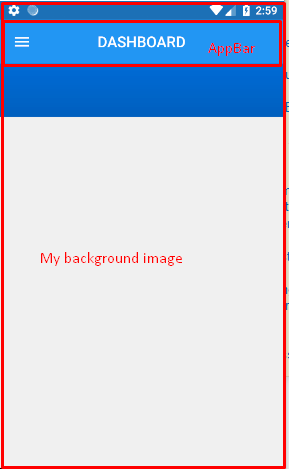
我在我的颤振应用程序中添加了AppBar。我的屏幕已经有了一个背景图像,我不想设置appBar颜色,也不希望将单独的背景图像设置为appBar。
我也想向appBar显示同样的屏幕背景图像。
我已经尝试过将appBar颜色设置为透明,但它显示的颜色像灰色。
示例代码:
appBar: new AppBar(
        centerTitle: true,
//        backgroundColor: Color(0xFF0077ED),
        elevation: 0.0,
        title: new Text(
            "DASHBOARD",
            style: const TextStyle(
                color:  const Color(0xffffffff),
                fontWeight: FontWeight.w500,
                fontFamily: "Roboto",
                fontStyle:  FontStyle.normal,
                fontSize: 19.0
            )),
      )
回答 12
Stack Overflow用户
回答已采纳
发布于 2018-10-31 10:22:34
您可以使用Stack小部件这样做。遵循下面的例子。
import 'package:flutter/material.dart';

void main() => runApp(new MyApp());

class MyApp extends StatelessWidget {
  @override
  Widget build(BuildContext context) {
    return new MaterialApp(
      home: new Home(),
    );
  }
}

class Home extends StatefulWidget {
  @override
  _HomeState createState() => _HomeState();
}

class _HomeState extends State<Home> {
  @override
  Widget build(BuildContext context) {
    return Scaffold(
      body: Stack(
        children: <Widget>[
          Scaffold(
            backgroundColor: Colors.transparent,
            appBar: new AppBar(
              title: new Text(
                "Hello World",
                style: TextStyle(color: Colors.amber),
              ),
              backgroundColor: Colors.transparent,
              elevation: 0.0,
            ),
            body: new Container(
              color: Colors.red,
            ),
          ),
        ],
      ),
    );
  }
}Stack Overflow用户
发布于 2019-12-30 17:13:22
Scaffold (在稳定-v1.12.13+hotfix.5中)支持这一点。
- 将Scaffold
extendBodyBehindAppBar设为true, - 将AppBar
elevation设置为0以消除阴影, - 根据需要设置AppBar
backgroundColor透明度。
  @override
  Widget build(BuildContext context) {
    return Scaffold(
      extendBodyBehindAppBar: true,
      backgroundColor: Colors.red,
      appBar: AppBar(
//        backgroundColor: Colors.transparent,
        backgroundColor: Color(0x44000000),
        elevation: 0,
        title: Text("Title"),
      ),
      body: Center(child: Text("Content")),
    );
}Stack Overflow用户
发布于 2020-01-24 12:33:50
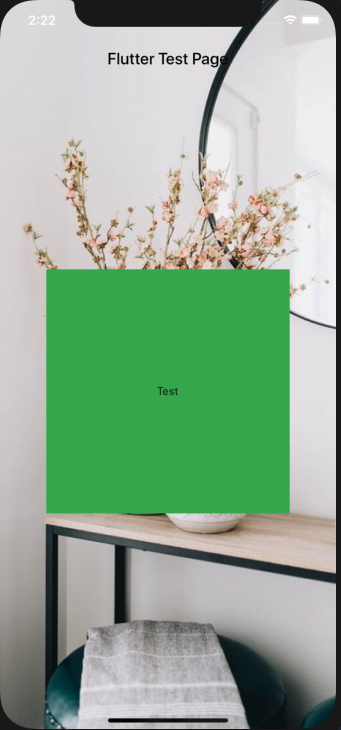
您可以使用Scaffold的property "extendBodyBehindAppBar:true“别忘了用SafeArea包装孩子
  @Override
  Widget build(BuildContext context) {
    return Scaffold(
      appBar: AppBar(
        title: Text(
          widget.title,
          style: TextStyle(color: Colors.black),
        ),
        backgroundColor: Colors.transparent,
        elevation: 0.0,
      ),
      extendBodyBehindAppBar: true,
      body: Container(
        width: double.infinity,
        height: double.infinity,
        decoration: BoxDecoration(
          image: DecorationImage(
            image: AssetImage('assets/background/home.png'),
            fit: BoxFit.cover,
          ),
        ),
        child: SafeArea(
            child: Center(
          child: Container(
            width: 300,
            height: 300,
            decoration: BoxDecoration(
              color: Colors.green,
            ),
            child: Center(child: Text('Test')),
          ),
        )),
      ),
    );
  }
页面原文内容由Stack Overflow提供。腾讯云小微IT领域专用引擎提供翻译支持
原文链接:
https://stackoverflow.com/questions/53080186
复制相关文章
相似问题
腾讯云开发者

Copyright © 2013 - 2026 Tencent Cloud. All Rights Reserved. 腾讯云 版权所有
深圳市腾讯计算机系统有限公司 ICP备案/许可证号:粤B2-20090059  粤公网安备44030502008569号
腾讯云计算(北京)有限责任公司 京ICP证150476号 | 京ICP备11018762号