
C#强制PropertyGrid不展开子类属性并在根级别显示它。
我面临着PropertyGrid的显示问题。我有一个名为Product的对象,它有一个属性字段作为List<字段>嵌套对象。
我使用了自定义的TypeConverters和PropertyDescriptors,就像在许多在线文章中一样,我实现了这样的行为:
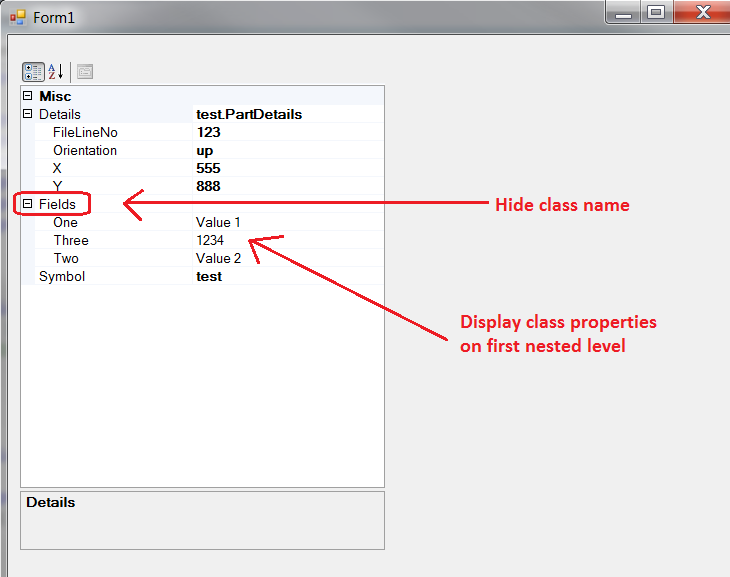
正如预期的那样,Field被很好地扩展了,但是我不想将它们扩展到单独的子类别,我只需要Field成员在与根成员相同的级别上。
现在,由于Product是一个可绑定的对象,我正试图使用转换器(即.不要循环,只需填充PG或创建一个新对象)。
我尝试了很多事情,它有可能欺骗一个TypeConverter这样做吗?以下是功能代码:
public partial class Form1 : Form
{
    public Form1()
    {
        InitializeComponent();
    }

    private void Form1_Load(object sender, EventArgs e)
    {

        Product product = new Product
        {
            Symbol = "test",
            Details = new PartDetails
            {
                FileLineNo = 123,
                Orientation = "up",
                X = 555,
                Y = 888
            },

            Fields = new FieldList {
                new Field { Name = "One", Value = "Value 1" },
                new Field { Name = "Two", Value = "Value 2" },
                new Field { Name = "Three", Value = 1234 }
            }

        };

        propertyGrid1.SelectedObject = product;
        propertyGrid1.ExpandAllGridItems();
    }
}


public class Product
{

    public string Symbol { get; set; }

    [TypeConverter(typeof(FieldListTypeConverter))]
    public FieldList Fields { get; set; }

    [TypeConverter(typeof(ExpandableObjectConverter))]
    public PartDetails Details { get; set; }

}

public class PartDetails
{
    public int FileLineNo { get; set; }
    public int X { get; set; }
    public int Y { get; set; }
    public string Orientation { get; set; }
}

public class Field
{
    public string Name { get; set; }
    public object Value { get; set; }

}


public class FieldList :
     List<Field>
//, ICustomTypeDescriptor
{

}

public class FieldListTypeConverter : TypeConverter
{
    public override object ConvertTo(ITypeDescriptorContext context, CultureInfo culture, object value, Type destinationType)
    {
        if (destinationType != typeof(string))
            return base.ConvertTo(context, culture, value, destinationType);

        return "";
    }

    public override bool GetPropertiesSupported(ITypeDescriptorContext context)
    {
        return true;
    }

    public override PropertyDescriptorCollection GetProperties(ITypeDescriptorContext context, object obj, Attribute[] attributes)
    {
        List<PropertyDescriptor> pdList = new List<PropertyDescriptor>();
        List<Field> fields = obj as List<Field>;
        if (fields != null)
        {
            foreach (Field field in fields)
            {
                FieldDescriptor fd = new FieldDescriptor(field);

                pdList.Add(fd);
            }

        }
        return new PropertyDescriptorCollection(pdList.ToArray());
    }

    private class FieldDescriptor : SimplePropertyDescriptor
    {
        public Field field { get; private set; } // instance

        public FieldDescriptor(Field field)
            // component type, property name, property type
            : base(field.GetType(), field.Name, field.Value.GetType())
        {
            this.field = field;
        }

        public override object GetValue(object obj)
        {
            return field.Value;
        }

        public override void SetValue(object obj, object value)
        {
            field.Value = value;
        }

        public override bool IsReadOnly
        {
            get { return false; }
        }
    }
}回答 2
Stack Overflow用户
发布于 2018-11-10 15:34:54
一般来说,你有正确的想法,但你的实现是错误的。
如果希望字段显示为“产品”的属性,则“产品”必须为字段中的每个项提供PropertyDescriptor本身。您可以使用应用于Product的TypeConverter来实现这一点。
[TypeConverter(typeof(ProductTypeConverter))]
public class Product
{
    public string Symbol { get; set; }
    //[TypeConverter(typeof(FieldListTypeConverter))]
    public FieldList Fields { get; set; }
    [TypeConverter(typeof(ExpandableObjectConverter))]
    public PartDetails Details { get; set; }
}
通过以下方式:
public class ProductTypeConverter : TypeConverter
{
    public override object ConvertTo(ITypeDescriptorContext context, CultureInfo culture, object value, Type destinationType)
    {
        if (destinationType != typeof(string))
        {
            return base.ConvertTo(context, culture, value, destinationType);
        }

        return "";
    }

    public override bool GetPropertiesSupported(ITypeDescriptorContext context)
    {
        return true;
    }

    public override PropertyDescriptorCollection GetProperties(ITypeDescriptorContext context, object instance, Attribute[] attributes)
    {
        PropertyDescriptorCollection pdc = TypeDescriptor.GetProperties(instance, attributes, true);
        PropertyDescriptor fieldsDescriptor = pdc.Find("Fields", false);
        List<PropertyDescriptor> pdList = new List<PropertyDescriptor>();
        foreach (PropertyDescriptor pd in pdc)
        {
            if (pd == fieldsDescriptor)
            {

                List<Field> fields = ((Product)instance).Fields;
                if (fields != null)
                {
                    foreach (Field field in fields)
                    {
                        FieldDescriptor fd = new FieldDescriptor(field);
                        pdList.Add(fd);
                    }

                }
            }
            else
            {
                pdList.Add(pd);
            }
        }
        return new PropertyDescriptorCollection(pdList.ToArray());
    }

    private class FieldDescriptor : SimplePropertyDescriptor
    {
        private Field privatefield;
        public Field field
        {
            get
            {
                return privatefield;
            }
            private set
            {
                privatefield = value;
            }
        }

        public FieldDescriptor(Field field) : base(field.GetType(), field.Name, field.Value.GetType())
        {
            // component type, property name, property type
            this.field = field;
        }

        public override object GetValue(object obj)
        {
            return field.Value;
        }

        public override void SetValue(object obj, object value)
        {
            field.Value = value;
        }

        public override bool IsReadOnly
        {
            get
            {
                return false;
            }
        }
    }

}请注意,从字段添加的属性不会分组在一起,并将与其他未分类的属性(Symbol)一起按字母顺序显示。
Stack Overflow用户
发布于 2018-11-10 20:00:50
若要自定义对象的属性列表,可以为对象使用自定义类型描述符。要做到这一点,您可以使用以下选项之一:
- 您的类可以实现
ICustomTypeDescriptor - 您的类可以从
CustomTypeDescriptor派生 - 您可以创建一个新的
TypeDescriptor并为类或对象实例注册它。
示例
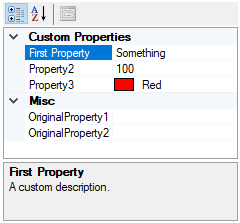
在本例中,我创建了一个名为MyClass的类,它包含一个自定义属性列表。通过为类实现ICustomTypeDescriptor,我将在属性网格中显示与普通属性类似的List<CustomProperty>。
使用此机制时,也可以使用自定义属性进行数据绑定。
using System;
using System.Collections.Generic;
using System.ComponentModel;
using System.Linq;public class MyClass : ICustomTypeDescriptor
{
public string OriginalProperty1 { get; set; }
public string OriginalProperty2 { get; set; }
public List<CustomProperty> CustomProperties { get; set; }
#region ICustomTypeDescriptor
public AttributeCollection GetAttributes() => TypeDescriptor.GetAttributes(this, true);
public string GetClassName() => TypeDescriptor.GetClassName(this, true);
public string GetComponentName() => TypeDescriptor.GetComponentName(this, true);
public TypeConverter GetConverter() => TypeDescriptor.GetConverter(this, true);
public EventDescriptor GetDefaultEvent() => TypeDescriptor.GetDefaultEvent(this, true);
public PropertyDescriptor GetDefaultProperty()
=> TypeDescriptor.GetDefaultProperty(this, true);
public object GetEditor(Type editorBaseType)
=> TypeDescriptor.GetEditor(this, editorBaseType, true);
public EventDescriptorCollection GetEvents() => TypeDescriptor.GetEvents(this, true);
public EventDescriptorCollection GetEvents(Attribute[] attributes)
=> TypeDescriptor.GetEvents(this, attributes, true);
public PropertyDescriptorCollection GetProperties() => GetProperties(new Attribute[] { });
public PropertyDescriptorCollection GetProperties(Attribute[] attributes)
{
var properties = TypeDescriptor.GetProperties(this, attributes, true)
.Cast<PropertyDescriptor>()
.Where(p => p.Name != nameof(this.CustomProperties))
.Select(p => TypeDescriptor.CreateProperty(this.GetType(), p,
p.Attributes.Cast<Attribute>().ToArray())).ToList();
properties.AddRange(CustomProperties.Select(x => new CustomPropertyDescriptor(this, x)));
return new PropertyDescriptorCollection(properties.ToArray());
}
public object GetPropertyOwner(PropertyDescriptor pd) => this;
#endregion
}CustomProperty
该类模拟自定义属性:
public class CustomProperty
{
    public string Name { get; set; }
    public object Value { get; set; }
    public string DisplayName { get; set; }
    public string Description { get; set; }
    public string Category { get; set; } = "Custom Properties";
}
CustomPropertyDescriptor
这个类是一个自定义属性描述符,它描述了一个CustomProperty。
public class CustomPropertyDescriptor : PropertyDescriptor
{
    object o;
    CustomProperty p;
    internal CustomPropertyDescriptor(object owner, CustomProperty property)
        : base(property.Name, null) { o = owner; p = property; }
    public override Type PropertyType => p.Value?.GetType() ?? typeof(object);
    public override void SetValue(object c, object v) => p.Value = v;
    public override object GetValue(object c) => p.Value;
    public override bool IsReadOnly => false;
    public override Type ComponentType => o.GetType();
    public override bool CanResetValue(object c) => false;
    public override void ResetValue(object c) { }
    public override bool ShouldSerializeValue(object c) => false;
    public override string DisplayName => p.DisplayName ?? base.DisplayName;
    public override string Description => p.Description ?? base.Description;
    public override string Category => p.Category ?? base.Category;
}
使用
private void Form1_Load(object sender, EventArgs e)
{
    var o = new MyClass();
    o.CustomProperties = new List<CustomProperty>()
    {
        new CustomProperty
        {
            Name ="Property1",
            DisplayName ="First Property",
            Value ="Something",
            Description = "A custom description.",
        },
        new CustomProperty{ Name="Property2", Value= 100},
        new CustomProperty{ Name="Property3", Value= Color.Red},
    };
    propertyGrid1.SelectedObject = o;
}
https://stackoverflow.com/questions/53222492
复制相似问题
腾讯云开发者
