
数据加载时不触发Datagridview组合框和Textbox事件
数据加载时不触发Datagridview组合框和Textbox事件
提问于 2018-11-16 05:58:25
我正在创建一个应用程序,其中datagridview具有一个组合框和多个文本框。
在datagridview中,当我选择手动datagridviewcombobox值时,将填充文本框值。
但是datagridview由bindingsource填充,datagridviewcombobox的值被选中,而textbox值为空。
示例,如下面所示
由用户选择的组合框值,帐户名称文本框已填充

由bindingsource(动态)选择的组合框值,帐户名称textbox为空
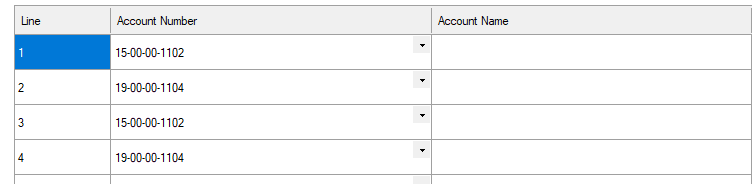
下面的是我的代码
int journalID = 0;
public Add(int id = 0)
{
     BindControls();
     journalID = id;
}


  private async void BindControls()
  {
     try
     {
            if (journalID > 0)
            {
                List<JournalAccountViewModel> list = await new JournalModel().GetDetailById(journalID);
                for (int i = 0; i <= list.Count - 1; i++)
                {
                    bindingSource1.Add(list[i]);
                }
            }
            else
            {
                bindingSource1.Add(new JournalAccountViewModel());
                bindingSource1.List.Clear();
            }
            dgvJournal.AutoGenerateColumns = false;
            dgvJournal.AllowUserToAddRows = true;
            dgvJournal.AutoSize = true;
            dgvJournal.DataSource = bindingSource1;
        }
        catch (Exception ex)
        {
            MessageBox.Show(ex.Message, "Rule", MessageBoxButtons.OK, MessageBoxIcon.Error);
        }
    }


   private void dgvJournal_EditingControlShowing(object sender, DataGridViewEditingControlShowingEventArgs e)
    {
        try
        {
            if (dgvJournal.CurrentCell.ColumnIndex == dgvJournal.Columns[colCredit.Name].Index) //Desired Column
            {
                TextBox tb = e.Control as TextBox;
                if (tb != null)
                {
                    tb.KeyPress += new KeyPressEventHandler(txtNumeri_KeyPress);
                }
            }

            if (dgvJournal.CurrentCell.ColumnIndex == dgvJournal.Columns[ColDebit.Name].Index) //Desired Column
            {
                TextBox tb = e.Control as TextBox;
                if (tb != null)
                {
                    tb.KeyPress += new KeyPressEventHandler(txtNumeri_KeyPress);
                }
            }


            ComboBox combo = e.Control as ComboBox;
            if (combo != null)
            {
                combo.SelectedIndexChanged -= new EventHandler(ComboBox_SelectedIndexChanged);
                combo.SelectedIndexChanged += new EventHandler(ComboBox_SelectedIndexChanged);
            }
        }
        catch (Exception ex)
        {
            MessageBox.Show(ex.Message, "Rule", MessageBoxButtons.OK, MessageBoxIcon.Error);
        }

    }


   private void ComboBox_SelectedIndexChanged(object sender, EventArgs e)
    {
        try
        {
            if (((ComboBox)sender).SelectedItem != null)
            {
                AccountViewModel account = (AccountViewModel)((ComboBox)sender).SelectedItem;
                var currentcell = dgvJournal.CurrentCellAddress;
                DataGridViewTextBoxCell cel = (DataGridViewTextBoxCell)dgvJournal.Rows[currentcell.Y].Cells[ColAccountName.Name];
                cel.Value = account.Name;
            }
            else
            {
                ((ComboBox)sender).SelectedIndex = 0;
            }
        }
        catch (Exception ex)
        {
            MessageBox.Show(ex.Message, "Rule", MessageBoxButtons.OK, MessageBoxIcon.Error);
        }
    }

  private void txtNumeri_KeyPress(object sender, KeyPressEventArgs e)
    {
        try
        {
            if (!char.IsControl(e.KeyChar) && !char.IsDigit(e.KeyChar) && e.KeyChar != '.')
            {
                e.Handled = true;
            }

            // only allow one decimal point
            if (e.KeyChar == '.' && (sender as TextBox).Text.IndexOf('.') > -1)
            {
                e.Handled = true;
            }

        }
        catch (Exception ex)
        {
            MessageBox.Show(ex.Message, "Rule", MessageBoxButtons.OK, MessageBoxIcon.Error);
        }
    }
当组合框值按程序设置时,请建议如何填充文本框值。
回答 2
Stack Overflow用户
回答已采纳
发布于 2018-11-19 04:29:08
    private void dgvJournal_DataBindingComplete(object sender, DataGridViewBindingCompleteEventArgs e)
    {
        if (e.ListChangedType == ListChangedType.Reset)
        {
            var a = (DataGridView)sender;
            var b = a.DataSource;
            var c = (BindingSource)b;
            var d = c.List;
            int sumDebit = 0, sumCredit = 0;
            int cnt = 0;
            foreach (JournalAccountViewModel account in d)
            {
                dgvJournal.Rows[cnt].Cells[ColAccountName.Name].Value = accountList.Where(acc => acc.ID == account.AccountID).FirstOrDefault().Name;
                enableCell(((DataGridViewCell)dgvJournal.Rows[cnt].Cells[ColDebit.Name]), (account.Debit > 0));
                enableCell(((DataGridViewCell)dgvJournal.Rows[cnt].Cells[colCredit.Name]), (account.Credit > 0));
                cnt++;
            }
        }
}Stack Overflow用户
发布于 2018-11-16 22:45:56
我将为该CellValueChanged创建一个DataGridView事件,并从ComboBox_SelectedIndexChanged事件中复制该功能。这将消除在dgvJournal_EditingControlShowing中设置这些事件的需要,并解决您的原始问题,因为它将在AccountNumber字段中任何值发生更改时触发。
    private void dgvJournal_CellValueChanged(object sender, DataGridViewCellEventArgs e)
    {
        int accountNumberColIndex = dgvJournal.Columns["AccountNumber"].Index;

        // Checking that this value is from the account number column
        if (e.ColumnIndex == accountNumberColIndex)
        {
            AccountViewModel account = (AccountViewModel) dgvJournal.Rows[e.RowIndex].Cells[e.ColumnIndex].Value;
            int accountNameColIndex = dgvJournal.Columns["AccountName"].Index;

            DataGridViewTextBoxCell accountNameCell = (DataGridViewTextBoxCell) dgvJournal.Rows[e.RowIndex].Cells[accountNameColIndex];
            accountNameCell.Value = account.Name;
        }
}页面原文内容由Stack Overflow提供。腾讯云小微IT领域专用引擎提供翻译支持
原文链接:
https://stackoverflow.com/questions/53332237
复制相关文章
相似问题
腾讯云开发者

Copyright © 2013 - 2026 Tencent Cloud. All Rights Reserved. 腾讯云 版权所有
深圳市腾讯计算机系统有限公司 ICP备案/许可证号:粤B2-20090059  粤公网安备44030502008569号
腾讯云计算(北京)有限责任公司 京ICP证150476号 | 京ICP备11018762号