
停止OutSide拖放在HTML5画布上,并在画布上限制弧的重叠
停止OutSide拖放在HTML5画布上,并在画布上限制弧的重叠
提问于 2019-04-29 10:19:22
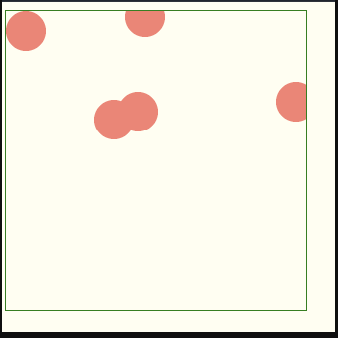
我有以下问题:
- 我要停止拖放到画布外面。
- 停止拖动时的圆圈重叠(停止将一个圆拖到另一个圆圈上)。
这是我的代码,可用于测试目的,在这个链接中
// get canvas related references
var mouseIsDown = false;
var lastX = 0;
var lastY = 0;
var circles = [];
var offsetX = 0;
var offsetY = 0;
var canvas = null;
var ctx = null;
var canvasWidth = 0;
var canvasHeight = 0;
var count = 0;

makeCircle(20, 20, "salmon");


    function makeCircle(x, y, fill){
  var i = 0;
    for(i =0 ; i< 5 ;i++){
        var circle = {
        x: x,
        y: y,
        r: 20,
        isDragging: false,
        fill: fill
      }
      circles.push(circle);
      y = y + 20;
    }
}
  var i =0;
  for(i = 0; i < circles.length;i++){
   updateCanvas();
  }

  addEventsToCanvas()
// an array of objects that define different rectangles
    function drawImageScaled(img) {
        var canvas = ctx.canvas;
        offsetX = canvas.getBoundingClientRect().left;
        offsetY = canvas.getBoundingClientRect().top;
        canvasWidth = canvas.width;
        canvasHeight = canvas.height;
        var hRatio = canvas.width / img.width;
        var vRatio = canvas.height / img.height;
        var ratio = Math.min(hRatio, vRatio);
        var centerShift_x = (canvas.width - img.width * ratio) / 2;
        var centerShift_y = (canvas.height - img.height * ratio) / 2;


        ctx.clearRect(0, 0, canvas.width, canvas.height);
        ctx.drawImage(img, 0, 0, img.width, img.height,
            centerShift_x, centerShift_y, img.width * ratio, img.height * ratio);

        if (circles) {
            for (var i = 0; i < circles.length; i++) {
                var circle = circles[i];
                drawCircle(circle);
                ctx.fillStyle = circle.fill;
                ctx.fill();
                ctx.stroke();
            }
        }
    }

function drawCircle(circle) {
            ctx.textAlign = 'center';
            ctx.textBaseline = 'middle';
            ctx.beginPath();
            ctx.fillStyle = circle.fill;
            ctx.strokeStyle = "black";
            ctx.font = "20px Georgia";
            ctx.lineWidth = 10;
            ctx.arc(circle.x, circle.y, circle.r, 0, 2 * Math.PI, false);
            ctx.fill();
            ctx.beginPath();
            ctx.fillStyle = "#ffffff";
            ctx.fill();
    }

function    updateCanvas(){
        canvas = document.getElementById("canvas");
        ctx = canvas.getContext("2d");
        let img = new Image();
        img.onload = drawImageScaled(img);
        img.setAttribute('crossOrigin', 'anonymous');
        img.src = "https://images.unsplash.com/photo-1532619675605-1ede6c2ed2b0?ixlib=rb-1.2.1&ixid=eyJhcHBfaWQiOjEyMDd9&auto=format&fit=crop&w=1950&q=80"
    }

  function  addEventsToCanvas(){
            // listen for mouse events
canvas.onmousedown = handleMouseDown;
canvas.onmouseup = handleMouseUp;
canvas.onmousemove = handleMouseMove;
    }

  function handleMouseDown(e){
        // tell the browser we're handling this mouse event
        e.preventDefault();
        e.stopPropagation();
        let mouseX = parseInt(e.clientX - offsetX);
        let mouseY = parseInt(e.clientY - offsetY);

        // mousedown stuff here
        lastX = mouseX;
        lastY = mouseY;
        for (var i = 0; i < circles.length; i++) {
            var circle = circles[i];
            var dx = circle.x - mouseX;
            var dy = circle.y - mouseY;
            if (dx * dx + dy * dy < circle.r * circle.r) {
                circles[i].isDragging = true;
                mouseIsDown = true;
            }
        }
    }

    function handleMouseUp(e){
        // tell the browser we're handling this mouse event
        e.preventDefault();
        e.stopPropagation();

        // mouseup stuff here
        mouseIsDown = false;
        for (var i = 0; i < circles.length; i++) {
            circles[i].isDragging = false;
        }
    }

    function handleMouseMove(e){
        if (!mouseIsDown) {
            return;
        }
        // tell the browser we're handling this mouse event
        e.preventDefault();
        e.stopPropagation();

        let mouseX = parseInt(e.clientX - offsetX);
        let mouseY = parseInt(e.clientY - offsetY);


        // mousemove stuff here
        for (var i = 0; i < circles.length; i++) {

            var circle = circles[i];
            if (circle.isDragging) {
                //move
                circle.x += (mouseX - lastX);
                circle.y += (mouseY - lastY);

            }
        }
        lastX = mouseX;
        lastY = mouseY;
        updateCanvas()
    }
这是输出
回答 1
Stack Overflow用户
回答已采纳
发布于 2019-04-29 12:04:50
要停止拖放到画布外,只需处理mouseLeave事件即可。从您的示例中,我更新了您的addEventsToCanvas函数如下:
function addEventsToCanvas(){
    // listen for mouse events
    canvas.onmousedown = handleMouseDown;
    canvas.onmouseup = handleMouseUp;
    canvas.onmousemove = handleMouseMove;
    canvas.onmouseleave = function(event) {mouseIsDown = false;}
}
那么,对于碰撞,这只是一些数学在绘图时间。下面是处理与画布边界和其他循环的冲突的代码:
function drawCircle(circle) {
    ctx.textAlign = 'center';
    ctx.textBaseline = 'middle';
    ctx.beginPath();
    ctx.fillStyle = circle.fill;
    ctx.strokeStyle = "black";
    ctx.font = "20px Georgia";
    ctx.lineWidth = 10;
    //avoid outside canvas x and y
    circle.x = Math.min(circle.x, canvas.width-circle.r);
    circle.x = Math.max(circle.x, circle.r);
    circle.y = Math.min(circle.y, canvas.height-circle.r);
    circle.y = Math.max(circle.y, circle.r);
    //then check if circles are not too close
    if(circle.isDragging) {
      circles.forEach(function(c) {
        if(c!=circle) {
          //calculate distance
          let dist = Math.sqrt(Math.pow(Math.abs(c.x-circle.x), 2) + Math.pow(Math.abs(c.y-circle.y), 2));
          if(dist<circle.r*2) {
            let angle = Math.atan2(c.y - circle.y, c.x - circle.x);
            circle.x = c.x - Math.cos(angle)*circle.r*2;
            circle.y = c.y - Math.sin(angle)*circle.r*2;
          }
        }
      });
    }
    ctx.arc(circle.x, circle.y, circle.r, 0, 2 * Math.PI, false);
    ctx.fill();
    ctx.beginPath();
    ctx.fillStyle = "#ffffff";
    ctx.fill();
}您可以在JSFiddle上测试整个代码。
编辑:我还修改了鼠标移动处理程序,将
circle.x += (mouseX - lastX);
circle.y += (mouseY - lastY);
通过
circle.x = mouseX;
circle.y = mouseY;
它允许在每次可能的时候将圆心放置在鼠标位置。
页面原文内容由Stack Overflow提供。腾讯云小微IT领域专用引擎提供翻译支持
原文链接:
https://stackoverflow.com/questions/55901320
复制相关文章
相似问题
腾讯云开发者

Copyright © 2013 - 2026 Tencent Cloud. All Rights Reserved. 腾讯云 版权所有
深圳市腾讯计算机系统有限公司 ICP备案/许可证号:粤B2-20090059  粤公网安备44030502008569号
腾讯云计算(北京)有限责任公司 京ICP证150476号 | 京ICP备11018762号