
在python中将CSV转换为JSON文件
在python中将CSV转换为JSON文件
提问于 2019-05-13 13:39:00
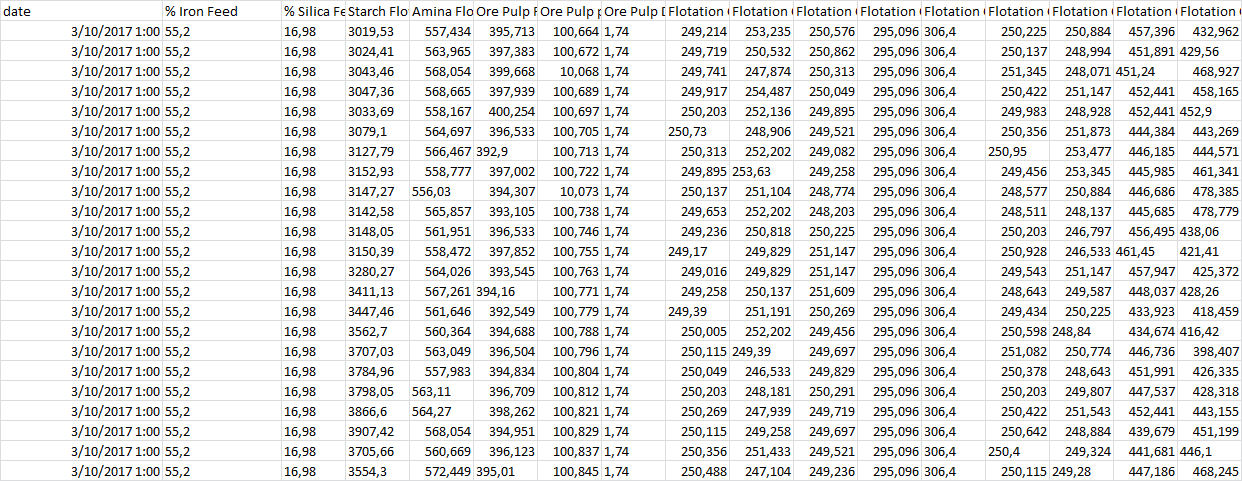
上面的csv文件,包含近2000行。
我想逐行解析CSV文件,并将其转换为JSON并发送到websocket。
我在网上找到了一些代码,它将CSV转换为JSON,如下所示:
import csv
import json

csvfile = open('file.csv', 'r')
jsonfile = open('file.json', 'w')

fieldnames = ("FirstName","LastName","IDNumber","Message")
reader = csv.DictReader( csvfile, fieldnames)
for row in reader:
    json.dump(row, jsonfile)
    jsonfile.write('\n')
但是上面的代码的问题是,我们需要提到字段名来解析CSV。因为我有2000多行,所以这不是一个可行的解决方案。
有人能建议如何逐行解析CSV文件并将其转换为JSON而不指定字段名吗?
回答 4
Stack Overflow用户
回答已采纳
发布于 2021-02-05 23:28:18
Python到JSON
要在Python中将CSV转换为JSON,请执行以下步骤:
- 初始化Python列表。
- 使用
csv.DictReader()函数读取CSV文件的行。 - 将每一行转换为字典。将字典添加到步骤1中创建的Python列表中。
- 使用
json.dumps()将Python转换为JSON字符串。 - 您可以将JSON字符串写入JSON文件。
data.csv
- 对于测试,我在csv文件中创建了100.000行复制/粘贴,使用苹果的M1芯片进行整个转换大约需要半秒钟,而所提供的示例仅需0.0005秒。
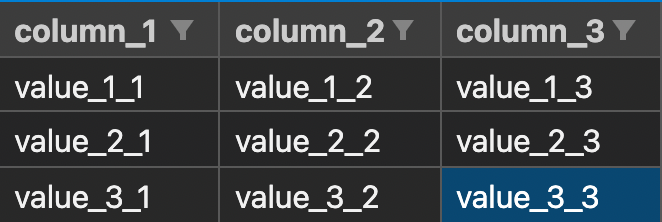
column_1,column_2,column_3
value_1_1,value_1_2,value_1_3
value_2_1,value_2_2,value_2_3
value_3_1,value_3_2,value_3_3
Python程序
import csv
import json
import time

def csv_to_json(csvFilePath, jsonFilePath):
    jsonArray = []

    #read csv file
    with open(csvFilePath, encoding='utf-8') as csvf:
        #load csv file data using csv library's dictionary reader
        csvReader = csv.DictReader(csvf)

        #convert each csv row into python dict
        for row in csvReader:
            #add this python dict to json array
            jsonArray.append(row)

    #convert python jsonArray to JSON String and write to file
    with open(jsonFilePath, 'w', encoding='utf-8') as jsonf:
        jsonString = json.dumps(jsonArray, indent=4)
        jsonf.write(jsonString)

csvFilePath = r'data.csv'
jsonFilePath = r'data.json'

start = time.perf_counter()
csv_to_json(csvFilePath, jsonFilePath)
finish = time.perf_counter()

print(f"Conversion 100.000 rows completed successfully in {finish - start:0.4f} seconds")
输出: data.json
Conversion 100.000 rows completed successfully in 0.5169 seconds[
{
"column_1": "value_1_1",
"column_2": "value_1_2",
"column_3": "value_1_3"
},
{
"column_1": "value_2_1",
"column_2": "value_2_2",
"column_3": "value_2_3"
},
{
"column_1": "value_3_1",
"column_2": "value_3_2",
"column_3": "value_3_3"
}
]Stack Overflow用户
发布于 2021-02-15 09:04:54
你可以试试这个:
import csv
import json

def csv_to_json(csvFilePath, jsonFilePath):
    jsonArray = []

    with open(csvFilePath, encoding='utf-8') as csvf:
        csvReader = csv.DictReader(csvf)

        for row in csvReader:
            jsonArray.append(row)

    with open(jsonFilePath, 'w', encoding='utf-8') as jsonf:
        jsonString = json.dumps(jsonArray, indent=4)
        jsonf.write(jsonString)

csvFilePath = r'data.csv'
jsonFilePath = r'data.json'
csv_to_json(csvFilePath, jsonFilePath)
我用600K+行转换了一个200 it的文件,它运行得很好。
Stack Overflow用户
发布于 2019-05-13 14:20:49
如果您对所拥有的解决方案感到满意,并且唯一困扰您的是如何输入列标题的“长”列表,我建议您使用类似于reader.next()的内容来阅读CSV的第一行(标头),
import csv

with open('your_CSV.csv') as csvFile:
    reader = csv.reader(csvFile)
field_names_list = reader.next()然后使用str.split(',')将获得的字符串拆分为列表。
您所得到的列表可以被提供给
fieldnames = (---from the above code block ---)代码行。
页面原文内容由Stack Overflow提供。腾讯云小微IT领域专用引擎提供翻译支持
原文链接:
https://stackoverflow.com/questions/56113592
复制相关文章
相似问题
腾讯云开发者

Copyright © 2013 - 2026 Tencent Cloud. All Rights Reserved. 腾讯云 版权所有
深圳市腾讯计算机系统有限公司 ICP备案/许可证号:粤B2-20090059  粤公网安备44030502008569号
腾讯云计算(北京)有限责任公司 京ICP证150476号 | 京ICP备11018762号