
具有可选择标签和多列的Kivy,RecycleView
从过去几周开始,我一直在努力为覆盆子pi3制作一个gui。现在,我遇到的问题是,我有一个表,表中有四个列,行号取决于来自DB的数据。我使用的是RecycleView结构。
下面是我正在做的项目的实际屏幕截图(我现在似乎没有粘贴图像的特权)。所引用的表很好地显示了从数据库中提取的3行。到目前为止还不错。
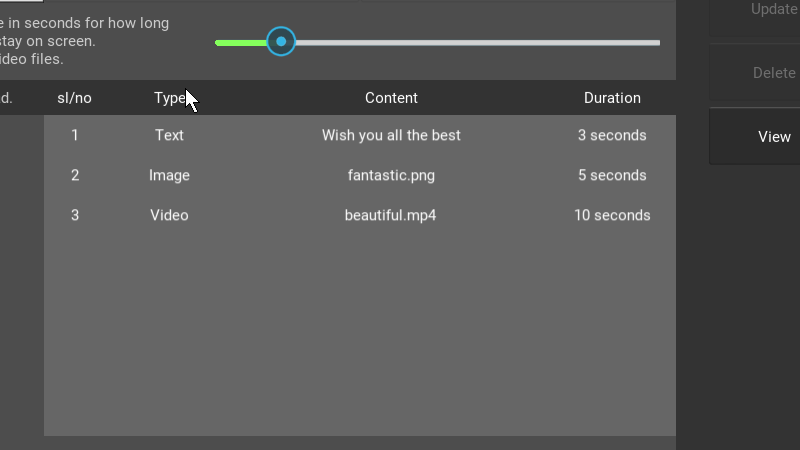
但现在,我需要使这些行具有可选性,而且我确实在努力做到这一点。我用SelectableRecycleBoxLayout和SelectableRecycleGridLayout实现了它,但是我的数据不再显示在列中了,这就是我得到的输出。
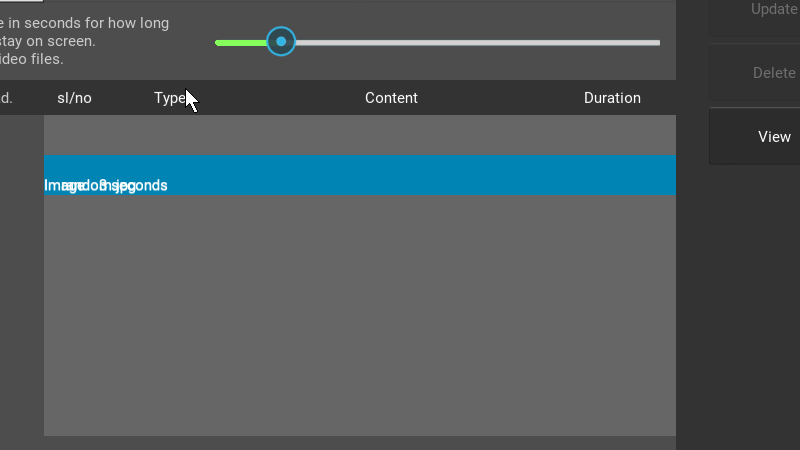
下面是代码的主要部分,我通过这些代码获得了结果,如Scren快照1所示。请给出如何正确实现可选视图的说明。谢谢。
main.py
class RecycleViewRow(BoxLayout):

    slno    = StringProperty('')
    typ     = StringProperty('')
    cont    = StringProperty('')
    dur     = StringProperty('')

#-----------------------------------------------------------------------
class SelectableRecycleBoxLayout(FocusBehavior, LayoutSelectionBehavior, RecycleBoxLayout):

    ''' Adds selection and focus behaviour to the view. '''
#-----------------------------------------------------------------------
class SelectableLabel(RecycleDataViewBehavior, Label):
    ''' Add selection support to the Label '''

    index = None
    selected = BooleanProperty(False)
    selectable = BooleanProperty(True)

    slno    = StringProperty('')
    typ     = StringProperty('')
    cont    = StringProperty('')
    dur     = StringProperty('')

    def refresh_view_attrs(self, rv, index, data):
        ''' Catch and handle the view changes '''
        self.index = index
        return super(SelectableLabel, self).refresh_view_attrs(
            rv, index, data)

    def on_touch_down(self, touch):
        ''' Add selection on touch down '''
        if super(SelectableLabel, self).on_touch_down(touch):
            return True
        if self.collide_point(*touch.pos) and self.selectable:
            return self.parent.select_with_touch(self.index, touch)

    def apply_selection(self, rv, index, is_selected):
        ''' Respond to the selection of items in the view. '''
        self.selected = is_selected
        if is_selected:
            pass #print("selection changed to {0}".format(rv.data[index]))
        else:
            pass #print("selection removed for {0}".format(rv.data[index]))
#-----------------------------------------------------------------------
class MainScreen(RecycleView):
    def __init__(self, **kwargs):
        super(MainScreen, self).__init__(**kwargs)
        #fetch data from the database
        app_ref = App.get_running_app()
        ads = app_ref.fetchAds() #function reads everything from db
        rows = len(ads)
        self.data = [{'slno': str(x+1),'typ': str(ads[x][1]),'cont': str(ads[x][2]),'dur': str(ads[x][3])} for x in range(rows)]
dash.kv
<SelectableLabel>:
    canvas.before:
        Color:
            rgba: (0, 0.517, 0.705, 1) if self.selected else (0.4,0.4, 0.4, 1)
        Rectangle:
            pos: self.pos
            size: self.size
    #on_press:

    RecycleViewRow:

#----------------------------------------------------------------
<RecycleViewRow>:
    orientation: 'horizontal'
    size_hint: 1.0, 1.0

    Label:
        text: root.slno
        size_hint_x : 0.2

    Label:
        text: root.typ
        size_hint_x : 0.4

    Label:
        text: root.cont
        size_hint_x : 1.0

    Label:
        text:  root.dur
        size_hint_x : 0.4
#----------------------------------------------------------------
<MainScreen>:
    viewclass: 'RecycleViewRow'
    RecycleBoxLayout:
        default_size: None, dp(40)
        default_size_hint: 1, None
        size_hint_y: None
        height: self.minimum_height
orientation: 'vertical'BoxLayout:
orientation : 'horizontal'
size_hint: 1.0,0.10
canvas.before:
Color:
rgba: [0.2,0.2,0.2,1.0]
Rectangle :
pos: self.pos
size: self.size
Label:
text: "sl/no"
size_hint: 0.2,1.0
Label:
text: "Type"
size_hint: 0.4,1.0
Label:
text: "Content"
size_hint: 1.0,1.0
Label:
text: "Duration"
size_hint: 0.4,1.0
BoxLayout:
orientation : 'vertical'
size_hint: 1.0,1.0
MainScreen: # the RecylcleView widget
Label:
size_hint: 1.0, 0.10
text: ""
canvas.before:
Color:
rgba: [0.3,0.3,0.3,1.0]
Rectangle :
pos: self.pos
size: self.size回答 1
Stack Overflow用户
发布于 2019-05-23 18:42:25
您需要使RecycleViewRow类具有可选性。
在python中,已经有了一个名为SelectableLabel的类。将其名称更改为RecycleViewRow,并让它派生自BoxLayout而不是Label。并删除原始的RecycleViewRow类。就像这样:
class RecycleViewRow(RecycleDataViewBehavior, BoxLayout):然后在kv中的RecycleViewRow顶部定义字符串属性,以确保它将键识别为字符串属性。并将SelectableLabel中的内容移动到RecycleViewRow顶部,并删除SelectableLabel。
所以现在应该是这样的:
RecycleViewRow:

    slno: ""
    typ: ""
    cont: ""
    dur: ""

    canvas.before:
        Color:
            rgba: (.0, 0.9, .1, .3) if self.selected else (0, 0, 0, 1)
        Rectangle:
            pos: self.pos
size: self.sizehttps://stackoverflow.com/questions/56274564
复制相似问题
腾讯云开发者

Copyright © 2013 - 2026 Tencent Cloud. All Rights Reserved. 腾讯云 版权所有
深圳市腾讯计算机系统有限公司 ICP备案/许可证号:粤B2-20090059  粤公网安备44030502008569号
腾讯云计算(北京)有限责任公司 京ICP证150476号 | 京ICP备11018762号