
使用Paramiko对SFTP服务器进行双因素(键和键盘交互)身份验证
我试图通过Python中的安全SFTP连接到服务器,但是我一直收到身份验证错误。我确信我掌握了正确的细节,因为我可以通过WinSCP来连接:
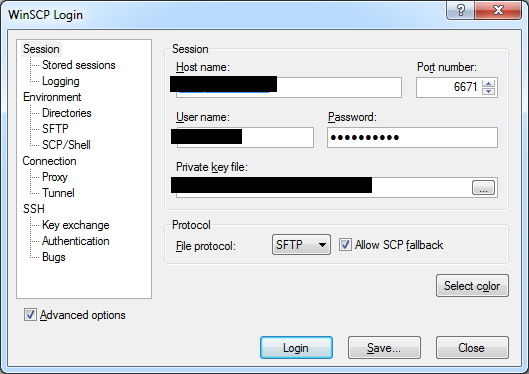
我还查看了Paramiko日志文件的输出,它说密码的身份验证失败了,但我确信密码是正确的,我的代码。
下面是我正在使用的代码,它是从各种堆栈溢出帖子中拼凑而成的。你知道为什么它不相连吗?
import paramiko
import pysftp
from base64 import decodebytes

host = '<my server address>'
port = 6671
user = '<my username>'
password = '<my password>'
private_key = '<location of my private key file>'
host_key_data = b"""<contains my host key data>"""
host_key = paramiko.RSAKey(data=decodebytes(host_key_data))
cnopts = pysftp.CnOpts()
cnopts.hostkeys.add(host, 'ssh-rsa', host_key)
pysftp.Connection(host, username=user, password=password, private_key=private_key, port=port, cnopts=cnopts)
日志文件的输出:
DEB [20190626-12:51:16.270] thr=4   paramiko.transport: Kex agreed: diffie-hellman-group-exchange-sha256
DEB [20190626-12:51:16.271] thr=4   paramiko.transport: HostKey agreed: ssh-rsa
DEB [20190626-12:51:16.272] thr=4   paramiko.transport: Cipher agreed: aes128-ctr
DEB [20190626-12:51:16.273] thr=4   paramiko.transport: MAC agreed: hmac-sha1
DEB [20190626-12:51:16.274] thr=4   paramiko.transport: Compression agreed: none
DEB [20190626-12:51:16.774] thr=4   paramiko.transport: Got server p (1024 bits)
DEB [20190626-12:51:17.029] thr=4   paramiko.transport: kex engine KexGexSHA256 specified hash_algo <built-in function openssl_sha256>
DEB [20190626-12:51:17.030] thr=4   paramiko.transport: Switch to new keys ...
DEB [20190626-12:51:17.032] thr=2   paramiko.transport: Host key verified (ssh-rsa)
DEB [20190626-12:51:17.032] thr=2   paramiko.transport: Attempting password auth...
DEB [20190626-12:51:17.531] thr=4   paramiko.transport: userauth is OK
INF [20190626-12:51:17.532] thr=4   paramiko.transport: Auth banner: b'FactSet File Transfer System (FTS)\n'
INF [20190626-12:51:17.767] thr=4   paramiko.transport: Authentication (password) failed.
使用WinSCP .NET程序集编写的VBA代码,该程序集工作如下:
' Setup session options
Dim mySessionOptions As New SessionOptions
With mySessionOptions
    .Protocol = Protocol_Sftp
    .HostName = "<hostname>"
    .PortNumber = 6671
    .UserName = "<username>"
    .Password = "<password>"
    .SshHostKeyFingerprint = "ssh-rsa 2048 fingerprintkey"
    .SshPrivateKeyPath = "location of private key file"
End With 回答 1
Stack Overflow用户
发布于 2019-06-27 06:09:29
2019-06-27 17:24:18.691来自代理的公钥"factset-rsa- key -20170717“身份验证。2019-06-27 17:24:24:18.756发送选美队的回复2019-06-27 17:24:19.260需要进一步认证。2019-06-27 17:24:19.266还需要进一步认证。2019-06-27 17:24:19.500提示(5,SSH服务器:密码认证,使用键盘交互认证.,密码:)2019-06-27 17:24:19.505使用存储密码。
您正在WinSCP中使用两个因素身份验证(键和键盘交互)。
恐怕pysftp不支持双因素身份验证。
直接使用帕拉米科,它支持多因素身份验证.pysftp在内部使用Paramiko。
实现完整的键盘交互身份验证可能比其他身份验证类型要复杂一些。但是由于服务器通常使用键盘交互身份验证来请求一个固定的密码,一些SSH库为这种情况提供了一个快捷方式。WinSCP .NET程序集在您的VBA脚本中也会这样做(您可以指定Password,尽管WinSCP可以进行键盘交互身份验证,而不是密码身份验证)。帕拉米科也这么做。如果使用Paramiko的password参数,Paramiko将使用指定的密码响应第一个键盘交互身份验证提示符。
ssh = paramiko.SSHClient()
# ...
ssh.connect(host, username=user, port=port, password=password, key_filename=private_key)
您还必须验证服务器的主机密钥(就像在pysftp和WinSCP中所做的那样)。
有关Paramiko的解决方案,请参见Paramiko“未知服务器”。
https://stackoverflow.com/questions/56782531
复制相似问题
腾讯云开发者

Copyright © 2013 - 2026 Tencent Cloud. All Rights Reserved. 腾讯云 版权所有
深圳市腾讯计算机系统有限公司 ICP备案/许可证号:粤B2-20090059  粤公网安备44030502008569号
腾讯云计算(北京)有限责任公司 京ICP证150476号 | 京ICP备11018762号