
把图像放在按钮的中心
把图像放在按钮的中心
提问于 2019-07-19 03:58:05
又卡住了找人帮忙。
这一次,我试图在按钮上对图像进行居中,并将其下方的文本放在中间。
到目前为止,我的代码中有一个片段
Button:
                canvas:
                    Rectangle:
                    # set rects size, pos = size, pos of the button
                        size:50,50
                        pos:self.pos
                        source:'icons/home.png'

                text:'NCERT\nSolutions'
                background_normal: ''
                background_color: rgba("#FFFFE0")
                color:0,0,0,1
                halign:'center'
                on_release:
                    app.root.current='flamingowindow'
这给出了以下结果
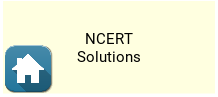
目标:图标应该在按钮的中间,下面的文本。
回答 2
Stack Overflow用户
回答已采纳
发布于 2019-07-19 14:07:20
这是一个真正的黑客,试图做你想做的事。在您想要的地方获取图标很容易,只需一点算术就可以完成,但是对文本的定位有点反复尝试:
    #:set image_height 50
    #:set text_height 30
    Button:
        canvas:
            Rectangle:
            # sets size, pos of the image
                size: image_height, image_height
                pos: self.pos[0] + (self.width - image_height)/2, self.pos[1] + self.height - image_height
                source: 'icons/home.png'
        font_size: text_height / 2.5
        text: "\\n\\n\\nNCERT\\nSolutions"
        halign: 'center'
        size_hint_y: None
height: image_height + text_height试验和错误涉及到text_height、font_size的计算以及在text开头放置多少行。
Stack Overflow用户
发布于 2019-07-19 17:36:25
我认为这是一个更好的解决办法。这段代码创建了一个名为ImageLabel的自定义ImageLabel,它由一个Image和下面的Label组成。整个ImageLabel充当一个Button。
from kivy.lang import Builder
from kivy.properties import ListProperty, StringProperty
from kivy.uix.behaviors import ButtonBehavior
from kivy.uix.boxlayout import BoxLayout

class ImageLabel(ButtonBehavior, BoxLayout):
    image_source = StringProperty('')
    image_size = ListProperty([50, 50])
    text = StringProperty('')

    # stuff used by ButtonBehavior
    background_color = ListProperty([1, 1, 1, 1])
    background_normal = StringProperty(
        'atlas://data/images/defaulttheme/button')
    background_down = StringProperty(
        'atlas://data/images/defaulttheme/button_pressed')
    background_disabled_normal = StringProperty(
        'atlas://data/images/defaulttheme/button_disabled')
    background_disabled_down = StringProperty(
        'atlas://data/images/defaulttheme/button_disabled_pressed')
    border = ListProperty([16, 16, 16, 16])

    Builder.load_string('''
<ImageLabel>:
    orientation: 'vertical'
    size_hint: None, None
    height: self.image_size[1] + label.texture_size[1]
    width: max(self.image_size[0], label.texture_size[0])
    state_image: self.background_normal if self.state == 'normal' else self.background_down
    disabled_image: self.background_disabled_normal if self.state == 'normal' else self.background_disabled_down
    canvas:
        Color:
            rgba: self.background_color
        BorderImage:
            border: self.border
            pos: self.pos
            size: self.size
            source: self.disabled_image if self.disabled else self.state_image
    Image:
        id: image
        source: root.image_source
        size: root.image_size
    Label:
        id: label
        halign: 'center'
        text: root.text
        size: self.texture_size
''')

if __name__ == '__main__':

    from kivy.app import App

    gl = Builder.load_string('''
FloatLayout:
    ImageLabel:
        pos_hint: {'center_x':0.5, 'center_y': 0.5}
        text: 'NCERT\\nSolutions'
        image_source: 'atlas://data/images/defaulttheme/filechooser_folder'
        image_size: 100, 100
        on_release: app.button_callback()
''')

    class ImageLabelTestApp(App):
        def build(self):
            return gl

        def button_callback(self):
            print('button pressed')

ImageLabelTestApp().run()页面原文内容由Stack Overflow提供。腾讯云小微IT领域专用引擎提供翻译支持
原文链接:
https://stackoverflow.com/questions/57105331
复制相关文章
相似问题
腾讯云开发者

Copyright © 2013 - 2026 Tencent Cloud. All Rights Reserved. 腾讯云 版权所有
深圳市腾讯计算机系统有限公司 ICP备案/许可证号:粤B2-20090059  粤公网安备44030502008569号
腾讯云计算(北京)有限责任公司 京ICP证150476号 | 京ICP备11018762号