
在Windows上运行OpenGL应用程序
我有两张视频卡:
Intel(R) HD Graphics 630,驱动程序版本: 25.20.100.6472 NVIDIA Quadro M1200,驱动版本: 26.21.14.3102
在Windows 10上,两种卡都能很好地与OpenGL/OpenGl的ES应用程序兼容。
我尝试使用Windows在Windows上运行OpenGL ES应用程序(基于Xming 6.9.0.31 /LibGDX/LWJGL3 3),并得到以下错误:
“要求GLX版本1.3”
我已经安装了mesa-utils软件包。
当我尝试运行glmark2基准测试时,会得到以下错误:
错误:需要GLX版本的>= 1.3 错误:错误:无法获得GL可视化配置! 错误: main:无法初始化画布
当我尝试运行glxgears -info基准测试时,应用程序将启动,显示的是齿轮,但不是旋转的。似乎应用程序只呈现第一个帧。在航站楼,我们有一些有趣的信息:
GL_RENDERER = Quadro M 1200/PCIe/SSE2 2 GL_VERSION = 1.2 (4.6.0NVIDIA 431.02) GL_VENDOR = NVIDIA公司 GL_EXTENSIONS = GL_ARB_depth_texture GL_ARB_imaging GL_ARB_multitexture GL_ARB_point_parameters GL_ARB_point_sprite GL_ARB_shadow GL_ARB_texture_border_clamp GL_ARB_texture_cube_map GL_ARB_texture_env_add GL_ARB_texture_env_combine GL_ARB_texture_env_crossbar GL_ARB_texture_env_dot3 GL_ARB_texture_mirrored_repeat GL_ARB_transpose_matrix GL_ARB_window_pos GL_EXT_abgr GL_EXT_bgra GL_EXT_blend_color GL_EXT_blend_func_separate GL_EXT_blend_minmax GL_EXT_blend_subtract GL_EXT_draw_range_elements GL_EXT_fog_coord GL_EXT_multi_draw_arrays GL_EXT_packed_pixels GL_EXT_secondary_color GL_EXT_separate_specular_color GL_EXT_shadow_funcs GL_EXT_stencil_two_side GL_EXT_stencil_wrap GL_EXT_texture3D GL_EXT_texture_edge_clamp GL_EXT_texture_env_add GL_EXT_texture_env_combine GL_EXT_texture_env_dot3 GL_EXT_texture_lod GL_EXT_texture_lod_bias GL_EXT_texture_object GL_EXT_vertex_array GL_ATI_texture_mirror_once GL_IBM_texture_mirrored_repeat GL_NV_blend_square GL_NV_point_sprite GL_NV_texgen_反射GL_NV_texture_rectangle GL_SGIS_generate_mipmap GL_SGIS_texture_lod GL_SGIX_depth_texture GL_SGIX_shadow VisualID 540x36 5493帧在35.0秒内= 156.996 FPS 2085帧,34.7秒= 60.154 FPS 2085帧,34.7秒= 60.146 FPS 2085帧在35.0秒内= 59.567 FPS 2085帧,34.7秒= 60.089 FPS
日志显示框架已经呈现,但应用程序窗口中没有发生任何事情。
glxinfo | grep -i "version" -A 2 -B 2的结果
直接呈现:否(如果您想知道原因,请尝试设置LIBGL_DEBUG=verbose) 服务器glx供应商字符串: SGI 服务器glx版本字符串: 1.2 (...) 客户glx供应商字符串: NVIDIA公司 客户端glx版本字符串: 1.4 (...)GLX版本: 1.2 (...) OpenGL供应商字符串: NVIDIA公司 OpenGL渲染器字符串: Quadro 1200/PCIe/SSE2 2 OpenGL版本字符串: 1.2 (4.6.0NVIDIA 431.02) (...)
查看上面的清单,我不明白为什么没有直接呈现,为什么服务器GLX版本是1.2 (而不是1.4),供应商是SGI,为什么OpenGL版本字符串是1.2 (而不是更高)?
如何正确运行WSL中的OpenGL应用程序?
编辑
nvidia-setting命令显示了以下输出:
ERROR: NVIDIA driver is not loaded
ERROR: Unable to load info from any available system
为什么?前面的命令显示,我已经为WSL安装了Nvidia驱动程序。
编辑2
安装完存储库中的Nvidia驱动程序之后:
sudo apt install nvidia-driver-390
我有以下nvidia-setting错误
libGL error: No matching fbConfigs or visuals found
libGL error: failed to load driver: swrast

ERROR: NVIDIA driver is not loaded


ERROR: Error querying enabled displays on GPU 0 (Missing Extension).


ERROR: Error querying connected displays on GPU 0 (Missing Extension).

** Message: 11:40:41.535: PRIME: No offloading required. Abort
** Message: 11:40:41.537: PRIME: is it supported? no

ERROR: nvidia-settings could not find the registry key file. This file should have been installed along with this driver at /usr/share/nvidia/nvidia-application-profiles-key-documentation. The application profiles will continue to work,
       but values cannot be prepopulated or validated, and will not be listed in the help text. Please see the README for possible values and descriptions.
更新
看来Xming 6支持非常老的OpenGL版本,所以我决定使用Cygwin/X作为decided。
我使用以下命令启动它:
startx -- -listen tcp基于Cygwin和WSL终端的输出,采用Mesa3D驱动程序。在WSL上,glxgears和glmark2正确工作。它们表明使用了以下呈现器(来自Mesa3d):
OpenGL Information
GL_VENDOR:     VMware, Inc.
GL_RENDERER:   llvmpipe (LLVM 8.0, 256 bits)
GL_VERSION:    3.1 Mesa 19.0.2
但是我的Java应用程序崩溃了:
shared memfd open() failed: Function not implemented
ALSA lib confmisc.c:767:(parse_card) cannot find card '0'
ALSA lib conf.c:4528:(_snd_config_evaluate) function snd_func_card_driver returned error: No such file or directory
ALSA lib confmisc.c:392:(snd_func_concat) error evaluating strings
ALSA lib conf.c:4528:(_snd_config_evaluate) function snd_func_concat returned error: No such file or directory
ALSA lib confmisc.c:1246:(snd_func_refer) error evaluating name
ALSA lib conf.c:4528:(_snd_config_evaluate) function snd_func_refer returned error: No such file or directory
ALSA lib conf.c:5007:(snd_config_expand) Evaluate error: No such file or directory
ALSA lib pcm.c:2495:(snd_pcm_open_noupdate) Unknown PCM default
AL lib: (EE) ALCplaybackAlsa_open: Could not open playback device 'default': No such file or directory
X Error of failed request:  BadMatch (invalid parameter attributes)
  Major opcode of failed request:  42 (X_SetInputFocus)
  Serial number of failed request:  159
  Current serial number in output stream:  176
另一方面,当我使用以下命令启动Cygwin/X时:
startxwin -- -listen tcp它似乎以加速渲染器开始,因为屏幕上有以下信息:
GL_VERSION:     4.6.0 NVIDIA 431.70
GL_VENDOR:      NVIDIA Corporation
GL_RENDERER:    Quadro M1200/PCIe/SSE2
(II) GLX: enabled GLX_SGI_make_current_read
(II) GLX: enabled GLX_SGI_swap_control
(II) GLX: enabled GLX_MESA_swap_control
(II) GLX: enabled GLX_SGIX_pbuffer
(II) GLX: enabled GLX_ARB_multisample
(II) GLX: enabled GLX_SGIS_multisample
(II) GLX: enabled GLX_ARB_fbconfig_float
(II) GLX: enabled GLX_EXT_fbconfig_packed_float
(II) GLX: enabled GLX_ARB_create_context
(II) GLX: enabled GLX_ARB_create_context_profile
(II) GLX: enabled GLX_ARB_create_context_robustness
(II) GLX: enabled GLX_EXT_create_context_es2_profile
(II) AIGLX: enabled GLX_MESA_copy_sub_buffer
(II) 894 pixel formats reported by wglGetPixelFormatAttribivARB
(II) 858 fbConfigs
(II) ignored pixel formats: 0 not OpenGL, 0 unknown pixel type, 36 unaccelerated
(II) GLX: Initialized Win32 native WGL GL provider for screen 0但是OpenGL应用程序(glxgears、glmark2和我自己的应用程序)不能在WSL上工作,从而产生类似于此的错误:
libGL error: No matching fbConfigs or visuals found
libGL error: failed to load driver: swrast
X Error of failed request:  GLXBadContext
  Major opcode of failed request:  148 (GLX)
  Minor opcode of failed request:  6 (X_GLXIsDirect)
  Serial number of failed request:  32
Current serial number in output stream: 31当我试图为我的卡安装最新的Nvidia驱动程序:NVIDIA-Linux-x86_64-430.40.run时,我有以下错误:
警告:文件‘/proc/sys/内核/mod探头’不可用;X服务器将使用
/sbin/modprobe作为modprobe实用程序的路径。此路径与nvidia-installer、/bin/kmod确定的路径不同。请验证/sbin/modprobe是否正确工作,或挂载/proc文件系统,并验证‘/proc/sys/内核/ and探测’报告正确的路径。->使用CC="/usr/bin/ CC“执行cc的正常检查。 错误:无法为当前运行的内核找到内核源代码树。请确保您已经为您的内核安装了内核源文件,并且它们已经正确配置;例如,在Red系统中,请确保安装了“内核源”或“内核-devel”RPM。如果您知道安装了正确的内核源文件,可以使用‘-内核-源-路径’命令行选项指定内核源文件路径。
总结:
如何成功地在WSL上运行OpenGL-硬件加速应用程序?如何在WSL上安装最新的/工作的NVidia驱动程序?
回答 2
Stack Overflow用户
发布于 2019-07-31 11:14:07
我认为齿轮不是旋转的,因为你的OpenGL版本(1.2)太旧了。在这个站点上,你可以看到它来自1998年(21岁)。它可能是格列克格尔斯没有测试这样一个旧的OpenGL版本。
当我运行glxgears时,我得到了这个版本: GL_VERSION =4.6.0NVIDIA 418.74
Stack Overflow用户
发布于 2019-08-09 04:59:20
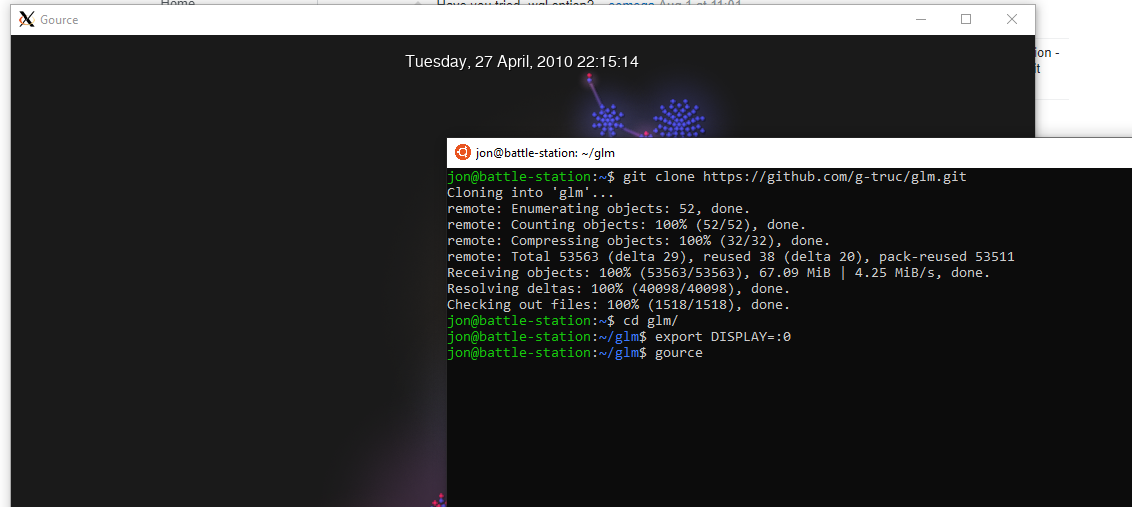
也许需要导出你的显示器。在默认xming设置下通过键入
export DISPLAY=:0 在您的linux终端中,当xming服务器正在运行时。旧的openGL应该是非常好的,虽然我建议更新的版本,因为它们应该更有可能与各种新的硬件相抗衡。如果您想测试这个问题是否是您的应用程序,下面是导出显示后在WSL ubuntu上的xming窗口中运行的另一个名为gource的应用程序的快速示例。我下载并安装了一份新的xming拷贝,运行了一次,什么也没有碰过,我克隆了GLM的github,然后在目录中运行了gource
https://stackoverflow.com/questions/57289236
复制相似问题
腾讯云开发者
