
AnimatedSwitcher与IndexedStack
我必须使用IndexedStack来维护我的BottomNavigationBar小部件的状态。现在,我希望在切换选项卡时使用AnimatedSwitcher (或替代)来创建动画。我在让AnimatedSwitcher触发IndexedStack更改时遇到了问题。我让IndexedStack作为AnimatedSwitcher的子部件,这显然会导致AnimatedSwitcher不触发,因为IndexedStack小部件不会改变,只是它的子部件。
body: AnimatedSwitcher(
  duration: Duration(milliseconds: 200),
  child: IndexedStack(
    children: _tabs.map((t) => t.widget).toList(),
    index: _currentIndex,
  ),
)
有办法解决这个问题吗?通过手动触发AnimatedSwitcher,还是使用不同的方法创建动画?我也尝试过更改键,但这显然会导致每次创建新状态时都会创建一个新的IndexedStack,因此选项卡的状态也会丢失。
回答 5
Stack Overflow用户
发布于 2019-08-29 03:33:04
如果您需要使用IndexedStack。
您可以添加自定义动画并在更改选项卡上触发它,如下所示:
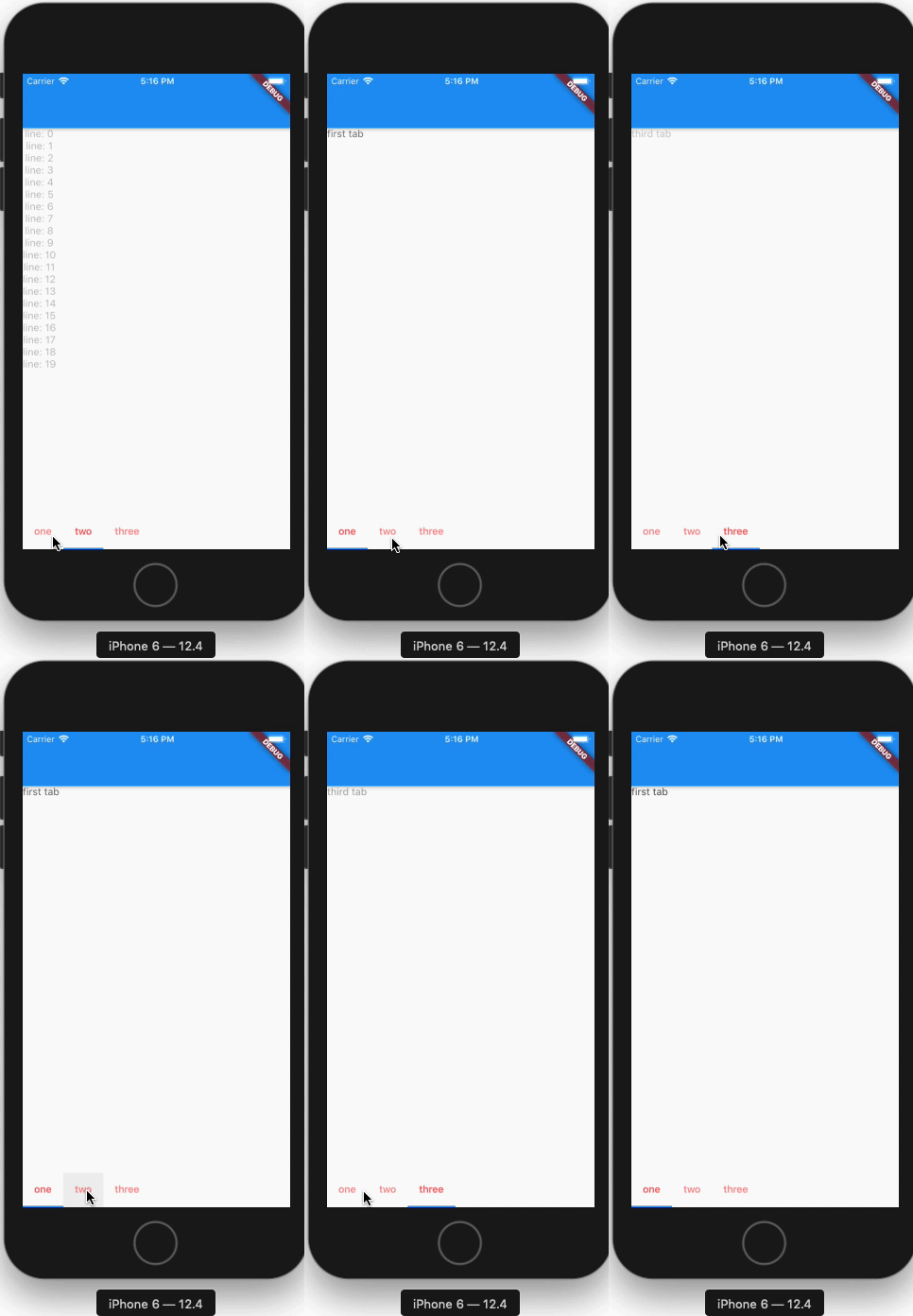
import 'package:flutter/material.dart';

void main() => runApp(MyApp());

class MyApp extends StatelessWidget {
  @override
  Widget build(BuildContext context) {
    return MaterialApp(
      title: 'Flutter Demo',
      theme: ThemeData(
        primarySwatch: Colors.blue,
      ),
      home: MyHomePage(),
    );
  }
}

class MyHomePage extends StatefulWidget {
  @override
  _MyHomePageState createState() => _MyHomePageState();
}

class _MyHomePageState extends State<MyHomePage> with TickerProviderStateMixin {
  final List<Widget> myTabs = [
    Tab(text: 'one'),
    Tab(text: 'two'),
    Tab(text: 'three'),
  ];

  AnimationController _animationController;
  TabController _tabController;
  int _tabIndex = 0;
  Animation animation;

  @override
  void dispose() {
    _tabController.dispose();
    super.dispose();
  }

  @override
  void initState() {
    _tabController = TabController(length: 3, vsync: this);
    _animationController = AnimationController(
      vsync: this,
      value: 1.0,
      duration: Duration(milliseconds: 500),
    );
    _tabController.addListener(_handleTabSelection);
    animation = Tween(begin: 0.0, end: 1.0).animate(_animationController);
    super.initState();
  }

  _handleTabSelection() {
    if (!_tabController.indexIsChanging) {
      setState(() {
        _tabIndex = _tabController.index;
      });
      _animationController.reset();
      _animationController.forward();
    }
  }

  @override
  Widget build(BuildContext context) {
    List<Widget> _tabs = [
      MyAnimation(
        animation: animation,
        child: Text('first tab'),
      ),
      MyAnimation(
        animation: animation,
        child: Column(
          children: List.generate(20, (index) => Text('line: $index')).toList(),
        ),
      ),
      MyAnimation(
        animation: animation,
        child: Text('third tab'),
      ),
    ];

    return Scaffold(
      appBar: AppBar(),
      bottomNavigationBar: TabBar(
        controller: _tabController,
        labelColor: Colors.redAccent,
        isScrollable: true,
        tabs: myTabs,
      ),
      body: IndexedStack(
        children: _tabs,
        index: _tabIndex,
      ),
    );
  }
}

class MyAnimation extends AnimatedWidget {
  MyAnimation({key, animation, this.child})
      : super(
          key: key,
          listenable: animation,
        );

  final Widget child;

  @override
  Widget build(BuildContext context) {
    Animation<double> animation = listenable;
    return Opacity(
      opacity: animation.value,
      child: child,
    );
  }
}Stack Overflow用户
发布于 2019-12-30 18:27:55
这是在动画中使用IndexedStack的一种更干净的方法,我创建了一个FadeIndexedStack小部件。
https://gist.github.com/diegoveloper/1cd23e79a31d0c18a67424f0cbdfd7ad
使用
body: FadeIndexedStack(
    //this is optional
    //duration: Duration(seconds: 1),
    children: _tabs.map((t) => t.widget).toList(),
    index: _currentIndex,
), Stack Overflow用户
发布于 2021-07-05 22:41:36
尝试将键添加到您的IndexedStack中,并向您的AnimatedSwitcher小部件添加一个transitionBuilder方法,如下所示.
AnimatedSwitcher(
            duration: Duration(milliseconds: 1200),
            transitionBuilder: (child, animation) => SizeTransition(
              sizeFactor: animation,
              child: IndexedStack(
                key: ValueKey<int>(navigationIndex.state),
                index: navigationIndex.state,
                children: _tabs.map((t) => t.widget).toList(),
              ),
            ),
            child: IndexedStack(
              key: ValueKey<int>(navigationIndex.state), //using StateProvider<int>
              index: navigationIndex.state,
              children: _tabs.map((t) => t.widget).toList(),
            ),
          ),
还有一些很酷的转换,比如ScaleTransition,SizeTransition,FadeTransition
https://stackoverflow.com/questions/57694249
复制相似问题
腾讯云开发者
