
FullCalendar显示事件半天(事件宽度)
FullCalendar显示事件半天(事件宽度)
提问于 2019-09-06 02:20:46
我想显示事件开始的半天和结束的半天或全天为少数事件。目前,所有事件都在一个月内全天工作。
同时可以根据开始时间和结束时间显示事件宽度吗?
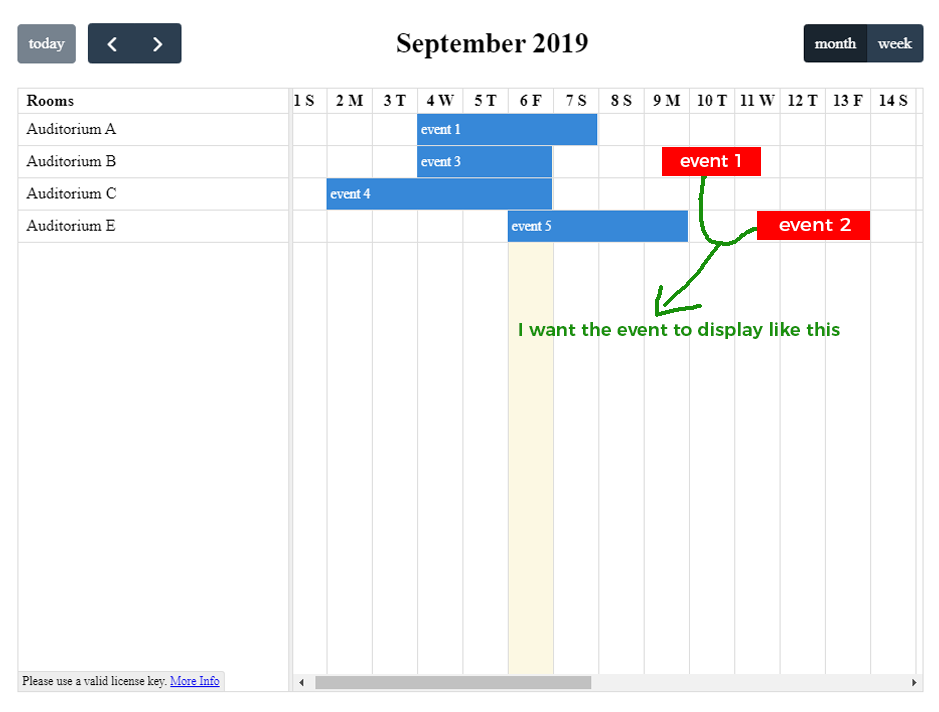
我已经尝试了下面的堆栈引用代码。请进一步澄清意见。
eventAfterRender: function(event, element, view) {
    var containerWidth = jQuery(element).offsetParent()
    .siblings("table").find(".fc-day-content").width();
    // half a day
    var elementWidth = parseInt(containerWidth / 2);
     // set width of element
    jQuery(element).css('width', elementWidth + "px");
}
document.addEventListener('DOMContentLoaded', function() {
  var calendarEl = document.getElementById('calendar');

  var calendar = new FullCalendar.Calendar(calendarEl, {
    timeZone: 'UTC',
    plugins: [ 'interaction', 'resourceTimeline' ],
    header: {
      left: 'promptResource today prev,next',
      center: 'title',
      right: 'resourceTimelineMonth,resourceTimelineWeek'
    },
    aspectRatio: 1.5,
    displayEventTime: true,
    displayEventTime: true,
			displayEventEnd: true,
			timeFormat: 'h:mma',
    defaultView: 'resourceTimelineMonth',
    resourceLabelText: 'Rooms',
	editable: true,
    resources: [ {
        "id": "a", "title": "Auditorium A"
    }

    ,
    {
        "id": "b", "title": "Auditorium B"
    }

    ,
    {
        "id": "c", "title": "Auditorium C"
    }
    ,
	{
        "id": "e", "title": "Auditorium E"
    }
    ,

    ],
   events: [
				{
					id: 1,
					className: "HalfClass",
					resourceId: 'a',
					title: 'Taufik1',
					start: "2019-09-03 06:00",
					end: "2019-09-05 12:00",
					description: ''
				},
				{
					id: 2,
					resourceId: 'b',
					title: "Smith",
					color: "#F6BB42",
					start: "2019-09-06",
					end: "2019-09-08"
				},
				{
					id: 3,
					resourceId: 'c',
					title: 'Austin',
					start: "2019-09-04",
					end: "2019-09-08",
					description: ''
				},
				{
					id: 4,
					resourceId: 'd',
					title: 'Wong Ling',
					color: "#DA4453",
					start: "2019-09-04",
					end: "2019-09-06"
				}

			]
  });

  calendar.render();
});#calendar {
max-width: 900px;
margin: 40px auto;
}<link href="https://fullcalendar.io/releases/core/4.2.0/main.min.css" rel="stylesheet"/>
<link href="https://fullcalendar.io/releases/timeline/4.2.0/main.min.css" rel="stylesheet"/>
<link href="https://fullcalendar.io/releases/resource-timeline/4.2.0/main.min.css" rel="stylesheet"/>
<script src="https://fullcalendar.io/releases/core/4.2.0/main.min.js"></script>
<script src="https://fullcalendar.io/releases/interaction/4.2.0/main.min.js"></script>
<script src="https://fullcalendar.io/releases/timeline/4.2.0/main.min.js"></script>
<script src="https://fullcalendar.io/releases/resource-common/4.2.0/main.min.js"></script>
<script src="https://fullcalendar.io/releases/resource-timeline/4.2.0/main.min.js"></script>
<div id="calendar"></div>
Stack Overflow用户
回答已采纳
发布于 2019-09-06 08:48:45
使用内置API的一个选项是设置一个较短的时隙持续时间,这将为日历提供更多的空间来准确地显示事件的时间。
slotDuration: {
  "hours": 12
},
将日历分成半天时段,而不是全天时段,在视图中引入一个时间组件,从而允许更细粒度的显示。
我还(可选地)使用了slotLabelInterval和slotLabelFormat来改进头部显示,使其从默认的slotDuration设置到相应的设置,因此看起来更整洁。
有关文档,请参见https://fullcalendar.io/docs/date-display和https://fullcalendar.io/docs/date-formatting。
document.addEventListener('DOMContentLoaded', function() {
  var calendarEl = document.getElementById('calendar');

  var calendar = new FullCalendar.Calendar(calendarEl, {
    timeZone: 'UTC',
    plugins: ['interaction', 'resourceTimeline'],
    header: {
      left: 'promptResource today prev,next',
      center: 'title',
      right: 'resourceTimelineMonth,resourceTimelineWeek'
    },
    aspectRatio: 1.5,
    displayEventTime: true,
    displayEventTime: true,
    displayEventEnd: true,
    timeFormat: 'h:mma',
    slotDuration: {
      "hours": 12
    },
    slotLabelInterval: {
      "hours": 24
    },
    slotLabelFormat: [{
        month: 'long',
        week: "short",
      }, // top level of text
      {
        weekday: 'narrow',
        day: 'numeric'

      } // lower level of text
    ],
    defaultView: 'resourceTimelineMonth',
    resourceLabelText: 'Rooms',
    editable: true,
    resources: [{
        "id": "a",
        "title": "Auditorium A"
      }

      ,
      {
        "id": "b",
        "title": "Auditorium B"
      }

      ,
      {
        "id": "c",
        "title": "Auditorium C"
      },
      {
        "id": "e",
        "title": "Auditorium E"
      },

    ],
    events: [{
        id: 1,
        className: "HalfClass",
        resourceId: 'a',
        title: 'Taufik1',
        start: "2019-09-03 06:00",
        end: "2019-09-05 12:00",
        description: ''
      },
      {
        id: 2,
        resourceId: 'b',
        title: "Smith",
        color: "#F6BB42",
        start: "2019-09-06",
        end: "2019-09-08"
      },
      {
        id: 3,
        resourceId: 'c',
        title: 'Austin',
        start: "2019-09-04",
        end: "2019-09-08",
        description: ''
      },
      {
        id: 4,
        resourceId: 'd',
        title: 'Wong Ling',
        color: "#DA4453",
        start: "2019-09-04",
        end: "2019-09-06"
      }

    ]
  });

  calendar.render();
});#calendar {
max-width: 900px;
margin: 40px auto;
}<link href="https://fullcalendar.io/releases/core/4.2.0/main.min.css" rel="stylesheet" />
<link href="https://fullcalendar.io/releases/timeline/4.2.0/main.min.css" rel="stylesheet" />
<link href="https://fullcalendar.io/releases/resource-timeline/4.2.0/main.min.css" rel="stylesheet" />
<script src="https://fullcalendar.io/releases/core/4.2.0/main.min.js"></script>
<script src="https://fullcalendar.io/releases/interaction/4.2.0/main.min.js"></script>
<script src="https://fullcalendar.io/releases/timeline/4.2.0/main.min.js"></script>
<script src="https://fullcalendar.io/releases/resource-common/4.2.0/main.min.js"></script>
<script src="https://fullcalendar.io/releases/resource-timeline/4.2.0/main.min.js"></script>
<div id="calendar"></div>
页面原文内容由Stack Overflow提供。腾讯云小微IT领域专用引擎提供翻译支持
原文链接:
https://stackoverflow.com/questions/57814960
复制相关文章
相似问题
腾讯云开发者

Copyright © 2013 - 2026 Tencent Cloud. All Rights Reserved. 腾讯云 版权所有
深圳市腾讯计算机系统有限公司 ICP备案/许可证号:粤B2-20090059  粤公网安备44030502008569号
腾讯云计算(北京)有限责任公司 京ICP证150476号 | 京ICP备11018762号