
 MCP MongoDB 服务器添加福利群:解决AI开发者的「MCP实战痛点」
 github
MCP MongoDB 服务器





这是一个模型上下文协议服务器,使 LLMs 能够与 MongoDB 数据库进行交互。该服务器提供了通过标准化接口检查集合架构和执行 MongoDB 操作的能力。
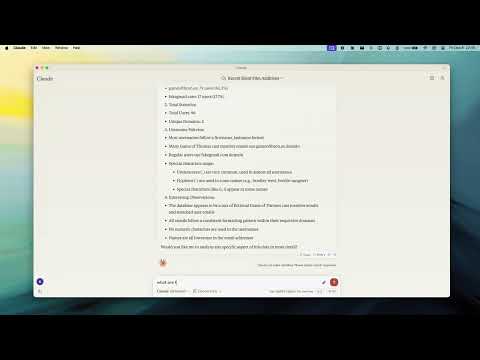
演示
主要功能
智能 ObjectId 处理
- 在字符串 ID 和 MongoDB ObjectId 之间进行智能转换
- 可使用
objectIdMode参数进行配置:"auto":根据字段名进行转换(默认)"none":不进行转换"force":强制将所有字符串 ID 字段转换为 ObjectId
灵活配置
- 环境变量:
MCP_MONGODB_URI:MongoDB 连接 URIMCP_MONGODB_READONLY:设置为 "true" 时启用只读模式
- 命令行选项:
--read-only或-r:以只读模式连接
只读模式
- 防止写操作(更新、插入、创建索引)
- 使用 MongoDB 的次要读取偏好以实现最佳性能
- 适合安全地连接到生产数据库
MongoDB 操作
- 读取操作:
- 查询文档,可选择执行计划分析
- 执行聚合管道
- 计算匹配条件的文档数量
- 获取集合架构信息
- 写入操作(不在只读模式时):
- 更新文档
- 插入新文档
- 创建索引
LLM 集成
- 集合补全以增强 LLM 交互
- 架构推断以改进上下文理解
- 集合分析以获取数据洞察
安装
全局安装
npm install -g mcp-mongo-server
开发环境
# 克隆仓库
git clone https://github.com/kiliczsh/mcp-mongo-server.git
cd mcp-mongo-server

# 安装依赖
npm install

# 构建
npm run build

# 开发时自动重建
npm run watch

使用
基本用法
# 使用 MongoDB URI 启动服务器
npx -y mcp-mongo-server mongodb://muhammed:kilic@localhost:27017/database

# 以只读模式连接
npx -y mcp-mongo-server mongodb://muhammed:kilic@localhost:27017/database --read-only
环境变量
您可以使用环境变量配置服务器,这在 CI/CD 管道、Docker 容器或不想在命令行参数中暴露连接详细信息时特别有用:
# 设置 MongoDB 连接 URI
export MCP_MONGODB_URI="mongodb://muhammed:kilic@localhost:27017/database"

# 启用只读模式
export MCP_MONGODB_READONLY="true"

# 运行服务器(如果未提供 URI,将使用环境变量)
npx -y mcp-mongo-server
在 Claude Desktop 配置中使用环境变量:
{
  "mcpServers": {
    "mongodb-env": {
      "command": "npx",
      "args": [
        "-y",
        "mcp-mongo-server"
      ],
      "env": {
        "MCP_MONGODB_URI": "mongodb://muhammed:kilic@localhost:27017/database",
        "MCP_MONGODB_READONLY": "true"
      }
    }
  }
}
使用 Docker 时使用环境变量:
# 构建
docker build -t mcp-mongo-server .

# 运行
docker run -it -d -e MCP_MONGODB_URI="mongodb://muhammed:kilic@localhost:27017/database" -e MCP_MONGODB_READONLY="true" mcp-mongo-server

# 或编辑 docker-compose.yml 并运行
docker-compose up -d
与 Claude Desktop 集成
手动配置
将服务器配置添加到 Claude Desktop 的配置文件中:
MacOS:~/Library/Application Support/Claude/claude_desktop_config.json
Windows:%APPDATA%/Claude/claude_desktop_config.json
命令行参数方法:
{
  "mcpServers": {
    "mongodb": {
      "command": "npx",
      "args": [
        "-y",
        "mcp-mongo-server",
        "mongodb://muhammed:kilic@localhost:27017/database"
      ]
    },
    "mongodb-readonly": {
      "command": "npx",
      "args": [
        "-y",
        "mcp-mongo-server",
        "mongodb://muhammed:kilic@localhost:27017/database",
        "--read-only"
      ]
    }
  }
}
环境变量方法:
{
  "mcpServers": {
    "mongodb": {
      "command": "npx",
      "args": [
        "-y",
        "mcp-mongo-server"
      ],
      "env": {
        "MCP_MONGODB_URI": "mongodb://muhammed:kilic@localhost:27017/database"
      }
    },
    "mongodb-readonly": {
      "command": "npx",
      "args": [
        "-y",
        "mcp-mongo-server"
      ],
      "env": {
        "MCP_MONGODB_URI": "mongodb://muhammed:kilic@localhost:27017/database",
        "MCP_MONGODB_READONLY": "true"
      }
    }
  }
}
GitHub 包使用:
{
  "mcpServers": {
    "mongodb": {
      "command": "npx",
      "args": [
        "-y",
        "github:kiliczsh/mcp-mongo-server",
        "mongodb://muhammed:kilic@localhost:27017/database"
      ]
    },
    "mongodb-readonly": {
      "command": "npx",
      "args": [
        "-y",
        "github:kiliczsh/mcp-mongo-server",
        "mongodb://muhammed:kilic@localhost:27017/database",
        "--read-only"
      ]
    }
  }
}
与 Windsurf 和 Cursor 集成
MCP MongoDB 服务器可以以与 Claude Desktop 类似的方式与 Windsurf 和 Cursor 一起使用。
Windsurf 配置
将服务器添加到您的 Windsurf 配置中:
{
  "mcpServers": {
    "mongodb": {
      "command": "npx",
      "args": [
        "-y",
        "mcp-mongo-server",
        "mongodb://muhammed:kilic@localhost:27017/database"
      ]
    }
  }
}
Cursor 配置
对于 Cursor,将服务器配置添加到您的设置中:
{
  "mcpServers": {
    "mongodb": {
      "command": "npx",
      "args": [
        "-y",
        "mcp-mongo-server",
        "mongodb://muhammed:kilic@localhost:27017/database"
      ]
    }
  }
}
您也可以使用环境变量方法与 Windsurf 和 Cursor 一起使用,遵循与 Claude Desktop 配置中相同的模式。
自动安装
使用 Smithery:
npx -y @smithery/cli install mcp-mongo-server --client claude
使用 mcp-get:
npx @michaellatman/mcp-get@latest install mcp-mongo-server
可用工具
查询操作
-
query:执行 MongoDB 查询
{ collection: "users", filter: { age: { $gt: 30 } }, projection: { name: 1, email: 1 }, limit: 20, explain: "executionStats" // 可选 } -
aggregate:运行聚合管道
{ collection: "orders", pipeline: [ { $match: { status: "completed" } }, { $group: { _id: "$customerId", total: { $sum: "$amount" } } } ], explain: "queryPlanner" // 可选 } -
count:计算匹配的文档数量
{
  collection: "products",
  query: { category: "electronics" }
}
写入操作
-
update:修改文档
{ collection: "posts", filter: { _id: "60d21b4667d0d8992e610c85" }, update: { $set: { title: "Updated Title" } }, upsert: false, multi: false } -
insert:添加新文档
{ collection: "comments", documents: [ { author: "user123", text: "Great post!" }, { author: "user456", text: "Thanks for sharing" } ] } -
createIndex:创建集合索引
{
  collection: "users",
  indexes: [
    {
      key: { email: 1 },
      unique: true,
      name: "email_unique_idx"
    }
  ]
}
系统操作
- serverInfo:获取 MongoDB 服务器详细信息
{
  includeDebugInfo: true  // 可选
}
调试
由于 MCP 服务器通过 stdio 进行通信,调试可能具有挑战性。使用 MCP Inspector 以获得更好的可见性:
npm run inspector
这将提供一个 URL,用于在浏览器中访问调试工具。
运行评估
评估包加载一个 mcp 客户端,然后运行 index.ts 文件,因此无需在测试之间重新构建。您可以通过在 npx 命令前加上前缀来加载环境变量。完整文档可以在这里找到。
OPENAI_API_KEY=your-key npx mcp-eval src/evals/evals.ts src/schemas/tools.ts
许可证
此 MCP 服务器根据 MIT 许可证授权。这意味着您可以自由使用、修改和分发该软件,但需遵守 MIT 许可证的条款和条件。有关更多详细信息,请参阅项目仓库中的 LICENSE 文件。
腾讯云开发者

Copyright © 2013 - 2026 Tencent Cloud. All Rights Reserved. 腾讯云 版权所有
深圳市腾讯计算机系统有限公司 ICP备案/许可证号:粤B2-20090059  粤公网安备44030502008569号
腾讯云计算(北京)有限责任公司 京ICP证150476号 | 京ICP备11018762号