Help & Documentation>实践教程>Auto Scaling>Enabling Services Upon CVM Start-up

Enabling Services Upon CVM Start-up

Last updated: 2025-12-05 17:58:01

Scenario

This document outlines the process of configuring services to start automatically on machines that have been auto-scaled, by modifying the /etc/rc.d/rc.local file. When utilizing auto-scaling, we aim for a completely hands-off approach, hence it is recommended to set up services on auto-scaled machines to start automatically post boot-up, for instance:
httpd service
mysqld service
php-fpm service
tomcat service
Among other services and so forth.

Instructions

Configure the service to start automatically at boot.

Note
This document uses an auto-scaling machine with CentOS as the operating system as an example.
2. Execute the following command to open the rc.local file.
vim /etc/rc.d/rc.local
3. Press i to enter edit mode, and press to navigate to the end of the file.
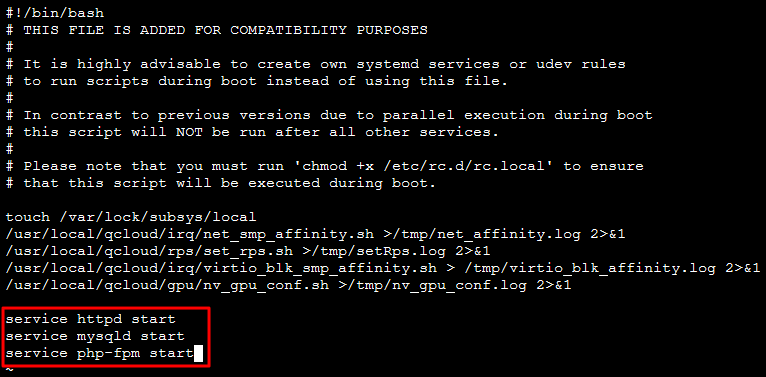
4. Enter the following content to set the services that need to be started automatically. This document uses httpd, mysqld, and php-fpm services as examples. Different websites require different services, so please set them according to your needs.
service httpd start
service mysqld start
service php-fpm start
The following figure shows the result after the addition is completed:

5. Enter :wq to save and exit. After this instance is rebooted, it will automatically access the website.

Configuration Verification (Optional)

Restart the server (you can restart by entering 'reboot', or restart through the console). After the server restarts, do not enter the server, just refresh the website to see if there is a response. If there is, the setting is successful.

Creating images

You can create an image based on this instance and use this image when creating a launch configuration. For more details, please refer to: