TDW

Last updated: 2024-10-14 17:48:03

Scenario

CKafka Connector enables data streaming capabilities, allowing you to distribute CKafka data to the distributed data warehouse TDW for storage, querying, and analysis.

Preparations

Currently, this feature relies on the TDW service, which should be activated first.

Instructions

1. Log in to the CKafka console.
2. Click Connector > Task List on the left sidebar, select the region, and click Create Task.
3. Enter the task name, select Data Distribution as the task type, choose Data Warehouse (TDW) as the data target type, and click Next.
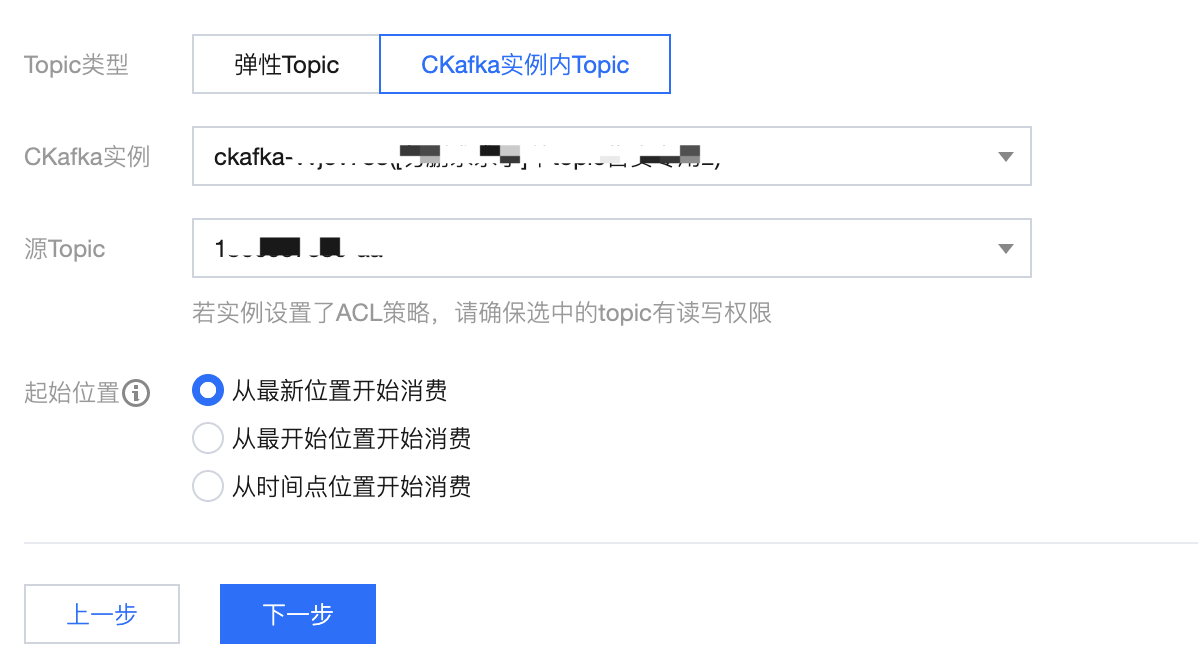
4. Configure the data source information.


Source Topic: Select the data source topic.
Elastic Topic: Select the pre-created elastic topic. For more information, see Topic Management.
CKafka Instance Topic: Select the created CKafka instance and topic. If the instance is configured with ACL policies, ensure that the selected topic has read/write permissions. For more information, see Topic Management.
Starting Position: Select the topic offset of historical messages when dumping.
5. After configuring the above information, click Next, click Preview Topic Message, and the first message from the specified Source Topic will be obtained and parsed.
Note
Currently, message parsing must meet the following requirements:
The message is a JSON string structure. The JSON key should match the TDW field name to correspond with the TDW table structure.
The source data must be in single-level JSON format. To convert nested JSON into single-level JSON, see Data Processing for simple message format conversion.
6. (Optional) Enable the Data Processing for Source Data button. For more information, see Simple Data Processing.
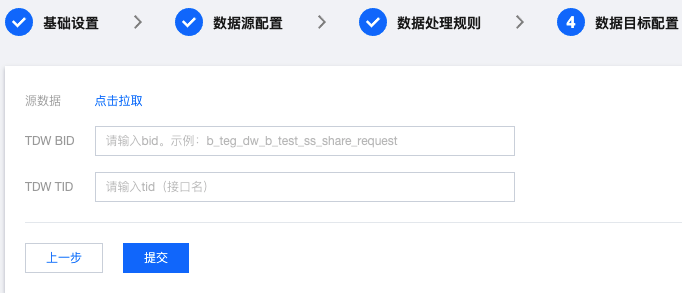
7. Click Next to configure the data target information.


Source Data: Click to pull the source topic data.
TDW BID: Enter the TDW BID.
TDW TID: Enter the TDW TID.
8. Click on Submit. The task you just created will appear in the task list, and the progress of the task creation can be monitored in the status bar.