Differences between instant video conferences and scheduled meetings?
Name | Description |
Schedule a meeting | You need to enter the meeting information. The scheduled meeting will be retained for 30 days, during which you can join the meeting at any time. |
Instant video conferences | You don't need to enter the meeting information. The meeting will be retained for only one hour, after which the system will end the meeting if there are no attendees in it. |
How to add a meeting to the meeting list?
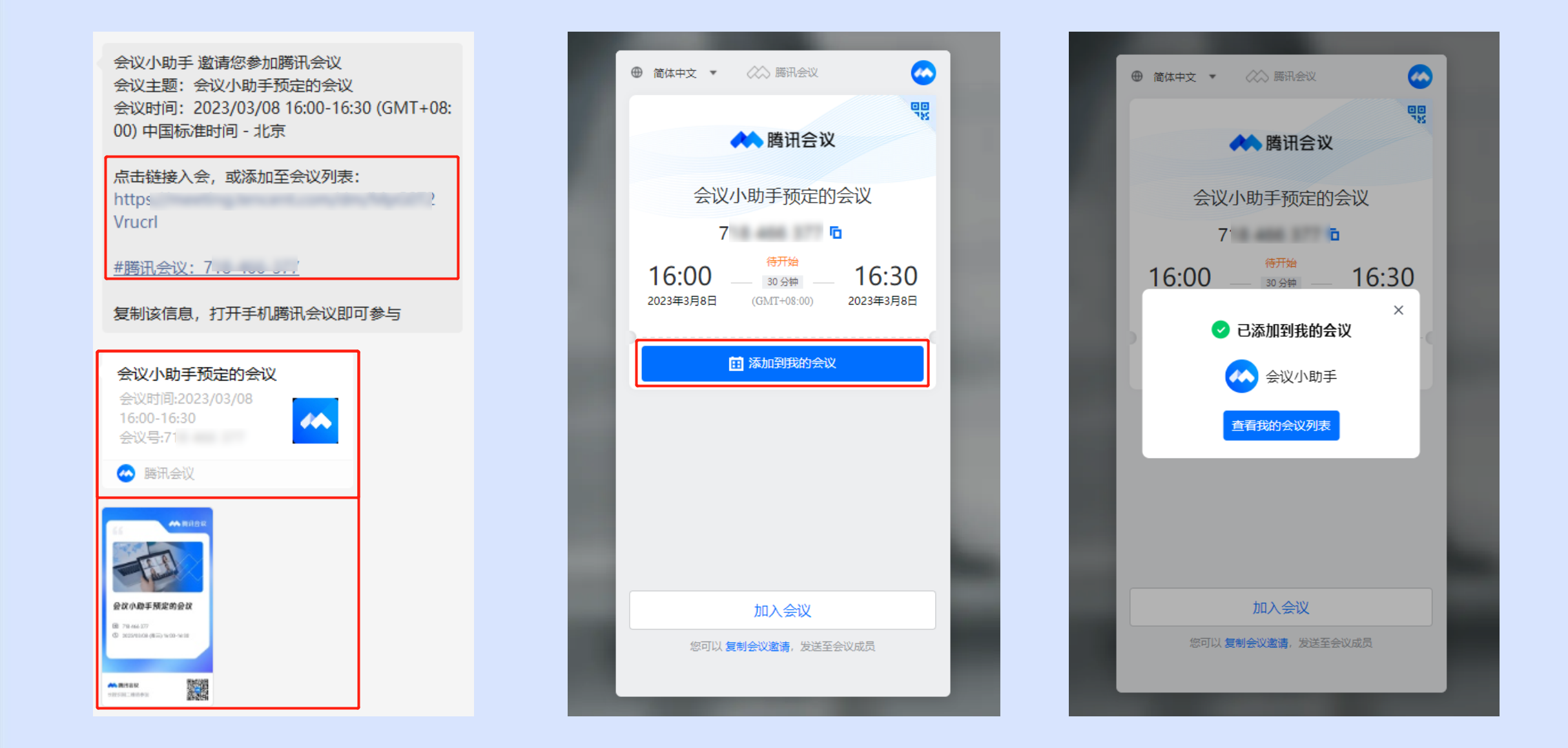
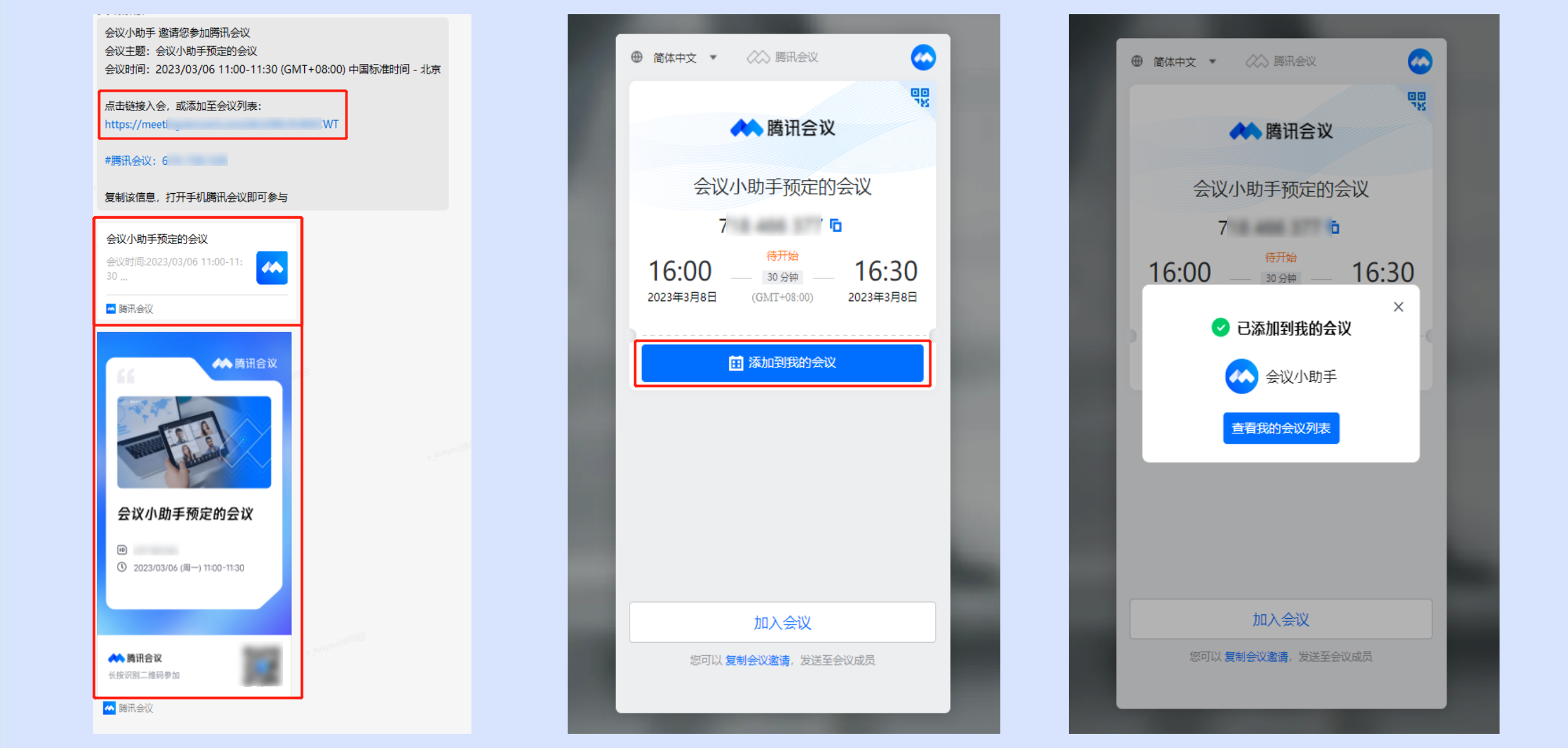
WeChat received a meeting invitation
Meeting Information: Invitees can click Meeting Link or Meeting Number > In the redirected page, click Add to My Meetings to view it in My Meetings List.
Invitation Card: Invitees can click Meeting Invitation Card > In the redirected page, click Add to My Meetings to view it in My Meetings List.
Conference Poster: Invitees can click or long-press Conference Poster, identify the QR Code in the image > In the redirected page, click Add to My Meetings to view it in My Meetings List.

Note:
Currently, manually entering a meeting number to add it to the meeting list is not supported.
WeCom received a meeting invitation
Meeting Information: Invitees can click Meeting Link > In the redirected page, click Add to My Meetings to view it in My Meetings List.
Invitation Card: Invitees can click Meeting Invitation Card > In the redirected page, click Add to My Meetings to view it in My Meetings List.
Conference Poster: Invitees can click or long-press Conference Poster, identify the QR Code in the image > In the redirected page, click Add to My Meetings to view it in My Meetings List.

Note:
Currently, WeCom does not support adding a meeting to the meeting list by clicking the meeting number.
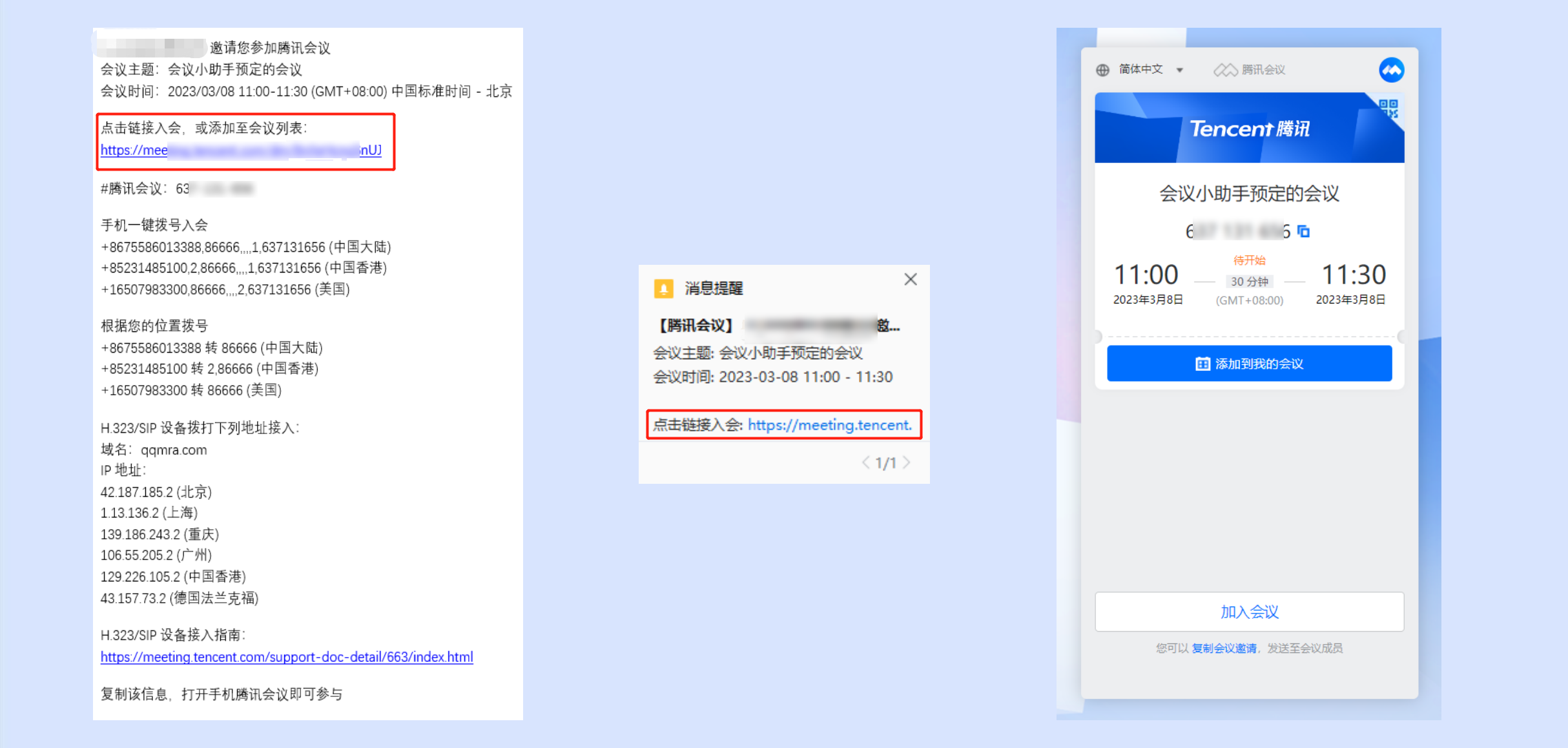
Email received a meeting invitation
Invitees can click Meeting Link > In the redirected page, click Add to My Meetings to view it in My Meetings List.
Meeting Invitation Notification
Invitees can click Meeting Link > In the redirected page, click Add to My Meetings to view it in My Meetings List.

I want to join the meeting via telephone. How is the charging calculated?
Telephone access to a meeting is charged according to local call rates; international long-distance calls are charged according to international roaming rates.
Why can't my WeCom log in to Tencent Meeting?
WeCom login to Tencent Meeting is only available to users who have purchased the Tencent Meeting Enterprise Edition. If your WeCom cannot log in to Tencent Meeting, please report this to your enterprise administrator.
I am the host, how do I transfer the host identity?
In the meeting interface, click Manage Members, select the member to whom you want to transfer the host identity, and click More. In the pop-up options, select Transfer Host.
What should I do if my network condition is poor but I need to attend the meeting?
You can click Settings in the meeting, select to enable Voice Mode to reduce network-related pressure. However, you should move to a place with a better network environment as soon as possible to avoid missing your meeting.
Is there a limit on the number of attendees who can join Tencent Meeting by scanning the Mini Program QR Code?
There is no attendee limit.
How do I view the meeting records?
You can log in to the Tencent Meeting official website, click the avatar in the top right corner to enter the user center, then click Meeting List on the left to view the records.
How do I export the list of attendees?
If you are the creator of the meeting, after the meeting ends, you can log in to the Tencent Meeting official website, click My Meetings, enter the Meeting List, and in the ended meetings, click Export Attendees.
How to rename?
Rename before joining the meeting:
When joining a meeting by meeting ID, apart from entering the 9-digit meeting ID, you also need to input your nickname, which will be displayed during the meeting. The first time you join, it will default to the name shown on your homepage, but you can change your nickname before joining. Once renamed and successfully joined, the system will remember this nickname for future meetings.
Rename during the meeting:
1. If you want to change your currently displayed nickname, you can click Member/Manage Members in the bottom operation bar, find your information bar, click Rename, and enter the new nickname.
2. If it's inconvenient for you to operate, you can also ask the host to change it for you.
How to solve the crash problem when renaming?
Crashes may be caused by the operating system or network anomalies. It's recommended to update your system or improve your network environment. If it still crashes after optimization, please use Online Support for assistance.
How to use Emojis?
In the new version, 21 emojis are provided (more will be available in future) to allow attendees to quickly express their opinions.
PC Terminal: During the meeting, click the emoji icon in the bottom left corner, 21 emojis will be displayed, then click to send an emoji.
Mobile Terminal: During the meeting, click the emoji icon in the bottom left corner, 21 emojis will be displayed, then click to send an emoji.
How to switch Hands-free/Earpiece Mode?
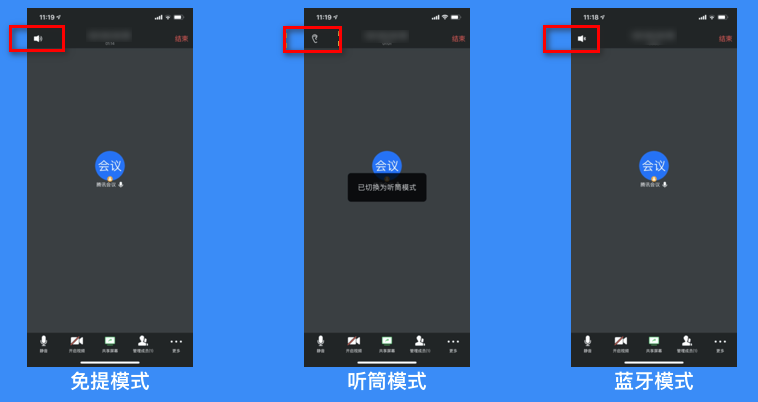
Open the Tencent Meeting app on your phone, you can see the "Speaker/Ear" icon in the top left corner of the meeting interface:
The speaker icon represents "Hands-free Mode".
The ear icon represents "Earpiece Mode".
Bluetooth Mode.

How many participants can join Tencent Meeting simultaneously?
The free version of Tencent Meeting supports up to 100 participants. The membership version can upgrade the meeting size to support up to 500 participants. The business and enterprise versions can purchase an extra-large room to support up to 2000 participants.
For meetings with more than 300 participants, such as training sessions, online public classes, forums, etc., it is recommended to use the Live Streaming feature. There is no limit on the number of viewers. The meeting creator can select any 4 participants' video or screen sharing windows to form the live streaming interface. Viewers can watch the live stream by opening the live stream link on their computer or mobile browser.
In a meeting, can the host see the private chat content of other participants?
The host cannot see the private chat content between other participants.
How do I add a meeting to My Meetings?
If the meeting creator has created a scheduled meeting, click the meeting link to enter the meeting details page, then click "Add to My Meetings" to add the meeting to your meeting list, preventing you from forgetting the meeting ID when you join.
How do I receive meeting reminders?
After binding your WeChat account, follow the "Tencent Meeting" official account. You will receive a message reminder from the official account 5 minutes before the start of the meeting, reminding you to join on time. You can also open "Receive Message Notifications" in the mobile App by clicking on the top left corneravatar > settings to receive timely meeting reminders.
You can follow the Tencent Meeting official account by scanning the QR code below with WeChat.

How do I enable the screen watermark?
PC Client: If you want to protect the content you are about to share, you can enable the screen sharing watermark in scheduled meetings and in the meeting itself by going to More > Settings > General Settings > Enable Screen Sharing Watermark, preventing unauthorized screenshots of your shared content.
Mobile Client: If you want to protect the content you are about to share, you can enable the screen sharing watermark in scheduled meetings and in the meeting itself by going to More > Settings > Enable Screen Sharing Watermark, preventing unauthorized screenshots of your shared content.
How do I lock the meeting?
PC Client: If you do not want unrelated personnel to join the meeting during the session, you can lock the meeting after all participants have joined by going to Manage Members > More and selecting Lock Meeting to prevent anyone else from joining the ongoing meeting.
Mobile Client: If you do not want unrelated personnel to join the meeting during the session, after all participants have joined, click Manage Members, then click the settings icon in the upper left corner of the pop-up page, and in the settings page select Lock Meeting to prevent others from joining the ongoing meeting.
How do I remove members from the meeting?
PC Client: If a stranger joins the meeting, you can click on their avatar and select Remove from Meeting, then select Do not allow users to rejoin the meeting.
Mobile Client: If a stranger joins the meeting, you can click on their avatar and select Remove from Meeting, then select Do not allow users to rejoin the meeting.
How do I search for members during the meeting?
Search for members during the meeting: If you need to locate a specific member in the meeting, you can open Manage Members and use the search box in the member list to search.
Is there a limit to the number of people in the Waiting Room feature of Tencent Meeting?
The waiting room can accommodate up to 3,000 people.
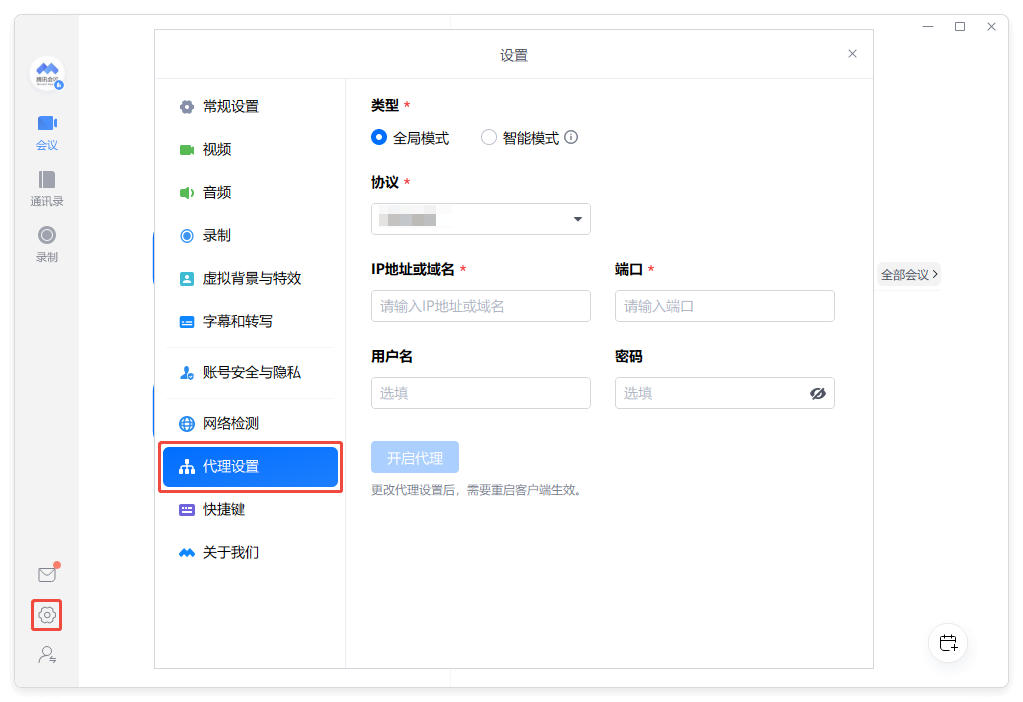
How to configure proxy access for Tencent Meeting on PC?
After logging in to Tencent Meeting on PC, click Personal avatar > Settings > Proxy settings to configure the proxy.

Why can't members join the meeting before the host enters?
Please check if the host has enabled the option Allow members to join the meeting before the host enters when scheduling the meeting. If not, enable this option.
How do I join different meetings at the same time?
For Free and Business Edition accounts, you can only join one meeting at a time with the same account.
Free and Business Edition accounts can join up to 5 different meetings initiated by others simultaneously by logging in from five different clients.
Enterprise Edition accounts can initiate and join up to five different meetings simultaneously or join up to five different meetings initiated by others simultaneously by logging in from five different clients.
(The five clients include: Windows, Mac, Android, iOS, iPad)
How to schedule a recurring meeting?
After logging in to Tencent Meeting, you can go to the "Main Interface", click Schedule Meeting, then select Recurring Meeting and fill in the necessary information to schedule the recurring meeting.
How long does it take for a Red Packet to be returned?
Unclaimed Red Packets will be returned to your payment account within 24 hours.
How to start a meeting using Personal PMI?
Currently, only Instant Meetings support using PMI to start a meeting. On the desktop client, you can click Instant Meeting dropdown, and select Use Personal Meeting ID.