Summary of Features
The Interactive Whiteboard service provided by Tencent Cloud supports streaming the whiteboard content to a TRTC room, allowing the viewing end to see the whiteboard content without integrating the Interactive Whiteboard. By combining TRTC bypass streaming and cloud-based mixing capabilities, the whiteboard content and other audio and video streams in the TRTC room can be mixed together according to a specified layout and streamed to CDN. The viewing end can watch via CDN pull stream.
1. For viewing through whiteboard streaming, refer to Whiteboard Streaming Viewing.
2. Achieve recording through whiteboard streaming. For details, refer to Whiteboard Streaming Recording.
Principles of Whiteboard Streaming
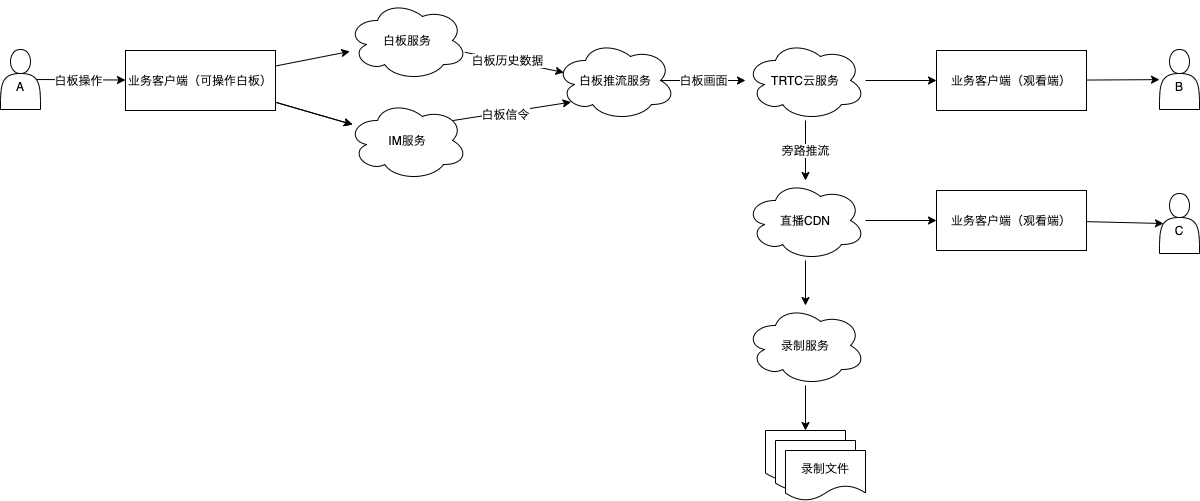
The Whiteboard Streaming Service will obtain Whiteboard Historical Data and Whiteboard Operation Signaling from the Whiteboard Service and Instant Messaging (IM) Service in real-time, perform Whiteboard Rendering, and then push the rendered whiteboard screen to the specified TRTC room as a main stream. Members in the room can subscribe to this Whiteboard Video Stream as needed. If Bypass Streaming is enabled, users outside the room can also pull the video stream through live CDN to watch.
Note:
1. After the whiteboard streaming (recording) request is successful, PushUserId (RecordUserId) will join the whiteboard classroom, IM group, and TRTC room corresponding to RoomId as a streaming (recording) user.
2. When operating the whiteboard in the whiteboard room (e.g., pen strokes, document page turning, audio and video playback), PushUserId will receive the signaling data in the whiteboard classroom through the IM group, then render it into a stream to the TRTC room. After the streaming is successful, the data corresponding to PushUserId can be seen on the TRTC dashboard.
3. The IM group corresponding to the RoomId must be created before the whiteboard streaming starts.
4. The format of RoomId must be a digital parameter, and the corresponding IM group needs to be a digital string (for example, if the RoomId is 1234, the IM group's GroupID should be "1234").