支持版本
1. 支持 Kafka 2.4.x、2.7.x、2.8.x 版本。
2. Kafka/CKafka 均可选择 Kafka 数据源,并按照 Kafka 步骤进行读写配置。
使用限制
1. Kafka 消息格式目前支持解析嵌套JSON、CSV(单分隔符) 和 AVRO,不支持 Oracle OGG 等其它特殊格式的 JSON。
2. 同时配置 parameter.groupId 和 parameter.kafkaConfig.group.id 时,parameter.groupId 优先级高于 kafkaConfig 配置信息中的 group.id。
Kafka 离线单表读取节点配置
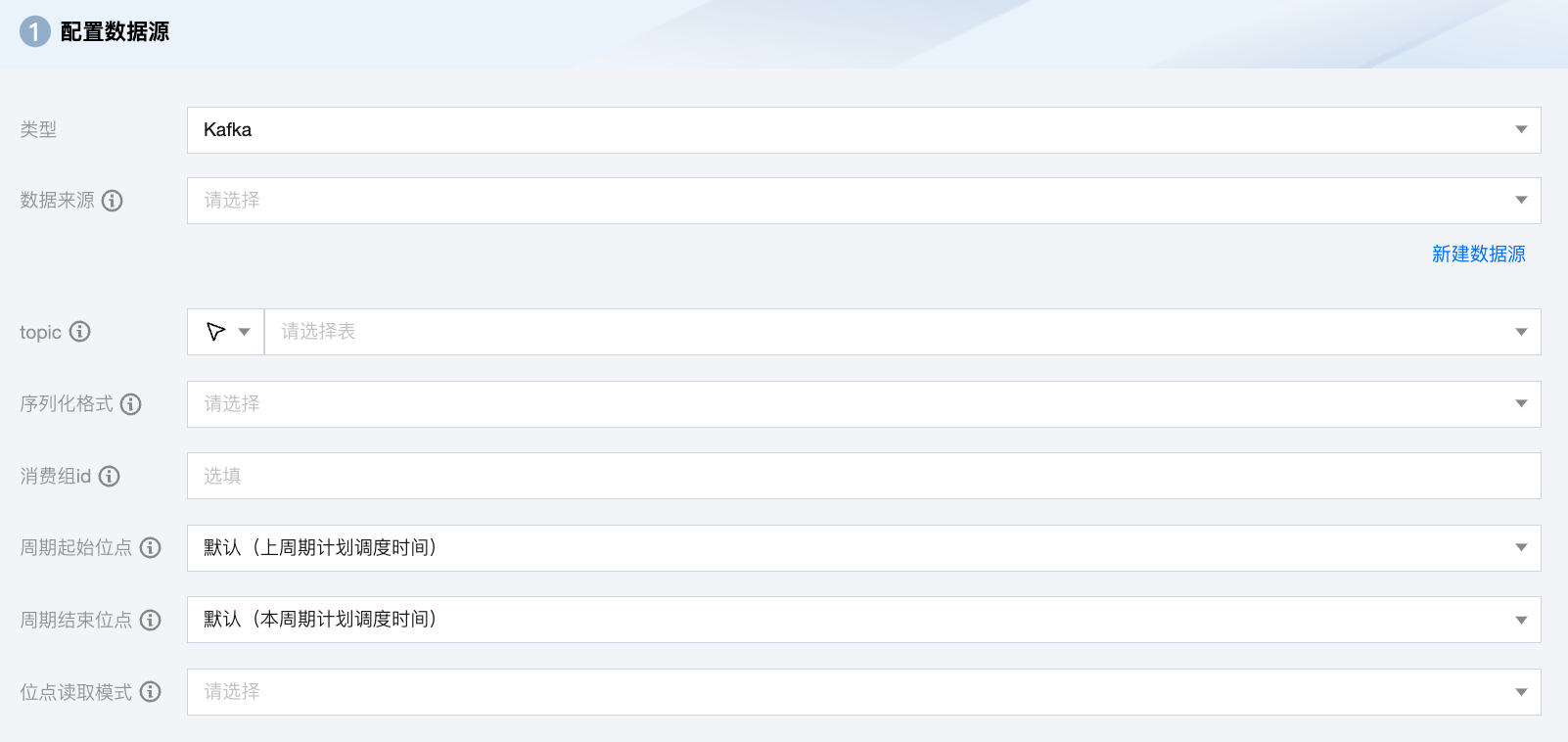
参数 | 说明 |
数据来源 | Kafka 读取端数据源类型支持 Kafka、CKafka。 |
topic | Kafka 的 Topic,是 Kafka 处理资源的消息源(feeds of messages)的聚合。 |
序列化格式 | 需要读取的 Kafka 数据,支持常量列、数据列和属性列: 常量列:使用单引号包裹的列为常量列,例如["'abc'", "'123'"] 数据列 如果您的数据是一个 JSON,支持获取 JSON 的属性,例如["event_id"] 如果您的数据是一个 JSON,支持获取 JSON 的嵌套子属性,例如["tag.desc"] 属性列 __key__表示消息的 key __value__表示消息的完整内容 __partition__表示当前消息所在分区 __headers__表示当前消息 headers 信息 __offset__表示当前消息的偏移量 __timestamp__表示当前消息的时间戳 |
消费组 ID | 避免该参数与其他消费进程重复,以保证消费位点的正确性。如果不指定该参数,默认设定 group.id=WeData_ group_${任务id} 。 |
周期起始位点 | 任务周期运行时,每次读取 Kafka 的开始位点。默认上周期计划调度时间,可选:分区起始位点、消费组当前位点、指定位点、指定时间。 指定时间:数据写入 Kafka 的时候自动生成一个 unixtime 时间戳作为该数据的时间记录。同步任务通过获取用户配置的 yyyymmddhhmmss 数值,将该值转成 unixtimestamp 后从 Kafka 中读取相应数据。例如,"beginDateTime": "20210125000000"。 分区起始位点:从 Kafka topic 每个分区没有删除的位点最小的数据开始抽取数据。 消费组当前位点:从任务配置上面指定的消费群组 ID 保存的位点开始读取数据,一般是使用这个群组 ID 读数据的进程上次停止的位点(最好确保使用这个群组 ID 的进程只有配置的这个数据集成任务,避免共用群组 ID 造成数据丢失),如果使用群组当前位点,一定要配置消费群组 ID,否则数据集成任务会随机生成一个群组 ID,而新的群组 ID 因为没有保存过位点,根据位点重置策略的不同会引起任务报错或从开始或结束位点开始读取数据。另外群组位点在客户端会定时自动提交到 Kafka 服务端,所以在任务失败后,如果重跑任务时,可能有数据重复或者丢失,另外向导模式下会自动丢弃读到的超过结束位点的记录,而这些丢弃数据的群组位点已经提交到服务端,在下一个周期任务运行时将无法读到这些丢弃的数据。 |
周期结束位点 | 任务周期运行时,每次读取 Kafka 的结束位点。默认本周期计划调度时间。当 keyType 或 valueType 配置为 STRING 时,将使用该配置项指定的编码解析字符串。 |
位点读取模式 | 手动运行同步任务时开始同步数据的起始位点。提供两种读取模式: latest:从上次偏移位置读取。 earlist:从开始位点读取。 |
Kafka 离线单表写入节点配置
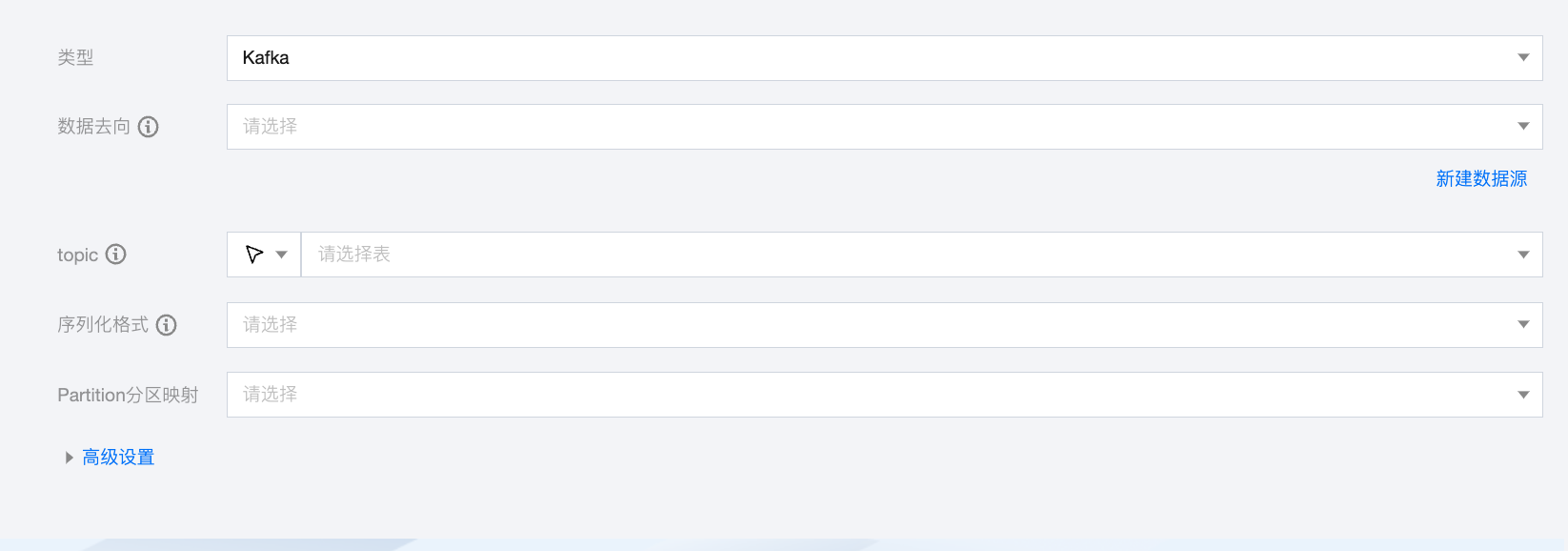
参数 | 说明 |
数据去向 | Kafka 读取端数据源类型支持 Kafka、CKafka。 |
topic | Kafka 的 Topic,是 Kafka 处理资源的消息源(feeds of messages)的聚合。 |
序列化格式 | 需要读取的 Kafka 数据,支持常量列、数据列和属性列: 常量列:使用单引号包裹的列为常量列,例如["'abc'", "'123'"] 数据列: 如果您的数据是一个 JSON,支持获取 JSON 的属性,例如["event_id"] 如果您的数据是一个 JSON,支持获取 JSON 的嵌套子属性,例如["tag.desc"] 如果您的数据是一个 JSON,同步时支持解析 JSON 数据,例如当 JSON 结构为{"li": {"boxs": ["abc", "efg"]}}时,配置字段名 li.boxs[0]即可读取到值 abc 属性列: __key__表示消息的 key。 __value__表示消息的完整内容。 __partition__表示当前消息所在分区。 __headers__表示当前消息 headers 信息。 __offset__表示当前消息的偏移量。 __timestamp__表示当前消息的时间戳。 |
Partition 分区映射 | 支持轮询写入分区、根据指定字段 Hash 写入、指定分区三种模式。 如果选择根据指定字段 Hash 写入模式,需要指定字段名称。 如果选择指定分区模式,需要设置分区号。 |
高级设置(选填) | 可根据业务需求配置参数。 |
数据类型转换支持
读取
其他数据类型默认为转换为 String 类型。
读取 Kafka value 的格式 | 源端字段类型 | 内部类型 |
JSON | INTEGER, LONG, BIGINTEGER | LONG |
| FLOAT, DOUBLE | DOUBLE |
| BOOLEAN | BOOL |
| JSON ARRAY, JSON OBJECT | STRING |
CSV | INTEGER, LONG, BIGINTEGER | LONG |
| FLOAT, DOUBLE | DOUBLE |
| BOOLEAN | BOOL |
| JSON ARRAY, JSON OBJECT | STRING |
AVRO | INTEGER, LONG, BIGINTEGER | LONG |
| FLOAT, DOUBLE | DOUBLE |
| BOOLEAN | BOOL |
| JSONARRAY, JSONObject | STRING |
写入
其他数据类型默认为转换为 String 类型。
写入 Kafka value 的格式 | 内部类型 | 目标端字段类型 |
JSON | LONG | INTEGER, BIGINT |
| DOUBLE | FLOAT, DOUBLE, DECIMAL |
| BOOL | BOOLEAN |
| STRING | STRING, VARCHAR, ARRAY |
| DATE | DATE, TIMESTAMP |
CSV | LONG | INTEGER, BIGINT |
| DOUBLE | FLOAT, DOUBLE, DECIMAL |
| BOOL | BOOLEAN |
| STRING | STRING, VARCHAR, ARRAY |
| DATE | DATE, TIMESTAMP |
AVRO | LONG | Integer、Bigint |
| DOUBLE | FLOAT, DOUBLE, DECIMAL |
| BOOL | BOOLEAN |
| STRING | STRING, VARCHAR, ARRAY |
| DATE | DATE, TIMESTAMP |
Kafka/CKafka 脚本 Demo
如果您配置离线任务时,使用脚本模式的方式进行配置,您需要在任务脚本中,按照脚本的统一格式要求编写脚本中的 reader 参数和 writer 参数。
"job": {"content": [{"reader": {"parameter": {"server": "ip:9092","endOffset": "9223372036854775807", //周期结束位点"kafkaConfig": {"group.id": "WeData_group_1", //消费组id"client.id": "WeData_client"},"messageFormat": "json", //序列化格式"column": ["__key__","__value__","__partition__","__headers__","__offset__","__timestamp__"],"encoding": "UTF-8","stopWhenPollEmpty": true,"beginOffset": "seekToLast", //周期起始位点"valueType": "STRING","skipExceedRecord": "true","topic": "source_topic", //源topic"keyType": "STRING","waitTime": 120},"name": "kafkareader"},"transformer": [],"writer": {"parameter": {"server": "ip:9092","messageFormat": "json", //序列化格式"kafkaConfig": {"client.id": "WeData_client"},"partitioner": "roundRobin", //Partition分区映射方式,支持轮询、指定字段hash和指定分区"column": [{"name": "key","type": "string"},{"name": "value","type": "string"},{"name": "partition","type": "string"},{"name": "headers","type": "string"},{"name": "offset","type": "string"},{"name": "timestamp","type": "string"}],"topic": "sink_topic" //目标topic},"name": "kafkawriter"}}],"setting": {"errorLimit": { //脏数据阈值"record": 0},"speed": {"byte": -1, //不限制同步速度,正整数表示设置最大传输速度 byte/s"channel": 1 //并发数量}}}


