The content of this page has been automatically translated by AI. If you encounter any problems while reading, you can view the corresponding content in Chinese.
Data quality is one of the core links in data governance. It aims to help users detect dirty data generated during data integration and data development immediately, automatically intercept exception tasks, block the spread and transmission of dirty data to downstream, and reduce user issue handling cost and resource waste.
Applicable Roles: Data Development Engineer, Data Warehouse Table Owner.
Fee Description
The costs generated by data quality task execution mainly include the following three parts:
1. WeData product feature version cost (premise).
2. WeData Execution Resource Cost: Charge based on the volume of scheduling resources consumed by Quality Task Instances.
3. Non-WeData direct costs: Quality Task Verification requires the cooperation of engines and data source services (for example, EMR, DLC, TCHouse-D, TCHouse-P, etc.) to execute. This will generate engine fees, which are charged by the engine side and not included in the WeData billing statement. For specific charging standards of each engine, please refer to the billing description in the engine product documentation on the Tencent Cloud official website.
The Quality Module mainly includes the following core features:
1. Support various Tencent Cloud Big Data Storage Engines (such as EMR, DLC, TCHouse - P, TCHouse - D) and open - source big data storage engines (such as Doris).
2. Configure data quality inspection rules at the table level and field level.
3. Configure execution policies based on actual business scenarios.
4. Set the rule strength to determine whether to block downstream tasks.
5. Support various user reach methods (WeCom group, WeChat, call, SMS, mail, Lark Group, DingTalk group).
6. Quality scoring can be obtained from six dimensions (accuracy, timeliness, integrity, uniqueness, consistency, and validity), and a library and table dimension quality report can be formed.
Features of Each Module
The introduction to the features of each Data Quality module is as follows:
Function
Overview
Quality Overview
Quality Result Overview:
view detection status; rule operation status
View alarm status Table alarm ranking
Rule Template
Unified management of rule templates for unified reuse:
56+ system built-in templates: can only be viewed;
Custom rule template: supports CRUD operations.
Data monitoring
Create detection rules:
Support various Tencent Cloud big data engines: EMR, DLC, TCHouse - P, TCHouse - D, Doris;
Support various creation methods: single table addition, multiple tables addition, batch upload.
View detection rules:
Support various viewing methods: view all, table dimension, rule dimension;
Support viewing the rule list of a table and performing rule management.
Ops management
Execution instance and results:
Support viewing the task running results of quality; and can view the historical running status of each rule;
Support exporting execution results and view historical export logs.
Quality Task:
Support viewing the generated quality inspection tasks;
Support configuring alarm information for quality tasks.
Alarm Information:
Support viewing historical alarm situations.
Quality Report
Quality Report:
Support counting historical operation results into quality scores in multiple dimensions: database and table, rule dimension.
Support viewing quality scores in multiple dimensions: comprehensive quality score, dimension quality score, Quality Detail Breakdown.
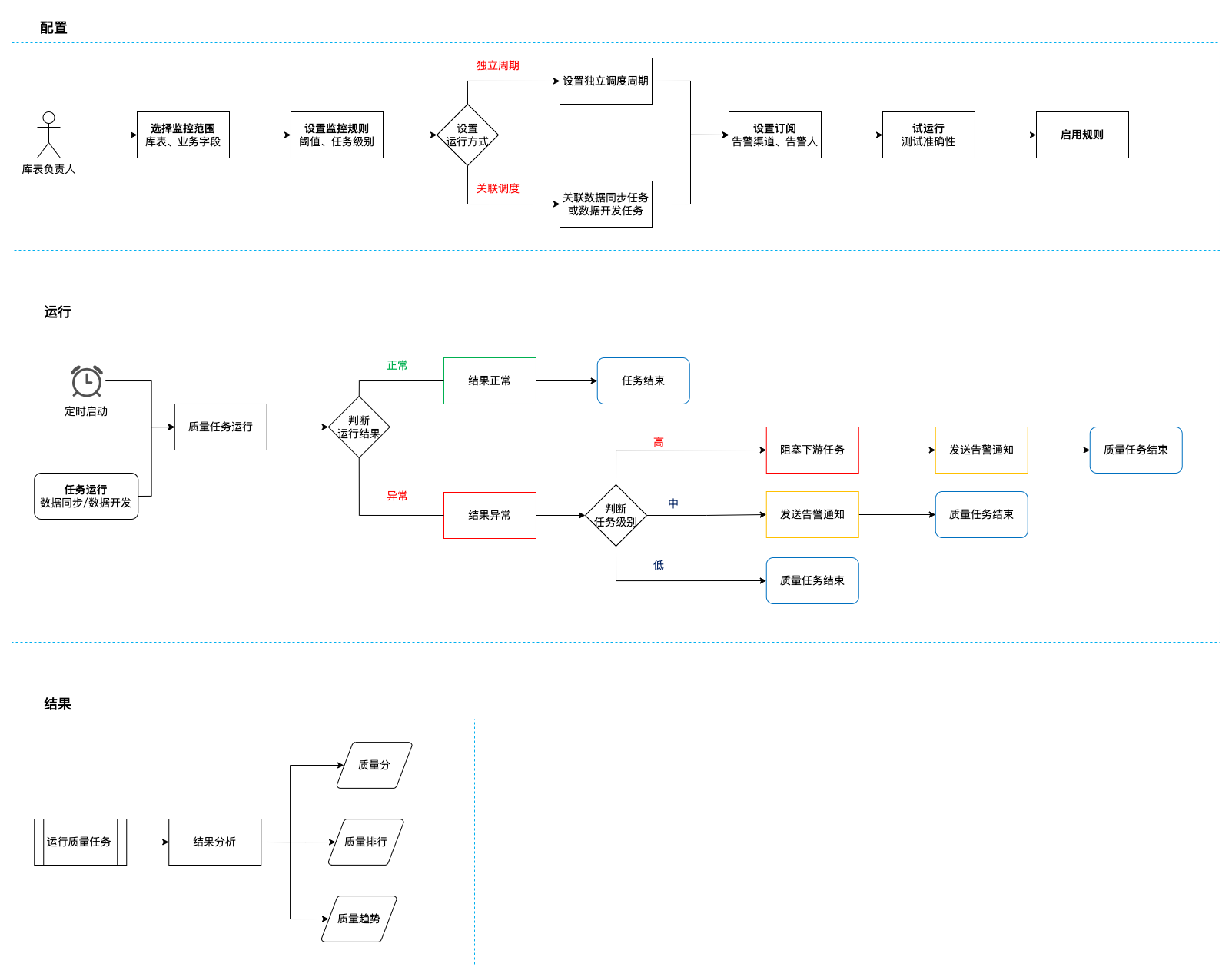
Core Process
Key Term Explanation:
Noun
Explanation
Independent Cycle
Set up periodic quality inspection for selected database tables and core business fields at custom frequencies such as daily, hourly, or by the minute. Quality tasks will be executed on a scheduled basis according to the set period. If an exception is detected, subscribers will be notified immediately.
Associated Scheduling
Associate quality tasks with production tasks (data sync tasks or data development tasks). After the production task execution is complete, insert a quality rule task execution. If an exception is detected, notify the handler to handle it immediately. Block downstream task execution according to the task level to avoid problem data expansion.
Must-Knows
After configuring the configuration tables for EMR, DLC, TCHouse-P, and TCHouse-D, as well as the field data quality rules, the scheduling node for output data requires the use of a scheduling resource group with established network connectivity for execution. It must ensure that the executor is stable and its version has been updated to the latest version before data quality rule validation can be normally triggered.
Each table can configure multiple table-level and field-level data quality rules and perform verifications simultaneously.