The content of this page has been automatically translated by AI. If you encounter any problems while reading, you can view the corresponding content in Chinese.
This policy allows you to manage all users and their permissions, financial-related information, and cloud service assets within the account
Can manage sub-account permissions
Can log in to WeData Console
Can create WeData Project
QCloudResourceFullAccess
This policy allows you to manage all cloud service assets within the account
Can log in to WeData Console
Can create WeData Project
ReadOnlyAccess
This policy allows you read-only access to all cloud service assets within the account that support interface-level or resource-level authentication
Can log in to WeData Console
Cannot create WeData Project
How to obtain/view EMR VPC?
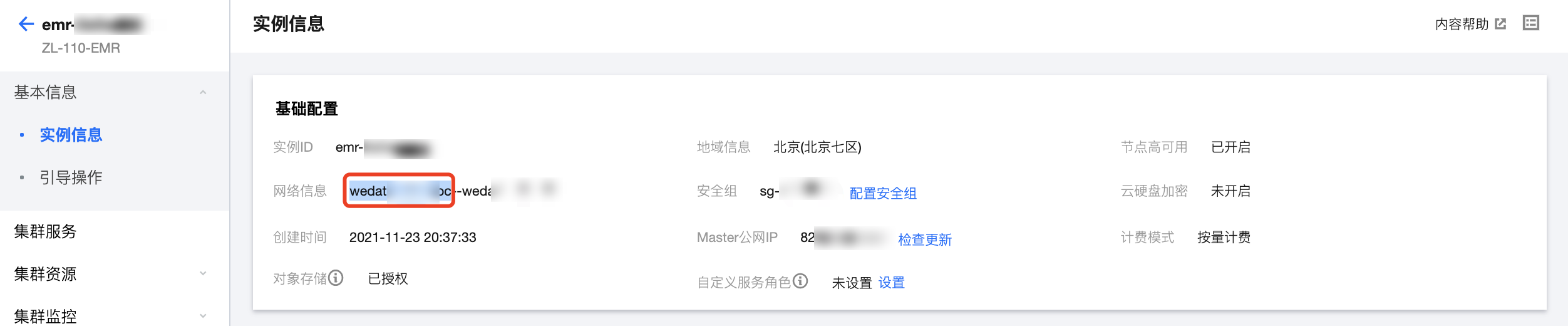
Go to Tencent Cloud EMR Console, select the region and ID corresponding to the cluster. Enter the Cluster Detail Page > Basic Information > Instance information page to view the cluster network information.
Note
The network information of EMR by default uses "--" to separate the ID and display name. You can copy the information before "--" (inside the red box) for search.
How to obtain/view the data source VPC?
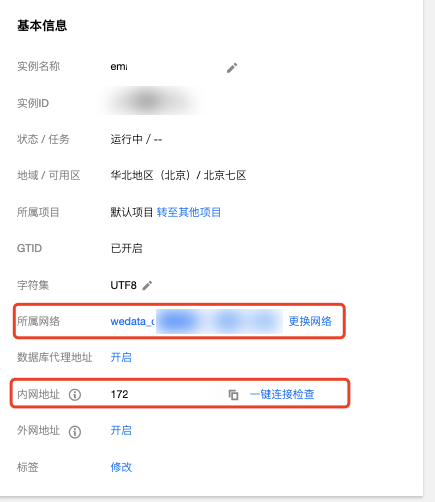
Taking MySQL as an example, go to the corresponding Tencent Cloud MySQL Console, select the region and ID of the corresponding instance. Enter the Instance Detail Page > Instance Details page, and view the instance network information.
When synchronizing the whole MySQL database, click "Pause" immediately after running, the task status always shows "In operation"?
Cause Analysis: After the whole database synchronization task starts running, clicking Pause immediately will cause the task status to remain "In operation". Backend data is continuously synchronizing, far exceeding the actual size of the source table.
Solution: When the MySQL whole database synchronization task is in the snapshot phase, the "Pause" operation is not supported.
After clicking "Continue" on a "Paused" task, some data is duplicated?
Cause Analysis: In the current version, resuming a real-time task after it was paused will start from the last checkpoint, so partial data duplication is a normal occurrence.
During real-time synchronization, after deleting the data source or changing the data source structure, the task shows "Running" but is not actually synchronizing?
Cause Analysis: During real-time task operation, if the following scenarios occur, the task still shows as running but is not actually synchronizing any data.
Deleting the data source in the MySQL source database. For example, during synchronization from MySQL to Hive, deleting the MySQL or Hive table in the MySQL source database.
Changing the data source structure in the MySQL source database. For example, during synchronization from MySQL to Hive, deleting or modifying certain fields in the MySQL or Hive table in the MySQL source database.
Both operations of deleting the data source and changing data structures are considered abnormal issues. WeData temporarily cannot obtain the abnormal status of the task.
Solution: After obtaining the abnormal logs, the solutions for the above two situations are as follows:
1. Delete the data source. Users need to reselect a new data source on the WeData real-time synchronization interface, configure the mapping relationship, and then click submit, choosing "Keep job status data, continue running".
2. Changing the data source structure. Users need to click Refresh in the WeData Real-time Synchronization Interface to obtain the latest data source structure, configure the mapping relationship, then click Submit, and choose "Retain Job Status Data, Continue Running".
When synchronizing MySQL sharded tables with different schemas, the task shows "Running" but the task is not successfully synchronized?
Cause Analysis: When synchronizing MySQL sharded tables, if the schemas of the configured tables are different and the fields establishing the mapping relationship do not exist in certain tables, the task status will show "Running" but will not actually execute successfully. Additionally, since Oceanus currently uses a strategy of continuous restarting when a task encounters an error, the task remains in a "Running" state.
Solution: For the unsuccessful scenario mentioned above, exclude non-compliant tables in the WeData Real-time Synchronization Interface, configure the mapping relationship, then click Submit, and choose "Retain Job Status Data, Continue Running".
When performing MySQL whole database synchronization, the "Oceanus job config length exceeds 100k limit" warning appears?
Problem Description: When performing MySQL whole database synchronization, the "Oceanus job config length exceeds 100k limit" warning appears.
Cause Analysis: To ensure the performance of the whole database migration task, the total length of the task configuration cannot exceed 100k in the current version. If too many data tables or the total number of table fields are too large, the system prompts a limit warning.
Solution: It is recommended that a single whole database migration task does not configure more than 20 tables. It can be divided into multiple whole database migrations or sharded tasks.
Does the Definition field configuration support Complex Types?
The current version does not support Complex Types such as Array, Map, and Struct, only Primitive Types.
An error occurs when submitting the task: "ache.calcite.sql.validate.SqlValidatorException: Cast function cannot convert value of type ..."?
Problem Description: When submitting a real-time synchronization task, the system reports the error "[TencentCloudSDKError] Code=FailedOperation, Message=ache.calcite.sql.validate.SqlValidatorException: Cast function cannot convert value of type ...".
Cause Analysis: The types between the source and target fields of real-time synchronization cannot be converted.
Solution:
1. Please check whether the field types configured between the source and target ends match. For specific type conversions between data sources and target ends, refer to Synchronized Data Source.
2. If the task is a MySQL-Ckafka single table synchronization task, check whether the mapping relationship for pkNames_wedata_di and sqlType_wedata_di with the target end is established. Since the current version does not support Complex Types such as Array, Map, and Struct in Ckafka fields, the pkNames_wedata_di and sqlType_wedata_di parameters cannot be written to the Ckafka target end.
Sub-account prompts "No PassRole" when redirected to Tencent Cloud Oceanus Console through operation and maintenance?