The content of this page has been automatically translated by AI. If you encounter any problems while reading, you can view the corresponding content in Chinese.
Help & Documentation>Data Lake Compute

Implementing Tencent Cloud TCHouse-D Read and Write Operations in DLC

Last updated: 2026-05-20 17:46:47

DLC has a built-in TCHouse-D Connector. You can connect to a Tencent Cloud TCHouse-D cluster by simply adding the corresponding configuration during development. This document describes how to perform read and write operations on TCHouse-D in DLC.

Background Information

Tencent Cloud TCHouse-D is built on the industry-leading OLAP database Apache Doris kernel. It is MySQL protocol compatible and integrates with the cloud big data ecosystem. With extensive cluster control capabilities and a comprehensive inspection and alarm system, Tencent Cloud TCHouse-D offers simple-to-use and easy-to-maintain fully managed cloud services to help customers quickly perform real-time OLAP data analysis. For more information about Tencent Cloud TCHouse-D, refer to the Tencent Cloud TCHouse-D Overview.

Prerequisites

You have purchased the Tencent Cloud TCHouse-D cluster.
The DLC service has been activated.
Note:
Cross-regional read/write for Tencent Cloud TCHouse-D is not currently supported. Plan your environment accordingly to ensure that both Tencent Cloud TCHouse-D and DLC are in the same region.

Operation Process

Step 1: Creating Tencent Cloud TCHouse-D Catalogs

1. Log in to the DLC console, select a service region. The account used for login must have permissions to create catalogs. To enable permissions for a sub-account, refer to Sub-account Permission Management.
2. Go to Data Management and click Create Data Catalog.
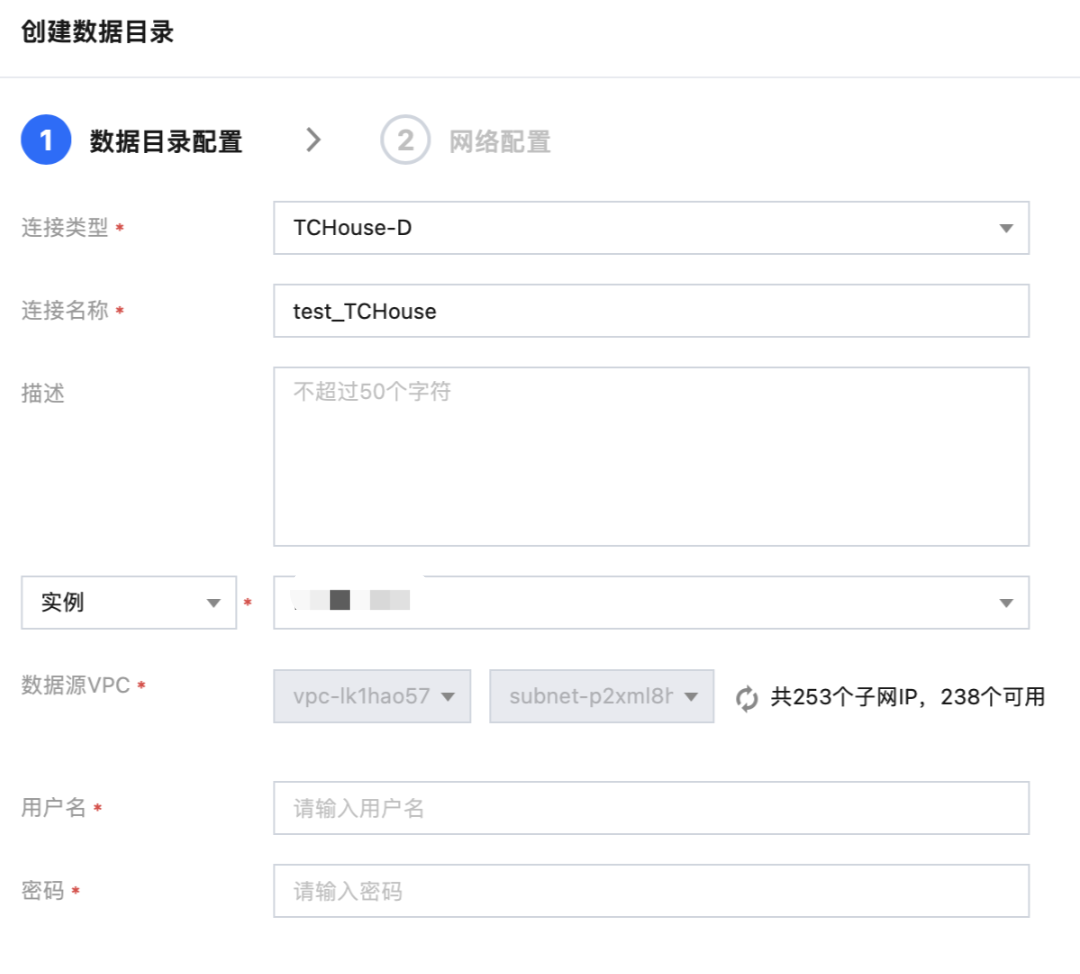
3. Go to the data source creation interface, and select Tencent Cloud TCHouse-D as the connection type. After entering the connection information, complete the network configurations to establish the network between the engine and the external data source.


4. Enter the data source information and click Confirm to create the data source.
5. In the data catalog list, you can view the connection information, status, creator, and other details.
Note:
You need to enter a username and password for an account with the corresponding Tencent Cloud TCHouse-D data permissions. Otherwise, queries will return an error.

Step 2: Querying or Writing Data to TCHouse-D

1. Log in to the DLC console, select Data Exploration, and switch the data catalog in the upper-left corner to the TCHouse-D catalog created in the previous step (assume its name is "tchouse").
2. Create a query. Assume that a TPCDS benchmark dataset exists in Tencent Cloud TCHouse-D. Using the following sample SQL, you can join the dataset with the internal DLC data and write the results back to Tencent Cloud TCHouse-D.
insert into tchouse.tpcds.d_table SELECT a.sk AS ctr_customer_sk, b.sk AS ctr_store_sk FROM tchouse.tpcds.f_table a LEFT JOIN DataLakeCatalog.dlc.dlc_table b ON a.id = b.id WHERE a.sssk = '123' GROUP BY a.sk, b.sk ;
3. Run the above query. The DLC computing engine will read the Tencent Cloud TCHouse-D dataset and write the query result total_return back to Tencent Cloud TCHouse-D.
Note:
Currently, dynamic overwrite is not supported for writing the query results back to Tencent Cloud TCHouse-D.