The content of this page has been automatically translated by AI. If you encounter any problems while reading, you can view the corresponding content in Chinese.
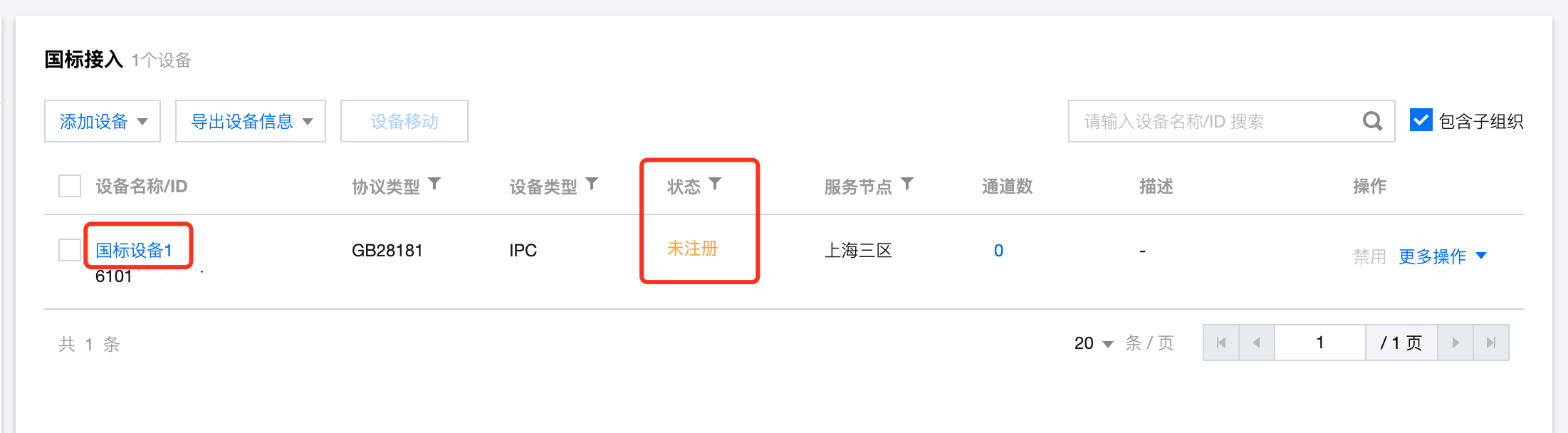
2. In the left navigation bar, select the Device Access feature, and first navigate to Device Organization Device Organization. Select the corresponding device organization, click Add Device (you can choose Manual Addition or Bulk Import. This document explains manual addition as an example).
3. After the device is successfully created, its initial status is Unregistered.
Step 2: Obtain device national standard configuration information
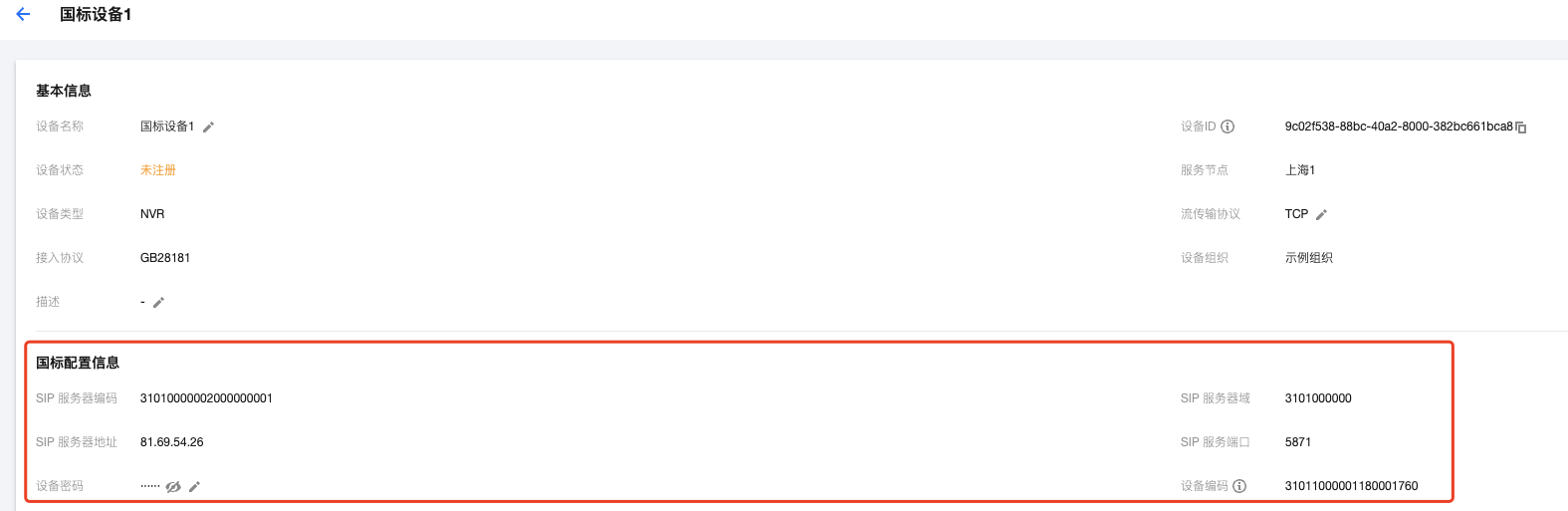
click the device name to enter the Device Details page, and view and record the configuration information generated for the device (as shown in the red box below).
Note:
When there are many devices, it is recommended to use the Export Device Information feature to export device configuration information in bulk.
Step 3: log in to the device Web interface for configuration
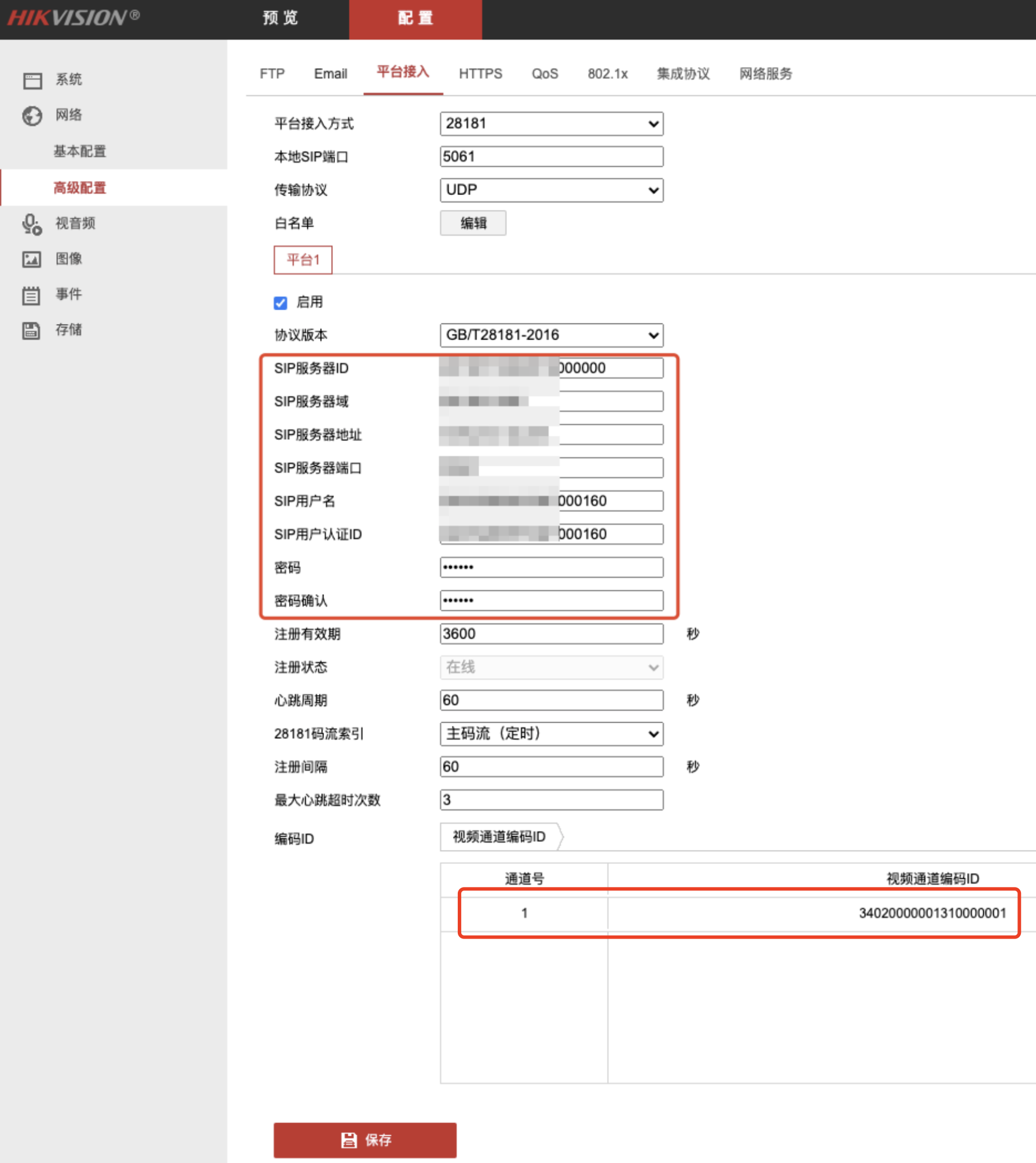
Hikvision device configuration example (using IPC as an example)
Configuration Parameters
Configuration Instructions
Local SIP Port
Must be changed to other port numbers like 5061, 5062, etc. (Do not use the device's default port number 5060, as it may be blocked by the router).
Transfer protocol
This refers to the protocol used for signaling transmission, prioritize choosing the TCP protocol.
Protocol Version
Select GB/T28181-2016.
SIP Server ID
Enter the SIP Server ID generated by the platform in Step 2.
SIP Server Domain
Enter the SIP Server Domain generated by the platform in Step 2(it's the first 10 digits of the SIP Server ID).
SIP Server Address
Enter the SIP Server IP generated by the platform in Step 2.
SIP Server Port
Enter the SIP Server Port number generated by the platform in Step 2.
SIP Username and SIP User Authentication ID
Enter the device code generated by the platform in Step 2, for example: 34020000001320000001
Password and Password Confirmation
Enter the device password in Step 2 (entered when creating the device in the console).
Registration Validity Period
The validity period for the device registration on the platform.It is recommended to use the default value of 3600s.
Heartbeat Interval
The time interval at which the device sends heartbeat information.It is recommended to use the default value of 60s.
Maximum Timeout Count
If the heartbeat continuously times out and reaches the "maximum number of timeouts," the device is considered unable to establish a connection with the platform.It is recommended to use the default value of 3 times.
Video Channel Encoding ID
The rule is consistent with the SIP username. Change the 11th-13th digits to 131, and it is recommended to write them in ascending order based on the channel number, ensuring no duplicates, for example: 34020000001310000001, 34020000001310000002,
Note:
Just ensure that the channel coding ID here does not repeat with the above [SIP username], otherwise, it will prompt "parameter error". However, it doesn't matter if it's the same as the channel coding ID of other devices.
The same rule applies when configuring NVR devices here.
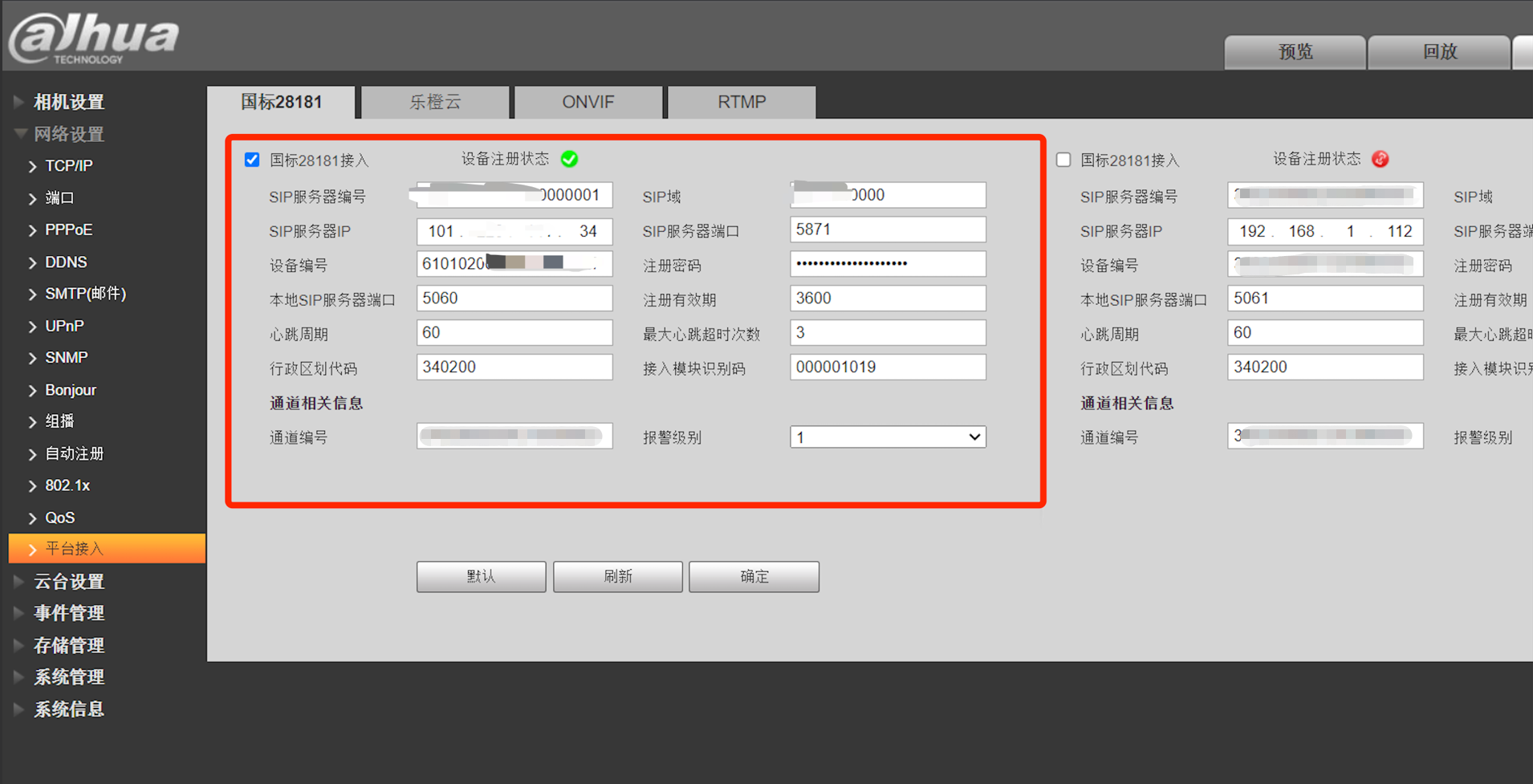
Dahua Device Configuration Example (using IPC as an example)
Parameter Configuration
Configuration Instructions
SIP Server Number
Enter the SIP Server ID generated by the platform in Step 2.
SIP Server Domain
Enter the SIP Server Domain generated by the platform in Step 2 (the first 10 digits of the SIP Server ID).
SIP Server IP
Enter the SIP Server IP generated by the platform in Step 2.
SIP Server Port
Enter the SIP Server Port number generated by the platform in Step 2.
Device Number
Enter the device code generated by the platform in Step 2, for example: 34020000001320000001
Registration Password
Enter the device password in Step 2 (entered when creating the device in the console).
Local SIP Server Port
Must be changed to other port numbers like 5061, 5062, etc. (Do not use the device's default port number 5060, as it may be blocked by the router).
Registration Validity Period
The validity period for the device registration on the platform. It is recommended to use the default value of 3600s.
Heartbeat Interval
The time interval at which the device sends heartbeat information. It is recommended to use the default value of 60s.
Maximum Timeout Count
If the heartbeat continuously times out and reaches the "maximum number of timeouts," the device is considered unable to establish a connection with the platform. It is recommended to use the default value of 3 times.
Channel Number
The rule is consistent with the SIP username. Change the 11th-13th digits to 131, and it is recommended to set them in ascending order based on the channel number, ensuring no duplicates, for example: 34020000001310000001, 34020000001310000002,
Note:
Just ensure that the channel encoding ID here does not repeat with the above [Device Number], otherwise, it will prompt "parameter error." However, it doesn't matter if it's the same as the channel encoding ID of other devices.
The same rule applies when configuring NVR devices here.
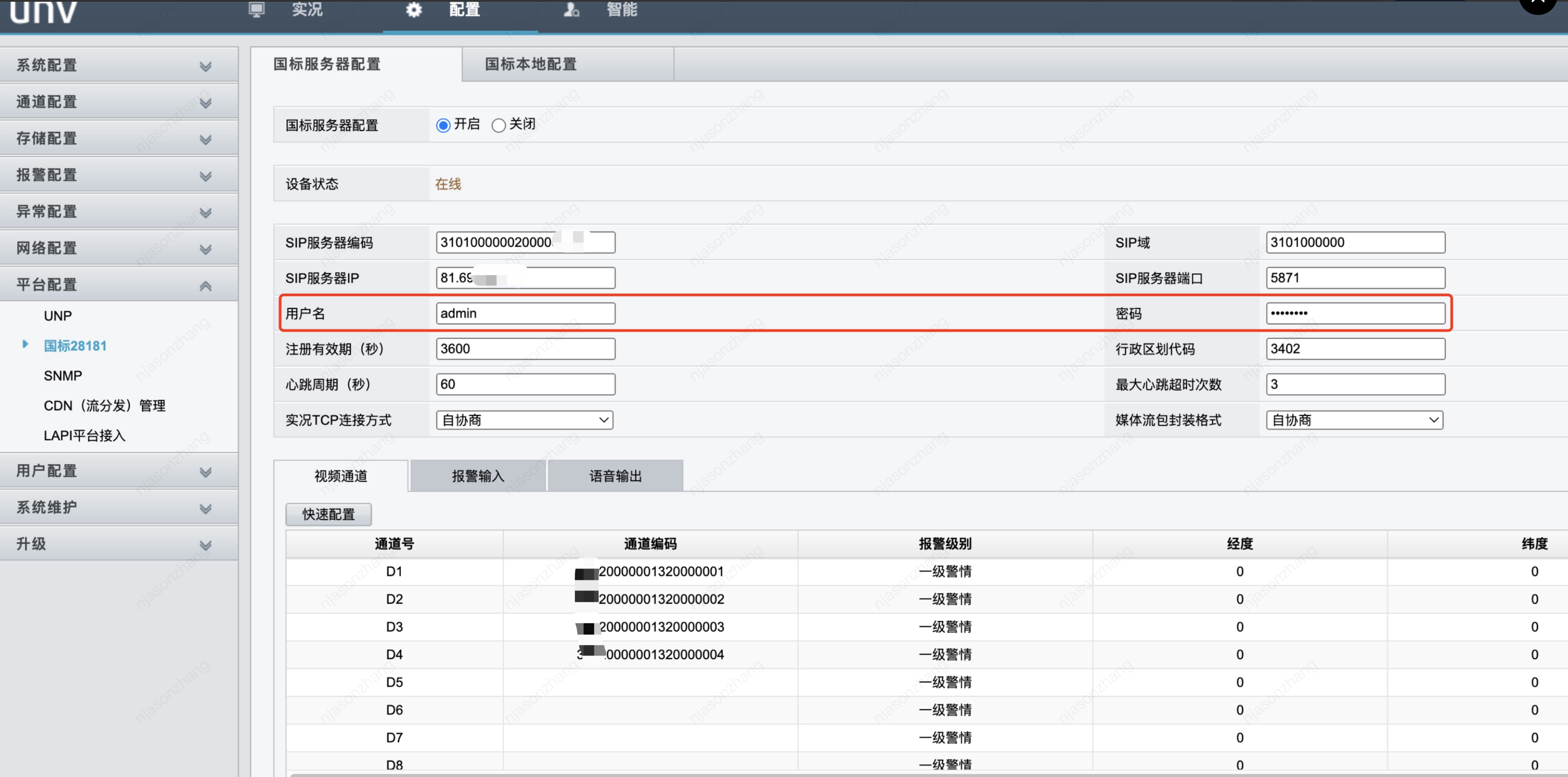
Yushi Device Configuration Demonstration (using NVR as an example)
Parameter Configuration
Configuration Instructions
SIP Server Code
Enter the SIP Server ID generated by the platform in Step 2.
SIP Domain
Enter the SIP Server Domain generated by the platform in Step 2 (the first 10 digits of the SIP Server ID).
SIP Server IP
Enter the SIP Server IP generated by the platform in Step 2.
SIP Server Port
Enter the SIP Server Port number generated by the platform in Step 2.
Username
Log in to the device Web end with the username.
Note:
Do not enter the device code generated by the platform here.
Password
Enter the device password in Step 2 (entered when creating the device in the console).
Registration Validity Period
The validity period for the device registration on the platform. It is recommended to use the default value of 3600s.
Heartbeat Interval
The time interval at which the device sends heartbeat information. It is recommended to use the default value of 60s.
Maximum Timeout Count
If the heartbeat continuously times out and reaches the "maximum number of timeouts," the device is considered unable to establish a connection with the platform. It is recommended to use the default value of 3 times.
Channel Number
The rule is consistent with the SIP username. Change the 11th-13th digits to 131, and it is recommended to set them in ascending order based on the channel number, ensuring no duplicates, for example: 34020000001310000001, 34020000001310000002,
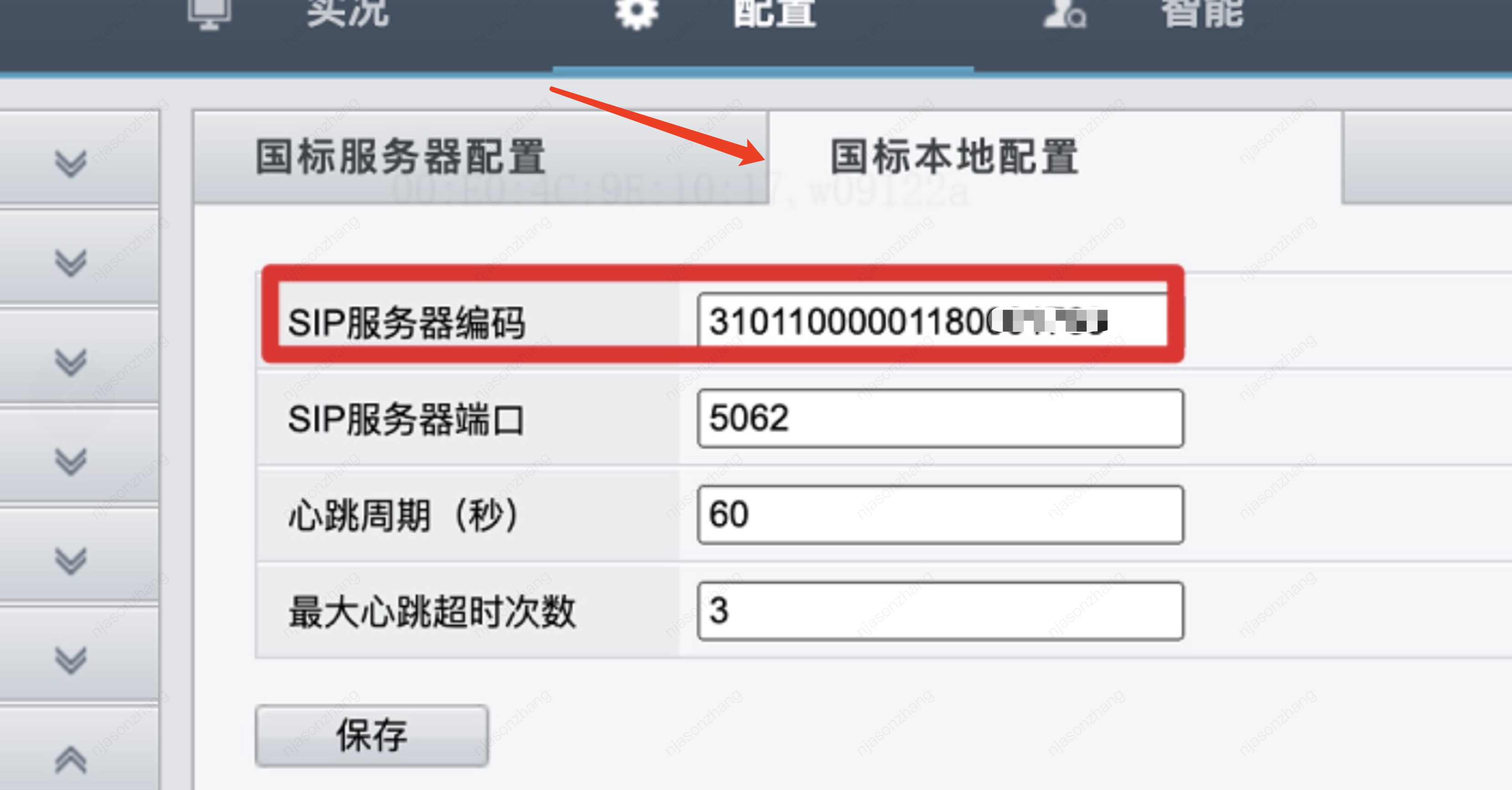
Local GB Configuration
Enter the device code generated by the platform in Step 2, for example: 34020000001320000001
Step 4: Complete the configuration
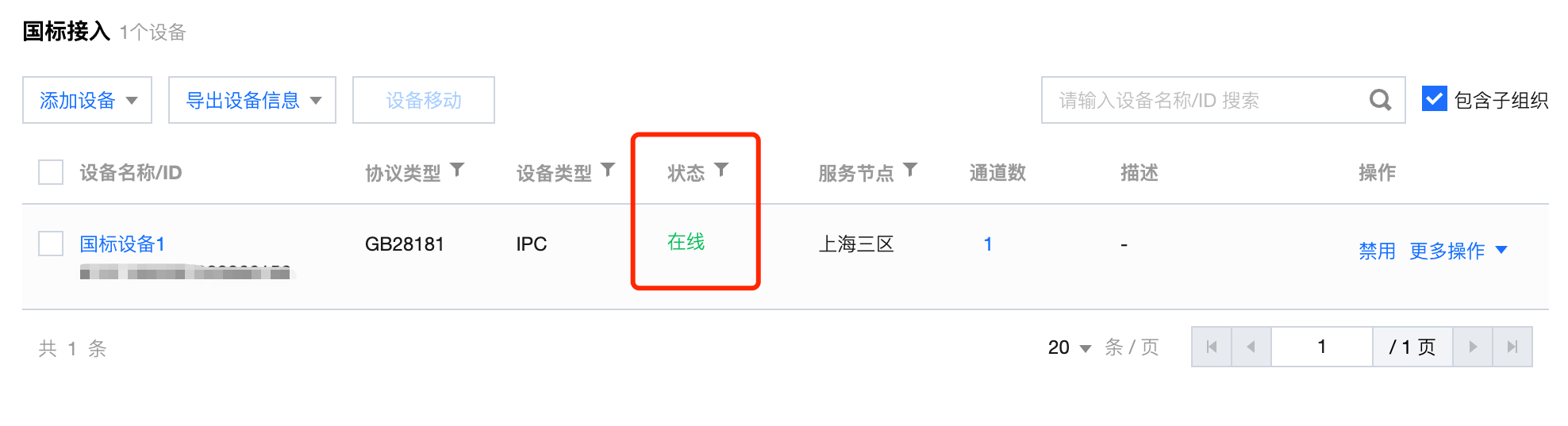
After completing the above configuration process, switch to the IVC Console and refresh the Device Access page. At this point, the device status will be shown as "online", indicating that the device has been successfully registered and is online.
Audio and Video Configuration Precautions
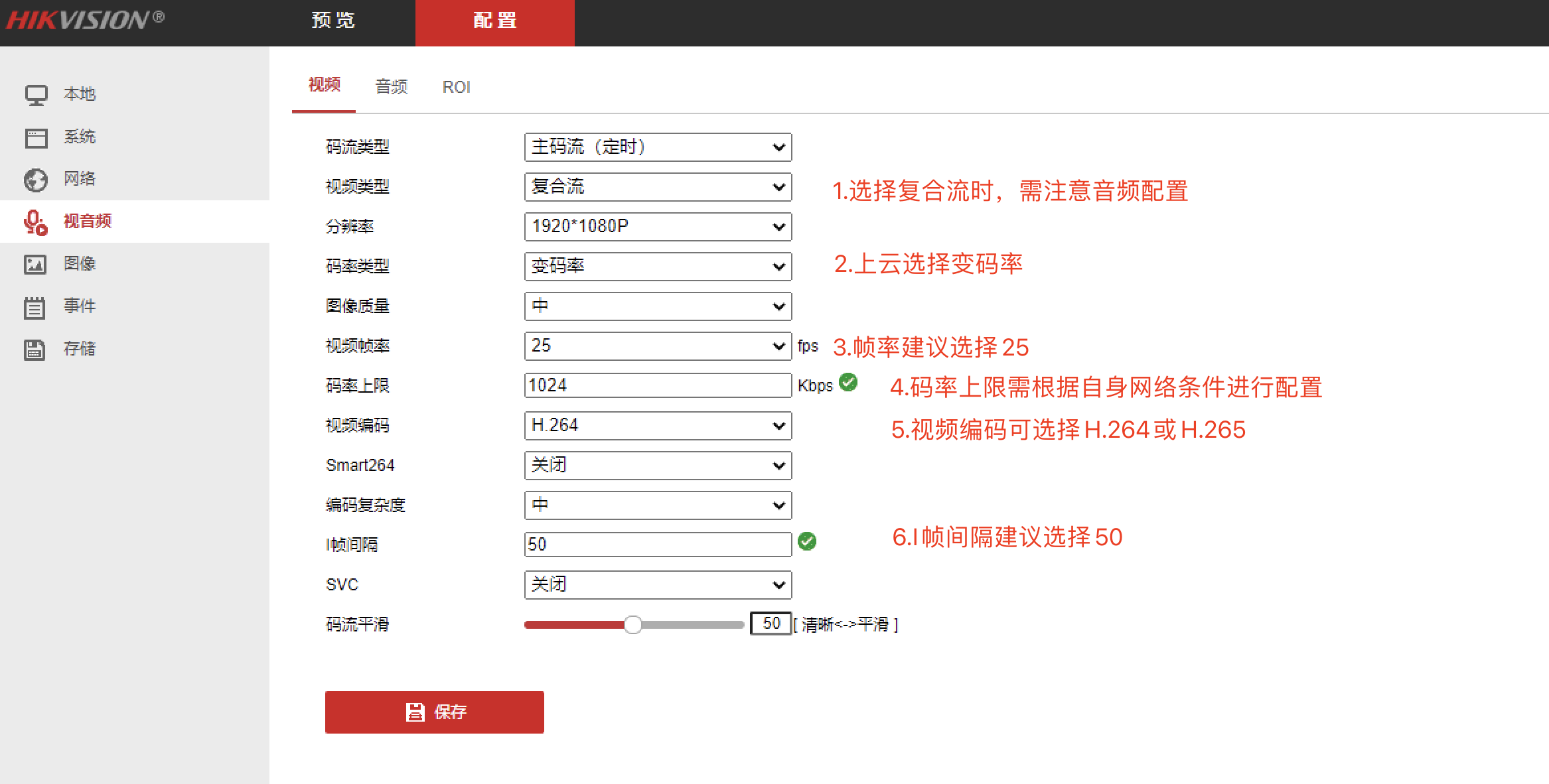
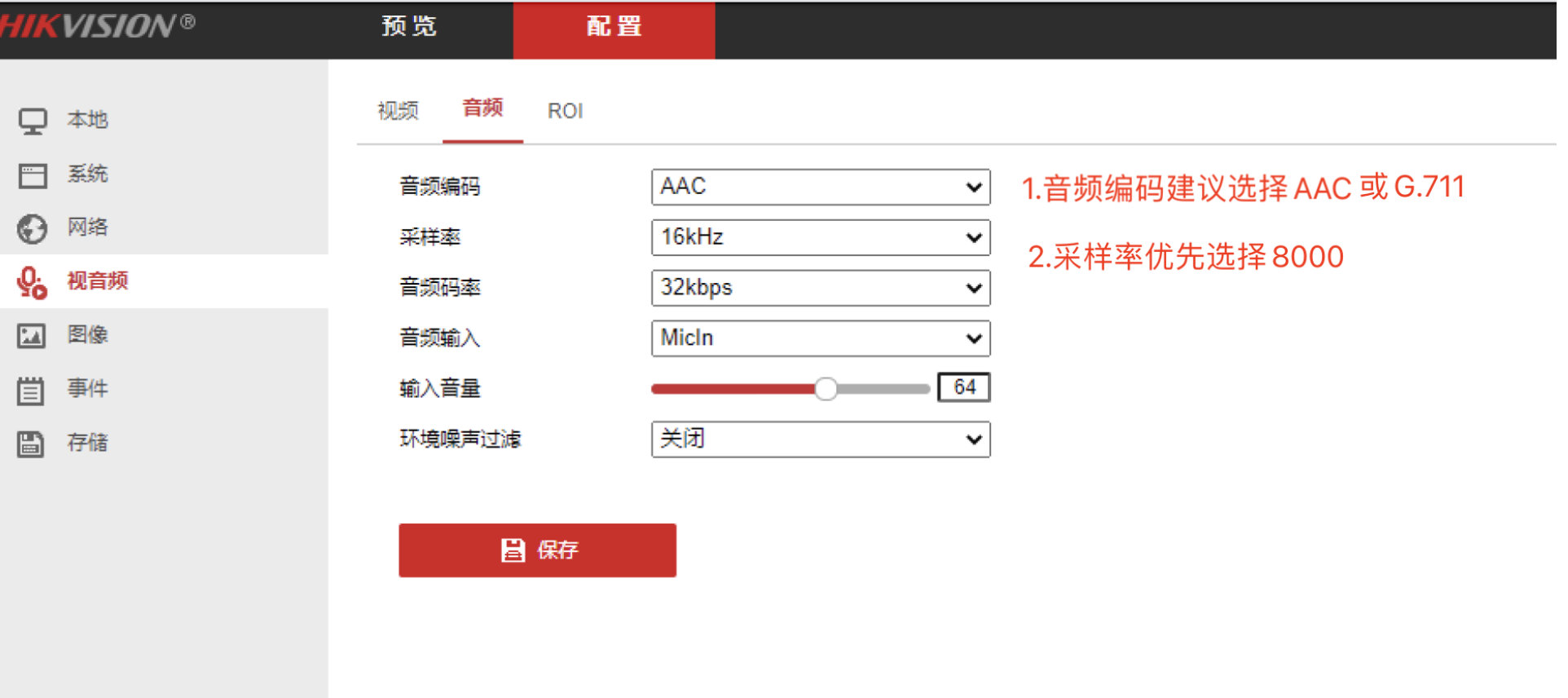
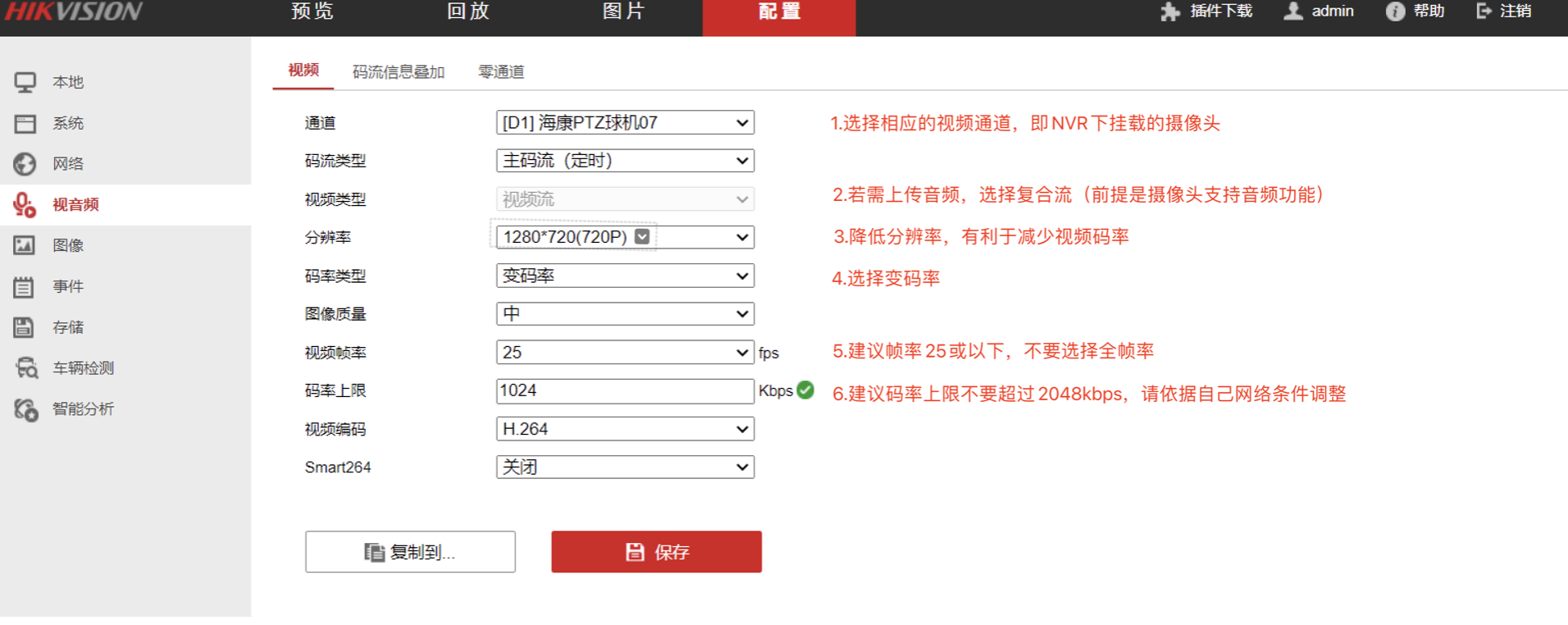
On the same network, issues such as video stuttering or live broadcast failure often occur due to insufficient or fluctuating network resources. Refer to the following configurations for audio and video parameters.
Note:
Do not enable any private encodings from the vendor such as smart264, smart265, SVC, etc., otherwise, registration will fail!
For some vendor devices, modifying the camera configuration under NVR configuration pages may not take effect. It is strongly recommended to log in to the IPC device end for configuration!
IPC Audio and Video Configuration Specifications
The following diagram uses Hikvision IPC as an example, other vendor devices are similar.
NVR Audio and Video Configuration Specifications
The following diagram uses Hikvision NVR as an example, other vendor devices are similar.