The content of this page has been automatically translated by AI. If you encounter any problems while reading, you can view the corresponding content in Chinese.
IPC Camera: Set the device network to Automatic IP Acquisition. Log in to the device's configuration interface at [Network > Basic Settings > TCP/IP > check Automatic Acquisition].
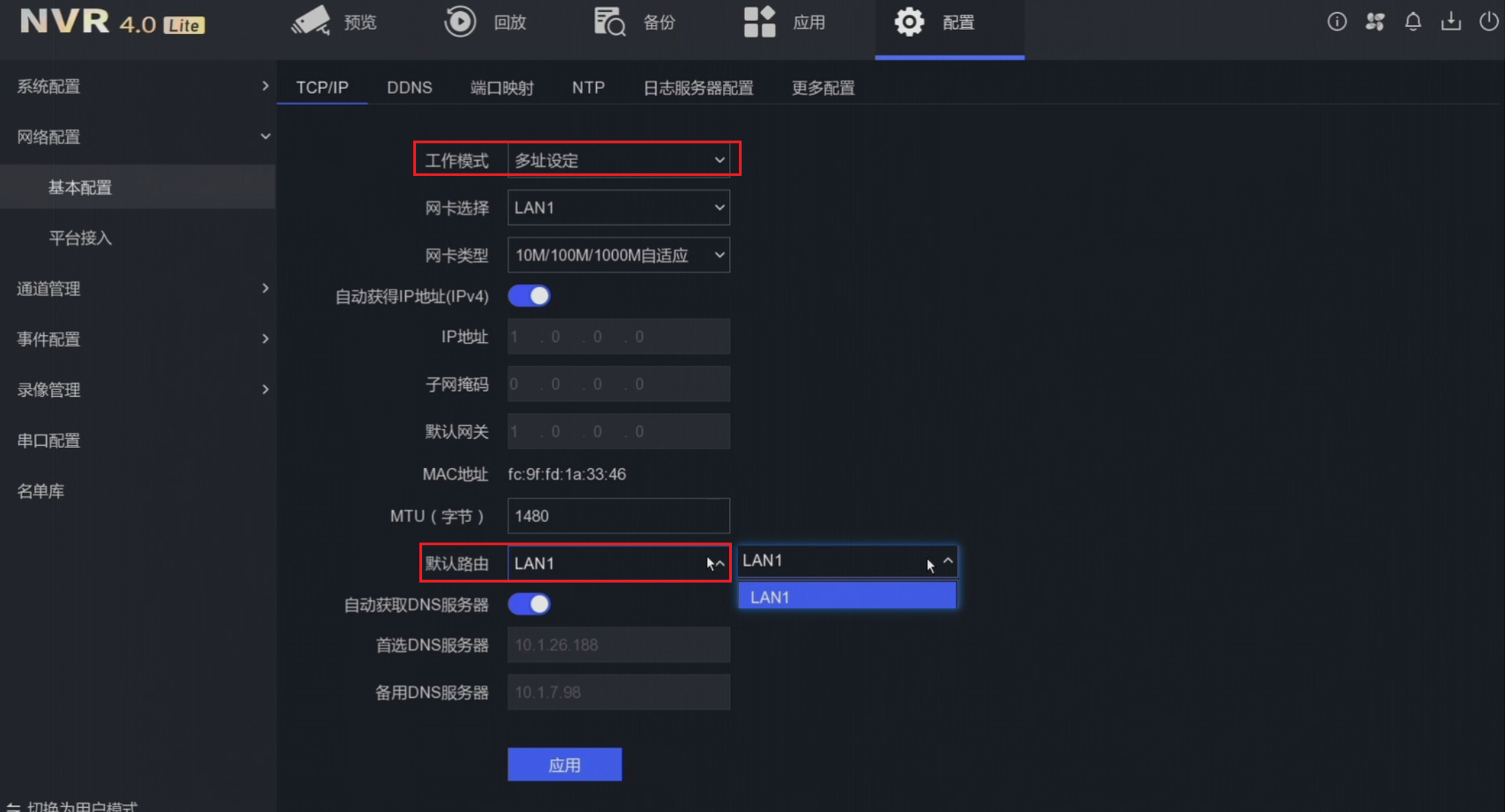
NVR Hard Disk Recorder: Taking Hikvision NVR as an example, log in to the device's configuration interface at [Network Configuration > Basic Settings], change the working mode to "Multiple Address Settings", select the LAN port connected to the internet, enable automatic IP acquisition, and enable automatic DNS server acquisition.
Note:
Multiple Address Settings mode means the different network cards of the NVR have independent parameters and do not interfere with each other.
Default Route means the device forwards data from the LAN port connected to the external network (select the actual LAN port connected to the external network as the default route).
The device network uses a directional data card
IoT devices often use directional data cards. The ISP may block network data sent by the device. Therefore, you need to contact the ISP and request them to add the platform's IP address to their allowlist to allow communication between the device and platform services.
National Standard Configuration Information Incorrectly Filled
1. 20-bit National Standard Encoding Correspondence Incorrectly Filled
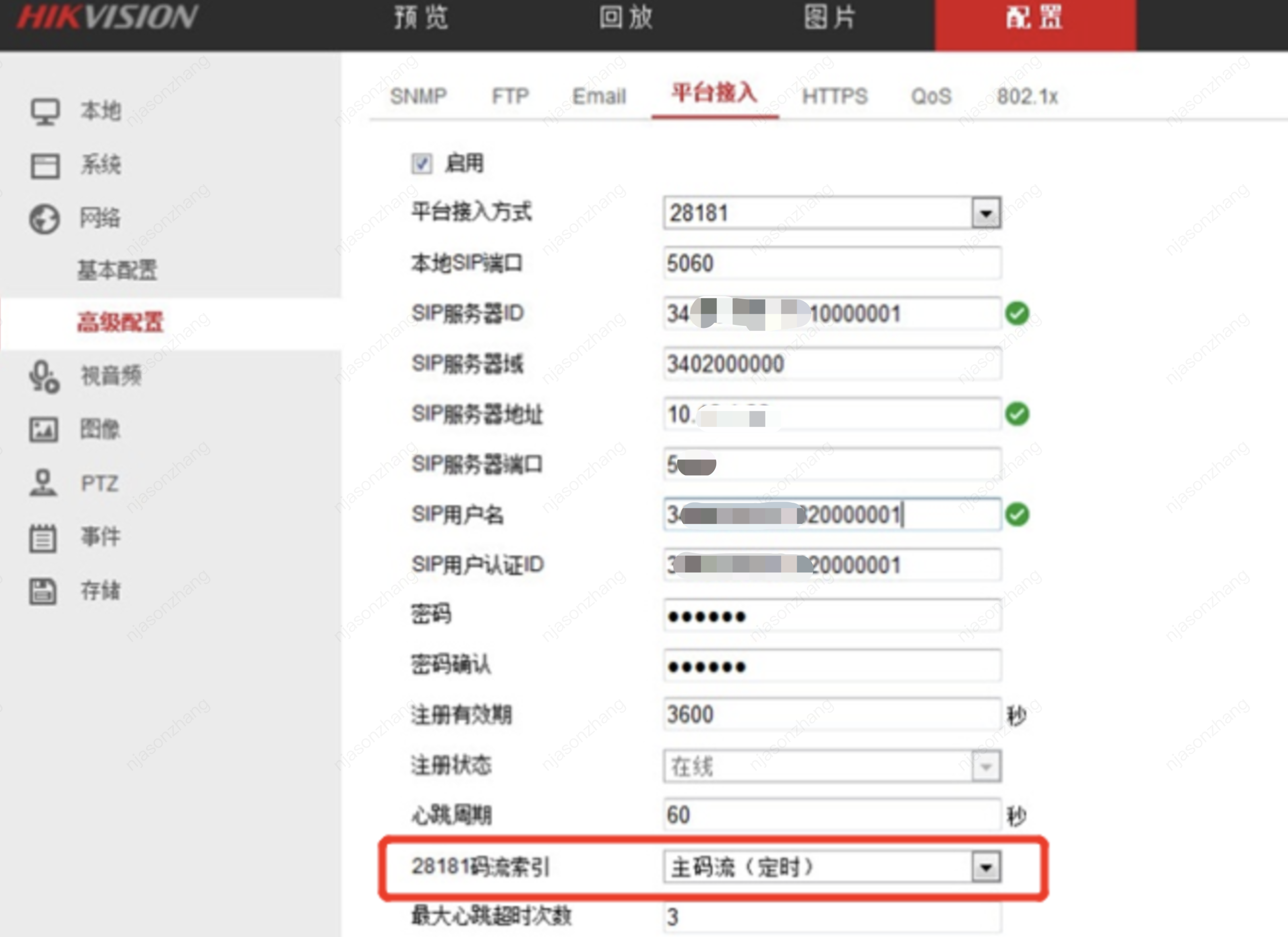
Hikvision Equipment: Both SIP username and SIP User Authentication ID need to be filled in with the device code generated by the platform, e.g., 34020000001320000001
Dahua Equipment: The device number needs to be filled in with the device code generated by the platform
Yushi Equipment: Pay special attention to Yushi Equipment, as its configuration information differs from other brands. You still need to fill in [National Standard Local Configuration] corresponding to the device code generated by the platform. For details, please refer to National Standard Configuration Guide for Equipment from Different Manufacturers.
2. Registration Validity Period 3600s, Heartbeat Cycle 60s, Maximum Number of Timeouts 3 times.
Video Channel Encoding ID was not specified
Devices do not come with a pre-defined video channel encoding ID; it must be manually specified.
It is recommended to modify the platform-generated device code: change the 11th-13th digits to 131, and sequentially assign the last digit from small to large for each channel without repetition. For example: 34020000001310000001, 34020000001310000002,......
Note:
Ensure that the video channel encoding ID specified here does not duplicate the device code; otherwise, a "Parameter Error" will be prompted.
Having the same video channel encoding ID as other devices does not cause a conflict.
Port Configuration Error
Local SIP Port: Must be changed to 5061, 5062, or other port numbers. (Do not use the device's default 5060 port, as it is highly likely to be blocked by the router).
Transfer Protocol: Refers to the signaling transfer protocol. If this configuration is available on the device configuration page, TCP Protocol must be selected (National Standard Protocol - Signaling uses the SIP session initiation protocol, which is based on UDP transfer. UDP traffic is subject to more restrictions in certain network environments)
How to choose the main/substream for devices to upload to the cloud through the GB28181 protocol?
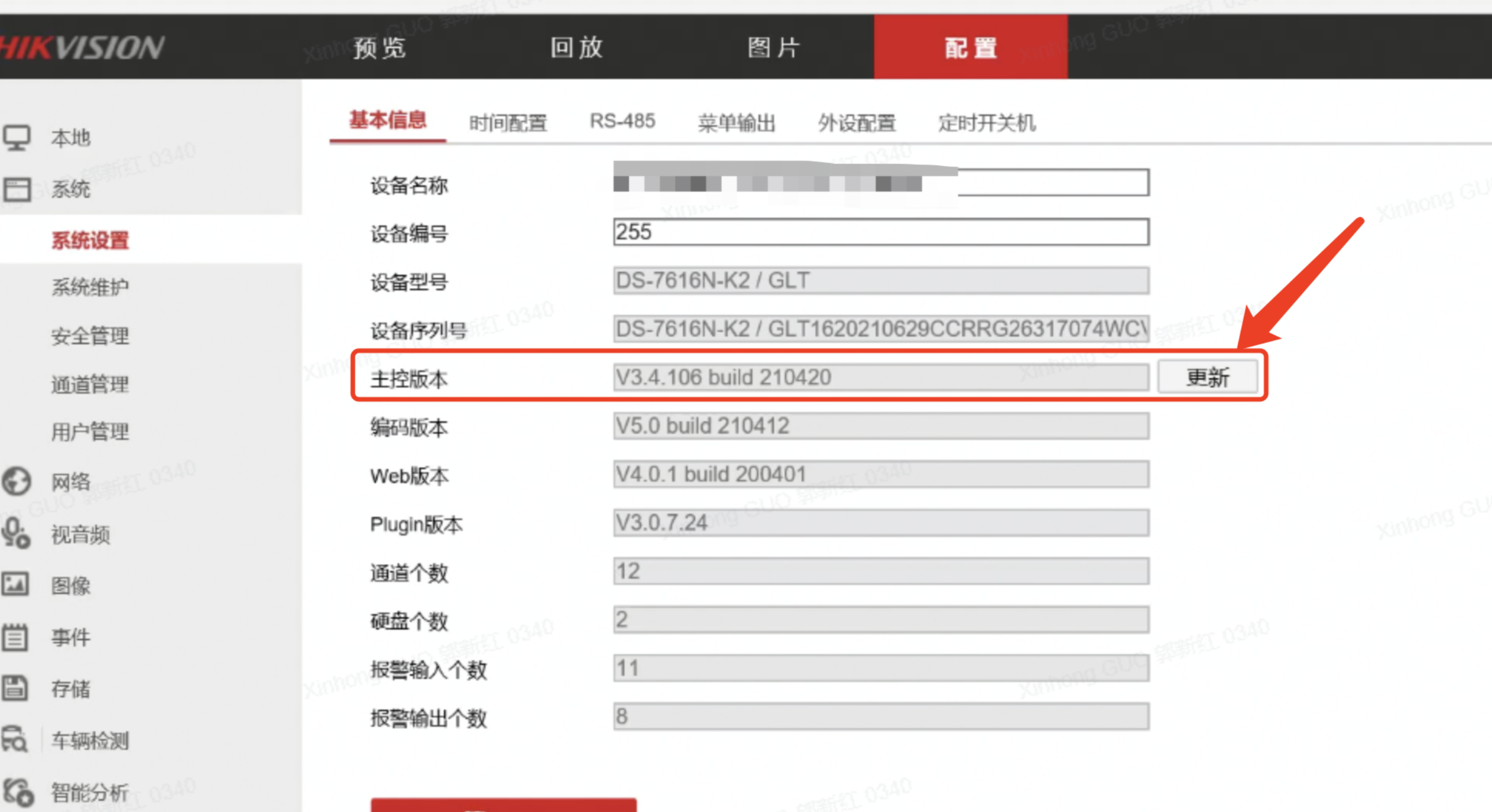
Cameras generally have three stream types (main, sub, and third stream). You can select in the device's national standard configuration page -> "28181 Stream Index" (taking Hikvision devices as an example). However, some devices do not support this; it is recommended to upgrade to the latest firmware version first. If still unsupported, consult the manufacturer.
What is the platform's basis for determining that the device is offline when using the GB28181 protocol?
Heartbeat Cycle (60 seconds) * Maximum Heartbeat Timeout Count (3) = Offline Detection Time (180 seconds). If the platform does not receive heartbeat signals within the "Offline Detection Time," the platform will determine the device is offline. Possible reasons include power outage or anomaly of the device, network interruption, or severe packet loss due to poor network quality.
What is the difference between the domain name provided by the customer for recording and the domain name for API call requests?
The domain name provided by the customer is used to generate the playback stream URL address, and is only used for real-time preview, local recording playback, and cloud recording playback; the domain name for API call requests is for the product service domain name. For details, please refer to Common Request Headers.
When uploading data to the cloud, how does the device choose between configuring Constant Bitrate (CBR) and Variable Bitrate (VBR)?
CBR (Constant Bit Rate) and VBR (Variable Bit Rate) are both bitrate control methods in video encoding, and their choice depends on different scenario requirements:
CBR: The data transmitted per second is fixed, which means the data transmission will maintain the same bitrate even if the video content changes. It is suitable for scenarios where network bandwidth is limited but video quality needs to be ensured.
VBR: It can automatically adjust the bitrate according to the complexity of the video content, reducing the bitrate for simpler content and increasing it for complex content, thereby achieving optimal video quality. It is suitable for scenarios with sufficient network bandwidth.
Therefore, the choice between CBR and VBR depends on the specific scenario requirements.
PTZ Control_Why does the screen stutter or become unclear during dome camera rotation, but return to normal after the rotation stops?
When the dome camera rotates, the pixels in the image change more significantly than in a static state, generally causing the bitrate to increase. If the device's uplink bandwidth is tight, the instantaneous increase in bitrate will increase transmission pressure. Using UDP for streaming may lead to packet loss causing screen tearing, while using TCP may result in stuttering.
Why can the console live preview only display four split screens?
The platform console live preview supports 4/9/16 split screens, but our player is within a web browser environment. Due to limited decoding performance, we have imposed restrictions When H.265 playback is detected or if all videos are H.265 encoded, a maximum of 4 split screens can be played concurrently. If all videos are H.264 encoded, there is no restriction on split screens.
Can the recording download be accurate to the second?
The recording download format supports MP4 and TS, with a maximum single download time of 1 hour. The current console supports download timing to the minute level, while the interface supports timing to the second level.
What is the format of the data dump? Can the duration be set?
The platform converts the format of the cloud-uploaded data uniformly to TS format (i.e., generating .ts slice files).
Using the recording schedule feature to pull streams to the cloud, the default slicing duration is 20 seconds per slice, and the path format is stored in the COS bucket as Year/Month/Day/Hour/Minute.
What is the specific path for data dump?
Using the recording schedule feature to pull streams to the cloud, it is then converted to TS slices stored in the COS bucket format: planid/channelid/year/mon/day/hour/starttime-endtime.ts
planid: The ID of the recording schedule (generated by the platform).
channelid: The video channel ID (generated by the platform).
starttime-endtime: Start time and end time, in UTC timestamp format, accurate to the second.
For example, the path of a complete slice:f610fbb1xxxxxxxxxxd212359b928b/7f7a3f2b-fxx0-4xxae-821e-9b8xxxx6e7d816/2022/09/05/14/1662360473178-1662360473188.ts
Which transmission protocol should be selected for media stream to the cloud, TCP or UDP?
Both are transport layer protocols in the OSI network model. The difference is: TCP is connection-oriented, establishing a connection through a three-way handshake and disconnecting with a four-way handshake. It ensures error-free, no loss, and sequential arrival of data through timeout retransmission, data validation, etc.; while UDP is connectionless, meaning it transmits data without establishing a connection first, resulting in faster transmission but unreliable delivery, including potential loss and duplication.
Suggested choice: If the device supports TCP protocol for media stream transmission, it should be prioritized. Due to potential transmission instability in the internet network, using UDP protocol may result in packet loss, causing video distortion; in practice, some devices experience floating stream phenomenon (the server has stopped receiving stream, but the device end continues streaming) when using UDP, leading to invalid data occupying the uplink network bandwidth and increasing device performance pressure.
What is the difference between Device ID and Device Code?
Device ID and Device Code are two distinct concepts:
Device ID: Also known as Device Identifier, it is a unique string generated by the platform to identify a specific device, the field in the interface is DeviceId (mainly used in API invocation)
Device Code: It is a device serial number assigned by the platform according to different device types. For example, the national standard protocol device has a 20-digit number code, while an RTMP device has a 10-character string code. The field in the interface is Code (mainly displayed on the page)