The content of this page has been automatically translated by AI. If you encounter any problems while reading, you can view the corresponding content in Chinese.
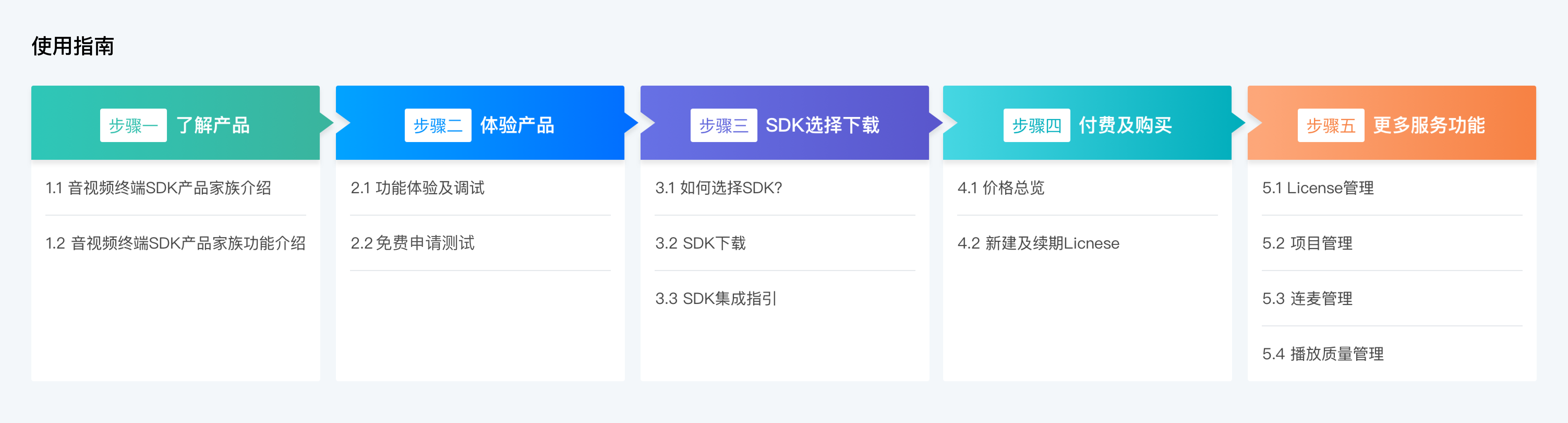
This document mainly introduces the capability support and purchase methods of each subproduct under the Audio and Video Terminal SDK Product Family, and provides relevant demos and SDK integration resources. The specific experience steps are as follows:
Step 1: Understanding the Product
1.1 Introduction to Audio and Video Terminal SDK Product Family
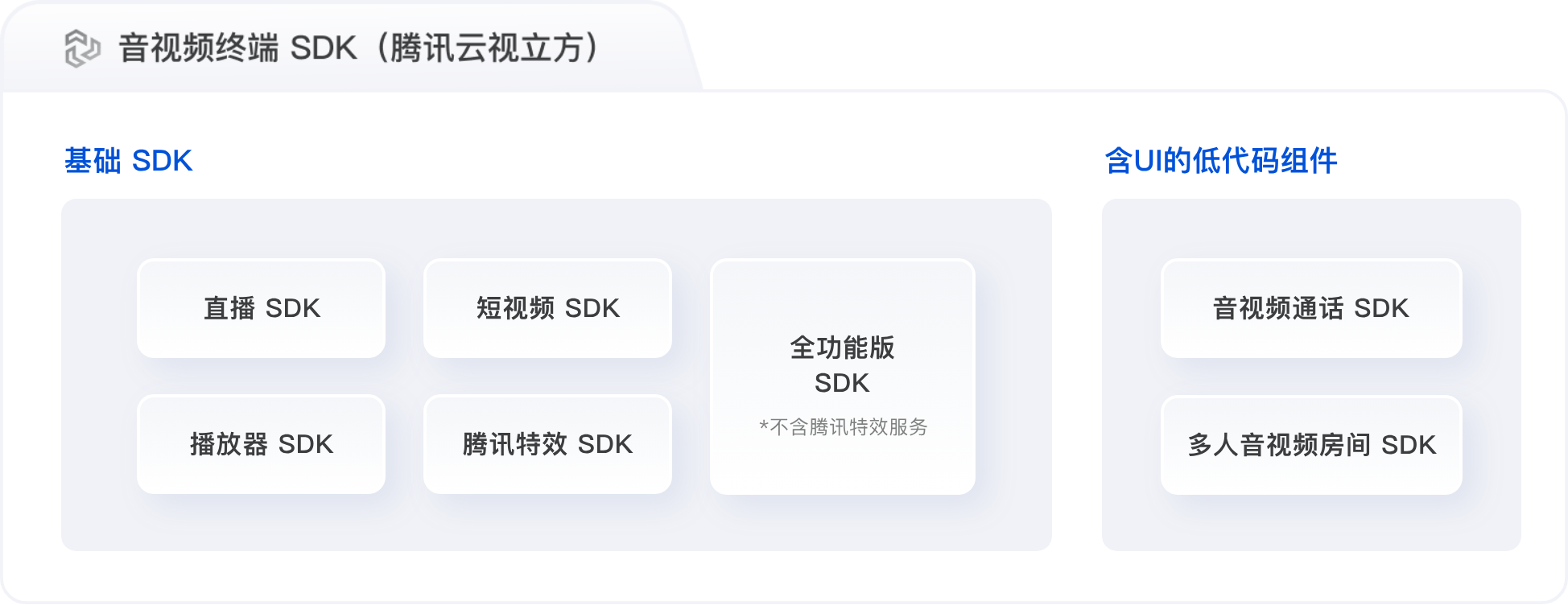
Audio and Video Terminal SDK (Tencent Cloud RT-Cube) product family is divided into basic SDK and low-code components with UI.
Basic SDK only provides basic terminal capabilities, including five sub-product SDKs: Mobile Live Video Broadcasting SDK (MLVB SDK), User Generated Short Video SDK (UGSV SDK), Player SDK, Full-Feature Version SDK, and Tencent Effect SDK.
Low-code components with UI provide a complete solution including backend service and terminal SDK, supporting quick integration of UI resources, including Tencent RTC Call and Tencent RTC Conference.
1.2 Introduction to Features of Audio and Video Terminal SDK Product Family
Basic SDK Feature Introduction
The correspondence between features and SDKs is shown in the following table . You can choose the corresponding SDK according to the needs of your own products. The full-feature version of SDK includes all the features of the live streaming SDK, short video SDK, player SDK and Tencent Real-Time Communication (TRTC) SDK, which can solve the dependency library conflict problem caused by the simultaneous use of multiple SDKs.
Feature / SDK
The Full Feature Version of SDK
MLVB SDK
Short Video SDK
Player SDK
Tencent Effect SDK
Streamers go live.
✓
✓
-
-
-
Streamer and audience mic connection / Streamer cross-room PK
✓
✓
-
-
-
Video recording and editing / Video upload and publishing
✓
-
✓
-
-
Live stream playback
✓
✓
-
✓
-
On-demand playback
✓
-
✓
✓
-
Tencent Real-Time Communication
✓
-
-
-
-
Beauty Effects
-
-
-
-
✓
Introduction to the Low Code Component Feature With UI
Component / Feature Description
Feature Description
Package Feature Support
TRTC Call SDK
The TRTC Call SDK (TUICallKit) is a product deeply customized for call scenarios. It provides features commonly seen in video call scenarios, such as one-on-one audio and video calls, group audio and video calls, mid-call third-party invitation, AI call noise reduction, and call lag optimization. It offers a fast integration solution with the same UI as WeChat video chat. Integration and launch can be completed in as fast as one day in just three steps.
The TRTC Conference SDK (TUIRoomKit) is a low-code component with UI designed for multi-person audio-video session scenarios such as enterprise meetings, online classes, and Online Salons. By integrating this component, you can add multi-person audio-video session features to your App in just three steps and launch your business within one day.
Currently, only TRTC Call SDK is a low-code component with UI. You can obtain the usage authorization and corresponding resources of TRTC Call SDK through the TRTC Call package. Among them, TRTC Call SDK provides package options in four versions. For detailed feature support of each version, see Package Feature Description.
Step 2: Experience the Product
2.1 Experience and Debug Features
To enable you to quickly understand the audio and video terminal (Tencent Cloud RT-Cube) product and features, we provide trial Demos of multiple different products:
The Tencent Cloud Audio/Video App provides scenario Demos for all products in the audio and video terminal SDK product family, including showroom streaming, video playback, video editing, and beauty effect scenarios.
The Web Demo Experience Hall allows you to experience audio and video related demos, helping you understand the product and experience core features. It also provides you with liability-free resources for product testing. Currently, 1V1 audio and video call demos, beauty effect demos and video playback demos are provided.
You can experience feature modules by freely applying for a trial version License usage authorization. The free-to-test Licenses are:
Live stream License, short video License, player License and terminal Top Speed Codec (TSC) License. For operation instructions, see Trail Version License.
Audio and Video Call SDK. You can claim a 7-day trial version for free. For the claim link, see Free Trial.
Step 3: SDK Selection and Download
Audio and Video Terminal SDK (Tencent Cloud RT-Cube) provides various terminal SDKs for audio and video scenarios. You can choose the corresponding SDK for download according to your own scenario needs.
3.1 How to Choose an SDK
The Audio and Video Terminal SDK (Tencent Cloud RT-Cube) provides terminal SDKs for various audio and video scenarios, including live streaming service scenarios, short video scenarios, audio and video call scenarios, beauty effect scenarios, video playback and video viewing scenarios and combination of multiple scenarios. You can choose the corresponding SDK for download according to your own scenario needs. Go to Scenario Selection and SDK Download to make a choice.
Note:
If you cannot determine the SDK you need through the use case, you can go to Custom SDK Download Page, select the features you need, and we will recommend the most suitable SDK based on your selection.
3.2 SDK Download
You can go to SDK Download to learn about specific SDK package information, download addresses and feature details, and select the terminal SDK you need.
3.3 SDK Integration Guide
After the SDK is downloaded, you can refer to the relevant integration guide to integrate the SDK. For details, see:
HarmonyOS live stream and Player SDK are now open for beta test by enterprise users. If you want to use them, please fill out the form and contact your business representative.
Step 4: Payment and Purchase
4.1 Snapshot Pricing
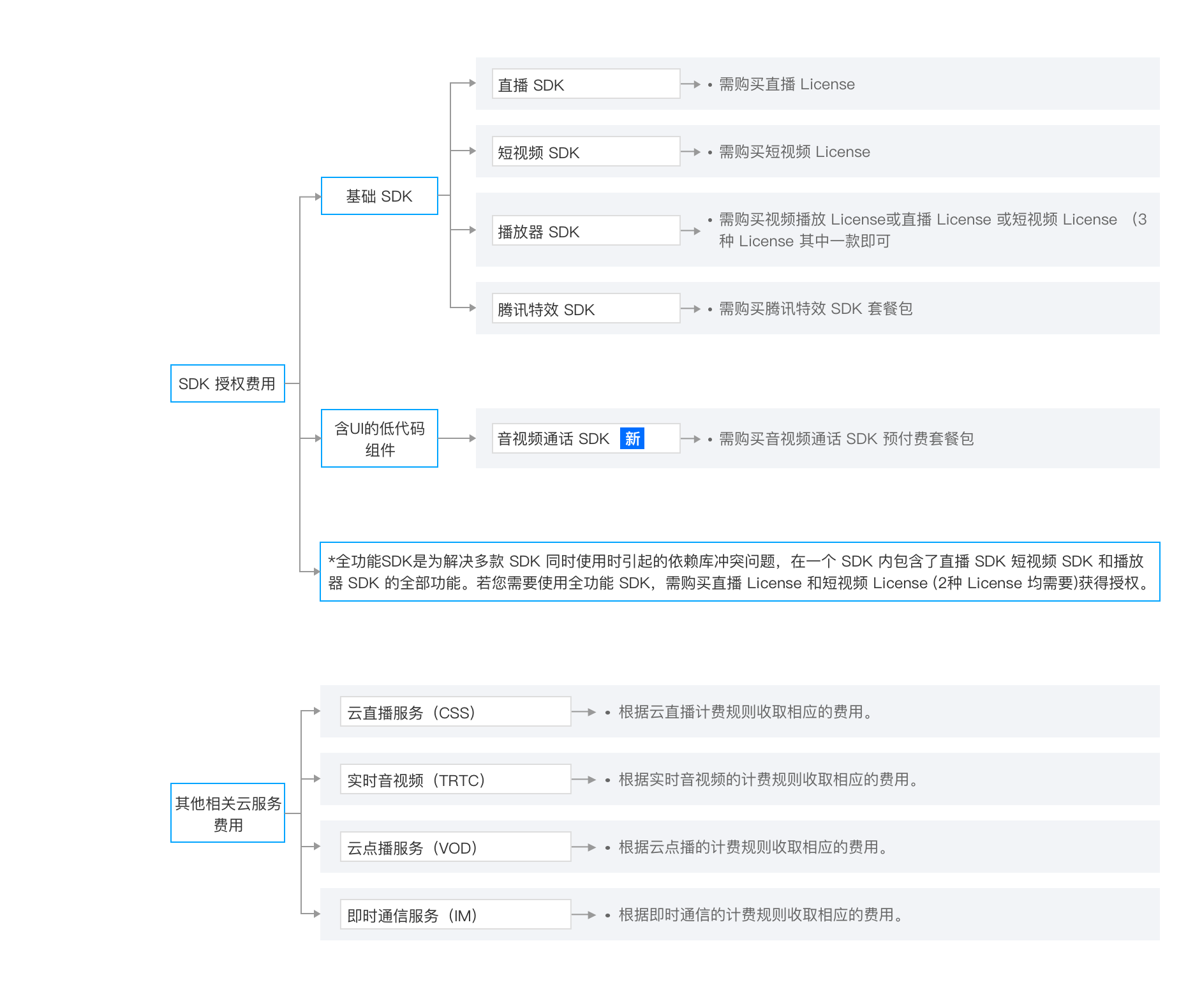
The fees for the Audio and Video Terminal SDK (Tencent Cloud RT-Cube) include: SDK licensing fees and other related cloud service fees. For details, see snapshot pricing.
4.2 Create and Renew License
The Audio and Video Terminal SDK (Tencent Cloud RT-Cube) includes live stream License, short video License, player License, terminal TSC License and Tencent Special Effect License. For more details on Licenses, see License Introduction.
The Audio and Video Call SDK does not require a License to unlock and use. After purchasing the Audio and Video Call SDK package, you will get the use authorization of the corresponding functions and the cloud resources in the package.
Step Five: More Features and Services
The audio and video terminal SDK console includes License Management, Project Management, Mic Connection Management and Playback quality monitoring service features. You can log in to Tencent Cloud RT-Cube console to add and renew Tencent Cloud Video Cube License, create projects to build exclusive audio and video call applications, comprehensively manage mic connection applications, and provide full-link playback data statistics, quality monitoring and visual analysis services.
5.1 Manage Licenses
The License management page can provide users with basic SDK lifecycle management, including free testing, creation, renewal and other operations.
The License for the Audio and Video Terminal SDK includes Live Stream License, Short Video License, Player License, Terminal TSC License and Tencent Effect License. You can add and renew various Licenses on the Tencent Cloud Vision Cube Console.
5.2 Project Management
Project management provides users with a low-code quick integration solution with UI.
You can create a project and receive free trial resources. With simple and quick integration, you can quickly add audio and video call capabilities to your application. For more information, see Free Trial.
New projects are set to trial version by default. Create and obtain relevant resources to experience the 7-day free trial service. If you need to officially develop and launch audio and video applications, just download, integrate and test the development package following Integration Guide after creating a new project, and purchase an audio and video call package to upgrade your business.
5.3 Mic Connection Management
The mic connection management feature allows you to quickly run the MLVB-API-Example Demo through simple configuration, experience the new mic connection solution, comprehensively manage mic connection applications, view real-time usage statistics related to mic connection applications, and assist users in quickly generating TRTC push/pull stream addresses and CDN playback URLs for the new mic connection solution.
Tencent Cloud RT-Cube integrates multiple features of the new Mic Connection Management into one console, which is specifically divided into four features: Quick and Easy to Use, Mic Connection Application, Usage Statistics and Address Generator, making it convenient for users to use quickly and meet the implementation of usage scenarios.
5.4 Playback Quality Monitoring
Playback Quality Monitoring provides data statistics, quality monitoring and visual analysis services for the entire on-demand playback process. It supports real-time data reporting, data aggregation, multi-dimensional filtering and refined targeted analysis, which can help enterprises monitor the overall operation status in real time, understand user habits and behavioral characteristics, effectively guide operational decision-making and drive business growth. For more information, see Playback Quality Monitoring.