The content of this page has been automatically translated by AI. If you encounter any problems while reading, you can view the corresponding content in Chinese.

Mini Program Side Related

Last updated: 2025-03-17 15:21:29

Environmental Issues

What Are the Environmental Requirements For a Mini Program?

Minimum version requirement of WeChat App for iOS: 7.0.9
Minimum version requirement of WeChat App for Android: 7.0.8
Minimum version requirement of mini program basic library: 2.10.0
Since the test account of the mini program does not have the permission to use <live-pusher> and <live-player>, please use the enterprise mini program account to apply for relevant permissions for development.
Since the WeChat Developer Tools do not support native components (i.e., <live-pusher> and <live-player> tags), it is necessary to run and experience on a real device.
The uniapp development environment is not supported. Please use the native mini program development environment.
For more detailed information, see Quick Integration (Mini Program).

What Should I Do If I Need to Launch or Deploy to the Official Environment On the Mini Program Side?

1. Apply for a domain name and complete the ICP Filing Registration.
2. Please deploy the server-side code on the applied server.
3. Configure the streaming domain and IM trusted domain in the request legal domains of the mini program console:
https://official.opensso.tencent-cloud.com
https://yun.tim.qq.com
https://cloud.tencent.com
https://webim.tim.qq.com
https://query.tencent-cloud.com
wss://wss.im.qcloud.com
wss://wss.tim.qq.com
https://web.sdk.qcloud.com

Does the Mini Program Support Development Environments Such As uniapp and taro?

TUICalling, TUIVoiceRoom and other native components are not supported for now.

Can Gravity Sensing Be Disabled On the Mini Program Side?

The gravity sensor API for mini programs is not available yet.

Can the Mini Program Support Being Minimized Into a Floating Window?

Currently, when there is a live-pusher with mode='RTC' and at least one live-player on the page, the mini program can normally collect and play audio when running in the background. Otherwise, the mini program will terminate the audio and video call when switching to the background.

Integration Issues

Does the Mini Program Side Distinguish Check-Out Event Types, Such As Voluntary Check-Out, Being Kicked, and Dissolving Room?

EVENT.KICKED_OUT indicates that the server removes a user or the room is dissolved and exited. LOCAL_LEAVE indicates local room exit.

Why Is the Picture Cropped When Horizontal Streaming On the Mini Program Side?

On iOS, you can enable portrait orientation lock. On Android, there is currently no way to avoid this issue. It requires modification at the mini program's underlying level.

Which Value Is Used to Judge the Network Fluctuation of the Mini Program?

Determine by netQualityLevel:
Undefined
Best
2: Good
3: Normal
4: Poorly
5: Very Poor
6: Unavailable

Does the Mini Program Side and Web Support Custom Stream ID?

The Mini Program supports custom stream IDs starting from WeChat version 7.0.12. When constructing rtcConfig, fill in the custom stream ID in the field. For details, see Demo implementation.
Web version 4.3.8 and above supports custom stream ID. Customize this field when creating a client.

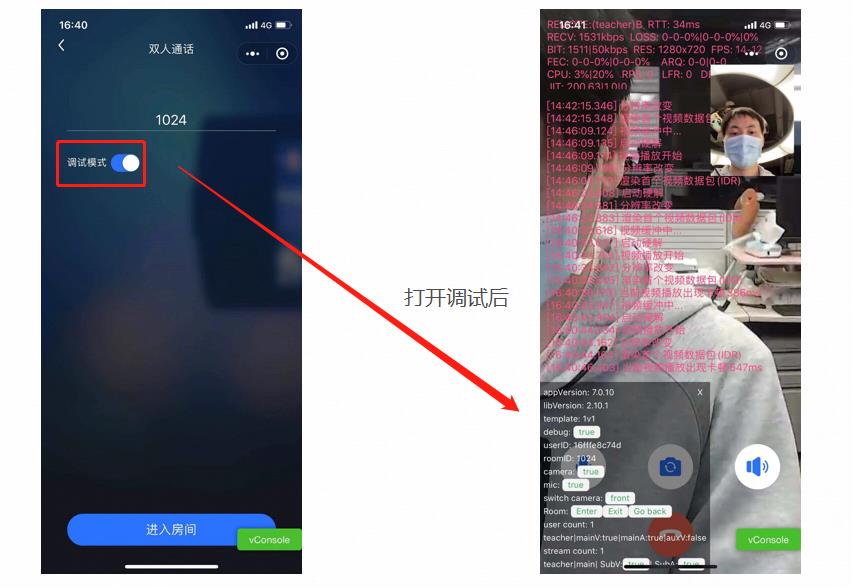
Why Does One Need to Enable Debug Mode When Debugging On the Mini Program Side?

After enabling debugging, you can skip adding "request legal domain" to the allowlist of the mini program to avoid login failure and call connection issues.

Why Does a Black Screen/Screen Freeze Occur On the Mini Program Side?

You can check the control panel in the lower left corner of the mini program Demo. Turn on Debug Mode to see detailed push and pull stream information on the interface. If there is no push and pull stream information, it means that room entry or live-pusher/live-player creation has failed.
img


Preparations Needed Before Integrating Tencent Real-Time Communication (TRTC) SDK On the Mini Program Side

1. Create a Tencent Cloud TRTC application, purchase the corresponding package, and obtain the SDKAppID and key information.
2. Mini program server domain name configuration.
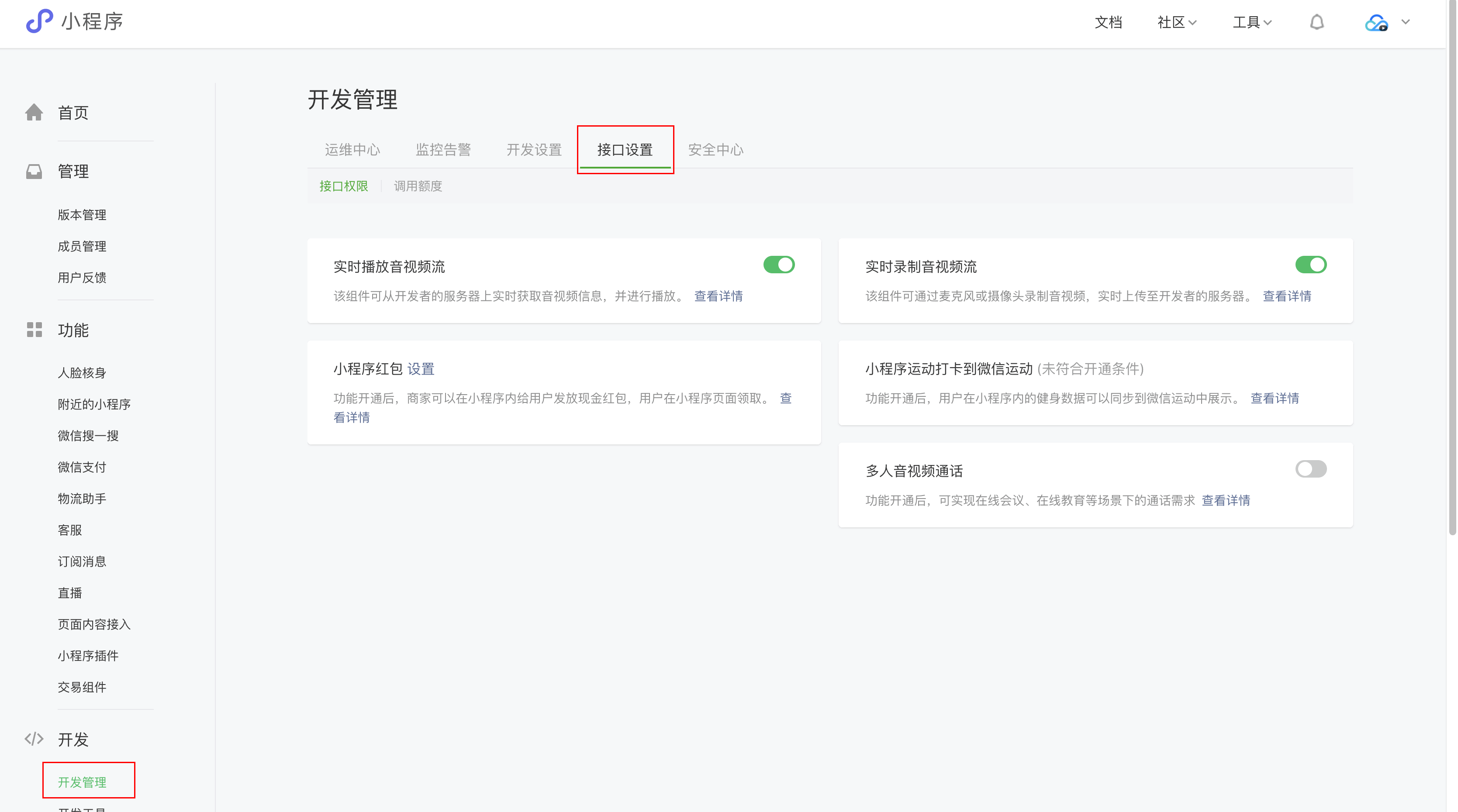
3. Enable permissions for mini program categories and live streaming, publishing and playback tags. (If not enabled, normal use will be unavailable.) For policy and compliance reasons, WeChat has not yet enabled support for all mini programs to use real-time audio and video features (i.e., <live-pusher> and <live-player> tags):
Mini program push/pull stream Tags do not support personal mini programs, but only support enterprise mini programs.
Mini program push/pull stream Tag usage permissions are currently only open to a limited number of categories.
Mini programs that meet the category requirements need to self-enable this component permission in WeChat public platform > Develop > API Settings, as shown below:


How to Handle No Visual On the Mini Program Side When Entering Multi-Person Audio and Video?

1. Please run on a real mobile phone. The emulator inside WeChat Developer Tools currently does not support direct running.
2. Please query the mini program base library version through wx.getSystemInfo. The minimum version requirement of the mini program base library is 2.10.0.
3. Please confirm the category to which the mini program belongs. Due to regulatory requirements, the permission to use the Push and Pull Streams Tags of the mini program is currently only open to a limited number of categories.
If you have more requirements or wish to cooperate further, you can submit a ticket or call 4009100100 to contact us.

Troubleshooting When a Running Error Occurs On the Mini Program Side

1. Please check if the opened mini program category is correct, and whether the <live-pusher> and <live-player> tags have been enabled.
2. Allowlist of mini program domains has been added to the valid domain of mini program requests, or debugging mode has been enabled.
3. Please decompress the Mini Program end Demo and run it directly. If it runs normally, it is recommended to refer to Quick Integration (Mini Program) to reintegrate the SDK.
4. If the problem persists, you can log in to WeChat Mini Program Developer Community to find relevant information, or submit a ticket or call 4009100100 to contact us.

<live-pusher> and <live-player> Tag Usage and Error Code?

Can the Mini Program Be Monitored When It Is Minimized to the Background?

Yes. You can listen to the onHide method of the mini program to check whether the user has minimized it to the background.

Why Can'T I Call or Am I Forced to Log Out?

The component does not currently support login multiple instances and does not support the Offline Push Signal feature. Please confirm the uniqueness of account login.
Multi-instance: A userID logging in repeatedly or logging in on different ends will cause signaling chaos.
Offline push: An instance can receive messages only when it is online. Signaling received when an instance is offline will not be pushed again after it goes online. That is, a mini program cannot receive incoming call reminders or call reminders when it is in the background or offline.

How to Distinguish Between Streamers and Audiences?

On the access side, there is no need to set the streamer/audience identity. The SDK itself distinguishes based on whether there is an upstream flow. When enableCamera || enableMic in the pusherAttributes properties is true, it is a streamer. When there is no audio or video upstream, it is an audience.

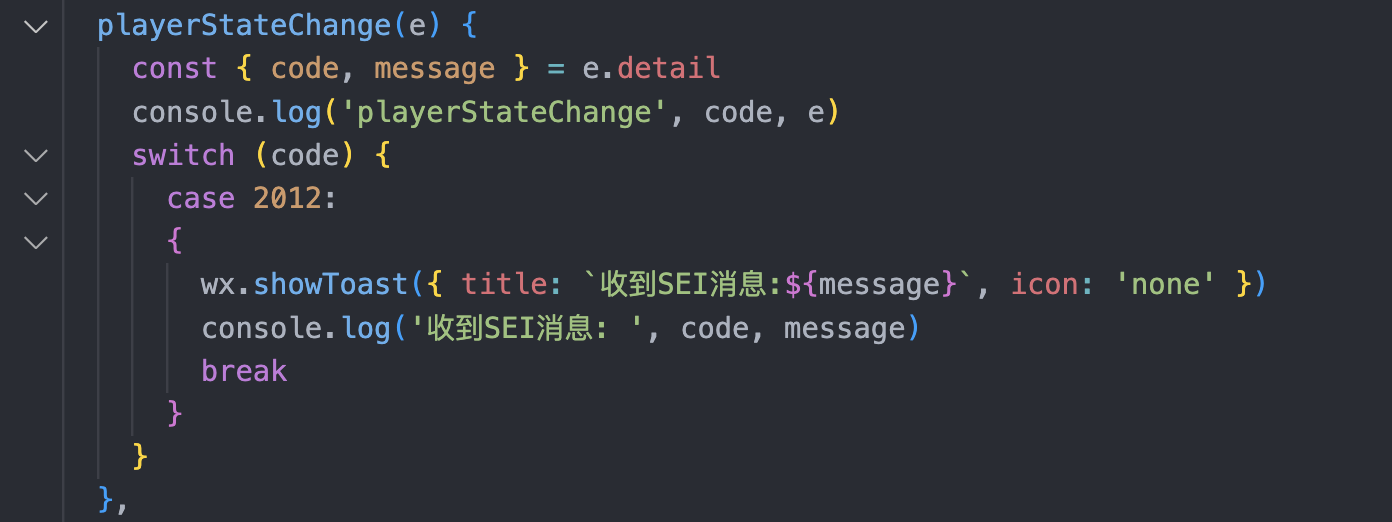
How Does the Mini Program Receive SEI Messages?

You can refer to WeChat mini program API LivePusherContext.sendMessage for SEI sending. Receive it by listening to the [live-player] bindstatechange 2012 event. The code reference is as follows:


How Does the Mini Program Use a String Room Number to Enter Room?

Use strRoomID when entering room. The priority of this parameter is higher than that of roomID.

How to Play Background Music?

The playBGM method is provided in pusherInstance. For details, see pusherInstance. If you use WeChat's native tags for playback, it may be incompatible with some models, resulting in abnormal volume modes or abnormal playback on the receiver speaker.

How to Suspend Streaming On the Mini Program Side?

On the mini program side, audio stream and video stream can be set to pause streaming separately. The relevant methods in pusherInstance are as follows:
Pause video stream: The pause method is provided in <pusherInstance>. Calling this API will display a black screen frame on the remote end.
Pause the audio stream: The setMICVolume method is provided in pusherInstance. Calling this API can set the locally collected volume to 0, and the remote end will not receive any sound.
For example, in scenarios where it is necessary to suspend two streams simultaneously, you can call pause to suspend the video stream and at the same time, call setMICVolume to set the volume to 0 to suspend the audio stream.
Both of the above methods will retain the occupation of the camera and microphone devices and are the recommended ways to pause streaming.
pusherAttributes also provides attributes to directly disable devices: enableMic, enableCamera. When these two attributes change, the remote end will receive a status change event. For specific phenomena, see the table below:
State Changes Invocation
Enable Mic Current Value
Enable Camera Current Value
Mini Program Phenomenon
Web Phenomenon
enableMic: false
true
true
REMOTE_AUDIO_REMOVE event
Receive the mute audio event in PLAYER_STATE_CHANGED
true
false
REMOTE_AUDIO_REMOVE event
Receive the stream-removed event
enableCamera: false
true
true
REMOTE_VIDEO_REMOVE event
Receive the mute video event in PLAYER_STATE_CHANGED
false
true
REMOTE_VIDEO_REMOVE event
Receive stream-removed event

Are the Mini Program Side, Desktop Browser and PC of TRTC (Tencent Real - Time Communication) Interconnect?

Yes, TRTC supports interconnectivity across the platform.