安装相关
trtc-electron-sdk 是否兼容官方 Electron v12.0.1 版本?
兼容的,trtc-electron-sdk 没有特别依赖 elecron 自身的 SDK,所以没有相关的版本依赖。
Electron 下载慢甚至卡住不动?
当开始下载
tmp-3320-1-SHASUMS256.txt-6.1.9文件或其它文件时,可能会特别慢,甚至在辛苦等待了很长时间后,等到的却是 npm 的 Timeout 错误:Downloading tmp-3320-1-SHASUMS256.txt-6.1.9[=> ] 1.0% of 5.56 kB (0 B/s)
解决方案 A:如果您是在家中办公,可以切换到国内的 npm 镜像。
# 指定 npm 国内镜像npm config set registry http://mirrors.tencent.com/npm/# 指定 Electron 的国内镜像地址npm config set ELECTRON_MIRROR=https://registry.npmmirror.com/mirrors/electron/npm install
解决方案 B:如果您是在公司办公,那么您公司的网络管理员可能已经设置了代理,需要确认 npm 的 proxy 配置是否指向了公司的代理服务器,以及是否配置了环境变量
ELECTRON_GET_USE_PROXY,如均无配置,请按以下步骤执行。1.1 设置 npm 代理 :
npm config set all_proxy=[您的代理地址]。1.2 配置
ELECTRON_GET_USE_PROXY环境变量,这样 Electron 的安装脚本就会通过 npm 的代理下载。解决方案 C:如果您是 Mac 环境。
export ELECTRON_GET_USE_PROXY=true
解决方案 D:如果您是 Windows 环境。
1.1 右键单击计算机 > 属性 > 高级系统设置 > 环境变量。
1.2 按下图操作设置环境变量 ELECTRON_GET_USE_PROXY ,然后执行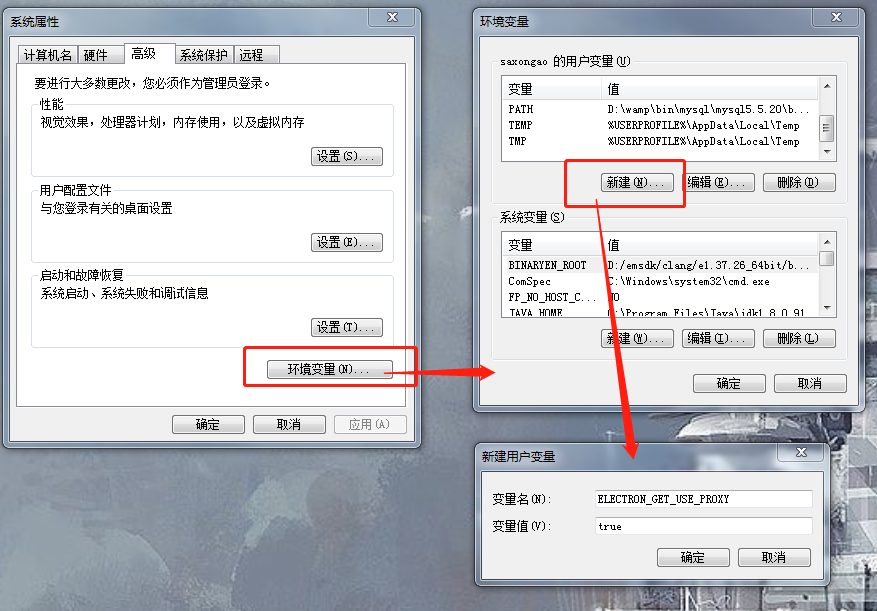
npm install或npm install --proxy=[您的代理地址]:
下载 Electron 时出现 404 错误?

在终端中输入如下指令:
npm config set electron_custom_dir 8.1.1 # 根据版本号来决定
运行相关
Windows 32 系统运行报错Error:resource\\trtc_electron_sdk.node is not a valid Win32 application, 提示需要 32 位的 trtc_electron_sdk.node?
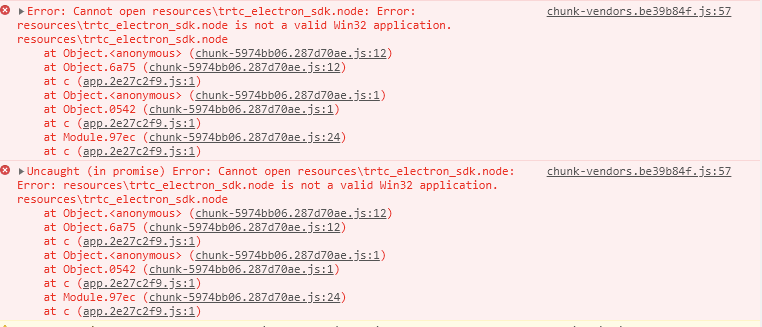
1. 进入到工程目录下的 trtc-electron-sdk 库目录下(xxx/node_modules/trtc-electron-sdk)。 执行:
npm run install -- arch=ia32
2. 下载完 32 位的
trtc_electron_sdk.node后,重新对项目进行打包。vscode terminal 启动 Electron Demo,进入房间后白屏?
vscode 需有摄像头权限, 可采用如下方式进行权限添加。
cd ~/Library/Application\\ Support/com.apple.TCC/cp TCC.db TCC.db.baksqlite3 TCC.db # sqlite> prompt appears.# for Mojave, CatalinaINSERT into access VALUES('kTCCServiceCamera',"com.microsoft.VSCode",0,1,1,NULL,NULL,NULL,'UNUSED',NULL,0,1541440109);# for BigSurINSERT into access VALUES('kTCCServiceCamera',"com.microsoft.VSCode",0,1,1,1,NULL,NULL,NULL,'UNUSED',NULL,0,1541440109);
跑 Demo 抛出空指针未定义的错误:“cannot read property 'dlopen' of undefined”?
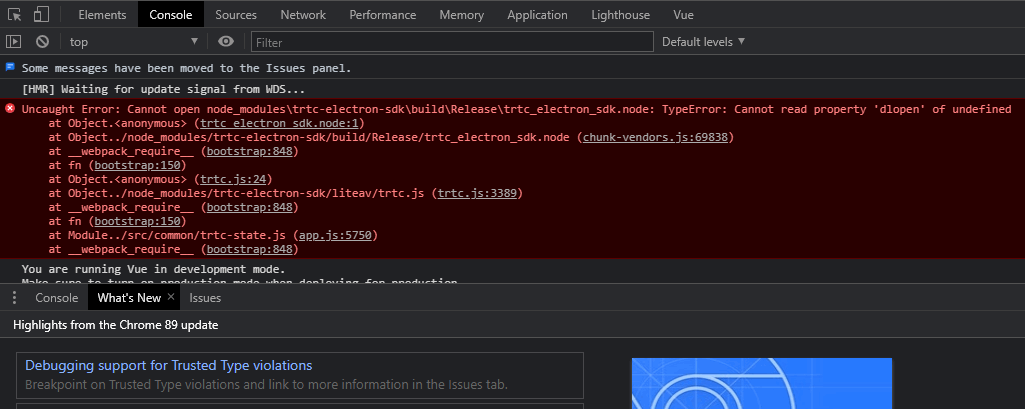
解决方法:
Electron 12 版本上下文隔离默认启用,可设置 contextIsolation 为 false。
let win = new BrowserWindow({width: 1366,height: 1024,minWidth: 800,minHeight: 600,webPreferences: {nodeIntegration: true,contextIsolation: false},});
Electron 多次出现重新进房问题?
需要具体 case 进行分析,大致原因如下:
客户端网络状态不好(断网会触发重进房)。
连着发两次进房信令也会重进房的。
有可能是设备负载过高,导致解码失败的重进房。
同一个 UID 多端登录互踢导致的重进房。
终端出现提示“Electron failed to install correctly”?
当看似安装完成,运行项目时,终端上出现以下错误:
Error: Electron failed to install correctly, please delete node_modules/electron and try installing again
按照如下三个步骤进行手动下载:
1. 执行
npm config get cache查看缓存目录。2. 手动下载 Electron ,并放到缓存目录中。
3. 重新执行
npm install。调用摄像头或麦克风时直接崩溃?
使用 vscode 终端启动项目,当 trtc-electron-sdk 启动摄像头和麦克风时,程序直接崩溃:
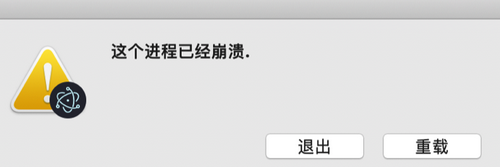
解决方案 A:使用有授权的终端运行项目。
解决方案 B:给 vscode 授权:在系统偏好设置 > 安全与隐私 中允许 vscode 的授权。
解决方案 C:按以下步骤关闭保护机制:
1.1 重启系统,按住 command + r 键,直到系统进入保护模式。
1.2 打开 terminal 输入
csrutil disable禁用保护机制。1.3 重启,正常进入系统,此时就可以使用 vscode 的终端启动项目了。
1.4 如需重新启动保护机制,只需要在第二步中执行
csrutil enable。Electron 在控制台中报错“xx is not defined”?
当运行项目时,Electron 在控制台中提示
xx is not defined,其中xx指代 node 模块。例如:Uncaught ReferenceError: require is not defined
在 Electron 的
main.js文件中将nodeIntegration配置项改成 true:let win = new BrowserWindow({width: 1366,height: 1024,webPreferences: {nodeIntegration: true, // 请将此项设置为 true},});
Mac 下,打包安装后,运行时白屏、崩溃问题
在 Mac OS 10.4 及以后版本,运行安装包时,如果获取不到 摄像头、麦克风、屏幕录制 权限,程序会因为没有这些硬件的访问权限,在进入 TRTC 房间后直接白屏或者崩溃。解决方法如下:
1. 添加 entitlements.mac.plist 文件,文件内容如下,相关配置的具体含义,请参见 苹果开发者网站。
<?xml version="1.0" encoding="UTF-8"?><!DOCTYPE plist PUBLIC "-//Apple//DTD PLIST 1.0//EN" "http://www.apple.com/DTDs/PropertyList-1.0.dtd"><plist version="1.0"><dict><key>com.apple.security.cs.allow-unsigned-executable-memory</key><true></true><key>com.apple.security.cs.allow-jit</key><true></true><key>com.apple.security.cs.allow-dyld-environment-variables</key><true></true><key>com.apple.security.device.audio-input</key><true></true><key>com.apple.security.device.camera</key><true></true></dict></plist>
2. 使用 electron-builder 打包时,需要将 entitlements.mac.plist 文件路径配置到 electron-builder 打包配置中。参考代码如下,注意
"entitlements"和 "entitlementsInherit" 两个配置项,"hardenedRuntime"需要配置为 true,配置项含义请参见 electron-builder官网。{"build": {"mac": {"extraFiles": [{"from": "node_modules/trtc-electron-sdk/build/Release/trtc_electron_sdk.node","to": "./Resources"}],"type": "distribution","hardenedRuntime": true,"entitlements": "assets/entitlements.mac.plist","entitlementsInherit": "assets/entitlements.mac.plist","gatekeeperAssess": false,"target": ["dmg"]},}}
3. Mac OS 12.1 及以上版本,仅使用以上配置,已不足以申请 麦克风、摄像头权限,需要借助 Electron API 的 systemPreferences.askForMediaAccess() 接口,在主进程中,主动申请一次摄像头、麦克风权限。参考代码如下。systemPreferences.getMediaAccessStatus() 接口可以检测 麦克风、摄像头、屏幕录制权限,但 systemPreferences.askForMediaAccess() 接口只能申请 摄像头 和 麦克风权限。
async checkAndApplyDeviceAccessPrivilege() {const cameraPrivilege = systemPreferences.getMediaAccessStatus('camera');console.log(`checkAndApplyDeviceAccessPrivilege before apply cameraPrivilege: ${cameraPrivilege}`);if (cameraPrivilege !== 'granted') {await systemPreferences.askForMediaAccess('camera');}const micPrivilege = systemPreferences.getMediaAccessStatus('microphone');console.log(`checkAndApplyDeviceAccessPrivilege before apply micPrivilege: ${micPrivilege}`);if (micPrivilege !== 'granted') {await systemPreferences.askForMediaAccess('microphone');}const screenPrivilege = systemPreferences.getMediaAccessStatus('screen');console.log(`checkAndApplyDeviceAccessPrivilege before apply screenPrivilege: ${screenPrivilege}`);}
4. 更多崩溃问题处理方法,请参阅 Electron 应用崩溃问题排查与解决方法。
打包相关
.node 模块的加载问题?
报错信息
打包编译出的程序在运行时,在控制台中看到类似的报错信息:
NodeRTCCloud is not a constructor
Cannot open xxx/trtc_electron_sdk.node或者The specified module could not be found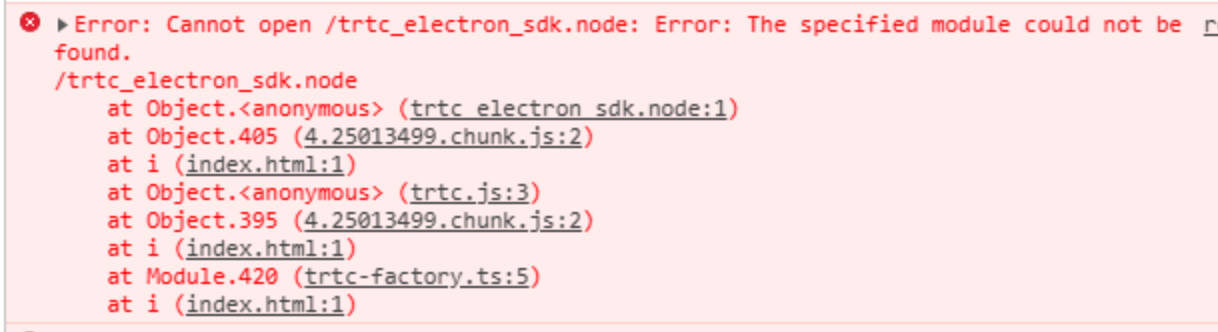
dlopen(xxx/trtc_electron_sdk.node, 1): image not found
解决方法
出现类似上述的信息,说明 trtc_electron_sdk.node 模块没有被正确的打包到程序中,可按照以下步骤进行处理。
1. 安装
native-ext-loader。npm i native-ext-loader -D
2. 修改 webpack 配置。
2.1 使
webpack.config.js在构建时可以接收名为--target_platform的命令行参数,以使代码构建过程按不同的目标平台特点正确打包,在 module.exports之前添加以下代码:const os = require('os');// 如果不传 target_platform 参数,程序会默认按当前平台类型进行打包const targetPlatform = (function(){let target = os.platform();for (let i=0; i<process.argv.length; i++) {if (process.argv[i].includes('--target_platform=')) {target = process.argv[i].replace('--target_platform=', '');break;}}// win32 统一表示 Windows 平台,包含 32 位和 64 位。darwin 表示 Mac 平台if (!['win32', 'darwin'].includes) target = os.platform();return target;})();
2.2 添加以下 rules 配置:
module: {rules: [{test: /\\.node$/,loader: 'native-ext-loader',options: {rewritePath: targetPlatform === 'win32' ? './resources' : '../Resources'}},]}
注意:
使用
vue-cli 创建的项目,webpack 配置存放在 vue.config.js 文件中的 configureWebpack 选项中。使用
create-react-app 创建的项目,webpack 配置文件为 [项目目录]/node_modules/react-scripts/config/webpack.config.js 。3. 配置 packages.json 文件,添加打包配置和构建脚本。
3.1 添加
electron-builder打包配置(注意大小写):"build": {"省略": "...","win": {"extraFiles": [{"from": "node_modules/trtc-electron-sdk/build/Release/","to": "./resources","filter": ["**/*"]}]},"mac": {"extraFiles": [{"from": "node_modules/trtc-electron-sdk/build/Release/trtc_electron_sdk.node","to": "./Resources"}]},"directories": {"output": "./bin"}},
3.2 添加 scripts 构建、打包脚本
create-react-app项目请参考以下配置:"scripts": {"build:mac": "react-scripts build --target_platform=darwin","build:win": "react-scripts build --target_platform=win32","compile:mac": "node_modules/.bin/electron-builder --mac","compile:win64": "node_modules/.bin/electron-builder --win --x64","pack:mac": "npm run build:mac && npm run compile:mac","pack:win64": "npm run build:win && npm run compile:win64"}
3.3
vue-cli项目请参考以下配置:"scripts": {"build:mac": "vue-cli-service build --target_platform=darwin","build:win": "vue-cli-service build --target_platform=win32","compile:mac": "node_modules/.bin/electron-builder --mac","compile:win64": "node_modules/.bin/electron-builder --win --x64","pack:mac": "npm run build:mac && npm run compile:mac","pack:win64": "npm run build:win && npm run compile:win64"}
找不到入口文件?
使用
create-react-app创建的项目,使用electron-builder打包时可能会遇到此问题:$ node_modules\\.bin\\electron-builder.cmd• electron-builder version=22.6.0 os=6.1.7601• loaded configuration file=package.json ("build" field)• public/electron.js not found. Please see https://medium.com/@kitze/%EF%B8%8F-from-react-to-an-electron-app-ready-for-production-a0468ecb1da3• loaded parent configuration preset=react-cra
其中
public/electron.js not found指的就是无法找到入口文件。解决方案
1. 移动并重命名入口文件:
cd [项目目录]mv main.electron.js ./public/electron.js
2. 修改 pacakge.json 文件:
{"main": "public/electron.js","省略": "..."}
在执行打包时,出现 fs-extra 模块的语法错误?
[项目目录]\\node_modules\\electron-builder\\node_modules\\fs-extra\\lib\\empty\\index.js:33} catch {^SyntaxError: Unexpected token {at new Script (vm.js:51:7)
Mac 下如何构建 X64 和 ARM64 双架构包?
TRTC Electron SDK 从 10.6.403 版本开始,默认支持 Mac 下构建 X64 和 ARM64 双架构包,只需要修改一下 electron-builder 和构建工具 Webpack 或者 Vite 配置即可。详细配置请参见 TRTC Electron SDK: Mac 下构建双架构包。
支持双架构打包后,如果不修改配置,则默认构建单架构应用包,架构类型与构建机器 CPU 类型相同。
说明:


