Overview
A node redirects the URL requested by the client to the destination URL based on the response status code. This feature allows the URL redirection, which was originally generated and returned by the origin in your business scenario, to be constructed and returned directly by the EdgeOne edge node. This reduces the network latency of back-to-source and the load of the origin in generating URL redirection, thereby enhancing the client's access performance.
Scenarios
The following are common scenarios where URL rewriting is applicable:
Website Migration or Restructuring: When a website undergoes migration or restructuring, changes to the URL structure may occur. To maintain the validity of old links, URL redirection can be used to redirect old URLs to new ones, ensuring that users and search engines can smoothly access the new resources.
Geolocation or Device Type Targeting: Based on the user's geographical location or device type, URL redirection can be used to guide users to different resources or pages. For instance, providing specially optimized mobile pages for mobile device users, or offering pages in different languages based on the user's location.
Temporary Maintenance or Event Pages: During temporary website maintenance or specific events, URL redirection can be used to guide users to maintenance notification pages or event pages, thereby enhancing the user experience.
Configure access URL redirection based on the granularity of requests, such as specific domain names, paths, or client regions
If you need to configure different access URL redirections for different domain names, paths, or client regions, etc. For instance, to configure access URL redirection for the
www.example.com domain under the example.com site, and you currently wish to replace the path /old-path/1234 with /new-path/1234, refer to the following steps:1. Log in to the EdgeOne console. In the left-hand menu, click on Site List. Within the site list, click on the site you wish to configure.
2. On the site details page, click Rule Engine.
3. On the rule engine management page, click Create rule to enter the new rule editing page. Using the current scenario as an example, you can follow the steps below:
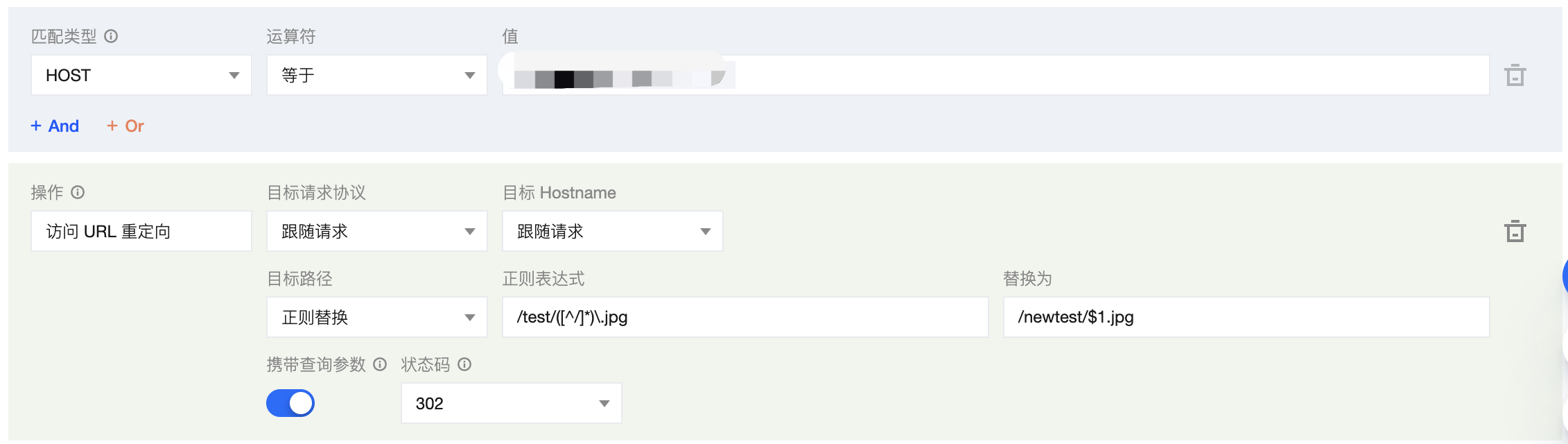
3.1 On the rule editing page, select HOST equals www.example.com for the matching type.
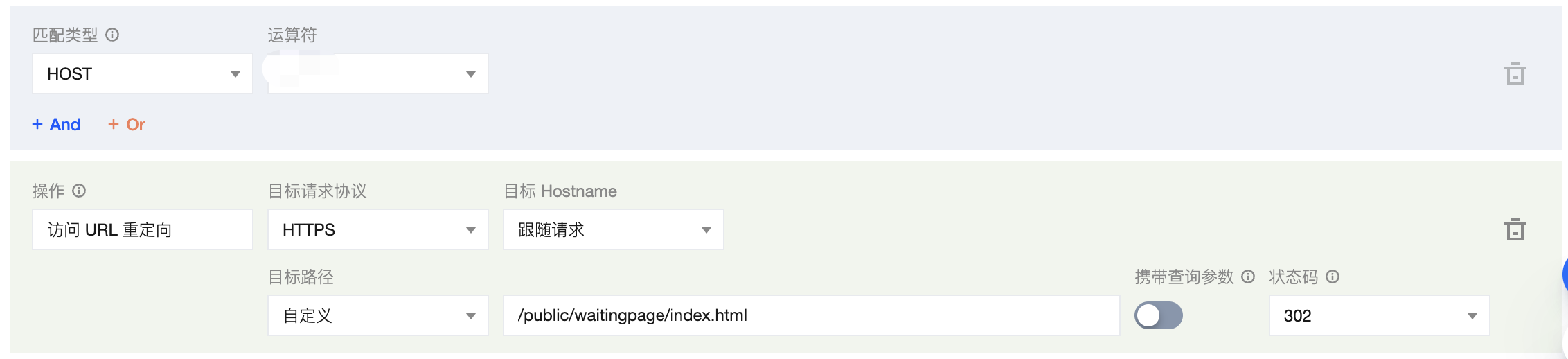
3.2 Click Operation, and in the pop-up operation list, select Access URL Redirection.
3.3 To configure the URL redirection rule for the current scenario, you can keep the target request protocol and target hostname to follow the request, configure the target path for regular expression replacement, and input the regular expression
^/old-path/(\d+)$ to match the target path, replacing it with /new-path/$1. The explanations for the related configuration items are as follows:Configuration items | Note |
Target protocol | The request protocol of the target redirect address defaults to follow the request, and it can support specifying redirection to HTTP/HTTPS protocol. |
Target hostname | The Hostname part of the target redirection address defaults to follow the request and supports modification to a custom domain name. |
Target path | The path part of the target redirection address offers three selection modes: Follow Request: The default configuration follows the path of the request. Customization: Define a complete path, replacing the original request path with the target path. For example, /download.Regular Replacement: Supports path matching and replacement through Google RE2 regular expressions. It also supports referencing regular capture groups with $num, where num represents the group number, supporting up to $9.For instance, if you wish to replace the path /old-path/1234 with /new-path/1234, you can configure the regular expression as ^/old-path/(\d+)$. In the replacement path, you can configure it as /new-path/$1, where $1 refers to the first captured group in the regular expression, i.e., the numeric part of the path. |
Carry query parameters | Whether to carry the original query parameters to the target URL is enabled by default, meaning the original query parameters are included after redirection. |
Status code | Select the response status code for redirection: 302 (default), 301, 303, and 307. |
4. The complete rule configuration is as follows. Click Save and publish to complete the rule configuration.