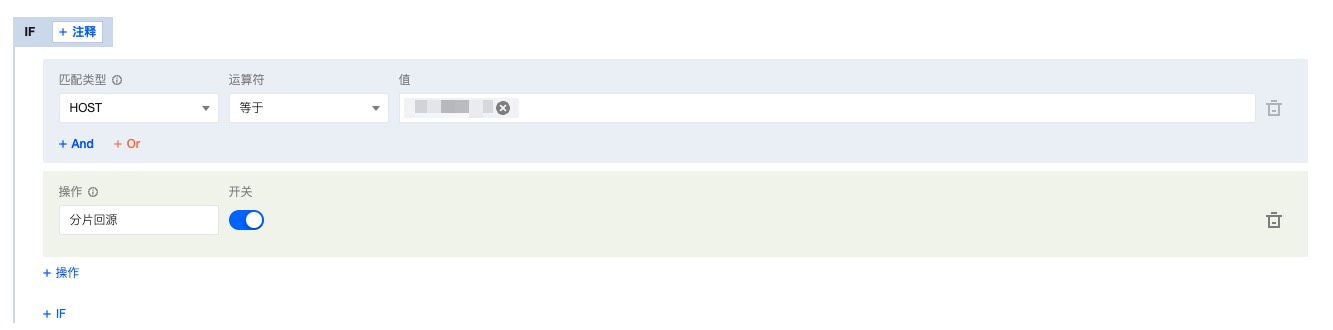
Range GETs can be enabled to reduce the consumption of large file origin-pulls and response time.
Why can Range GETs improve the efficiency of large file delivery?
When caching resources, nodes improve efficiency by caching resource files in segments (all segments have the same cache time on the node, following the node cache expiration TTL configuration), while also supporting Range requests. If the client carries the HTTP header Range: bytes = 0-999 during the request, only the first 1000 bytes of the file are returned, not the entire file.
Upon enabling Range GETs, if the client requests only a portion of the file, and that portion has expired in the node's cache, it is necessary to pull the latest resources from the origin. The node will perform a Range GET based on the client's request, pulling only the required portion of the file to cache on the node, and simultaneously returning it to the user. This effectively reduces origin-pull consumption and enhances overall response speed.
If Range GETs are not enabled and the client requests a portion of the file, the node will pull from the origin according to the client's range, caching only the requested portion of the file on the node and returning it to the client. However, this may not achieve optimal performance. In scenarios involving large files, it is recommended to enable Range GETs.
Scenarios
If your business resources are large static files, and the origin server supports Range requests, or the origin server is a Tencent Cloud COS server and has not used data processing functions (such as image processing), it is recommended to enable Range GETs to improve distribution efficiency and response speed.
Supports and Limits
The origin must support Range requests, or the origin-pull may fail.
The origin-pull may fail if Range GETs is enabled for small static files, or if you enable it while using a Tencent Cloud COS origin server and data processing methods such as image processing.
Instructions
1. Log in to the EdgeOne console and select Origin Configuration > Rule Engine from the left sidebar.
2. On the Rule Engine page, select the desired site and click
to configure Range GETs rules as needed.
3. On the Rule Engine page, select Range GETs and configure other parameters as needed. Click Save and Publish or Save Only.
Note
Currently, supported match types include host, URL path, and file extension.