使用场景
如果您的源站服务为 TCP 协议,且当前 Nginx 已原生支持 Proxy Protocol 协议,建议在业务服务器前增加已支持 Proxy Protocol V1/V2 协议的 Nginx 服务器,以获取客户端真实 IP。您可以参考以下步骤来进行操作。
说明:
四层代理仅企业版套餐可用。
如果您当前源站服务为 TCP 协议,但是不希望部署 Nginx 服务来单独解析客户端真实 IP,希望在业务服务器内直接解析获取客户端真实 IP 以辅助业务判断逻辑,您可以参考:在业务服务器解析客户端真实 IP。
部署方式
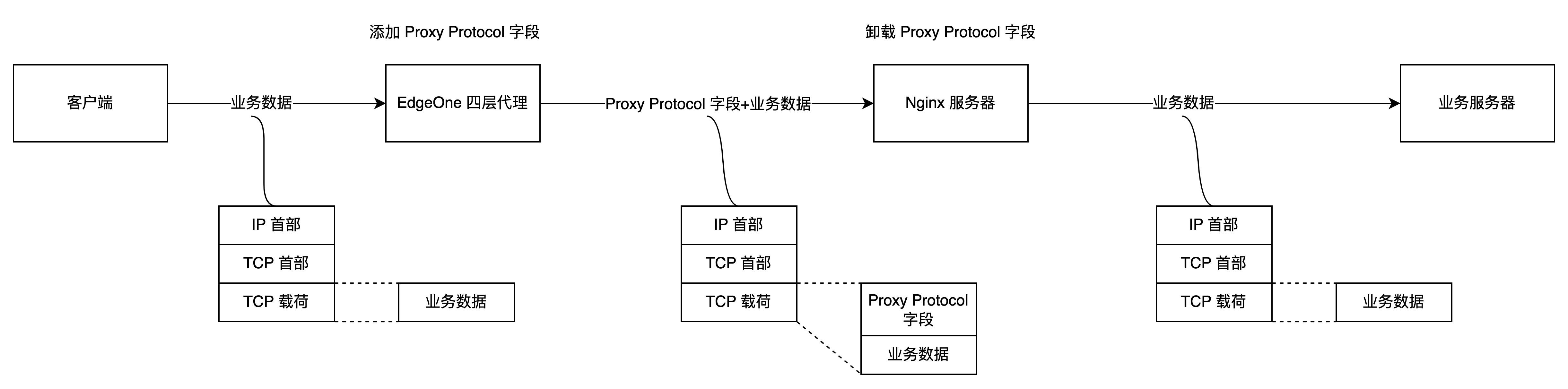
如上图所示,您需要在业务服务器前部署 Nginx 服务器,由 Nginx 服务器来完成 Proxy Protocol 字段的卸载,对真实客户端的 IP 地址收集可以通过在 Nginx 服务器上分析 Nginx 日志来完成,而业务服务器不用去关心真实客户端地址。此时,在 EdgeOne 四层代理服务中配置源站地址时,可将源站地址指向该 Nginx 服务即可。
操作步骤
步骤一:部署 Nginx 服务
请根据您所需使用的 Proxy Protocol 协议版本,选择对应的 Nginx 版本进行部署:
支持 Proxy Protocol V1:Nginx Plus R11 及以后,Nginx Open Source 1.11.4及以后。
支持 Proxy Protocol V2:Nginx Plus R16 及以后,Nginx Open Source 1.13.11及以后。
如需了解其他 Nginx 版本对 Proxy Protocol 协议的支持,请参考 Nginx 文档:Accepting the PROXY Protocol。
为了在 Nginx 上启用四层代理服务,您需要安装 Nginx-1.18.0 版本及其 stream 模块。以下是安装步骤:
# 安装nginx编译环境依赖yum -y install gcc gcc-c++ autoconf automakeyum -y install zlib zlib-devel openssl openssl-devel pcre-devel# 解压源码包tar -zxvf nginx-1.18.0.tar.gz# 进入目录cd nginx-1.18.0# 设置nginx编译安装配置,带上--with-stream./configure --prefix=/opt/nginx --sbin-path=/opt/nginx/sbin/nginx --conf-path=/opt/nginx/conf/nginx.conf --with-http_stub_status_module --with-http_gzip_static_module --with-stream# 编译make# 安装make install
步骤二:配置 Nginx 内 Stream 模块
以 Nginx-1.18.0版本为例,可以执行以下命令来打开 Nginx 的配置文件 nginx.conf:
vi /opt/nginx/conf/nginx.conf
Stream 模块配置内容参考如下:
stream {# 设置日志格式,其中proxy_protocol_addr为解析PP协议拿到的客户端地址, remote_addr为上一跳的地址log_format basic '$proxy_protocol_addr -$remote_addr [$time_local] ''$protocol $bytes_sent $bytes_received ''$session_time';access_log logs/stream.access.log basic;# upstream配置upstream RealServer {hash $remote_addr consistent;# 其中127.0.0.1:8888为业务服务器的地址和端口server 127.0.0.1:8888 max_fails=3 fail_timeout=30s;}# server配置server{# 四层监听端口,对应着四层代理配置的源站端口,需配置proxy_protocol支持对入包的PP协议解析listen 10000 proxy_protocol;proxy_connect_timeout 1s;proxy_timeout 3s;proxy_pass RealServer;}}
步骤三:配置四层代理转发规则
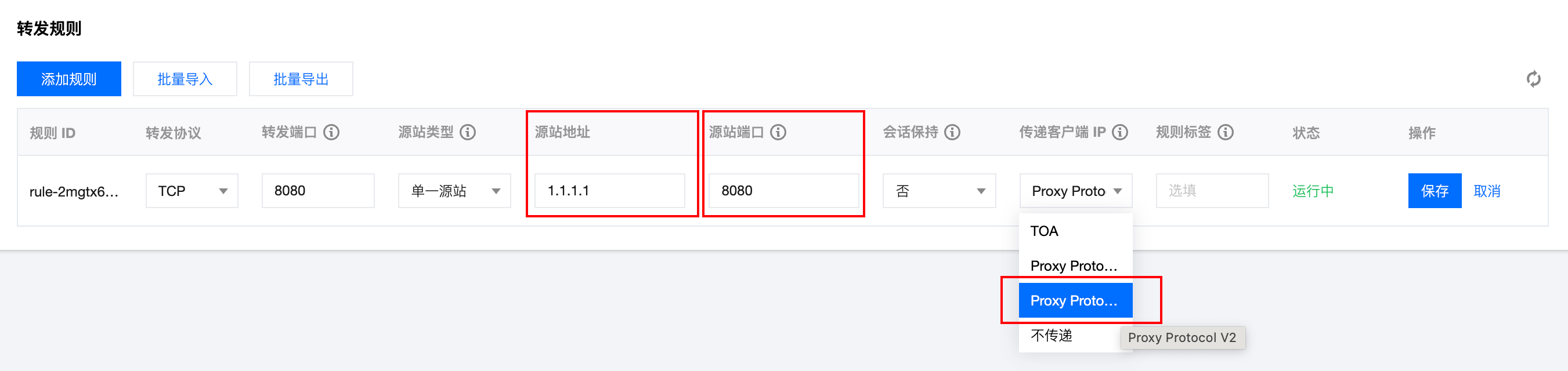
配置完 Nginx 服务后,您可以前往控制台的四层代理服务,修改四层代理转发规则。将源站地址修改为当前 Nginx 服务的 IP,源站端口为 步骤二 内配置的四层监听端口。传递客户端 IP 时,根据您当前使用的 Nginx 版本支持情况,选择 Proxy Protocol V1 或 Proxy Protocol V2。
步骤四:模拟客户端请求,验证结果
可以通过搭建 TCP 服务,然后使用另一台服务器模拟客户端请求进行验证。具体示例如下:
1. 可以使用 Python 在当前服务器上创建一个 HTTP 服务,来模拟 TCP 服务。
# 基于python2python2 -m SimpleHTTPServer 8888# 基于python3python3 -m http.server 8888
2. 用另一台服务器充当客户端,构造客户端请求,以 Curl 请求来模拟 TCP 请求:
# 利用curl发起http请求, 其中域名为四层代理域名,8888为四层代理转发端口curl -i "http://d42f15b7a9b47488.davidjli.xyz.acc.edgeonedy1.com:8888/"
3. 在 Nginx 服务器上查看 Nginx 日志,如下展示:

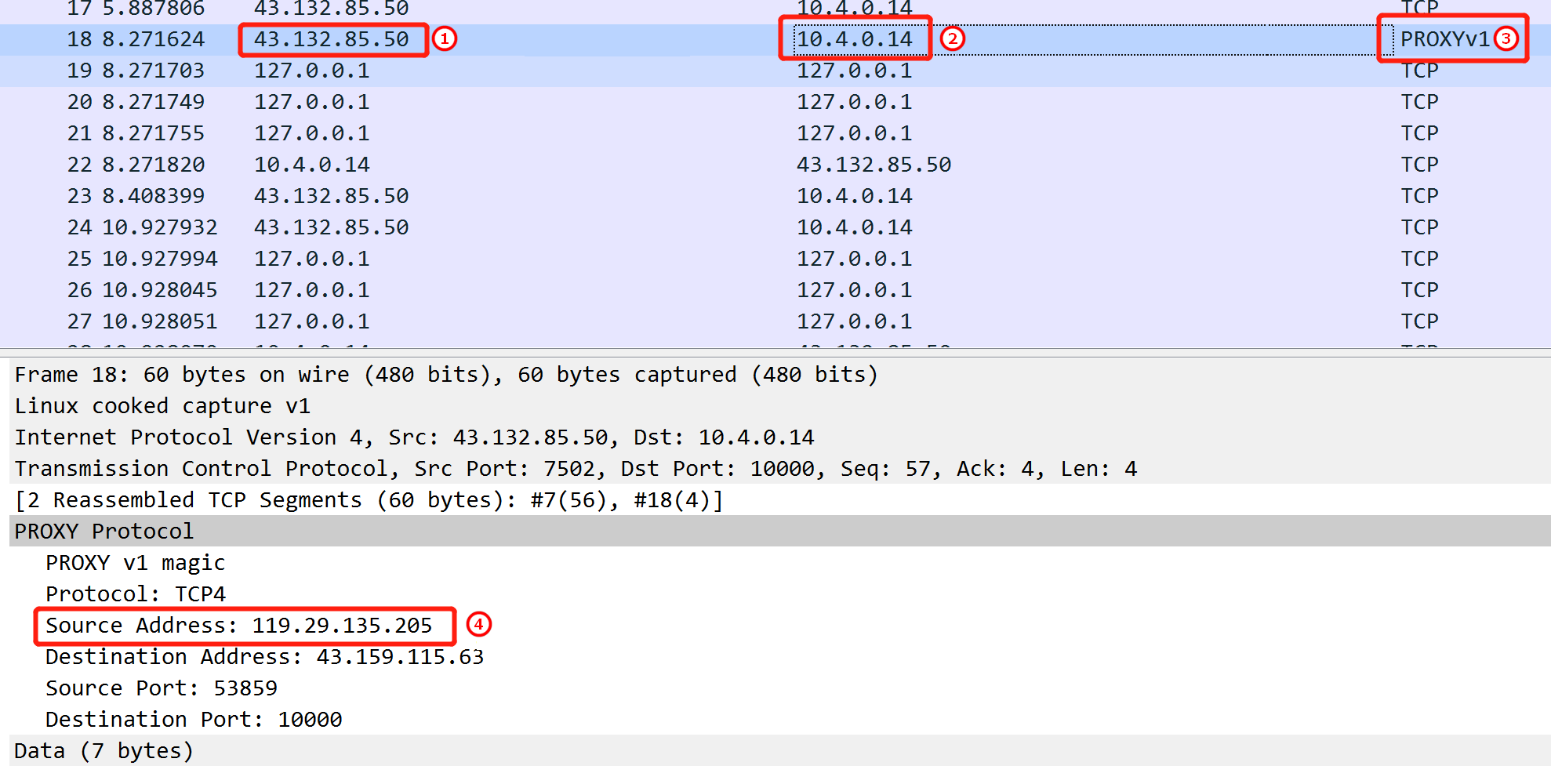
您可以在 Nginx 服务器上进行抓包,并通过 Wireshark 分析数据包。在 TCP 握手完成后,第一个业务数据包的前面会添加 Proxy Protocol 字段。下面是 Proxy Protocol V1 版本的示例:①四层代理出口 IP、②Nginx 服务器 IP、③协议版本、④真实客户端 IP 地址。