Overview

Last updated: 2024-01-12 14:53:30
Traffic mirror is a traffic collection feature that enables you to filter traffic in the specified collection range by different criteria. Then you can copy and forward the filtered traffic to CVM instances in the same VPC. This feature is applicable to use cases such as security auditing, risk monitoring, troubleshooting, and business analysis.
Notes
Using the traffic mirror feature will consume CVM resources such as CPU, memory, and bandwidth. For example, if a network interface has 1 Gbps inbound traffic and 1 Gbps outbound traffic and uses the traffic mirror feature, its application system will need to handle 1 Gbps inbound traffic and 3 Gbps outbound traffic (including 1 Gbps outbound traffic, 1 Gbps mirrored inbound traffic, and 1 Gbps mirrored outbound traffic).
When using the traffic mirror feature, please pay attention to the traffic forwarding configurations (such as ip_forward) of the related CVMs to prevent traffic loops from affecting business stability.

Workflow

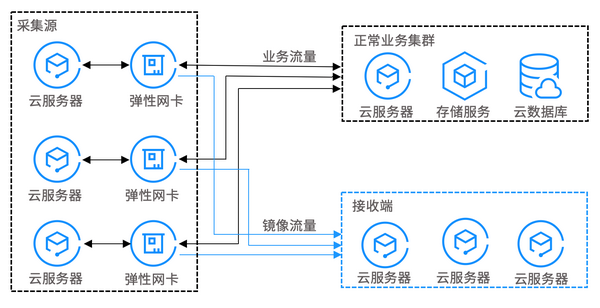
The following are key components of a traffic mirror, together with its workflow.
Source: The specified ENIs in the VPC, which support filtering by rules such as the network, collection range, collection type, and traffic filtering.
Target: The receiving IPs that the collected traffic is copied to.


Use Cases

Security auditing

A running system may incur unhealthy network traffic or generate an error message due to software exceptions, hardware faults, computer viruses, or improper use. To locate the causes of these issues, you can use the traffic mirror feature to analyze the network messages.

Intrusion detection

To ensure the confidentiality, integrity, and availability of network system resources, you can use the traffic mirror feature to copy traffic to CVM clusters for real-time analysis.

Business analysis

Use the traffic mirror feature to clearly and visually present the business traffic mode.