Tencent Cloud CDN uses a Key-Value format for resource mapping during caching, where the Key is the cache key and the Value is the resource cached in the CDN. You can configure cache key rules to retain only parameters that affect the resource content as cache keys, converting a type of request for the same resource into a unified cache key and hitting the same cache to improve hit rate.
Ignore Parameter
If in your business scenario, the parameters after the question mark in the resource URL path affect the resource content, they need to be retained as cache keys; otherwise, if the parameters do not affect the resource content, they should not be used as cache keys.
Scenario of not ignoring parameters
When a user accesses the resource through a URL, the access request may carry some parameters for special purposes. For example, the following URLs are used to represent two different images: http://cloud.tencent.com/1.jpg?version=1http://cloud.tencent.com/1.jpg?version=2 In this scenario, you need to select "Do not ignore" and retain all parameters and values in the URL as cache keys to cache images and distinguish between resources.
Scenario of retaining specified parameters or ignoring specified parameters
If the URL carries other parameters that do not affect the image content, such as the timestamp "time" to record the request time, in addition to the "version" parameter that affects the resource content: http://cloud.tencent.com/1.jpg?version=1&time=1651752741http://cloud.tencent.com/1.jpg?version=1&time=1651752742http://cloud.tencent.com/1.jpg?version=2&time=1651752743 In this scenario, you can choose to "retain specified parameters" or "ignore specified parameters", specifying to retain the "version" parameter that affects the image content as the cache key, or specifying to ignore the "time" parameter that does not affect the image content. Both methods can achieve the following caching results:
For requests with the same version value, ignore the time parameter and its value, sharing a cache.
For requests with different version values, ignore the time parameter and its value, distinguishing caches.
Scenarios where all parameters are ignored
If you use the timestamp signature parameter for access authentication in an audio/video scenario: http://cloud.tencent.com/1.mp4?sign=XXXXXX In this scenario, you need to choose "Ignore All", using the URL part before "?" http://cloud.tencent.com/1.mp4 as the cache key. The node will then only cache one resource, and the cache can be directly hit through signature authentication even if the timestamp signature keeps changing.
Ignore case
If case differences in resource URL paths are irrelevant to resource content in your business scenario, you can enable the case ignoring configuration to improve the hit rate.
Configuration Guide
View Configuration
Log in to the CDN Console, select Domain Management from the left menu, click Management in the domain operation column to enter the domain configuration page, switch the tab to Cache Configuration, and you will find Cache Key Rule Configuration.
When adding an accelerated domain name, the ignore parameters default to off or on based on different business types:
If the accelerated domain name selects small web file business type, the default does not enable ignore parameters. In the cache key rule configuration, the ignore parameters for all file rules are set to "do not ignore."
If the accelerated domain name selects large file download or audio and video on-demand business type, the default enable ignore parameters. In the cache key rule configuration, the ignore parameters for all file rules are set to "ignore all."
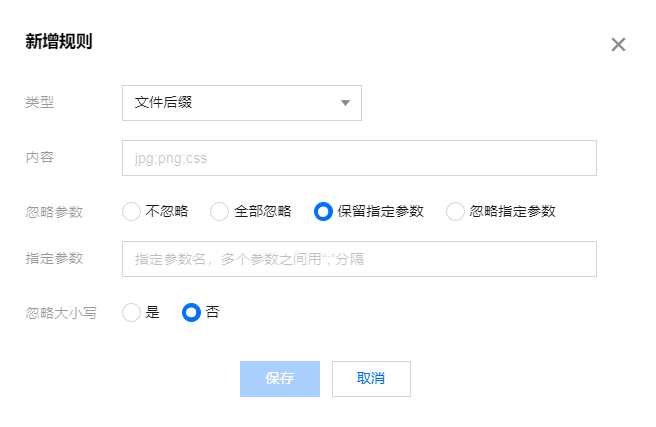
Adding rules
You can add cache rules as needed.
Configuration limitations
Each domain name can be configured with up to 20 cache key rules (including the default ones).
Rule priority can be adjusted: rules at the bottom of the list have higher priority (the priority of default rules cannot be adjusted).
In each rule of specified file type, folder, and full-path file, up to 100 groups of contents can be entered. Please use ";" to separate different contents, e.g., "Specified file type - jpg;png".
Select Retain Specified Parameters and Ignore Specified Parameters. The constraints for specifying parameters are as follows:
All files: up to 30 parameter names can be entered; each one can contain up to 20 characters.
Specified file type/folder/full-path file: up to 30 parameter names can be entered; each one can contain up to 20 characters. Separate each parameter name with ";". For example: key1;key2;key3.
Modify Rule
You can modify the added cache key rules. Click Modify in the operation column of the cache key rule.
Note
The default rules support modifying ignore parameters and cache ignore URL case configurations, while the type and content cannot be modified.
Delete Rule
You can delete the added cache key rules. Click Delete in the operation column of the cache key rule. (Default rules cannot be deleted)
Configuration Example
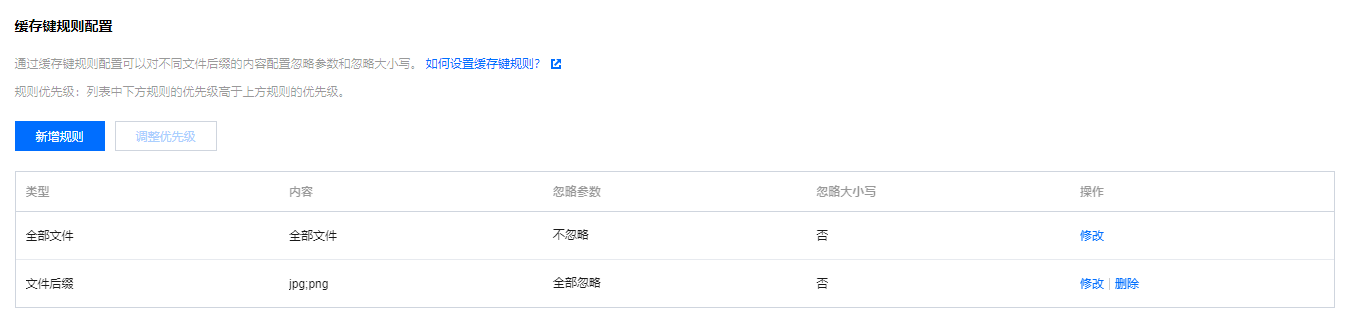
If the cache key rule configuration of the acceleration domain name www.test.com is as follows:
The actual access is as follows:
The client requests resources www.test.com/abc.jpg?version=1&colour=red and www.test.com/abc.JPG?version=1&colour=red. Assuming both requests reach CDN node X, and node X does not have the cache of these two resources:
The request goes back to the origin server to fetch the image resource abc.jpg and caches it on CDN node X. Since ignore parameters: ignore all is enabled, the link before "?" www.test.com/abc.jpg is used as the cache key.
When the client requests www.test.com/abc.JPG?version=1&colour=red, because ignore case is not enabled, it cannot hit the previously cached resource www.test.com/abc.jpg. The request goes back to the origin server to fetch the image resource abc.JPG and caches it on CDN node X, with the corresponding cache key www.test.com/abc.JPG?version=1&colour=red.