Reset Password

Last updated: 2023-09-04 10:10:13

Scenario

If you forgot your database account password or need to change it while using TencentDB for MySQL, you can reset it in the console.
Note
For TencentDB for MySQL, the password resetting feacture has been connected to CAM; therefore, we recommend that you exercise tighter control over the permission to this API (password resetting) or sensitive resources (i.e., TencentDB for MySQL instances) by granting such permission only to appropriate personnel.
We recommended that you regularly reset the password at least once every three months for the sake of data security.

Instructions

1. Log in to the TencentDB for MySQL console. In the instance list, click an instance ID or Manage in the Operation column to enter the instance management page.
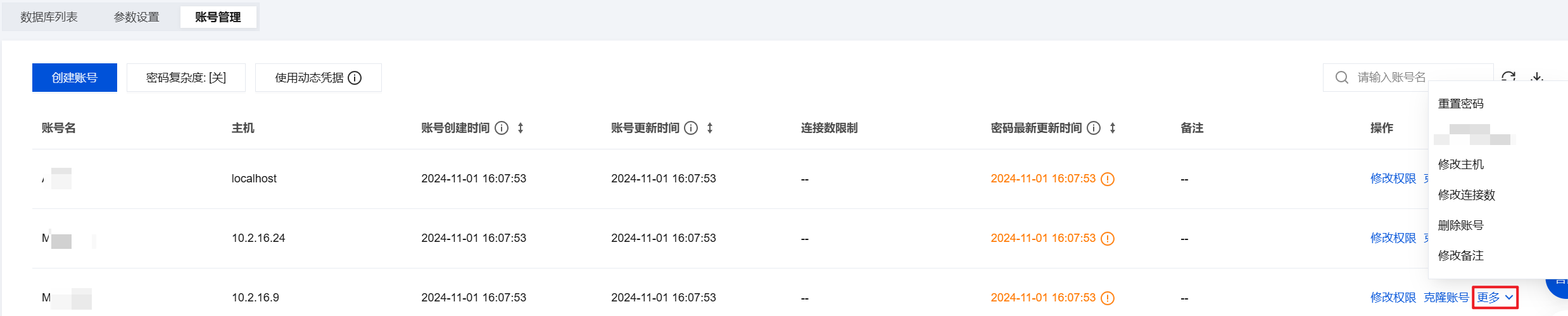
2. On the Instance Management page, navigate to Database Management > Account Management, find the account for which you need to reset the password, and click Reset Password or select More > Reset Password.


3. In the Reset Password dialog box, enter the new password and confirm the password, then click OK.
Note
The password should be a combination of 8–64 characters containing at least two of the three types: letters, digits, and symbols (_+-&=!@#$%^*()).

Related APIs

API
Description
Modify the password of the TencentDB account