TencentDB for MySQL supports transition-to-cold storage for backup files to reduce the backup storage costs. This document describes how to use this feature.
Note
The free space is not applicable to transition-to-cold storage.
The archive storage type isn't available yet.
Feature Overview
Transition-to-cold storage: The feature automatically transitions the storage types of generated data and binlog backup files according to the configured transition-to-cold storage rules to reduce the storage costs.
After setting the backup retention period in Auto Backup > Set Backup Retention Time, backup files will be stored according to the backup policy. Within the retention period, you can use Transition to Cold Storage to transition backup files to standard storage N days (customizable) after their creation. Furthermore, you can transition backup files to archive storage X days (customizable) after their creation. This process is called backup settlement.
Backup File Storage Type Definition
Standard storage: It is suitable for business scenarios with frequent access and use. It can be used for rollback and cloning, uses no free space, and only supports downloads over the private network.
Archive storage: Suitable for low-frequency access scenarios, archive storage requires a minimum storage period of 90 days. If the storage period is less than 90 days, the storage fee will be calculated based on 90 days. Downloading is not supported.
Note
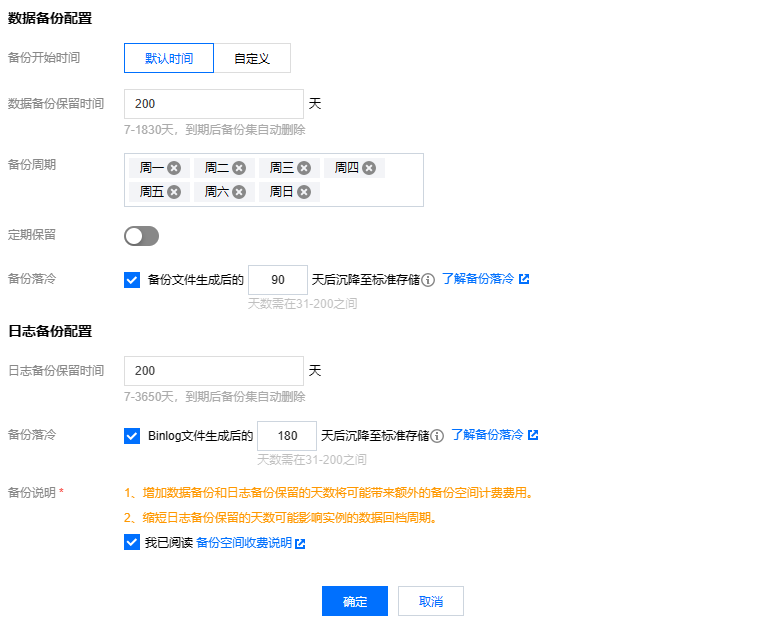
You can configure to transition backup files generated a certain number of days ago to standard storage. The number can range from 30 days to the configured number of backup retention days.
You can configure the backup files to be downgraded to archive storage after a specified number of days. The minimum number of days is 90, and the maximum is the set backup retention period.
The backup storage type can only be transitioned from hot to cold (general storage > standard storage > archive storage) but not vice versa.
All the configured transition-to-cold storage policies will be performed at 00:00 Beijing time (GMT+08:00) on the next day. As lifecycle tasks are executed asynchronously, the execution for backups after the rule is configured will be finished by 24:00 on the next day in most cases. The time is calculated based on the modification time of the transition-to-cold storage configuration.
Transition-to-cold storage can be configured for data backups and binlog backups separately.
Transition-to-cold storage can be used together with periodic archive.
Billing description
Transitioned backups are stored at lower prices to reduce the storage costs. For billing details, see Backup Space Billing.
Transition-to-cold storage policy
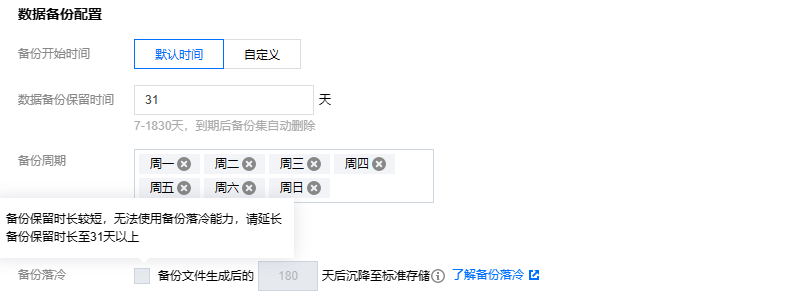
1. Backup retention period ≤ 31 days: Transition-to-cold storage cannot be configured. To configure it, extend the backup retention period to more than 31 days.
2. 31 days < backup retention period ≤ 180 days: Archive storage days cannot be configured.
3. The standard storage days can't be greater than or equal to the archive storage days.
4. Standard storage days and archive storage days can't be less than the backup retention period.
5. A transition-to-cold storage rule only takes effect after it is selected.
Configuring transition-to-cold storage
1. Log in to the TencentDB for MySQL console, click an instance ID on the instance list page to enter the management page, and select Backup and Restoration* > Auto-Backup Settings.
2. In the Backup Settings pop-up window, configure the data backup retention period and cycle or configure the log backup retention period, select the target transition-to-cold storage policy, and specify the number of days.
3. Read and select Backup Space Billing Notes and click OK.
Examples of transition-to-cold storage
Example 1: Non-archive backup + transition-to-cold storage configurationBackground
Company A has a TencentDB for MySQL instance in Guangzhou region. The data backup retention period is 200 days, and the non-archive backup cycle is every Monday, Wednesday, Friday, and Sunday. On December 31, 2022, the following transition-to-cold storage policy is configured: after a backup file is generated for 90 or 180 days, it will be transitioned to standard or archive storage respectively.
Transition expectations
The transition-to-cold storage policy takes effect on January 1, 2023.
Existing backup files: Starting from January 1, 2023, existing backup files generated for more than 90 or 180 days are transitioned to standard or archive storage respectively.
New backup files: Starting from January 1, 2023, newly generated backup files are transitioned to standard or archive storage respectively after 90 or 180 days.
Example 2: Archive backup + transition-to-cold storage configurationBackground
Company B has a TencentDB for MySQL instance in Guangzhou region. The data backup retention period is 365 days, the non-archive backup cycle is every Monday, Wednesday, Friday, and Sunday, the archive backup retention period is 365 days, and one backup file is retained periodically per month. On January 31, 2023, the following transition-to-cold storage policy is configured: after a backup file is generated for 90 or 180 days, it will be transitioned to standard or archive storage respectively.
Transition expectations
The transition-to-cold storage policy takes effect on February 1, 2023.
Existing backup files: Starting from February 1, 2023, existing backup files generated for more than 90 or 180 days are transitioned to standard or archive storage respectively.
New backup files: Starting from February 1, 2023, newly generated backup files are transitioned to standard or archive storage respectively after 90 or 180 days.
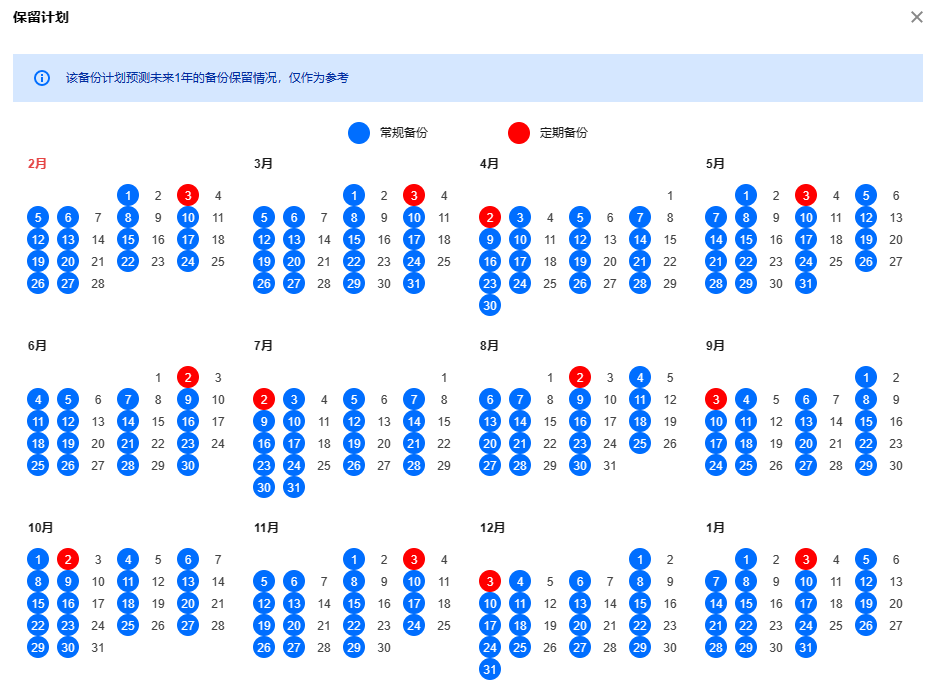
In the backup retention schedule shown in the figure below, each newly generated backup file will be transitioned according to the time configured in the transition-to-cold storage policy, and backups can be transitioned only from hot to cold.