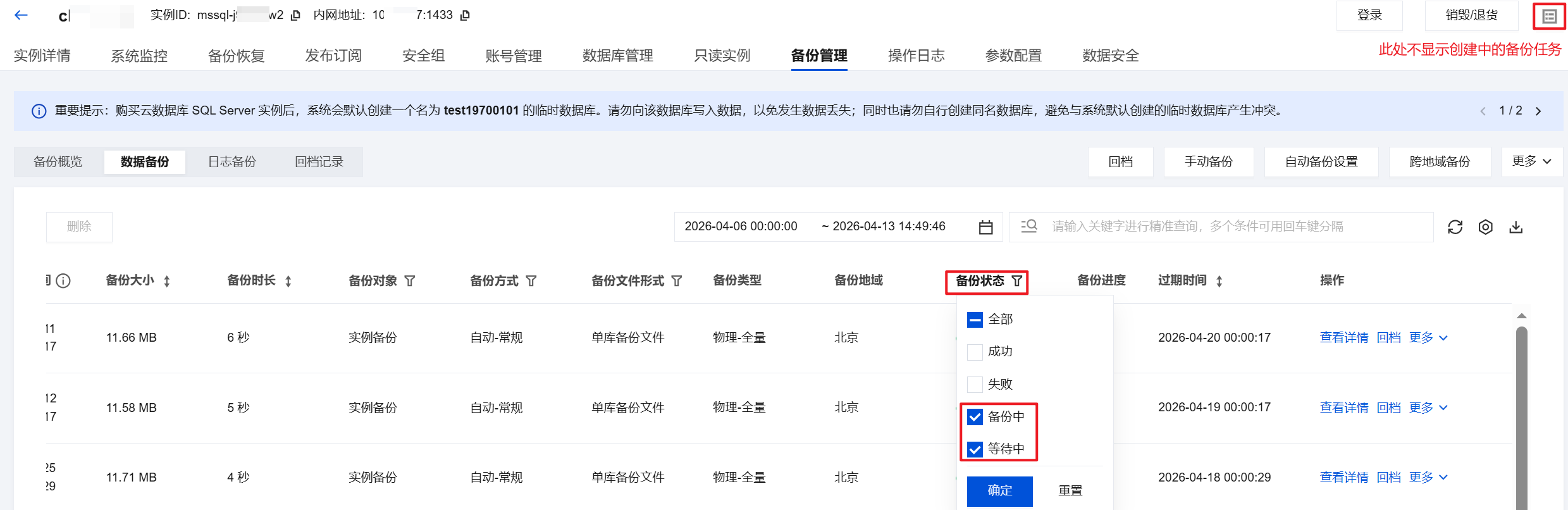
How do I back up TencentDB for SQL Server?
TencentDB for SQLServer features a wide range of backup capabilities to ensure data security, prevent data loss, or damage. It supports managing and viewing backups through the SQL Server console's Backup Management page, including automatic backups, manual backups, data backups, log backups, single database backups, package backups, instance backups, multiple database backups, cross-region backups, custom backup strategies, from 7 to 1830 days of backup retention period and custom backup cycles, etc. For more details, please refer to Backup Overview.
How do I configure automatic backup?
You can set this up on the SQL Server console's Backup Management page of your instance. For more details, please refer to Setting up Automatic Backups.
How do I create a manual backup?
You can set this up on the SQL Server console's Backup Management page of your instance. For more details, please refer to Creating Manual Backups.
How do I view and modify the backup policy?
You can view and modify backup policies on the SQL Server console's Backup Management page of your instance. For more details, please refer to Setting up Automatic Backups.
How long can TencentDB for SQL Server retain backups?
TencentDB for SQL Server automatically retains backups for 7 days by default, supporting custom backup retention periods. The validity is based on the user-set backup days. For more details, please refer to Setting up Automatic Backups.
Manual backups are retained for the same duration as automatic backups unless manually deleted. Users can delete them as needed, for more details, please refer to Deleting Manual Backups.
Can I delete backups manually?
Automatic backups cannot be deleted manually. You can set the retention period for automatic backups, and they will be deleted automatically when they expire.
Manual backups can be manually deleted from the backup list on the SQL Server console, without manual deletion, the retention duration will be determined by the chosen retention time strategy at the time of the backup.
Can I disable data and log backups?
It cannot be turned off. However, you can reduce the backup frequency and delete manual backup data no longer in use through the SQL Server console to decrease the amount of space occupied by backups.
Why can't I initiate a manual backup task?
You need to check the automatic backup time you configured. If the instance is performing the daily automatic backup task, you cannot initiate a manual backup task.
How do I cancel a backup task?
Backup tasks for TencentDB for SQL Server cannot be canceled.
Is the database available during the backup period?
The backup window is a user-defined time period for daily automatic backups. During this time, TencentDB for SQL Server instances will be backed up. These regular backups allow you to restore your database instance to any backup point within the retention period. Business operations are not affected during the backup window, but you cannot perform restart or manual backup operations in the TencentDB for SQL Server console.
How do I back up a single database in TencentDB for SQL Server?
You can log in to the SQL Server Console. In the instance list, click the instance ID, select the Backup Management page, and click Backup Task Configuration. Set the backup file format to Single Database Backup Files, which will upload each database's .bak file directly to COS without packaging. For details, see Setting Backup Task.
How do I set up backup tasks from instances in TencentDB for SQL Server?
You can log in to the SQL Server Console. In the instance list, click the instance ID, select the Backup Management page, and click Backup Task Configuration. Set the backup task execution option to Back up tasks from instances. Then, you can adjust the execution instance of the backup task. For details, see Setting Backup Task. Only the 2017/2019 cluster versions support setting the backup task execution instance.
How do I download TencentDB for SQL Server backup files?
The TencentDB for SQL Server console provides a list of backup files that can be downloaded via intranet and internet addresses.
You can log in to the SQL Server Console. In the instance list, click the instance ID, select the Backup Management page. In the backup list, click Download to get the private and public network download addresses, or directly click Local Download to download. For details, see Downloading Backups.
Can TencentDB for SQL Server be backed up using third-party tools?
TencentDB for SQL Server does not support backups using third-party tools. For security reasons, data directory permissions on physical machines cannot be granted. Users can only initiate backups through the console.
Can I download or restore backup files that exceed the retention period?
Expired backup sets will be deleted automatically and cannot be downloaded or restored.
We recommend that you configure a backup retention period based on business needs or download the backup files locally in the SQL Server Console.
You can also manually back up instance data in the console. Manual backups can be manually deleted; if not manually deleted, they will be retained according to the retention duration of automatic backups.
Note
Manual backups will also take up the backup space. We recommend that you plan the usage of the backup space appropriately to reduce costs.
Can I download the backup files of an isolated instance?
You can still download backups of isolated instances.
For annual and monthly subscription instances: seven days after the instance expires, starting from the 8th day, the instance is isolated and moved to the recycle bin. At this time, rollback is prohibited; manual backups and automatic backups still proceed. Backup downloads can be done under the instance operations column > More. The portion of the instance backup that exceeds the free space provided is still billed until the instance is taken offline.
Pay-as-you-go instances: 24 hours after expiration, the instance is isolated and moved into the Recycle Bin. At this time, rollback is prohibited, but manual backup and automatic backup can still be performed. You can perform backup download in the instance operation column > More. The excessive backup space will still be billed until the instance is decommissioned.
Will my TencentDB for SQL Server backup files remain after the instance is deleted?
Once a TencentDB for SQL Server instance is deleted, the corresponding backup files will be automatically deleted and not retained. If you need to keep the data, please ensure the data is backed up before deleting the instance.
How is the backup space for TencentDB for SQL Server charged?
TencentDB for SQL Server offers a free backup space quota based on regions. The amount of free backup space is equal to the total storage space of all single-node (formerly Basic Edition) and dual-node (formerly High Availability/Cluster Edition) master instances in the respective region. For pricing beyond the free quota, see Backup Space Charging.
What should I do if the backup space exceeds the free quota?
When your backup file size exceeds the free quota for backup space, you can increase the storage space or reduce the usage of backup space.
The backup files of an instance will occupy backup space. Each TencentDB for SQL Server instance has a certain amount of free quota for backup space. Any usage beyond the free quota will incur additional charges.
How can I reduce the backup space costs for TencentDB for SQL Server?
Delete unused manual backup data (Manual backups can be deleted on the SQL Server console's Instance Management page under Backup Management).
Reduce the frequency of automatic data backup for non-core businesses. You can adjust the backup cycle and backup file retention period in the console, which should be at least twice a week.
Note
Rollback feature is based on data backups + log backups within the backup cycle and retention days. Reducing the frequency of automatic backups and retention days will affect the rollback time range of instance data, so please weigh your backup configurations carefully.
Reduce the retention period of data and log backups for non-core businesses (a 7-day retention period can meet the requirements of most scenarios).
Business Scenario | Recommended Backup Retention Period |
Core product/service | 7-1830 days |
Non-core and non-data product/service | 7 days |
Archive businesses | Seven days. We recommend you manually back up data based on your actual business needs and delete the backups promptly after use |
Testing business | Seven days. We recommend you manually back up data based on your actual business needs and delete the backups promptly after use |
How do I view the backup space usage of TencentDB for SQL Server?
You can log in to the SQL Server console, select Database Backup to view the backup space statistics and trends for all instances and regions under your account, as well as real-time statistics for individual instances. For details, please refer to Viewing Backup Space.
How do I roll back a TencentDB for SQL Server instance?
The data backup retention period for TencentDB for SQL Server is seven days by default and supports custom retention days. The log backup retention period is the same as the data backup retention period. Users can roll back instance data to any point within the retention period set. For details, refer to Rolling back Databases.
How do I clone a database for a TencentDB for SQL Server instance?
TencentDB for SQL Server provides a database cloning feature, enabling one-click cloning of existing databases to the current instance. You need to specify the new database name during cloning. The account permissions and other relevant information of the new cloned database will be identical to the source database. For details, refer to Cloning Database.
What is the use of downloaded data backups and log backups?
You can use these backup files to restore data at any time. They can be restored to other cloud databases or self-built databases. For more details, refer to Cold Backup Migration.
Can I restore the downloaded backups to another TencentDB for SQL Server instance?
In the TencentDB for SQL Server console, you can use the cold backup migration feature to restore the downloaded backup files to another SQL Server instance. For details, refer to Cold Backup Migration.
How can I restore the backup of a self-built local database to TencentDB for SQL Server?
In the TencentDB for SQL Server console, you can upload backup files directly or download backup files from COS. Use the cold backup migration feature to restore the backup of a self-built database to TencentDB for SQL Server. For details, refer to Cold Backup Migration.
Does TencentDB for SQL Server support restoring a full backup to a self-built database?
TencentDB for SQL Server supports full backups. After downloading the backup file, you can manually restore it to a self-built database. For details, refer to Downloading Backups.
What is the difference between direct backup upload and downloading from COS in cold backup migration?
Direct Upload: Users upload the backup file from their local environment to Tencent Cloud COS, then download it to TencentDB for SQL Server for restoration. Additionally, uploading to Tencent Cloud COS does not occupy the user’s backup storage space, but the file is retained for 24 hours and automatically deleted afterward.
Downloading from COS: The backup file is downloaded from the user’s own COS to TencentDB for SQL Server for restoration.
Will the backup files uploaded directly in cold backup migration occupy the user’s backup storage space?
The backup files uploaded in the backup recovery scenario are temporarily stored in Tencent Cloud COS and will not occupy the user’s own backup storage space. The files are retained for 24 hours after a successful upload and automatically deleted afterward.