Cross-region backup

Last updated: 2024-09-08 23:00:57

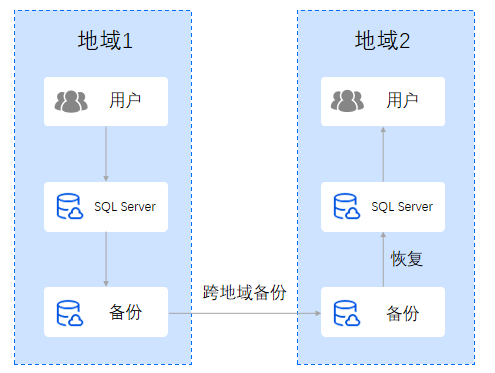
TencentDB for SQL Server provides a cross-region backup feature, supporting the storage of backup files in another region to enhance regulatory compliance and disaster recovery capabilities, while improving data reliability. This article introduces the cross-region backup feature.

Operation scenarios

Data is an important part of enterprise operations. Although information technology brings convenience, it also reveals that electronic data and stored information are very vulnerable to damage or loss. Any incident, such as natural disaster, system failure, employee misoperation, or virus infection, can cause complete interruption of business operations or even catastrophic loss. Therefore, ensuring the security and integrity of core data is a top priority for every enterprise.
TencentDB for SQL Server provides a cross-region backup feature that stores backup CFS in other regions to maximize the avoidance of data damage caused by natural disasters, system failures, etc. Cross-region backups ensure high availability for database recovery, meeting requirements for data availability, security, offsite backup recovery, disaster recovery, long-term data archiving, and regulatory compliance.


Notes on Cross-Region Backup

Cross-region backup doesn't affect the local default backup, and both coexist after cross-region backup is enabled.
Cross-region backup will be triggered after the local default automatic backup is complete, that is, the default automatic backup is dumped to the storage device for cross-region backup.
Backup files in the cross-region backup space include automatic data backups and log backups, that is, local automatic backups are automatically synced to the destination region for storage.
The default retention duration for cross-region backups is 7 days. Custom retention duration is supported, with a minimum of 7 days and a maximum of 1830 days.
Enabling/disabling cross-region backup and modifying the backup region option does not affect existing backups.
The retention days for cross-region backups only affect the lifecycle of backups stored in the cross-region storage.
Modifying the cross-region backup retention duration will affect the lifecycle of historical cross-region backups.
Modifying the cross-region backup region option does not affect the backup storage region of existing cross-region backups.
Cross-region backups stored in a non-local region cannot use the free storage space of local backups.

Billing description

Cross-region backup fees consist of storage and traffic costs. That is: Cross-region backup fees = cross-region backup storage fees + cross-region replication traffic fees Cross-region backup storage fees are charged based on the destination region on a pay-as-you-go basis, and cross-region replication traffic fees are charged based on the link between the source and destination regions. For detailed billing instructions and pricing, please refer to Cross-Region Backup Billing .

Differences between cross-region backup and intra-regional backup

Comparison Item
Local backup
Cross-region backup
Default state
Enabled by default
Disabled by default, needs to be enabled manually
Backup storage region
Backups are stored in the region where the instance is located
Backups are stored in an additional destination region
Backup metering region and billing region
Backup volume is counted in the backup space of the master instance's region
Backup volume is counted in the backup space of the master instance's region. Backup fees are calculated based on the backup storage region (i.e., the destination region)
Billing lifecycle
Annual and monthly subscription instances are retained in the recycle bin for only 7 days by default and will be destroyed along with the instance after 7 days
Pay-as-you-go instances are retained in the recycle bin for only 3 days by default and will be destroyed along with the instance after 3 days
Annual and monthly subscription instances are retained in the recycle bin for only 7 days by default and will be destroyed along with the instance after 7 days
Pay-as-you-go instances are retained in the recycle bin for only 3 days by default and will be destroyed along with the instance after 3 days
Free storage space utilization
Can utilize free storage space
Cannot utilize free storage space
Backup space billing rules
If the backup size does not exceed the free tier, the backup is free. Once exceeded,The hourly cost of the backup = (Total size of backup files - Free tier) x Backup unit price
Billing space (for that region) = Data backup volume < automatic + manual > (for that region) + Log backup volume < automatic > (for that region) - Free backup space (for that region)
All cross-region backup files generated will incur charges once cross-region backup is enabled
Billing space (for the master instance's region) = Data backup volume < automatic > (destination region) + Log backup volume < automatic > (destination region)

Regions supported for cross-region backup

Source Region
Supported destination regions for backup
Beijing , Guangzhou , Shanghai , Chengdu , Chongqing , Nanjing , Beijing Finance , Shanghai Finance , Shenzhen Finance , Hong Kong (China)
Beijing , Guangzhou , Shanghai , Chengdu , Chongqing , Nanjing , Beijing Finance , Shanghai Finance , Shenzhen Finance
Regions other than the source region are supported for backup. Refer to the console for specific supported regions
Note:
Backups from the Chinese mainland region to the Hong Kong (China) region are currently not supported.
Cross-region backup is temporarily unsupported for other countries; any future updates will be synchronized.

Enable cross-region backup through the console

1. Log in to SQL Server Console.
2. In the instance list, find the target instance, click on the instance ID or the Operation column's Manage to enter the instance management page.
3. On the instance management page, select Backup Management, click Cross-Region Backup Settings.


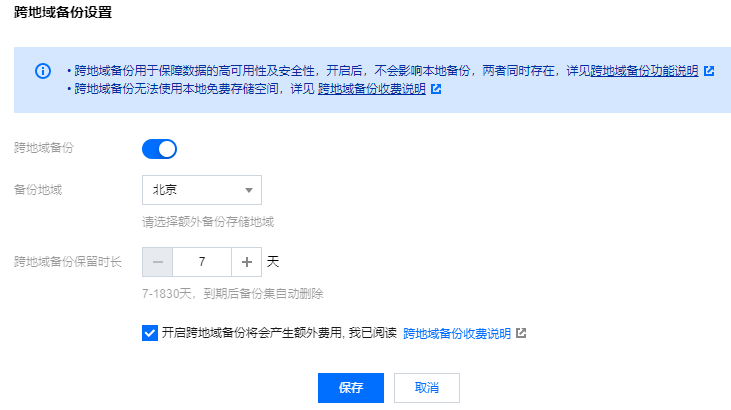
4. In the Cross-region Backup Settings window, set the following parameters, click Save.


Parameter
Description
Cross-region backup
Enable the cross-region backup feature by clicking the button
Backup Region
Select the region for storing cross-region backups. Click the dropdown key to choose the desired region, 1-2 regions can be selected
Cross-region backup retention duration
The retention duration of cross-region backup files can be set from 7 to 1830 days. Upon expiration, backup sets will be automatically deleted.
Cross-Region Backup Billing
Enabling cross-region backup incurs additional fees. Please read and check this option

Modify cross-region backup settings

Note:
Modifying the backup region will not affect the storage region of existing backups, it will only affect the storage region of new backups.
Modifying the cross-region backup retention duration will affect the lifecycle of existing cross-region backups as well as new ones.
Option 1
1. Log in to SQL Server Console.
2. In the instance list, find the target instance, click on the instance ID or the Operation column's Manage to enter the instance management page.
3. On the instance management page, select Backup Management and click Cross-Region Backup Settings.
4. In the cross-region backup settings window, modify the backup region and retention duration, then click Save.
Option 2
1. Log in to SQL Server Console.
2. Select Database Backup on the left sidebar and select a region at the top of the database backup page.
3. In the database backup page, select Overview > Real-time Backup Statistics > Cross-region Backup.
4. In the cross-region backup list, find the target instance and click its Operations column's Cross-region Backup Settings.
5. In the cross-region backup settings window, modify the backup region and retention duration, then click Save.

Disable cross-region backup

Note:
After disabling cross-region backup, no new cross-region backup files will be generated, and billing for new cross-region backup files will stop.
Option 1
1. Log in to SQL Server Console.
2. In the instance list, find the target instance, click on the instance ID or the Operation column's Manage to enter the instance management page.
3. On the instance management page, select Backup Management and click Cross-Region Backup Settings.
4. In the cross-region backup settings window, turn off the cross-region backup button.
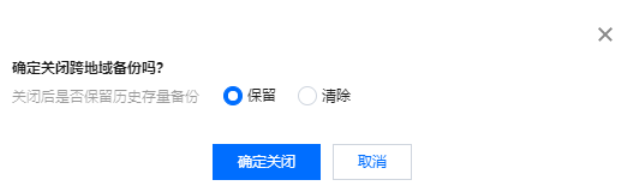
5. In the pop-up window, choose to retain or clear inventory backups, then click Confirm Disable. 
Note:
If you choose to retain, the historical inventory cross-region backup files will be saved and billed according to the set cross-region backup retention time. The cross-region backup retention duration can be modified before disabling cross-region backup.
If you choose to clear, the historical inventory cross-region backup files will be cleared, which means the inventory cross-region backup files will be deleted along with disabling cross-region backup.
Option 2
1. Log in to SQL Server Console.
2. Select Database Backup from the left navigation bar, and at the top of the Database Backup page, select a region.
3. In the database backup page, select Overview > Real-time Backup Statistics > Cross-region Backup.
4. In the cross-region backup list, find the target instance and click its Operations column's Cross-region Backup Settings.
5. In the cross-region backup settings window, turn off the cross-region backup button.
6. In the pop-up window, choose to retain or clear inventory backups, then click Confirm Disable.

Related APIs

API
Description
The ModifyCrossBackupStrategy interface is used to enable or disable the cross-region backup strategy.
The DescribeCrossRegions interface is used to query the target region of cross-region backups.
The DescribeCrossBackupStatistical interface is used to query the list of real-time cross-region backup statistics.