本文旨在简单探讨 Redisson 客户端在面临网络波动及服务故障切换时所遇到的业务阻塞问题,并提出一种简洁而有效的业务层面解决方案,为类似问题的解决提供启发。
问题背景
通过 Redisson 客户端连接腾讯云分布式缓存数据库实例时,VPC 网关发生故障,持续时间接近 10 秒。为了恢复网络连接,隔离故障网络设备并重新恢复网络链路。尽管连接数得以恢复到正常的业务水平,但受网络故障影响的业务仍然持续性报错。只有重启客户端之后,系统重新建立了与 Redis 数据库的连接,业务请求才得以恢复正常。
异常分析
根据异常产生过程,对问题场景进行复现,获取报错日志信息,深度分析 Redisson 连接的内部工作机制,定位潜在问题。
复现问题
面对网络持续性抖动这一复杂场景,为了便于测试和直观展示,通过在云服务器(CVM)上配置 iptables 规则,阻断对 Redis 服务的访问,从而模拟网络抖动的效果,再解除阻断,恢复网络链路,收集业务请求时的报错日志信息。
1. 为了确保代码的清晰性和易于理解,设计一个简洁的 Redisson 客户端示例,用于连接到腾讯云分布式缓存数据库服务器,并在连接成功后执行一个简单的 while 循环,以模拟一个持续的任务。
说明:
如下代码,
config-file.yaml配置文件,设置 Redis 服务器的地址、端口、密码,以及 timeout (3000ms)等信息,根据配置信息,建立 Redis 的连接。本示例以 Redisson 3.23.4 版本为例介绍,不同版本的 Redisson 可能存在一些差异,建议查阅或咨询 Redisson 官方文档。
package org.example;// 导入Redisson相关的包import org.redisson.Redisson;import org.redisson.api.RAtomicLong;import org.redisson.api.RedissonClient;import org.redisson.config.Config;import org.redisson.connection.balancer.RoundRobinLoadBalancer;// 导入Java IO相关的包import java.io.File;import java.io.IOException;public class Main {public static void main(String[] args) throws IOException {// 从YAML文件中读取Redisson的配置信息Config config = Config.fromYAML(new File("/data/home/test**/redissontest/src/main/resources/config-file.yaml"));RedissonClient redisson = Redisson.create(config);// 初始化一个计数器变量int i = 0;// 循环1000000次while(i++ < 1000000){// 获取一个原子长整型对象,键值为当前计数器的值RAtomicLong atomicLong = redisson.getAtomicLong(Integer.toString(i));// 对原子长整型对象的值进行原子减1操作atomicLong.getAndDecrement();}// 关闭Redisson客户端redisson.shutdown();}}
2. 客户端正常启动并运行一小段时间后,修改 iptables 配置,阻断 Redis 的连接。
sudo iptables -A INPUT -s 10.0.16.6 -p tcp --sport 6379 -m conntrack --ctstate NEW,ESTABLISHED -j DROP
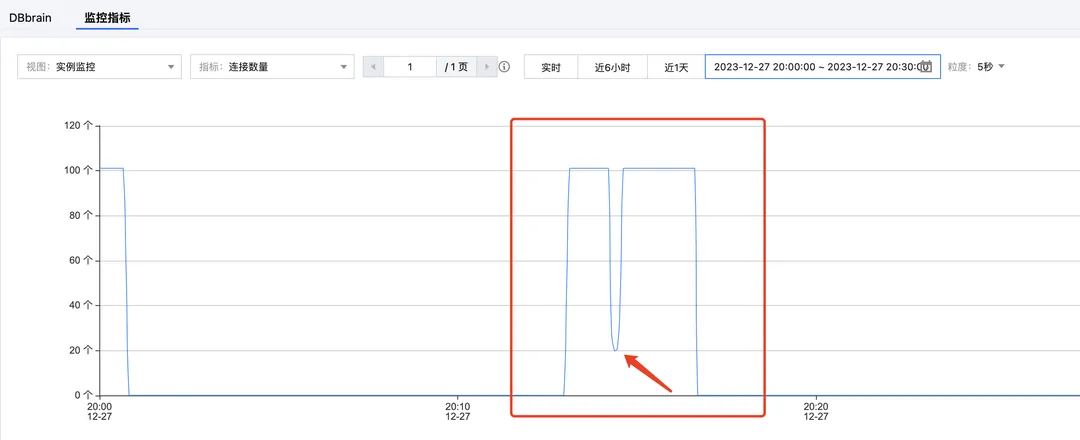
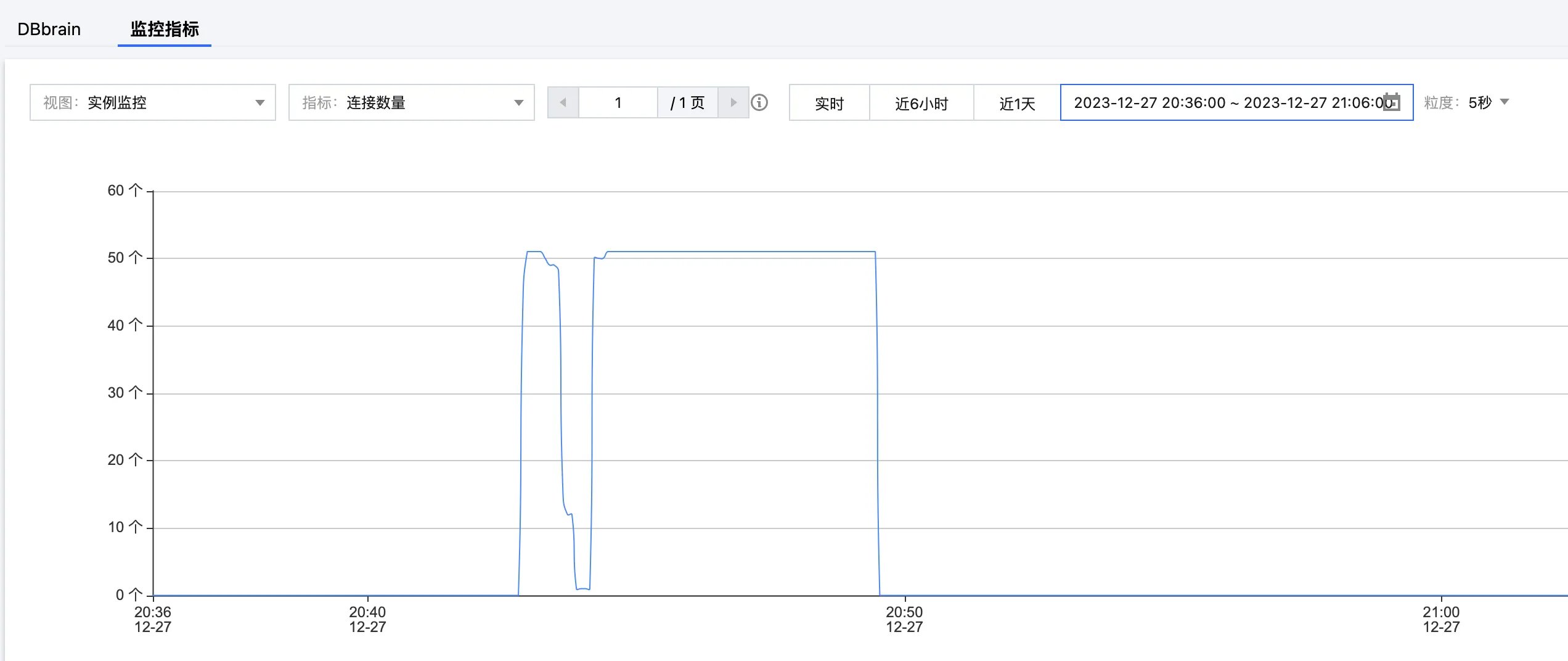
3. 在 腾讯云分布式缓存数据库控制台 的系统监控页面,查看连接数量的指标。该指标呈直线式下降趋势,如下图所示。
4. 执行如下命令,修改 iptables 配置,解除连接阻断,恢复网络。
sudo iptables -D INPUT -s 10.0.16.6 -p tcp --sport 6379 -m conntrack --ctstate NEW,ESTABLISHED -j DROP
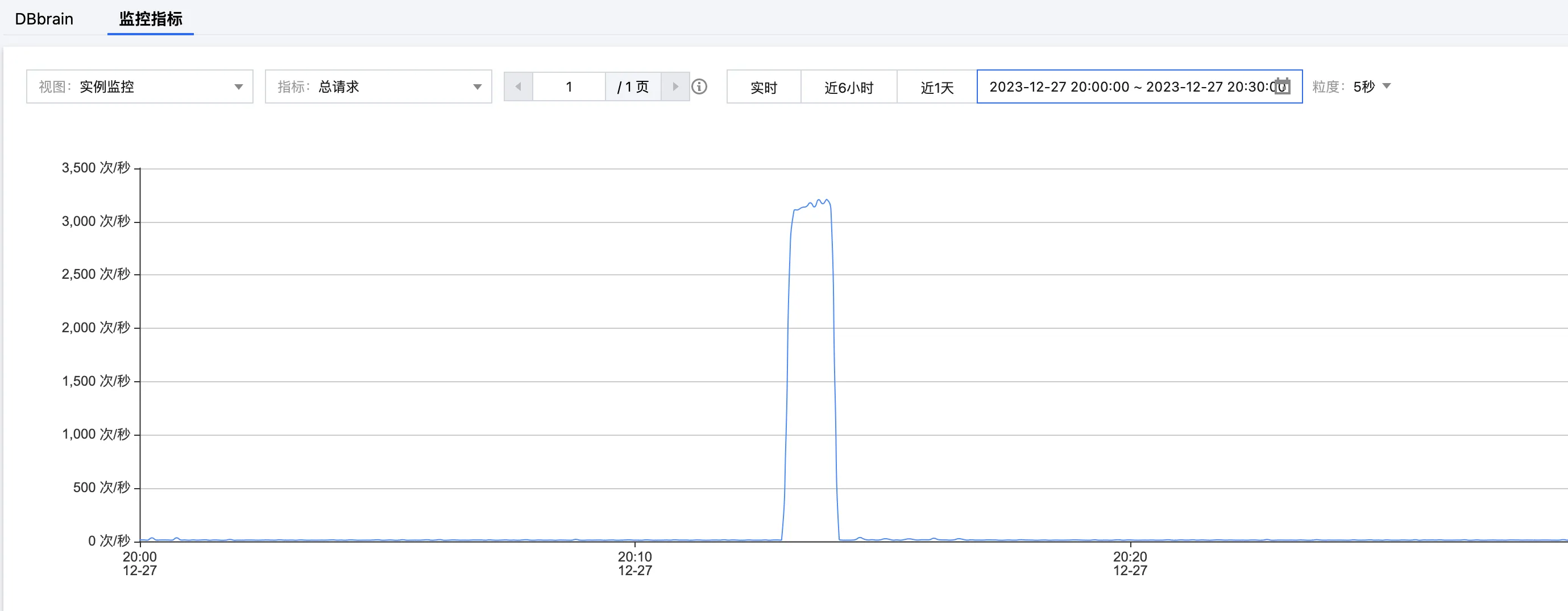
5. 在网络恢复正常之后,客户端迅速进行重连。在 腾讯云分布式缓存数据库控制台 的系统监控页面再次查看指标。连接数量恢复到原始水平,但总请求依然异常,如下所示。
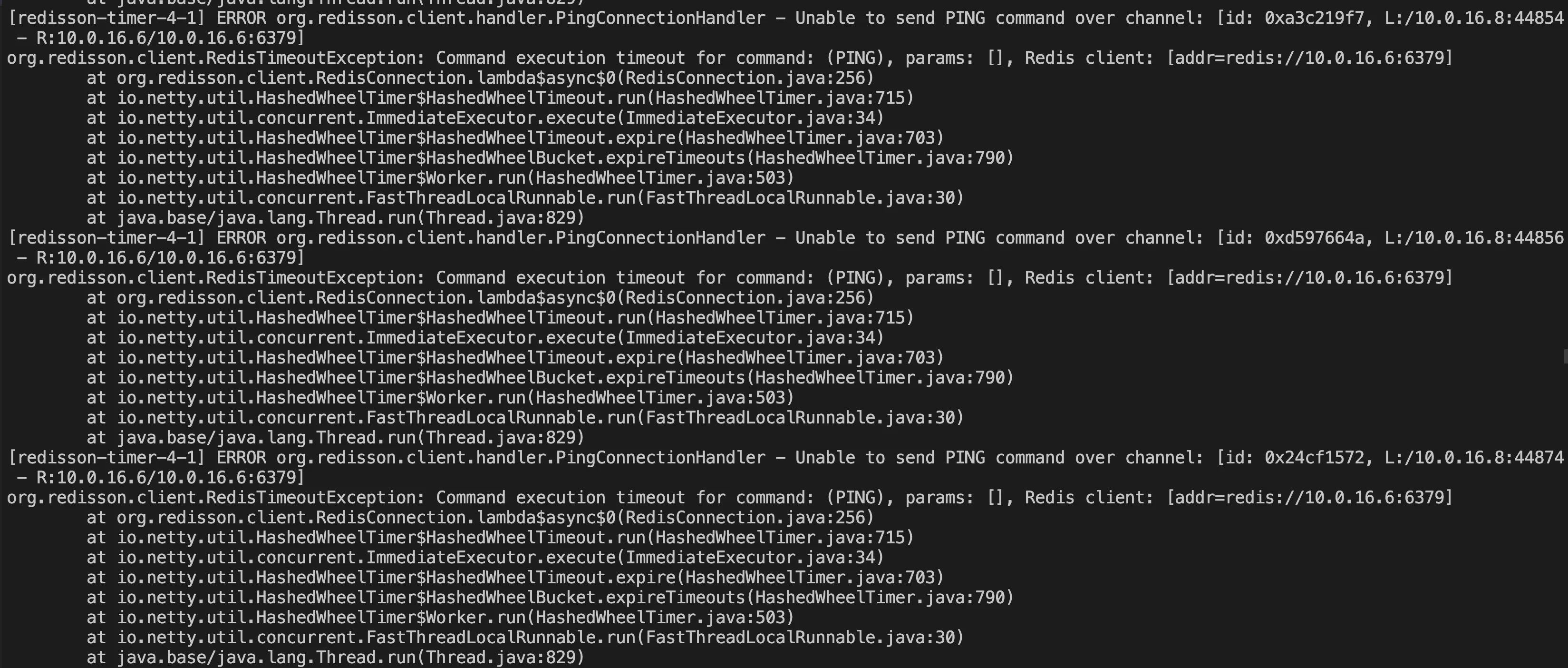
6. 获取异常日志信息,如下图所示。
分析源码
根据报错信息,逐一分析代码,定位问题,可了解 Redisson 在重连出现异常报错之后,并没有尝试重新获取新的 Channel 的行为,导致请求持续报错。
1. 报错信息
Unable to send PING command over channel,查看 PingConnectionHandler 代码,如下所示。可以看出,PING 重连探测失败报错后,执行ctx.channel().close(),关闭了异常的 channel,并且执行connection.getRedisClient().getConfig().getFailedNodeDetector().onPingFailed();检测当前连接客户端的状态。if(connection.getUsage() == 0 && future != null && (future.cancel(false) || cause(future) != null)) {Throwable cause = cause(future);if (!(cause instanceof RedisRetryException)) {if (!future.isCancelled()) {log.error("Unable to send PING command over channel: {}", ctx.channel(), cause);}log.debug("channel: {} closed due to PING response timeout set in {} ms", ctx.channel(), config.getPingConnectionInterval());ctx.channel().close();connection.getRedisClient().getConfig().getFailedNodeDetector().onPingFailed();} else {connection.getRedisClient().getConfig().getFailedNodeDetector().onPingSuccessful();sendPing(ctx);}} else {connection.getRedisClient().getConfig().getFailedNodeDetector().onPingSuccessful();sendPing(ctx);}
2. 进一步分析 Connection 来源
RedisConnection connection = RedisConnection.getFrom(ctx.channel());查看创建连接的构造函数 RedisConnection(),如下所示。该函数创建更新 channel 属性和记录最后使用连接的时间,但并没有切换新 Channel 尝试连接的行为。public <C> RedisConnection(RedisClient redisClient, Channel channel, CompletableFuture<C> connectionPromise) {this.redisClient = redisClient;this.connectionPromise = connectionPromise;updateChannel(channel);lastUsageTime = System.nanoTime();LOG.debug("Connection created {}", redisClient);}// updateChannel 更新 Channel的属性public void updateChannel(Channel channel) {if (channel == null) {throw new NullPointerException();}this.channel = channel;channel.attr(CONNECTION).set(this);}
3. 若更新集群信息,连接会出现如下错误信息。
ERROR org.redisson.cluster.ClusterConnectionManager - Can't update cluster stateorg.redisson.client.RedisTimeoutException: Command execution timeout for command: (CLUSTER NODES), params: [], Redis client: [addr=redis://10.0.16.7:6379] at org.redisson.client.RedisConnection.lambda$async$0(RedisConnection.java:256) at io.netty.util.HashedWheelTimer$HashedWheelTimeout.run(HashedWheelTimer.java:715) at io.netty.util.concurrent.ImmediateExecutor.execute(ImmediateExecutor.java:34) at io.netty.util.HashedWheelTimer$HashedWheelTimeout.expire(HashedWheelTimer.java:703) at io.netty.util.HashedWheelTimer$HashedWheelBucket.expireTimeouts(HashedWheelTimer.java:790) at io.netty.util.HashedWheelTimer$Worker.run(HashedWheelTimer.java:503) at io.netty.util.concurrent.FastThreadLocalRunnable.run(FastThreadLocalRunnable.java:30) at java.base/java.lang.Thread.run(Thread.java:829)
4. 在
ClusterConnectionManager.java 中可以定位到更新集群的报错信息片段。可以看出,在抛出Can't update cluster state异常后,仅检查了集群状态的变更,而并没有从连接池中拿取新连接进行操作的行为,直接返回。private void checkClusterState(ClusterServersConfig cfg, Iterator<RedisURI> iterator, AtomicReference<Throwable> lastException) {if (!iterator.hasNext()) {if (lastException.get() != null) {log.error("Can't update cluster state", lastException.get());}// 检查集群状态的变更scheduleClusterChangeCheck(cfg);return;}......}
解决方案
基于上述问题,对业务侧代码进行调整,在出现异常连接时,主动打断当前的连接线程,重新进行 Channel 和连接配置,并进行重连操作。
调整代码
如下代码,以问题复现时设计的代码为基础进行优化,补充异常重连的操作。
package org.example;import org.redisson.Redisson;import org.redisson.api.RAtomicLong;import org.redisson.api.RedissonClient;import org.redisson.config.Config;import org.redisson.connection.balancer.RoundRobinLoadBalancer;import java.io.File;import java.io.IOException;public class Main {public static void main(String[] args) throws IOException {boolean connected = false;RedissonClient redisson = null;while (!connected) {try {Config config = Config.fromYAML(new File("/data/home/sharmaxia/redissontest/src/main/resources/config-file.yaml"));redisson = Redisson.create(config);connected = true;} catch (Exception e) {e.printStackTrace();try {Thread.sleep(1000);} catch (InterruptedException ex) {Thread.currentThread().interrupt(); //主动打断当前thread重新从连接池中拿连接}}}int i = 0;while (i++ < 1000000) {try {RAtomicLong atomicLong = redisson.getAtomicLong(Integer.toString(i));atomicLong.getAndDecrement();} catch (Exception e) {e.printStackTrace();try {Thread.sleep(1000);} catch (InterruptedException ex) {Thread.currentThread().interrupt(); //主动打断当前thread重新从连接池中拿连接}i--;}}redisson.shutdown();}}
验证结果
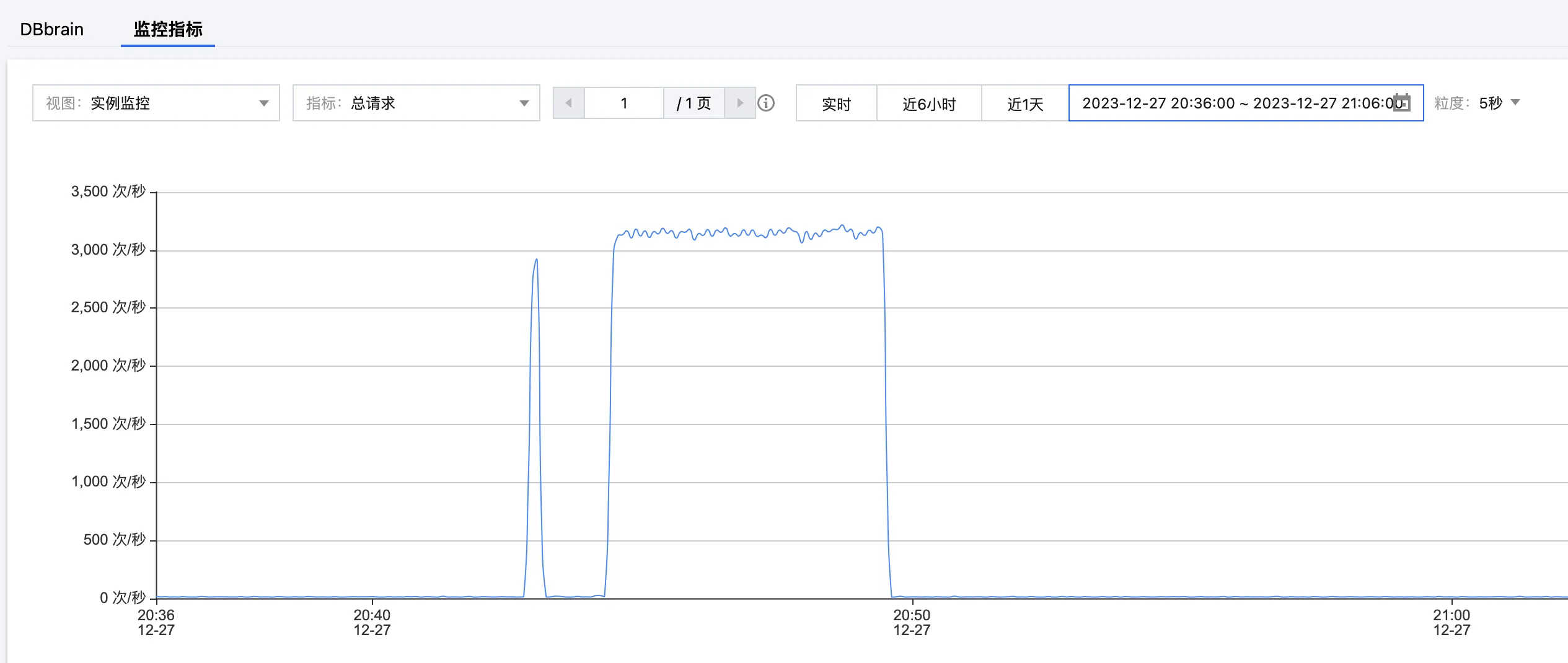
查看连接数量与总请求的监控指标,确认业务恢复正常,以验证代码经过调整后,解决 Redisson 客户端超时重连异常造成的业务故障。
连接数量
总请求