操作场景
腾讯云分布式缓存数据库目前支持外网地址的地域:成都、北京、上海、广州,其他地域如需外网访问,可以通过具备外网 IP 的云服务器 CVM 进行端口转发,来实现外网访问实例。
说明:
iptable 转发的方式存在稳定性风险,不建议在生产环境使用外网接入。
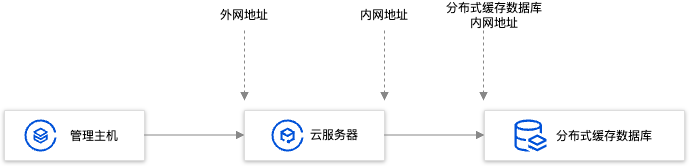
操作步骤
1. 登录 云服务器,开通云服务器 IP 转发功能。
说明:
云服务器和数据库须是同一账号,且同一个 VPC 内(保障同一个地域),或同在基础网络内。
echo 1 > /proc/sys/net/ipv4/ip_forward
Running Environment
Operating System: Ubuntu 24.04.3 LTS / x86_64
Runtime Version: GNU bash, version 5.2.21(1)-release (x86_64-pc-linux-gnu)
2. 配置转发规则,如下示例是将26.xx.x.2:10001(云服务器外网地址,端口可自行选择)的访问转发至内网为10.0.0.5:6379的实例。
iptables -t nat -A PREROUTING -p tcp --dport 10001 -j DNAT --to-destination 10.0.0.5:6379iptables -t nat -A POSTROUTING -d 10.0.0.5 -p tcp --dport 6379 -j MASQUERADE
Running Environment
Operating System: Ubuntu 24.04.3 LTS / x86_64
Runtime Version: GNU bash, version 5.2.21(1)-release (x86_64-pc-linux-gnu)
3. 配置 云服务器安全组,放开云服务器外网端口的访问权限,安全组规则建议仅放开需要访问的源地址。
4. 在访问端通过外网地址(本示例即26.xx.xx.2:10001)连接内网分布式缓存数据库实例,连接命令与内网连接命令一致,命令请参见 通过客户端工具连接。
5. 连接腾讯云分布式缓存数据库后,执行
info命令返回数据库相关信息即表示连接成功。


