当 App 进入后台或被杀进程后,IM 消息将通过各厂商推送通道(FCM、小米、华为、vivo、OPPO、荣耀、魅族、APNs、HarmonyOS Push 等)下发至终端设备。发送消息时,您可以通过推送配置设置通知栏标题、内容、点击透传数据,以及各厂商通道的推送特性(如消息分类、铃音、图片、私信模板等)。
选择推送配置结构
IM SDK 提供两种推送配置结构,请根据发送端平台选择:
发送端平台 | 推送配置结构 | 说明 |
Android、iOS | V2TIMPushInfo | |
Android、iOS | V2TIMOfflinePushInfo | |
其他平台(C、C++、HarmonyOS、Flutter、React Native、uni-app、Unity 等) | V2TIMOfflinePushInfo |
V2TIMPushInfo(Android / iOS 推荐)
注意:
IMSDK 9.1.x 及以上版本支持。
结构说明
V2TIMPushInfo 包含 4 个字段:字段 | 类型 | 说明 | 是否在通知栏可见 |
title | String | 通知栏标题。 | 可见 |
desc | String | 通知栏内容。自定义消息必须填写。 | 可见 |
clickPayload | Android:byte[] iOS:NSString | 点击通知后传给 App 的透传数据,常用于页面跳转,建议使用 JSON 格式。 | 不可见 |
notification | String(JSON) | 通知特性配置,如消息分类、铃音、图片、私信模板等。 | 不可见(但影响展示行为) |
请按需选择用法:
基础用法:只设置
title、desc、clickPayload。消息分类等配置由 SDK 默认填充,适合大多数聊天场景。高级用法:在基础用法的基础上设置
notification,自定义消息分类、铃音、图片、私信模板等。基础用法
只需设置以下 3 个字段:
title:不填时使用默认标题(如发送者昵称或群名称)。desc:不填时使用默认内容(如文本消息的文字)。自定义消息必须填写,否则不推送。clickPayload:按业务需要填写,接收端点击通知后可获取。SDK 默认配置
使用
V2TIMPushInfo 时,SDK 会按 IM 聊天场景自动填充以下配置,无需手动设置:通道 | 默认配置 | 含义 |
华为 | huawei.category = "IM" | 即时通讯类消息 |
荣耀 | honor.importance = "NORMAL" | 服务通讯类消息 |
OPPO | oppo.category = "IM" | 即时通讯类消息 |
vivo | vivo.category = "IM"vivo.classification = 1vivo.notifyType = 4 | 即时通讯类消息,响铃和振动 |
魅族 | meizu.notifyType = 1 | 私信消息 |
FCM | googleFCM.priority = "high" | 高优先级 |
HarmonyOS | harmony.category = "IM" | 即时通讯类消息 |
说明:
如果不是 IM 聊天场景(例如营销通知),请参考 高级用法 覆盖对应字段。
小米、OPPO 的通知渠道(
channelId)和私信模板(templateId)没有默认值,请按需在 notification 中设置。私信模板 ID 也可以在 IM 控制台配置,配置后无需修改代码。用法示例
以下示例发送一条单聊消息。发送群消息时,
userID 传空,groupID 传群 ID。import com.tencent.imsdk.v2.V2TIMManager;import com.tencent.imsdk.v2.V2TIMMessage;import com.tencent.imsdk.v2.V2TIMPushInfo;import com.tencent.imsdk.v2.V2TIMSendCallback;import com.tencent.imsdk.v2.V2TIMSendMessageOption;import java.nio.charset.StandardCharsets;V2TIMMessage message = V2TIMManager.getMessageManager().createTextMessage("你好,在吗?");V2TIMPushInfo pushInfo = new V2TIMPushInfo();pushInfo.setTitle("张三");pushInfo.setDesc("你好,在吗?");pushInfo.setClickPayload("{\\"key\\":\\"value\\"}".getBytes(StandardCharsets.UTF_8));V2TIMSendMessageOption option = new V2TIMSendMessageOption();option.setPushInfo(pushInfo);V2TIMManager.getMessageManager().sendMessage(message, "user_001", null, option,new V2TIMSendCallback<V2TIMMessage>() {@Overridepublic void onProgress(int progress) {}@Overridepublic void onSuccess(V2TIMMessage v2TIMMessage) {}@Overridepublic void onError(int code, String desc) {}});
import com.tencent.imsdk.v2.V2TIMManagerimport com.tencent.imsdk.v2.V2TIMMessageimport com.tencent.imsdk.v2.V2TIMPushInfoimport com.tencent.imsdk.v2.V2TIMSendCallbackimport com.tencent.imsdk.v2.V2TIMSendMessageOptionval message = V2TIMManager.getMessageManager().createTextMessage("你好,在吗?")val pushInfo = V2TIMPushInfo()pushInfo.title = "张三"pushInfo.desc = "你好,在吗?"pushInfo.clickPayload = "{\\"key\\":\\"value\\"}".toByteArray(Charsets.UTF_8)val option = V2TIMSendMessageOption()option.pushInfo = pushInfoV2TIMManager.getMessageManager().sendMessage(message, "user_001", null, option,object : V2TIMSendCallback<V2TIMMessage> {override fun onProgress(progress: Int) {}override fun onSuccess(v2TIMMessage: V2TIMMessage?) {}override fun onError(code: Int, desc: String?) {}})
#import <ImSDK_Plus/ImSDK_Plus.h>V2TIMMessage *message = [[V2TIMManager sharedInstance] createTextMessage:@"你好,在吗?"];V2TIMPushInfo *pushInfo = [[V2TIMPushInfo alloc] init];pushInfo.title = @"张三";pushInfo.desc = @"你好,在吗?";pushInfo.clickPayload = @"{\\"key\\":\\"value\\"}";V2TIMSendMessageOption *option = [[V2TIMSendMessageOption alloc] init];option.pushInfo = pushInfo;[[V2TIMManager sharedInstance] sendMessage:messageuserID:@"user_001"groupID:niloption:optionprogress:nilsucc:^{} fail:^(int code, NSString *desc) {}];
import ImSDK_Pluslet message = V2TIMManager.sharedInstance().createTextMessage(text: "你好,在吗?")let pushInfo = V2TIMPushInfo()pushInfo.title = "张三"pushInfo.desc = "你好,在吗?"pushInfo.clickPayload = "{\\"key\\":\\"value\\"}"let option = V2TIMSendMessageOption()option.pushInfo = pushInfoV2TIMManager.sharedInstance().sendMessage(message: message, userID: "user_001", groupID: nil, option: option, progress: nil, succ: {}, fail: { code, desc in})
高级用法
需要自定义消息分类、铃音、图片、私信模板等特性时,设置
notification 字段。填写规则
notification 是一个 JSON 字符串,第一层为分组名(通用配置、平台或厂商通道),第二层为该分组的字段:{"ios": { "sound": "default" },"huawei": { "category": "IM" }}
按需填写:只填写需要的分组和字段。未填写的字段使用 SDK 默认值;已填写的字段覆盖对应的默认值,同一分组内的其他默认值仍保留。
按接收端生效:同一份配置可以同时包含多个分组,推送时按接收端实际使用的通道取用对应分组。例如 Android 发送端也可以填写
ios 分组,设置 iOS 接收端的铃音。类型正确:布尔值使用
true / false,整数使用数字,不要加引号。模板参数:
commonConfig.tencentPushTemplateParam、xiaomi.templateParam、oppo.templateTitle、oppo.templateContent 直接传 JSON 对象即可,也支持传 JSON 字符串。容错:字段名或类型错误不会导致消息发送失败,SDK 会忽略该字段并打印 warning 日志;
notification 不是合法 JSON 时,按未填写处理。用法示例
以下示例包含了 notification 的所有分组和字段,复制后删除不需要的字段即可使用:
{"commonConfig": {"image": "https://example.com/image.png","notificationMode": "notification","tencentPushTemplateId": "templateid","tencentPushTemplateParam": { "address": "1908 会议室", "time": "3 分钟" }},"android": {"sound": "private_ring"},"ios": {"pushType": 0,"sound": "default","ignoreBadge": false,"interruptionLevel": "active","enableBackgroundNotification": false,"image": "https://example.com/image.png"},"harmony": {"category": "IM","image": "https://example.com/image.png","ignoreBadge": false,"sound": "alert.mp3","soundDuration": 10},"huawei": {"category": "IM","image": "https://example.com/image.png"},"honor": {"importance": "NORMAL","image": "https://example.com/image.png"},"xiaomi": {"channelId": "im_channel","templateId": "P10032","templateParam": { "keywords1": "张三", "keywords2": "你好,在吗?" }},"oppo": {"channelId": "im_channel","category": "IM","notifyLevel": 2,"templateId": "oppoid","templateTitle": { "city": "北京" },"templateContent": { "userName": "汤姆", "city": "深圳市" }},"vivo": {"category": "IM","classification": 1,"notifyType": 4},"meizu": {"notifyType": 1},"googleFCM": {"channelId": "im_channel","image": "https://example.com/image.png","priority": "high","notificationMode": "notification"}}
注意:
示例中所有保留的字段都会生效,请删除不需要的字段(或整个分组),不要原样使用。
保留的字段请将示例值替换为实际值,尤其是通知渠道 channelId、模板 ID 和模板参数、image 图片地址、sound 铃音文件名。
示例中有 SDK 默认值的字段(如各通道的 category、vivo.notifyType、googleFCM.priority),取值与默认值相同,不需要修改时可以直接删除。
import org.json.JSONObject;import java.util.HashMap;import java.util.Map;Map<String, Object> commonConfig = new HashMap<>();commonConfig.put("image", "https://example.com/image.png");commonConfig.put("notificationMode", "notification");commonConfig.put("tencentPushTemplateId", "templateid");Map<String, Object> tencentPushTemplateParam = new HashMap<>();tencentPushTemplateParam.put("address", "1908 会议室");tencentPushTemplateParam.put("time", "3 分钟");commonConfig.put("tencentPushTemplateParam", tencentPushTemplateParam);Map<String, Object> androidConfig = new HashMap<>();androidConfig.put("sound", "private_ring");Map<String, Object> ios = new HashMap<>();ios.put("pushType", 0);ios.put("sound", "default");ios.put("ignoreBadge", false);ios.put("interruptionLevel", "active");ios.put("enableBackgroundNotification", false);ios.put("image", "https://example.com/image.png");Map<String, Object> harmony = new HashMap<>();harmony.put("category", "IM");harmony.put("image", "https://example.com/image.png");harmony.put("ignoreBadge", false);harmony.put("sound", "alert.mp3");harmony.put("soundDuration", 10);Map<String, Object> huawei = new HashMap<>();huawei.put("category", "IM");huawei.put("image", "https://example.com/image.png");Map<String, Object> honor = new HashMap<>();honor.put("importance", "NORMAL");honor.put("image", "https://example.com/image.png");Map<String, Object> xiaomiTemplateParam = new HashMap<>();xiaomiTemplateParam.put("keywords1", "张三");xiaomiTemplateParam.put("keywords2", "你好,在吗?");Map<String, Object> xiaomi = new HashMap<>();xiaomi.put("channelId", "im_channel");xiaomi.put("templateId", "P10032");xiaomi.put("templateParam", xiaomiTemplateParam);Map<String, Object> oppoTemplateTitle = new HashMap<>();oppoTemplateTitle.put("city", "北京");Map<String, Object> oppoTemplateContent = new HashMap<>();oppoTemplateContent.put("userName", "汤姆");oppoTemplateContent.put("city", "深圳市");Map<String, Object> oppo = new HashMap<>();oppo.put("channelId", "im_channel");oppo.put("category", "IM");oppo.put("notifyLevel", 2);oppo.put("templateId", "oppoid");oppo.put("templateTitle", oppoTemplateTitle);oppo.put("templateContent", oppoTemplateContent);Map<String, Object> vivo = new HashMap<>();vivo.put("category", "IM");vivo.put("classification", 1);vivo.put("notifyType", 4);Map<String, Object> meizu = new HashMap<>();meizu.put("notifyType", 1);Map<String, Object> googleFCM = new HashMap<>();googleFCM.put("channelId", "im_channel");googleFCM.put("image", "https://example.com/image.png");googleFCM.put("priority", "high");googleFCM.put("notificationMode", "notification");Map<String, Object> notification = new HashMap<>();notification.put("commonConfig", commonConfig);notification.put("android", androidConfig);notification.put("ios", ios);notification.put("harmony", harmony);notification.put("huawei", huawei);notification.put("honor", honor);notification.put("xiaomi", xiaomi);notification.put("oppo", oppo);notification.put("vivo", vivo);notification.put("meizu", meizu);notification.put("googleFCM", googleFCM);pushInfo.setNotification(new JSONObject(notification).toString());
import org.json.JSONObjectval notification = mapOf("commonConfig" to mapOf("image" to "https://example.com/image.png","notificationMode" to "notification","tencentPushTemplateId" to "templateid","tencentPushTemplateParam" to mapOf("address" to "1908 会议室", "time" to "3 分钟")),"android" to mapOf("sound" to "private_ring"),"ios" to mapOf("pushType" to 0,"sound" to "default","ignoreBadge" to false,"interruptionLevel" to "active","enableBackgroundNotification" to false,"image" to "https://example.com/image.png"),"harmony" to mapOf("category" to "IM","image" to "https://example.com/image.png","ignoreBadge" to false,"sound" to "alert.mp3","soundDuration" to 10),"huawei" to mapOf("category" to "IM","image" to "https://example.com/image.png"),"honor" to mapOf("importance" to "NORMAL","image" to "https://example.com/image.png"),"xiaomi" to mapOf("channelId" to "im_channel","templateId" to "P10032","templateParam" to mapOf("keywords1" to "张三", "keywords2" to "你好,在吗?")),"oppo" to mapOf("channelId" to "im_channel","category" to "IM","notifyLevel" to 2,"templateId" to "oppoid","templateTitle" to mapOf("city" to "北京"),"templateContent" to mapOf("userName" to "汤姆", "city" to "深圳市")),"vivo" to mapOf("category" to "IM","classification" to 1,"notifyType" to 4),"meizu" to mapOf("notifyType" to 1),"googleFCM" to mapOf("channelId" to "im_channel","image" to "https://example.com/image.png","priority" to "high","notificationMode" to "notification"))pushInfo.notification = JSONObject(notification).toString()
NSDictionary *notification = @{@"commonConfig": @{@"image": @"https://example.com/image.png",@"notificationMode": @"notification",@"tencentPushTemplateId": @"templateid",@"tencentPushTemplateParam": @{@"address": @"1908 会议室", @"time": @"3 分钟"}},@"android": @{@"sound": @"private_ring"},@"ios": @{@"pushType": @0,@"sound": @"default",@"ignoreBadge": @NO,@"interruptionLevel": @"active",@"enableBackgroundNotification": @NO,@"image": @"https://example.com/image.png"},@"harmony": @{@"category": @"IM",@"image": @"https://example.com/image.png",@"ignoreBadge": @NO,@"sound": @"alert.mp3",@"soundDuration": @10},@"huawei": @{@"category": @"IM",@"image": @"https://example.com/image.png"},@"honor": @{@"importance": @"NORMAL",@"image": @"https://example.com/image.png"},@"xiaomi": @{@"channelId": @"im_channel",@"templateId": @"P10032",@"templateParam": @{@"keywords1": @"张三", @"keywords2": @"你好,在吗?"}},@"oppo": @{@"channelId": @"im_channel",@"category": @"IM",@"notifyLevel": @2,@"templateId": @"oppoid",@"templateTitle": @{@"city": @"北京"},@"templateContent": @{@"userName": @"汤姆", @"city": @"深圳市"}},@"vivo": @{@"category": @"IM",@"classification": @1,@"notifyType": @4},@"meizu": @{@"notifyType": @1},@"googleFCM": @{@"channelId": @"im_channel",@"image": @"https://example.com/image.png",@"priority": @"high",@"notificationMode": @"notification"}};NSData *data = [NSJSONSerialization dataWithJSONObject:notification options:0 error:nil];pushInfo.notification = [[NSString alloc] initWithData:data encoding:NSUTF8StringEncoding];
let commonConfig: [String: Any] = ["image": "https://example.com/image.png","notificationMode": "notification","tencentPushTemplateId": "templateid","tencentPushTemplateParam": ["address": "1908 会议室", "time": "3 分钟"]]let androidConfig: [String: Any] = ["sound": "private_ring"]let ios: [String: Any] = ["pushType": 0,"sound": "default","ignoreBadge": false,"interruptionLevel": "active","enableBackgroundNotification": false,"image": "https://example.com/image.png"]let harmony: [String: Any] = ["category": "IM","image": "https://example.com/image.png","ignoreBadge": false,"sound": "alert.mp3","soundDuration": 10]let huawei: [String: Any] = ["category": "IM","image": "https://example.com/image.png"]let honor: [String: Any] = ["importance": "NORMAL","image": "https://example.com/image.png"]let xiaomi: [String: Any] = ["channelId": "im_channel","templateId": "P10032","templateParam": ["keywords1": "张三", "keywords2": "你好,在吗?"]]let oppo: [String: Any] = ["channelId": "im_channel","category": "IM","notifyLevel": 2,"templateId": "oppoid","templateTitle": ["city": "北京"],"templateContent": ["userName": "汤姆", "city": "深圳市"]]let vivo: [String: Any] = ["category": "IM","classification": 1,"notifyType": 4]let meizu: [String: Any] = ["notifyType": 1]let googleFCM: [String: Any] = ["channelId": "im_channel","image": "https://example.com/image.png","priority": "high","notificationMode": "notification"]let notification: [String: Any] = ["commonConfig": commonConfig,"android": androidConfig,"ios": ios,"harmony": harmony,"huawei": huawei,"honor": honor,"xiaomi": xiaomi,"oppo": oppo,"vivo": vivo,"meizu": meizu,"googleFCM": googleFCM]if let data = try? JSONSerialization.data(withJSONObject: notification) {pushInfo.notification = String(data: data, encoding: .utf8)}
notification 字段说明
共 11 个分组。“SDK 默认值”为未填写时 SDK 自动填充的值,“-”表示不填充。
字段 | 类型 | SDK 默认值 | 说明 |
image | String | - | 通知图片,URL 必须使用 HTTPS 协议,例如 https://example.com/image.png。 |
notificationMode | String | - | 通知模式: "notification":通知栏消息; "data":透传消息,不展示通知栏。 不设置时为通知栏消息。 |
tencentPushTemplateId | String | - | 推送模板 ID,模板在控制台创建并生成。 |
tencentPushTemplateParam | Object / String | - | 推送模板填充参数,key 与模板变量一致。 例:模板为“您参与的会议,地址 {address},将于 {time} 后开始!”,参数为 {"address": "1908 会议室", "time": "3 分钟"}。 |
字段 | 类型 | SDK 默认值 | 说明 |
sound | String | - | 自定义铃音,填写 Android 工程 res/raw 目录中的铃音文件名,不带后缀。仅华为、FCM 通道支持;FCM 在 Android 8.0 及以上需在 googleFCM.channelId 对应的通知渠道中设置铃音。 |
字段 | 类型 | SDK 默认值 | 说明 |
pushType | Integer | 0 | 推送类型: 0:普通 APNs 推送; 1:VoIP 推送。 |
sound | String | - | 铃音: "default":系统声音; "push.no_sound":静音; 自定义铃音:先将铃音文件添加到 Xcode 工程,再填写文件名(带后缀)。 |
ignoreBadge | Boolean | false | true:这条消息不增加 App 图标的未读角标。 |
interruptionLevel | String | - | 通知级别(iOS 15 及以上支持): "passive":无声音、振动和横幅,只出现在通知中心; "active":有声音或振动,并显示横幅(系统默认); "time-sensitive":专注模式下也会提醒,需在苹果开发者平台和 Xcode 工程中开启对应能力; "critical":静音模式下也会提醒,需向苹果申请。 |
enableBackgroundNotification | Boolean | false | true:离线接收时唤起应用,并透传 clickPayload。 |
image | String | - | 通知图片,URL 必须使用 HTTPS 协议。支持 JPEG、GIF、PNG,大小不超过 10 MB。 需在 IM 控制台开启 mutable-content,并接入 Notification Service Extension;获取图片的 key 为 "image"。 |
字段 | 类型 | SDK 默认值 | 说明 |
category | String | "IM" | |
image | String | - | 通知图片,URL 必须使用 HTTPS 协议。支持 png、jpg、jpeg、heif、gif、bmp,图片长 × 宽 < 25000 像素。 |
ignoreBadge | Boolean | false | true:这条消息不增加 App 图标的未读角标。 |
sound | String | - | 自定义铃音,铃音文件需放在应用的 /resources/rawfile 目录下,填写文件名,例如 "alert.mp3"。支持 MP3、WAV、MPEG 等格式,不设置时使用系统铃音。未设置 soundDuration 时,铃音建议不超过 30 秒,超过会被截断。 |
soundDuration | Integer | - | 铃音播放时长,单位为秒,取值范围 [1, 60],需同时设置 sound。铃音时长不足时循环播放,到达设定时长后停止。 |
字段 | 类型 | SDK 默认值 | 说明 |
category | String | "IM" | |
image | String | - | 通知图片,URL 必须使用 HTTPS 协议。图片小于 512 KB,建议规格 40dp × 40dp、弧角 8dp,格式建议 JPG、JPEG、PNG。 |
字段 | 类型 | SDK 默认值 | 说明 |
importance | String | "NORMAL" | "NORMAL":服务通讯类; "LOW":资讯营销类。 |
image | String | - | 通知图片,URL 必须使用 HTTPS 协议。图片小于 100 KB,建议规格 160px × 160px、弧角 32px。 |
字段 | 类型 | SDK 默认值 | 说明 |
channelId | String | - | 通知渠道 ID,Android 8.0 及以上系统使用。 |
templateId | String | - | 私信模板 ID。也可在 IM 控制台配置,配置后无需修改代码。 |
templateParam | Object / String | - | 模板参数: key 和个数须与模板配置完全一致; 参数值长度 1~128 字符,不能为纯空格; 不支持 emoji、特殊符号(\\p{So})及未分配的 Unicode 字符。 |
说明:
小米模板 ID 也支持在 IM 控制台设置,常用来适配 IM 场景下(私信消息)推送消息接入推送模板。控制台设置模板 ID 后,会默认填充
V2TIMPushInfo 的 title 和 desc 字段内容给模板标题和内容,等效于:{"xiaomi": {"templateParam": { "keywords1": "title", "keywords2": "desc" }}}
对应的申请模板示例(因为小米要求“主标题首位不可以变量开头”,所以示例模板标题前面增加“@”,可根据实际情况自行适配):

只需在控制台填好模板 ID,存量 IM 用户的离线消息就会自动走私信模板通道,不用改代码、不用发版。IM 类型消息也建议统一用这种方式接入私信模板。
字段 | 类型 | SDK 默认值 | 说明 |
channelId | String | - | 通知渠道 ID,Android 8.0 及以上系统使用。接入 OPPO 推送时必须设置。 |
category | String | "IM" | 通讯与服务类:"IM"、"ACCOUNT" 等; 内容与营销类:"NEWS"、"CONTENT" 等。 |
notifyLevel | Integer | - | 通知栏提醒等级, category 为 "IM" 时生效:1:通知栏; 2:通知栏 + 锁屏(OPPO 默认); 16:通知栏 + 锁屏 + 横幅 + 震动 + 铃声。 |
templateId | String | - | |
templateTitle | Object / String | - | 标题模板参数。 例:模板标题为“欢迎来到 ${city}”,参数为 {"city": "北京"}。 |
templateContent | Object / String | - | 内容模板参数。 例:模板内容为“欢迎 ${userName} 来到 ${city}”,参数为 {"userName": "汤姆", "city": "深圳市"}。 |
说明:
OPPO 模板 ID 也支持在 IM 控制台设置,常用来适配 IM 场景下(
category = "IM")推送消息接入推送模板。控制台设置模板 ID 后,会默认填充 V2TIMPushInfo 的 title 和 desc 字段内容给模板标题和内容,等效于:{"oppo": {"templateTitle": { "title": "titleInfo" },"templateContent": { "desc": "descInfo" }}}
对应的申请模板示例:
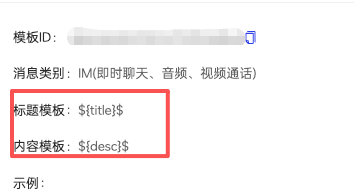
只需在控制台填好模板 ID,存量 IM 用户的离线消息就会自动走私信模板通道,不用改代码、不用发版。IM 类型消息也建议统一用这种方式接入私信模板。
字段 | 类型 | SDK 默认值 | 说明 |
category | String | "IM" | |
classification | Integer | 1 | 旧版消息分类:0 为运营消息,1 为系统消息。已设置 category 时无需关注。 |
notifyType | Integer | 4 | 通知类型: 1:无; 2:响铃; 3:振动; 4:响铃和振动。 |
字段 | 类型 | SDK 默认值 | 说明 |
notifyType | Integer | 1 | 0:公信消息; 1:私信消息。 |
字段 | 类型 | SDK 默认值 | 说明 |
channelId | String | - | 通知渠道 ID,Android 8.0 及以上系统使用。 |
image | String | - | 通知图片,URL 必须使用 HTTPS 协议。图片小于 1 MB;未展开时显示为大图标,展开后显示为大图片。 |
priority | String | "high" | 消息优先级: "normal":普通优先级,应用在后台时可能延迟送达; "high":高优先级,设备处于低电耗模式时也会尝试立即送达。 |
notificationMode | String | "notification" | 通知模式,取值同 commonConfig.notificationMode,仅对 FCM 生效,优先级高于 commonConfig.notificationMode。未设置时与 commonConfig.notificationMode 一致。 |
V2TIMOfflinePushInfo(全平台可用)
注意:
Android、iOS 上的
V2TIMOfflinePushInfo 及对应的 sendMessage 接口已标记为废弃(编译时有告警),但仍可正常使用。建议 Android、iOS 新接入使用 V2TIMPushInfo。其他平台请继续使用
V2TIMOfflinePushInfo。使用此结构时,SDK 不会自动填充 V2TIMPushInfo 基础用法 中的默认配置。
各平台 API 参考
平台 | API 文档 |
Android | |
iOS | |
C++ | |
C | |
HarmonyOS |
通用属性说明
属性 | 类型 | 含义 | 是否在通知栏可见 |
title | String | 离线推送通知栏标题。 | 可见 |
desc | String | 离线推送通知栏正文(自定义消息必填)。 | 可见 |
ext | Android:byte[] iOS:NSString | 透传扩展字段,点击推送后 APP 内读取。 | 不可见 |
disablePush | boolean | 是否关闭本条离线推送。 | 不可见(true 则整条通知都不出现) |
vendorParams | String(JSON) | 各厂商扩展参数(fcmPriority、vivoNotifyType、oppoTemplateId 等)。 | 不可见(但影响展示行为) |
vendorParams 字段说明
V2TIMOfflinePushInfo.vendorParams 以 JSON 字符串的形式,透传各厂商推送通道的专属高级配置。您可以按需组合以下字段,SDK 会根据最终命中的推送通道自动取用对应参数。注意:
IMSDK 8.7 及以上版本支持。
字段列表
特性分类 | 字段 | 类型 | 使用说明 | 备注 |
FCM 消息优先级 | fcmPriority | String | FCM 推送消息优先级设置: "normal":普通优先级,应用在前台运行时,普通优先级消息会被立即传递。当应用在后台运行时,消息传递可能会延迟。如果是对时间不太敏感的消息(例如新电子邮件通知、使界面保持同步或在后台同步应用数据),建议您选择普通传递优先级; "high":高优先级,即使设备处于低电耗模式,FCM 也会立即尝试传递高优先级消息。 高优先级消息适用于对时间敏感的用户可见内容。 | 无 |
vivo 通知类型 | vivoNotifyType | Integer | vivo 通知类型: 1:无。 2:响铃。 3:振动。 4:响铃和振动。 默认值:4。 | 无 |
OPPO 私信模板 | oppoTemplateId | String | 下发对应私信模板时必须携带,不支持自拟。 | 说明: 控制台也支持设置模板 ID, 常用来适配 IM 场景下 (category = "IM") 推送消息接入推送模板: 控制台设置模板 ID 后,会默认填充 V2TIMOfflinePushInfo 的 title 和 desc 字段内容给模板标题和内容,格式如下:
对应的申请模板示例: 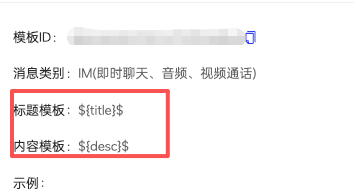 只需在控制台填好模板 ID,存量 IM 用户的离线消息就会自动走私信模板通道,不用改代码、不用发版。IM 类型消息也建议统一用这种方式接入私信模板。 |
| oppoTitleParam | JSON String | OPPO 标题模板填充参数: 例:私信模板 ID 标题模板为:欢迎来到$ {city} $ ,$ {city} $ 欢迎您。 此参数内容为:{“city”:“北京”} | |
| oppoContentParam | JSON String | OPPO 内容模板填充参数: 例:私信模板 ID 对应的内容模板为:欢迎$ {userName} $ 来到$ {city} $ 参数内容为:{“userName”:“汤姆”,“city”:“深圳市”} | |
推送模板 | pushTemplateId | String | 推送模板 ID。 模板在控制台创建并生成,客户端发送时指定。 | 无 |
| pushTemplateParam | JSON String | 推送模板填充参数。 例: 对应的模板是: {appName} 发来一条消息 您参与的会议,地址 {address} ,将于 {time} 后开始! 参数内容为: { "appName": " TIMPush ", "address":" 1908 会议室 ", "time":" 3 分钟 " } | 无 |
鸿蒙自定义铃音 | harmonySound | String | 自定义消息通知铃声。 此处设置的铃声文件必须放在应用的 /resources/rawfile 路径下。例如设置为 alert.mp3,对应应用本地的 /resources/rawfile/alert.mp3 文件。支持的文件格式包括 MP3、WAV、MPEG 等,如果不设置,则用默认系统铃声。 当请求不携带 soundDuration 字段时,建议铃声时长不超过 30 秒,若超过 30 秒则截断处理;当请求携带 soundDuration 字段时,详情请参见 soundDuration 字段说明。 | 无 |
| harmonySoundDuration | Integer | 自定义消息通知铃声时长。 需要配合 harmonySound 字段使用,只有当请求同时携带 harmonySound 字段,harmonySoundDuration 字段才会生效。仅支持数字,单位为秒,取值范围 [1, 60]。 harmonySound 字段传入的自定义消息通知铃声会播放至 harmonySoundDuration 字段值后停止,若自定义消息通知铃声对应的时长不足 harmonySoundDuration 字段值则会循环播放,在达到 harmonySoundDuration 字段值后停止。 | 无 |
小米推送模板 | xiaomiTemplateId | String | 消息模板 ID | 说明: 控制台也支持设置模板 ID, 常用来适配 IM 场景下 (私信消息) 推送消息接入推送模板: 控制台设置模板 ID 后,会默认填充 V2TIMOfflinePushInfo 的 title 和 desc 字段内容给模板标题和内容,格式如下:
对应的申请模板示例:(因为小米要求 “主标题首位不可以变量开头”,所以示例模板标题前面增加 “@”,可根据实际情况自行适配):  只需在控制台填好模板 ID,存量 IM 用户的离线消息就会自动走私信模板通道,不用改代码、不用发版。IM 类型消息也建议统一用这种方式接入私信模板。 |
| xiaomiTemplateParam | JSON String | 模板参数,值为 JSON 字符串。 参数格式与个数须与模板配置完全一致; 参数值长度 1~128 字符,不能为纯空格; 不支持 emoji、特殊符号(\\p{So})及未分配的 Unicode 字符。 | |
vendorParams 用法示例
V2TIMOfflinePushInfo v2TIMOfflinePushInfo = new V2TIMOfflinePushInfo();Map<String, Object> map = new HashMap<>();map.put("fcmPriority", "high");map.put("vivoNotifyType", 4);map.put("oppoTemplateId", "oppoid");Map<String, Object> oppoTitleMap = new HashMap<>();oppoTitleMap.put("title", "title");map.put("oppoTitleParam", new Gson().toJson(oppoTitleMap));Map<String, Object> oppoContentMap = new HashMap<>();oppoContentMap.put("desc", "desc");map.put("oppoContentParam", new Gson().toJson(oppoContentMap));map.put("pushTemplateId", "templateid");Map<String, Object> pushTemplateParamMap = new HashMap<>();pushTemplateParamMap.put("key1", "value1");map.put("pushTemplateParam", new Gson().toJson(pushTemplateParamMap));map.put("harmonySound", "ring.mp3");map.put("harmonySoundDuration", 10);map.put("xiaomiTemplateId", "xiaomiid");Map<String, Object> xiaomiTemplateParamMap = new HashMap<>();xiaomiTemplateParamMap.put("keywords1", "value1");xiaomiTemplateParamMap.put("keywords2", "value2");map.put("xiaomiTemplateParam", new Gson().toJson(xiaomiTemplateParamMap));String param = new Gson().toJson(map);v2TIMOfflinePushInfo.setVendorParams(param);
val map = mutableMapOf<String, Any>("fcmPriority" to "high","vivoNotifyType" to 4,"oppoTemplateId" to "oppoid","pushTemplateId" to "templateid","harmonySound" to "ring.mp3","harmonySoundDuration" to 10,"xiaomiTemplateId" to "xiaomiid")val oppoTitleMap = mapOf("title" to "title")map["oppoTitleParam"] = Gson().toJson(oppoTitleMap)val oppoContentMap = mapOf("desc" to "desc")map["oppoContentParam"] = Gson().toJson(oppoContentMap)val pushTemplateMap = mapOf("key1" to "value1")map["pushTemplateParam"] = Gson().toJson(pushTemplateMap)val xiaomiTemplateMap = mapOf("keywords1" to "value1", "keywords2" to "value2")map["xiaomiTemplateParam"] = Gson().toJson(xiaomiTemplateMap)val param = Gson().toJson(map)val v2TIMOfflinePushInfo = V2TIMOfflinePushInfo()v2TIMOfflinePushInfo.vendorParams = param
NSMutableDictionary *map = [@{@"fcmPriority": @"high",@"vivoNotifyType": @4,@"oppoTemplateId": @"oppoid",@"pushTemplateId": @"templateid",@"harmonySound": @"ring.mp3",@"harmonySoundDuration": @10,@"xiaomiTemplateId": @"xiaomiid"} mutableCopy];NSDictionary *oppoTitleMap = @{@"title": @"title"};NSData *titleData = [NSJSONSerialization dataWithJSONObject:oppoTitleMap options:0 error:nil];NSString *oppoTitleJson = [[NSString alloc] initWithData:titleData encoding:NSUTF8StringEncoding];[map setObject:oppoTitleJson forKey:@"oppoTitleParam"];NSDictionary *oppoContentMap = @{@"desc": @"desc"};NSData *contentData = [NSJSONSerialization dataWithJSONObject:oppoContentMap options:0 error:nil];NSString *oppoContentJson = [[NSString alloc] initWithData:contentData encoding:NSUTF8StringEncoding];[map setObject:oppoContentJson forKey:@"oppoContentParam"];NSDictionary *pushTemplateParamMap = @{@"key1": @"value1"};NSData *pushTemplateData = [NSJSONSerialization dataWithJSONObject:pushTemplateParamMap options:0 error:nil];NSString *pushTemplateJson = [[NSString alloc] initWithData:pushTemplateData encoding:NSUTF8StringEncoding];[map setObject:pushTemplateJson forKey:@"pushTemplateParam"];NSDictionary *xiaomiPushTemplateParamMap = @{@"keywords1": @"value1", @"keywords2": @"value2"};NSData *xiaomiPushTemplateData = [NSJSONSerialization dataWithJSONObject:xiaomiPushTemplateParamMap options:0 error:nil];NSString *xiaomiPushTemplateJson = [[NSString alloc] initWithData:xiaomiPushTemplateData encoding:NSUTF8StringEncoding];[map setObject:xiaomiPushTemplateJson forKey:@"xiaomiTemplateParam"];NSData *paramsData = [NSJSONSerialization dataWithJSONObject:map options:0 error:nil];NSString *params = [[NSString alloc] initWithData:paramsData encoding:NSUTF8StringEncoding];V2TIMOfflinePushInfo *v2TIMOfflinePushInfo = [[V2TIMOfflinePushInfo alloc] init];v2TIMOfflinePushInfo.vendorParams = params;
var map: [String: Any] = ["fcmPriority": "high","vivoNotifyType": 4,"oppoTemplateId": "oppoid","pushTemplateId": "templateid","harmonySound": "ring.mp3","harmonySoundDuration": 10,"xiaomiTemplateId": "xiaomiid"]let oppoTitleMap: [String: String] = ["title": "title"]if let titleData = try? JSONSerialization.data(withJSONObject: oppoTitleMap),let oppoTitleJson = String(data: titleData, encoding: .utf8) {map["oppoTitleParam"] = oppoTitleJson}let oppoContentMap: [String: String] = ["desc": "desc"]if let contentData = try? JSONSerialization.data(withJSONObject: oppoContentMap),let oppoContentJson = String(data: contentData, encoding: .utf8) {map["oppoContentParam"] = oppoContentJson}let pushTemplateParamMap: [String: String] = ["key1": "value1"]if let pushTemplateData = try? JSONSerialization.data(withJSONObject: pushTemplateParamMap),let pushTemplateJson = String(data: pushTemplateData, encoding: .utf8) {map["pushTemplateParam"] = pushTemplateJson}let xiaomiTemplateParamMap: [String: String] = ["keywords1": "value1", "keywords2": "value2"]if let xiaomiTemplateData = try? JSONSerialization.data(withJSONObject: xiaomiTemplateParamMap),let xiaomiTemplateJson = String(data: xiaomiTemplateData, encoding: .utf8) {map["xiaomiTemplateParam"] = xiaomiTemplateJson}let paramsData = try! JSONSerialization.data(withJSONObject: map)let params = String(data: paramsData, encoding: .utf8)!let v2TIMOfflinePushInfo = V2TIMOfflinePushInfo()v2TIMOfflinePushInfo.vendorParams = params;
#include <sstream>#include <string>V2TIMOfflinePushInfo offline_push_info;//std::string param = R"({"fcmPriority":"high","vivoNotifyType":4})";std::ostringstream param;// 拼主结构体param << "{";param << "\\"fcmPriority\\":\\"high\\",";param << "\\"vivoNotifyType\\":4,";param << "\\"oppoTemplateId\\":\\"oppoid\\",";param << "\\"pushTemplateId\\":\\"templateid\\",";param << "\\"harmonySound\\":\\"ring.mp3\\",";param << "\\"harmonySoundDuration\\":10,";param << "\\"xiaomiTemplateId\\":\\"xiaomiid\\",";// 拼oppoTitleParam的json字符串std::string oppo_title_json = "{\\"title\\":\\"title\\"}";param << "\\"oppoTitleParam\\":\\"";for (const char c : oppo_title_json) {// 转义嵌套json里的双引号if (c == '"') param << '\\\\';param << c;}param << "\\",";// 拼oppoContentParam的json字符串std::string oppo_content_json = "{\\"desc\\":\\"desc\\"}";param << "\\"oppoContentParam\\":\\"";for (const char c : oppo_content_json) {if (c == '"') param << '\\\\';param << c;}param << "\\",";// 拼pushTemplateParam的json字符串std::string push_template_json = "{\\"key1\\":\\"value1\\"}";param << "\\"pushTemplateParam\\":\\"";for (const char c : push_template_json) {if (c == '"') param << '\\\\';param << c;}param << "\\",";// 拼xiaomiTemplateParam的json字符串(新增)std::string xiaomi_template_json = "{\\"keywords1\\":\\"value1\\",\\"keywords2\\":\\"value2\\"}";param << "\\"xiaomiTemplateParam\\":\\"";for (const char c : xiaomi_template_json) {if (c == '"') param << '\\\\';param << c;}param << "\\"}";offline_push_info.vendorParams = param.str();
新旧对照
Android、iOS 从
V2TIMOfflinePushInfo 切换到 V2TIMPushInfo 时,可参考以下对照。发送接口对照
项目 | V2TIMOfflinePushInfo(旧) | V2TIMPushInfo(新) |
发送接口 | sendMessage(message, receiver, groupID, priority, onlineUserOnly, offlinePushInfo, ...) | sendMessage(message, userID, groupID, option, ...) |
消息优先级 | priority 参数 | option.priority |
仅在线用户接收 | onlineUserOnly 参数 | option.onlineUserOnly |
推送配置 | offlinePushInfo 参数 | option.pushInfo |
推送配置为空时 | 正常推送 | 不推送 |
关闭本条推送 | 设置 disablePush 为 true | 不设置 option.pushInfo |
消息分类等默认配置 | 不自动填充 |
字段对照
“新字段”中的点号表示
notification 中的层级,例如 ios.sound 表示 {"ios": {"sound": "..."}}。旧字段 | 新字段 |
title | title |
desc | desc |
ext | clickPayload |
disablePush | 无,不设置 option.pushInfo 即不推送 |
iOSPushType | ios.pushType |
iOSSound | ios.sound |
ignoreIOSBadge | ios.ignoreBadge |
iOSInterruptionLevel | ios.interruptionLevel |
enableIOSBackgroundNotification | ios.enableBackgroundNotification |
iOSImage | ios.image |
AndroidSound | android.sound |
AndroidHuaWeiCategory | huawei.category |
AndroidHuaWeiImage | huawei.image |
AndroidHonorImportance | honor.importance |
AndroidHonorImage | honor.image |
AndroidXiaoMiChannelID | xiaomi.channelId |
vendorParams.xiaomiTemplateId | xiaomi.templateId |
vendorParams.xiaomiTemplateParam | xiaomi.templateParam |
AndroidOPPOChannelID | oppo.channelId |
AndroidOPPOCategory | oppo.category |
AndroidOPPONotifyLevel | oppo.notifyLevel |
vendorParams.oppoTemplateId | oppo.templateId |
vendorParams.oppoTitleParam | oppo.templateTitle |
vendorParams.oppoContentParam | oppo.templateContent |
AndroidVIVOCategory | vivo.category |
AndroidVIVOClassification | vivo.classification |
vendorParams.vivoNotifyType | vivo.notifyType |
AndroidMeizuNotifyType | meizu.notifyType |
AndroidFCMChannelID | googleFCM.channelId |
AndroidFCMImage | googleFCM.image |
vendorParams.fcmPriority | googleFCM.priority |
HarmonyCategory | harmony.category |
HarmonyImage | harmony.image |
ignoreHarmonyBadge | harmony.ignoreBadge |
vendorParams.harmonySound | harmony.sound |
vendorParams.harmonySoundDuration | harmony.soundDuration |
vendorParams.pushTemplateId | commonConfig.tencentPushTemplateId |
vendorParams.pushTemplateParam | commonConfig.tencentPushTemplateParam |
无(新增) | commonConfig.image |
无(新增) | commonConfig.notificationMode |
无(新增) | googleFCM.notificationMode |


