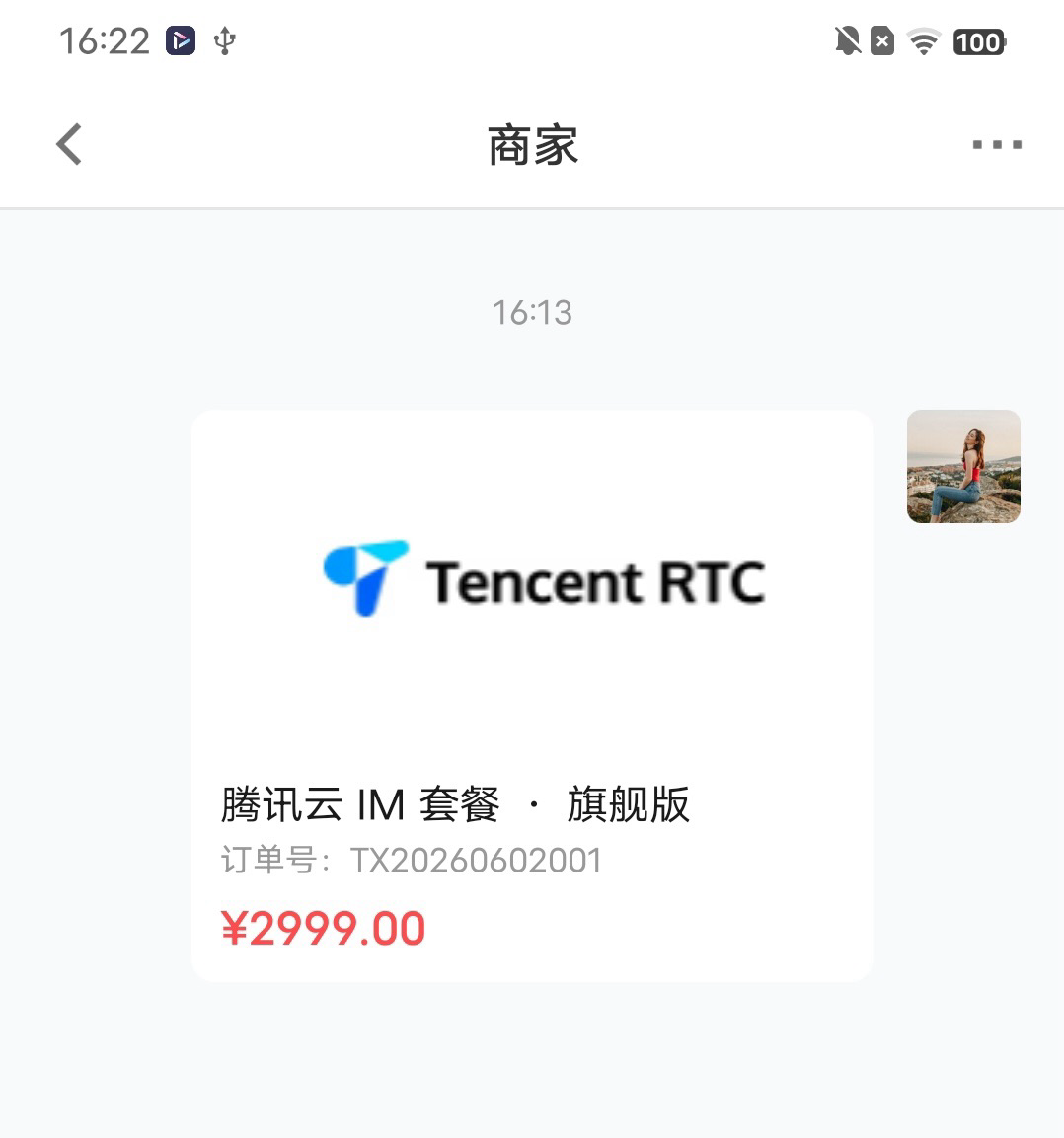
TUIKit 默认实现了文本、图片、语音、视频、文件等基本消息类型的发送和展示,如果这些类型满足不了您的需求,您可以新增自定义消息类型(订单卡片、商品卡片、问卷、骰子、链接卡等)。
基本消息类型
消息类型 | 显示效果图 |
文本类消息 |  |
图片类消息 |  |
语音类消息 |  |
视频类消息 |  |
文件类消息 | 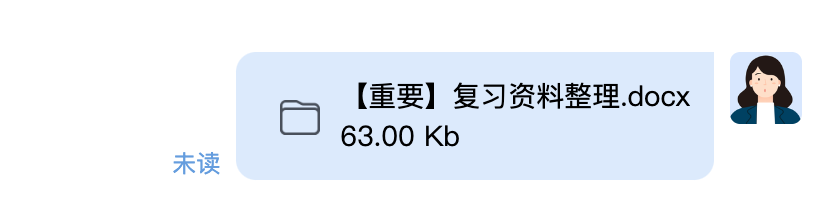 |
自定义消息实现步骤
步骤 1:定义业务数据
自定义消息需要传入哪些数据是用户自行决定的,假设我们要开发一个订单卡片(OrderCard)的自定义消息,示例代码如下所示:
{businessID: 'order_card', // 业务类型标识,渲染分发依赖此字段version: 1, // 协议版本号,后续字段升级时用于兼容判断orderID: 'TX20260602001',title: '腾讯云 IM 套餐 · 旗舰版',price: 2999,cover: 'https://web.sdk.qcloud.com/im/assets/images/tencent_rtc_logo.png' // 演示图片,业务方请替换为自己的图片}
步骤 2:创建自定义消息组件
新建
OrderCardMessage.nvue,该组件接收 message 属性,解析 message.messageBody.customMessage.data 进行消息渲染。<template><view v-if="data.businessID === 'order_card'" class="order-card"><view class="order-card__cover"><image class="order-card__cover-image" :src="data.cover" mode="aspectFit" resize="contain" /></view><view class="order-card__body"><text class="order-card__title">{{ data.title }}</text><text class="order-card__id">订单号:{{ data.orderID }}</text><text class="order-card__price">¥{{ priceText }}</text></view></view></template><script setup>import { computed } from 'vue';const props = defineProps({message: { type: Object, required: true }})const data = computed(() => {try {return JSON.parse(props.message.messageBody?.customMessage?.data || '{}')} catch (e) {return {}}})const priceText = computed(() => Number(data.value.price || 0).toFixed(2))</script><style>.order-card { width: 480rpx; background-color: #FFFFFF; border-radius: 16rpx; overflow: hidden; }.order-card__cover { width: 480rpx; height: 240rpx; justify-content: center; align-items: center; }.order-card__cover-image { width: 480rpx; height: 240rpx; }.order-card__body { padding: 20rpx; }.order-card__title { font-size: 30rpx; color: #1A1A1A; lines: 2; }.order-card__id { font-size: 24rpx; color: #999; margin-top: 8rpx; }.order-card__price { font-size: 32rpx; color: #FF4D4F; font-weight: 600; margin-top: 16rpx; }</style>
步骤 3:注册到 MessageList
MessageList 的 customMessageRender 接受一个 (message, conversationID) => Component | null 工厂函数,根据 步骤 1:定义业务数据 中约定的 key(businessID)返回对应业务组件即可,返回 null 自动降级为内置渲染。说明:
customMessageRender 对自己发出去的、对方发过来的、滚屏加载的历史消息全部生效。如果接收端没注册渲染器,会自动降级为 TUIKit 内置 CustomMessage 默认渲染。<template><MessageList :conversationID="conversationID" :customMessageRender="renderCustomMessage" /></template><script setup>import { ref } from 'vue';import { onLoad } from '@dcloudio/uni-app';import MessageList from '@/uni_modules/tuikit-atomic-x/components/MessageList/MessageList.nvue';import OrderCardMessage from './OrderCardMessage.nvue'const renderCustomMessage = (message) => {try {const data = JSON.parse(message.messageBody?.customMessage?.data || '{}')if (data.businessID === 'order_card') return OrderCardMessage} catch (e) {}return null}const conversationID = ref('');// ==================== 生命周期 ====================onLoad((options) => {if (!options.conversationID) {console.error('未接收到 conversationID 参数')return}conversationID.value = options.conversationID;})</script>
步骤 4:触发发送自定义消息
在
MessageInput 的 toolList 中追加一个发送订单的工具按钮,在 callback 里调用 sendCustomMessage 发送订单卡片消息。说明:
toolList 没传时用内置 DEFAULT_TOOLS(照片/视频/文件/语音通话/视频通话),传了就完全替换。 自定义
ToolItem 必须带 callback,否则不响应。icon/cover 支持线上 URL 或工程内静态资源路径,业务上线请替换为自己的图标/图片。<script setup>import { ref, shallowRef } from 'vue';import { onLoad } from '@dcloudio/uni-app';import { DEFAULT_TOOLS } from '@/uni_modules/tuikit-atomic-x/components/MessageInput/MessageInput.nvue'import { useMessageInputState } from '@/uni_modules/tuikit-atomic-x/state/MessageInputState'const conversationID = ref('');const inputState = shallowRef(null)// 在内置工具基础上追加一个"订单"按钮const toolList = [...DEFAULT_TOOLS,{id: 'order',name: '订单',icon: '/uni_modules/tuikit-atomic-x/static/icon/custom.png', // 演示用工程内既有图标,业务方请替换为自己的图标callback: () => {// 实际业务一般跳订单选择页,回来后用拿到的订单数据调发送inputState.value?.sendCustomMessage({businessID: 'order_card',version: 1,orderID: 'TX20260602001',title: '腾讯云 IM 套餐 · 旗舰版',price: 2999,cover: 'https://web.sdk.qcloud.com/im/assets/images/tencent_rtc_logo.png' // 演示图片,业务方请替换为自己的图片}).catch(err => uni.showToast({ icon: 'none', title: err.message || '发送失败' }))}}]onLoad((options) => {if (!options.conversationID) {console.error('未接收到 conversationID 参数')return}conversationID.value = options.conversationID;inputState.value = useMessageInputState({ conversationID: conversationID.value });})</script><template><MessageInput :conversationID="conversationID" :toolList="toolList" /></template>
完整示例代码
修改聊天页
pages/scenes/chat/chat/index.nvue,新增订单按钮 + 订单卡片消息渲染。下面是改完后的完整代码(复制覆盖即可),同目录下新增一个 OrderCardMessage.nvue 组件。<template><view class="page-container"><CustomNavbarposition="fixed":title="navigationTitle":showBack="true":showMenu="true"@back="onNavBack"@menuSelect="onNavMenuSelect"/><viewclass="message-list-container":style="{ paddingBottom: inputToolbarHeight + 'px' }"@tap="closeSoftKeyboard"><MessageListv-if="conversationID":conversationID="conversationID":locateMessage="locateMessage":inputToolbarHeight="inputToolbarHeight":inputPanelHeight="inputPanelHeight":customMessageRender="renderCustomMessage"@onMessageListTap="closeSoftKeyboard"/></view><MessageInputv-if="conversationID"ref="messageInputRef":conversationID="conversationID":toolList="toolList":setOfflinePushInfo="setOfflinePushInfo"@height-change="onMessageInputHeightChange"/></view></template><script setup lang="ts">import { ref, shallowRef, computed } from 'vue'import { onLoad, onShow } from '@dcloudio/uni-app'import MessageList from '@/uni_modules/tuikit-atomic-x/components/MessageList/MessageList.nvue'import MessageInput, { DEFAULT_TOOLS } from '@/uni_modules/tuikit-atomic-x/components/MessageInput/MessageInput.nvue'import CustomNavbar from '@/uni_modules/tuikit-atomic-x/components/CustomNavbar/CustomNavbar.nvue'import { useConversationListState } from '@/uni_modules/tuikit-atomic-x/state/ConversationListState'import { useGroupState } from '@/uni_modules/tuikit-atomic-x/state/GroupState'import { useMessageInputState } from '@/uni_modules/tuikit-atomic-x/state/MessageInputState'import { MessageType } from '@/uni_modules/tuikit-atomic-x/types/message'import type { OfflinePushContext, OfflinePushInfo } from '@/uni_modules/tuikit-atomic-x/types/message'import OrderCardMessage from './OrderCardMessage.nvue'const { joinedGroupList, fetchJoinedGroupList } = useGroupState()const conversationID = ref('')const locateMessage = ref(null)const isInGroup = ref(false)const messageInputRef = ref(null)const inputToolbarHeight = ref(0)const inputPanelHeight = ref(0)const inputState = shallowRef<ReturnType<typeof useMessageInputState> | null>(null)const { fetchConversationInfo, conversationList } = useConversationListState('chat')const isC2CConversation = computed(() => conversationID.value.startsWith('c2c_'))const currentConversation = computed(() =>conversationList.value.find(conv => conv.conversationID === conversationID.value))const navigationTitle = computed(() => currentConversation.value?.title || '聊天')// ==================== 自定义消息:订单卡片 ====================const toolList = [...DEFAULT_TOOLS,{id: 'order',name: '订单',icon: '/uni_modules/tuikit-atomic-x/static/icon/custom.png', // 演示用工程内既有图标,业务方请替换为自己的图标callback: () => {// 实际业务一般跳订单选择页,回来后用拿到的订单数据调发送inputState.value?.sendCustomMessage({businessID: 'order_card',version: 1,orderID: 'TX20260602001',title: '腾讯云 IM 套餐 · 旗舰版',price: 2999,cover: 'https://web.sdk.qcloud.com/im/assets/images/tencent_rtc_logo.png' // 演示图片,业务方请替换为自己的图片}).catch(err => uni.showToast({ icon: 'none', title: err.message || '发送失败' }))}}]const renderCustomMessage = (message: any) => {try {const data = JSON.parse(message.messageBody?.customMessage?.data || '{}')if (data.businessID === 'order_card') return OrderCardMessage} catch (e) {}return null}// ==================== 导航栏 ====================const onNavBack = () => uni.navigateBack()const onNavMenuSelect = () => {if (!isC2CConversation.value) {isInGroup.value = joinedGroupList.value.some(group => group.groupID === conversationID.value?.replace('group_', ''))if (!isInGroup.value) {uni.showToast({ title: '您已不在群内,无法进行此操作', icon: 'none' })return}}uni.navigateTo({url: `/pages/scenes/chat/chatSetting/index?conversationID=${conversationID.value}&showType=0`})}// ==================== 输入框 ====================const onMessageInputHeightChange = ({ inputToolbarHeight: toolbar, inputPanelHeight: panel }) => {inputToolbarHeight.value = toolbarinputPanelHeight.value = panel}const closeSoftKeyboard = () => messageInputRef.value?.collapse()// ==================== 离线推送 ====================const setOfflinePushInfo = (ctx: OfflinePushContext): OfflinePushInfo | null => {const title = currentConversation.value?.title || '新消息'let description = '[新消息]'switch (ctx.messageType) {case MessageType.TEXT:description = (ctx.messageBody as { text?: string })?.text || '[文本消息]'breakcase MessageType.IMAGE: description = '[图片]'; breakcase MessageType.VIDEO: description = '[视频]'; breakcase MessageType.SOUND: description = '[语音]'; breakcase MessageType.FILE: description = '[文件]'; breakcase MessageType.CUSTOM: return nulldefault: return null}return {title,description,extensionInfo: {ext: JSON.stringify({ conversationID: ctx.conversationID, messageType: ctx.messageType })}}}// ==================== 生命周期 ====================onLoad((options) => {if (!options.conversationID) {console.error('未接收到 conversationID 参数')return}conversationID.value = options.conversationID;inputState.value = useMessageInputState({ conversationID: conversationID.value });fetchConversationInfo(conversationID.value)fetchJoinedGroupList()if (uni.$locateMessage) {locateMessage.value = uni.$locateMessageuni.$locateMessage = null}})onShow(() => fetchConversationInfo(conversationID.value))</script><style>.page-container { flex: 1; flex-direction: column; background-color: #F9FAFC; }.message-list-container { flex: 1; flex-direction: column; background-color: #F9FAFC; }</style>
<template><view v-if="data.businessID === 'order_card'" class="order-card"><view class="order-card__cover"><image class="order-card__cover-image" :src="data.cover" mode="aspectFit" resize="contain" /></view><view class="order-card__body"><text class="order-card__title">{{ data.title }}</text><text class="order-card__id">订单号:{{ data.orderID }}</text><text class="order-card__price">¥{{ priceText }}</text></view></view></template><script setup>import { computed } from 'vue'const props = defineProps({message: { type: Object, required: true }})const data = computed(() => {try {return JSON.parse(props.message.messageBody?.customMessage?.data || '{}')} catch (e) {return {}}})const priceText = computed(() => Number(data.value.price || 0).toFixed(2))</script><style>.order-card { width: 480rpx; background-color: #FFFFFF; border-radius: 16rpx; overflow: hidden; }.order-card__cover { width: 480rpx; height: 240rpx; justify-content: center; align-items: center; }.order-card__cover-image { width: 480rpx; height: 240rpx; }.order-card__body { padding: 20rpx; }.order-card__title { font-size: 30rpx; color: #1A1A1A; lines: 2; }.order-card__id { font-size: 24rpx; color: #999; margin-top: 8rpx; }.order-card__price { font-size: 32rpx; color: #FF4D4F; font-weight: 600; margin-top: 16rpx; }</style>
效果如图所示: