Cross-region snapshot replication

Last updated: 2023-09-22 10:40:25

Cloud disk snapshots now support cross-region replication. This feature allows you to conveniently migrate data and services to other regions, and you can also build your business's cross-region disaster recovery system based on this cross-region replication capability. The snapshot cross-region replication is currently in the beta testing phase. You can apply to use Tencent Cloud's cloud disk snapshot cross-region replication.

Usage Limits

Beta Application: Snapshot cross-region replication is currently in the beta phase, and an application is required to use this feature.
Supported Regions: Please refer to Regions and Availability Zones.
Financial Special Zone: Replication is only supported between financial special zones.
System disk snapshots are not supported.

Instructions

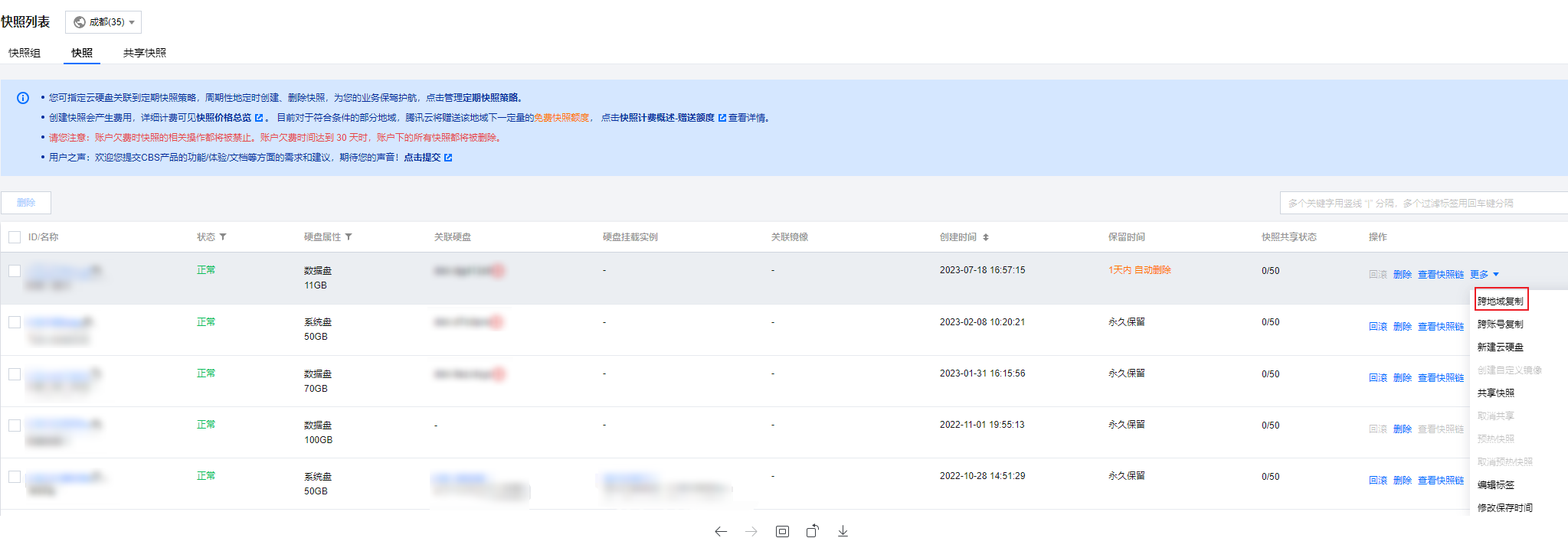
1. Log in to the Snapshot List page.
2. Click on More > Cross-account Replication in the Operation column of the target snapshot row.

3. Configure the following parameters:
New Snapshot Name: Enter the name for the new snapshot, which can contain up to 60 characters. This is an optional parameter. The default naming will include the source snapshot ID and region information, formatted as Copied <Source Snapshot ID> from <Source Snapshot Region>, for example, Copied snap-oi5spwt2 from ap-shanghai.
Region: Select the target region to which you need to replicate, this is a mandatory parameter.
Check the snapshot quota and geographical restriction when you select the region.
4. Click OK to initiate replication. The source snapshot will display a status prompt, and a new snapshot will be added in the target region.
5. Once the replication is completed, you can view the new snapshot in the snapshot list of the target region.
Note
The source snapshot cannot be deleted during the cross-region replication of the snapshot.
During the process of cross-region replication:
Source Snapshot Status: You can view it in the status bar of the source snapshot row in the Snapshot List of the source region.
Status of target snapshot: You can view it by going to the snapshot list page of the target region.