Within the scaling group, you can designate a specific sub-machine to be exempt from reduction during scaling down activities. When such activities occur, the Auto Scaling selects the sub-machines to be reduced from the remaining machines.
You can enable the Instance Protection setting for one or more scaling group instances, with the flexibility to modify the scaling group or instance protection settings at any given time.
In the event that all remaining instances within the scaling group are under reduction protection and a scaling down event occurs simultaneously, the Auto Scaling will decrease the required capacity without removing any instances.
Scenarios
Typically, the machines within a scaling group are stateless, and any machine can be removed at any time. However, in practical application, there are scenarios where it is appropriate to set specific instances to be exempt from reduction:
Multipurpose Machine: For cost considerations, individual machines may serve multiple purposes beyond their roles within the cluster. For instance, a machine might store data generated within the cluster, thus rendering it stateful.
Preventing Misoperations: If there are concerns about policy setting errors impacting operations, "exemption from reduction" can be set for certain machines. This ensures that Auto Scaling will never reduce these machines, maintaining a smooth pathway for "Request-LB-Submachine".
Instructions
1. Log into the Auto Scaling console and select Scaling Groups from the left navigation bar.
2. On the Scaling Groups page, select the ID of the scaling group that needs to be configured, which will take you to the details page of that scaling group.
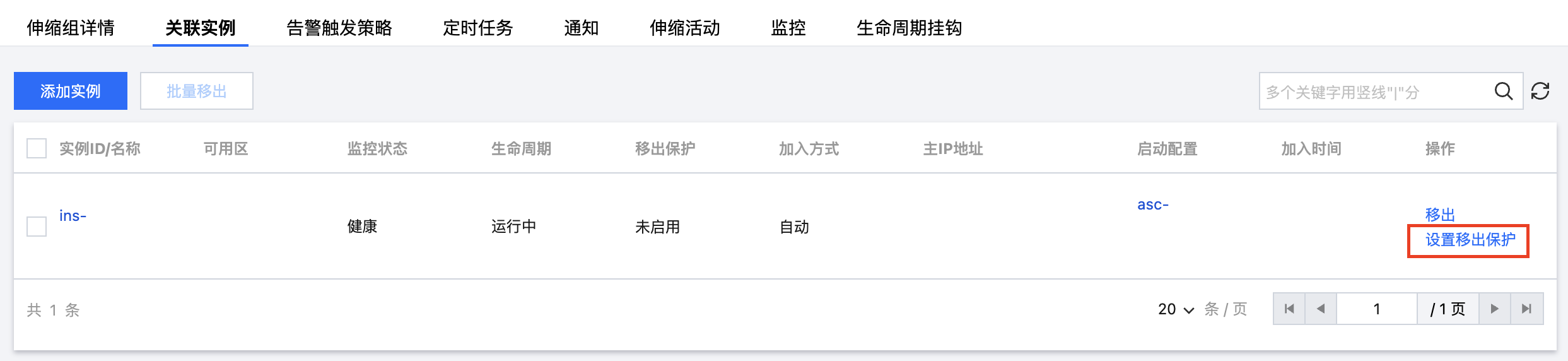
3. Select the Associated Instances tab, and click on Enable Removal Protection on the right side of the row where the instance that needs to be exempted from reduction is located, as shown in the figure below:
4. Click Confirm in the pop-up prompt to complete the setup.