操作场景
账号保护是指在您进行登录或敏感操作(例如:修改账号登录方式、修改账号密码、修改安全手机等)时,腾讯云给您增加的一层登录/操作保护。
开启登录保护后,登录腾讯云官方网站时,需要验证身份。避免了即使他人盗取您的密码,也无法登录您的账号的情况,能够最大限度地保证您的账号安全。
开启操作保护后,在您进行敏感操作前,需要您先完成身份验证,以确保是您本人操作。
本文将为您介绍账号保护的类型,以及如何开启/关闭账号保护的操作步骤。
注意:
注意事项
敏感操作校验有效期为60分钟,如果您超过60分钟再次进行敏感操作则需再次验证。
如果账号同时开启了登录保护和操作保护,并在登录时进行了二次校验,登录后60分钟内进行敏感操作则不触发敏感操作校验。
账号保护类型
说明:
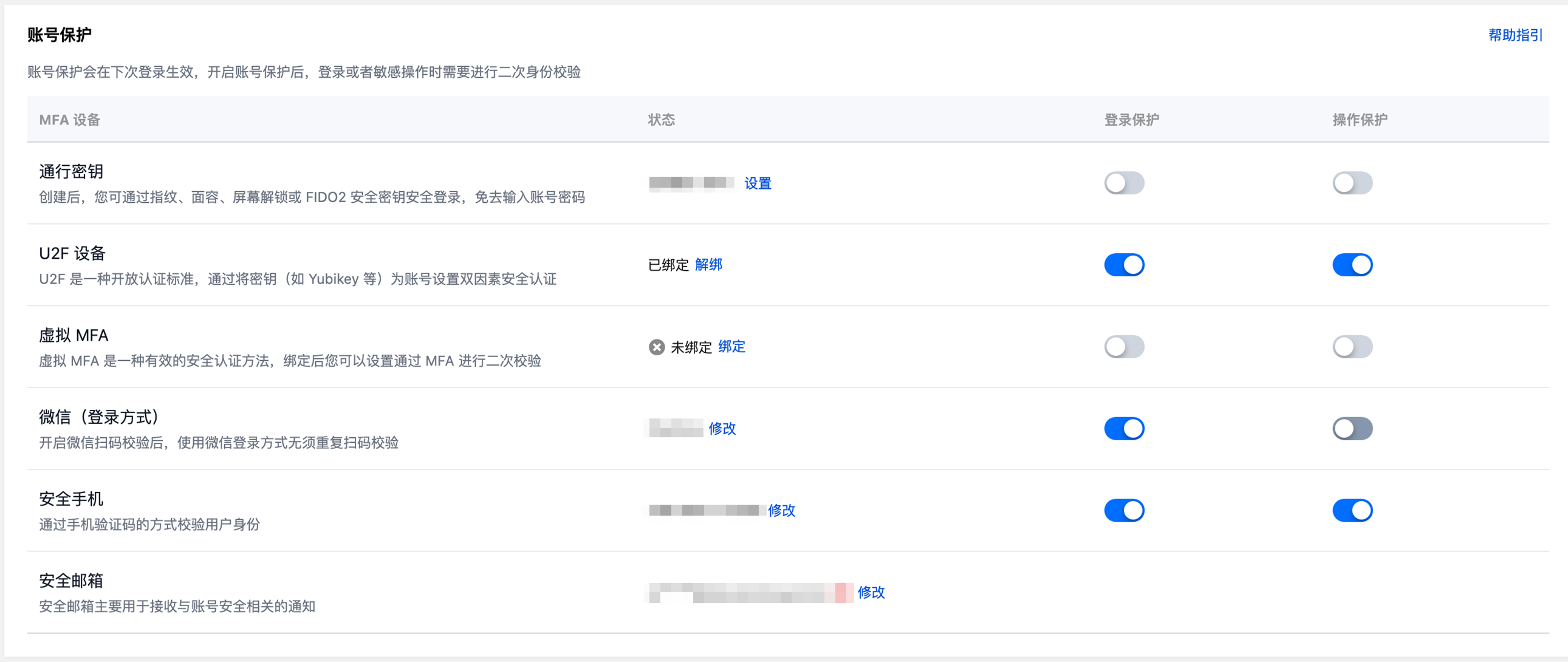
启用 U2F 设备校验需要账号已绑定 U2F 设备,目前 U2F 设备仅支持存量白名单用户使用。
开启微信扫码验证需要账号 已绑定微信登录方式。
启用 MFA 设备校验需要账号 已绑定 MFA 设备。
启用通行密钥设备校验需要账号 已创建通行密钥。
通行密钥设备校验仅支持 PC 端,暂不支持移动端(小程序、H5 页面)。
账号保护类型 | 登录保护作用 | 操作保护作用 |
启用通行密钥设备校验 | 在登录页面输入账号密码后,进入通行密钥验证页面,完成您绑定的密钥验证后即可完成登录。 | 在控制台进行相关敏感操作后,进入通行密钥验证页面,完成您绑定的密钥验证后,才能完成此操作,否则不能执行动作。 |
启用 U2F 设备 | 在登录页面输入账号密码后,进入 U2F 设备确认页面,插入 U2F 安全密钥并轻点按钮即可完成登录。 | 在控制台进行相关敏感操作后,进入 U2F 设备确认页面,插入 U2F 安全密钥并轻点按钮即可完成校验,通过校验后,才能完成此操作,否则不能执行动作。 |
开启微信扫码验证 | 在登录页面使用非微信扫码登录方式后,进入身份确认页面,需要用微信扫码确认身份,如果扫码的微信和账号关联的微信一致,则可完成登录,否则不能完成登录。 | 在控制台进行相关敏感操作时,进入身份验证页面,需要用微信扫码确认身份,如果扫码的微信和账号关联的微信一致,才能完成此操作,否则不能执行动作。 |
启用 MFA 设备校验 | 在登录页面输入账号密码后,进入 MFA 密码输入页面,输入正确的 MFA 密码即可完成登录。 | 在控制台进行相关敏感操作时,进入身份验证页面,需要输入 MFA 密码,如果输入的 MFA 密码正确,才能完成此操作,否则不能执行动作。 |
开启手机验证码校验 | 在登录页面输入账号密码后,进入手机验证码输入页面,单击获取手机验证码,输入正确验证码即可完成登录。 | 在控制台进行相关敏感操作时,进入身份验证页面,需要输入手机验证码,如果输入的验证码正确,才能完成此操作,否则不能执行动作。 |
不开启 | 不进行二次认证。 | 不进行二次认证。 |
操作步骤
开启/修改账号保护
1. 登录 账号中心 > 安全设置 页面。
2. 在账号保护栏中,找到登录保护和操作保护。
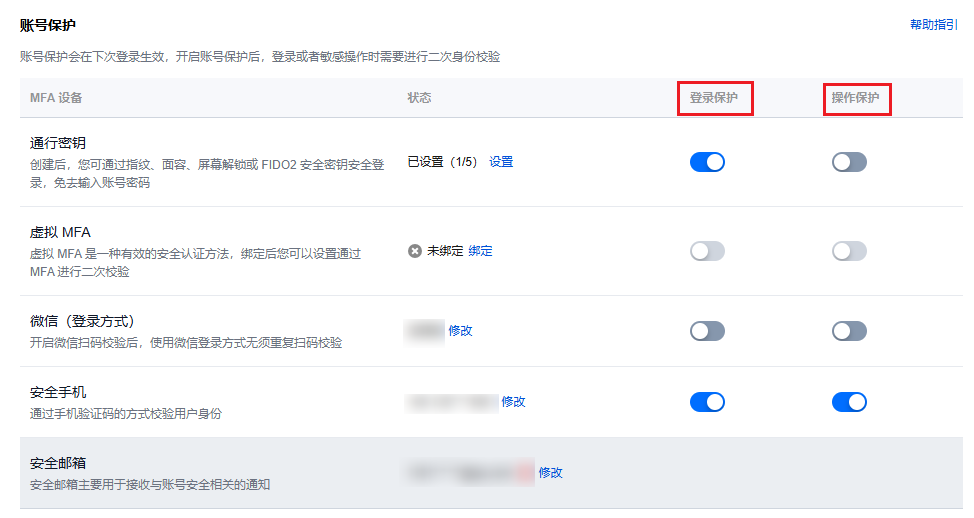
3. 选择您需要开启的保护类型,单击
说明:
可以同时开启多种设备的登录保护和操作保护,优先校验排序靠前的设备,剩余开启的设备可在备选校验中选择。
如果账号开启了虚拟 MFA 设备的登录保护,且绑定的虚拟 MFA 设备和登录方式为同一个微信,使用该微信扫码登录时会自动跳过登录保护校验。
如果账号创建了通行密钥并开启了登录保护,使用通行密钥登录时会自动跳过登录保护校验。
4. 在弹出的身份验证窗口中,根据页面指引进行操作,验证通过即可成功开启。
说明:
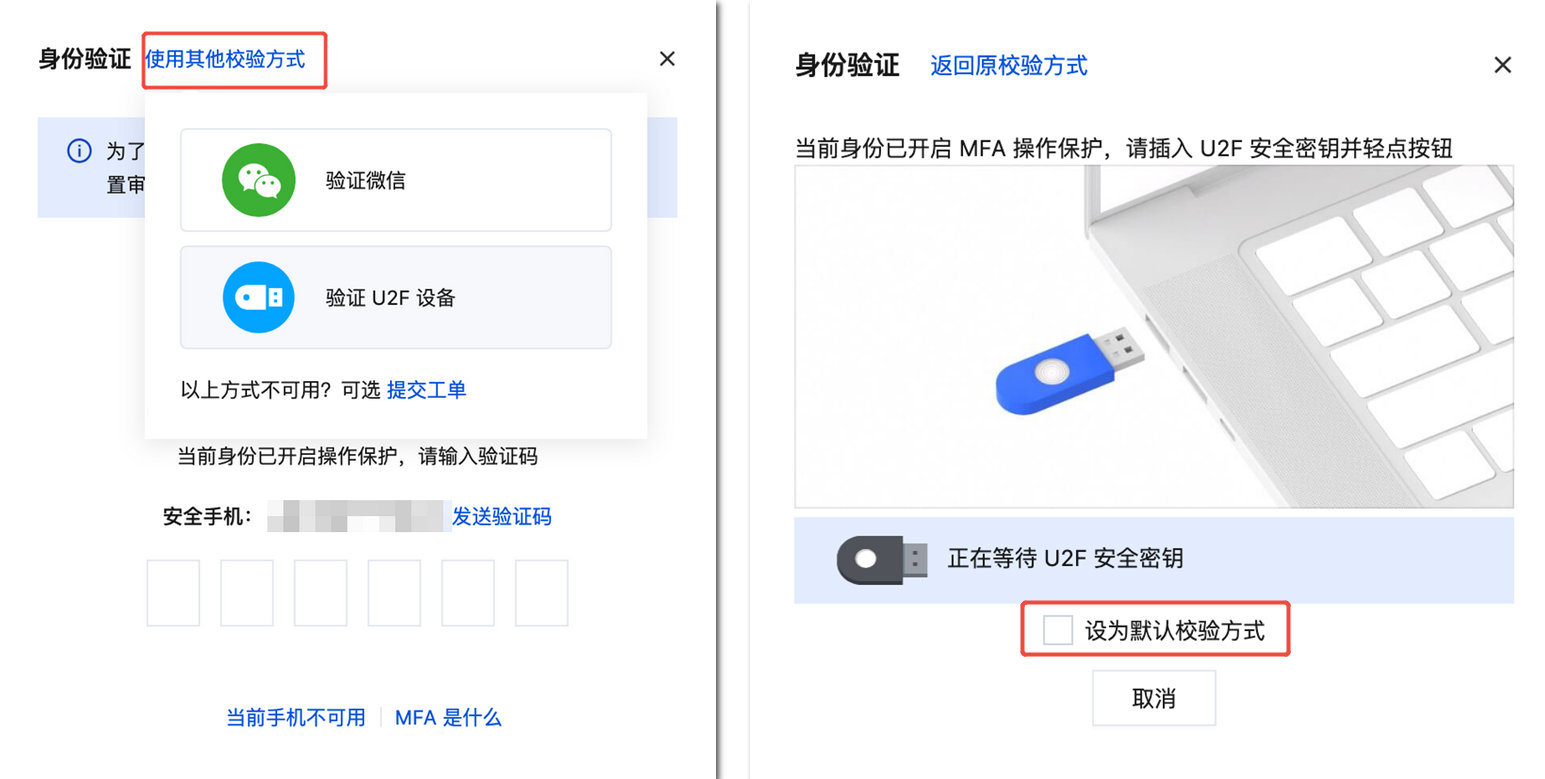
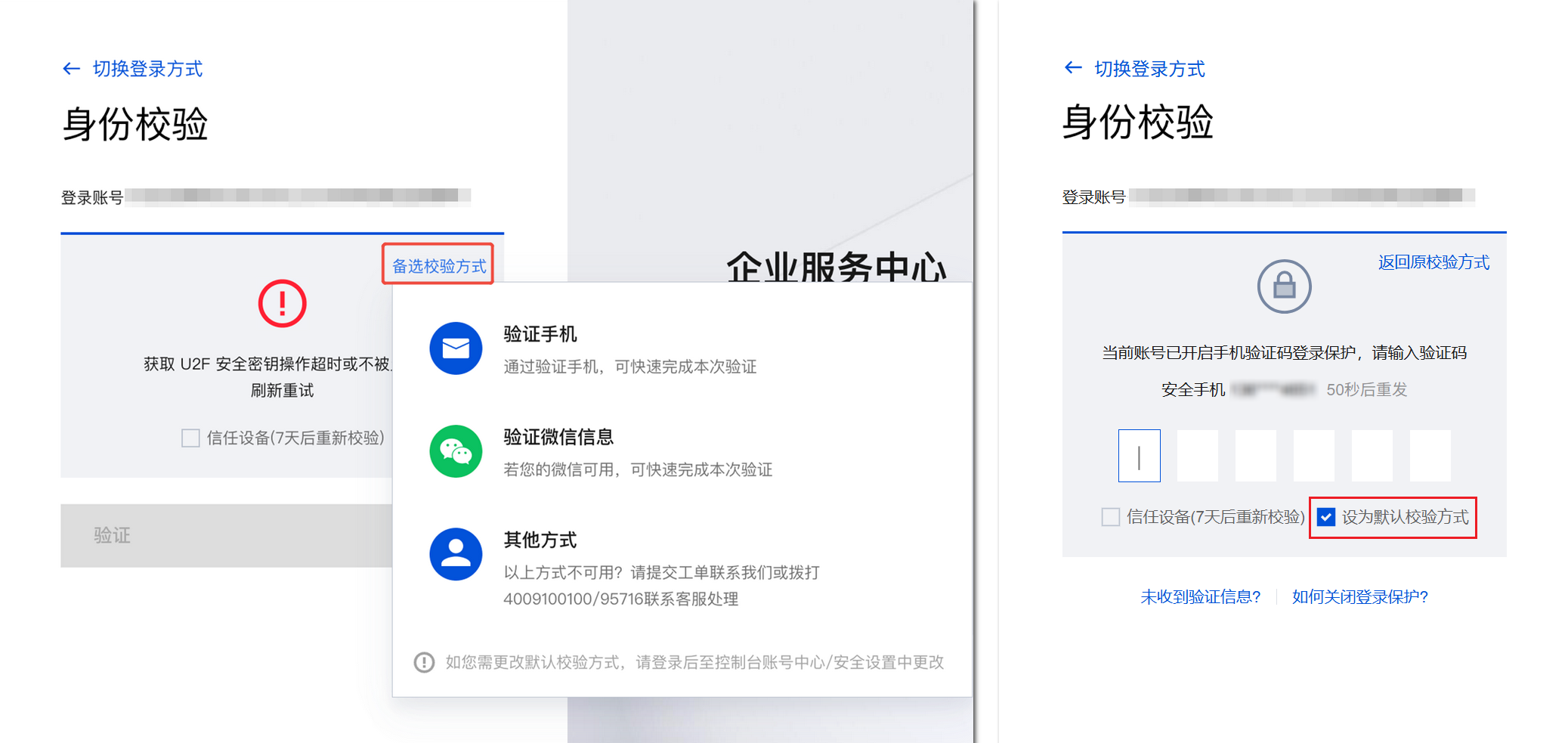
如果当前身份验证方式不可用,可以单击使用备选校验方式,通过备选校验方式验证身份。
若您未绑定其他备选校验方式,请拨打 4009100100 / 95716 联系客服处理。
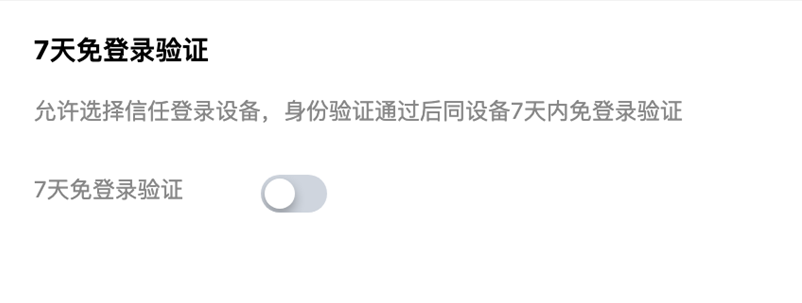
5. (可选)7天免登录验证页面也可以选择信任登录设备,开启7天免登录验证,如不需要请忽略。
关闭账号保护
警告:
关闭账号保护将降低您的账号与资产安全等级,请谨慎操作。
关闭登录保护后,日常登录仅需账号和密码,不再强制要求二次身份验证,可能增加密码泄露后的账号被盗风险。
关闭操作保护后,日常敏感操作将不再验证身份,增加了误操作风险,从而造成数据丢失或资产损失。
注意:部分高危操作场景(例如:账号30天未登录、登录环境异常、注销账号等)不受关闭账号保护的影响,系统仍会强制触发身份验证,进一步保障账号与资产安全。
1. 登录腾讯云控制台,进入 安全设置 页面。
2. 在账号保护栏中,找到登录保护和操作保护。
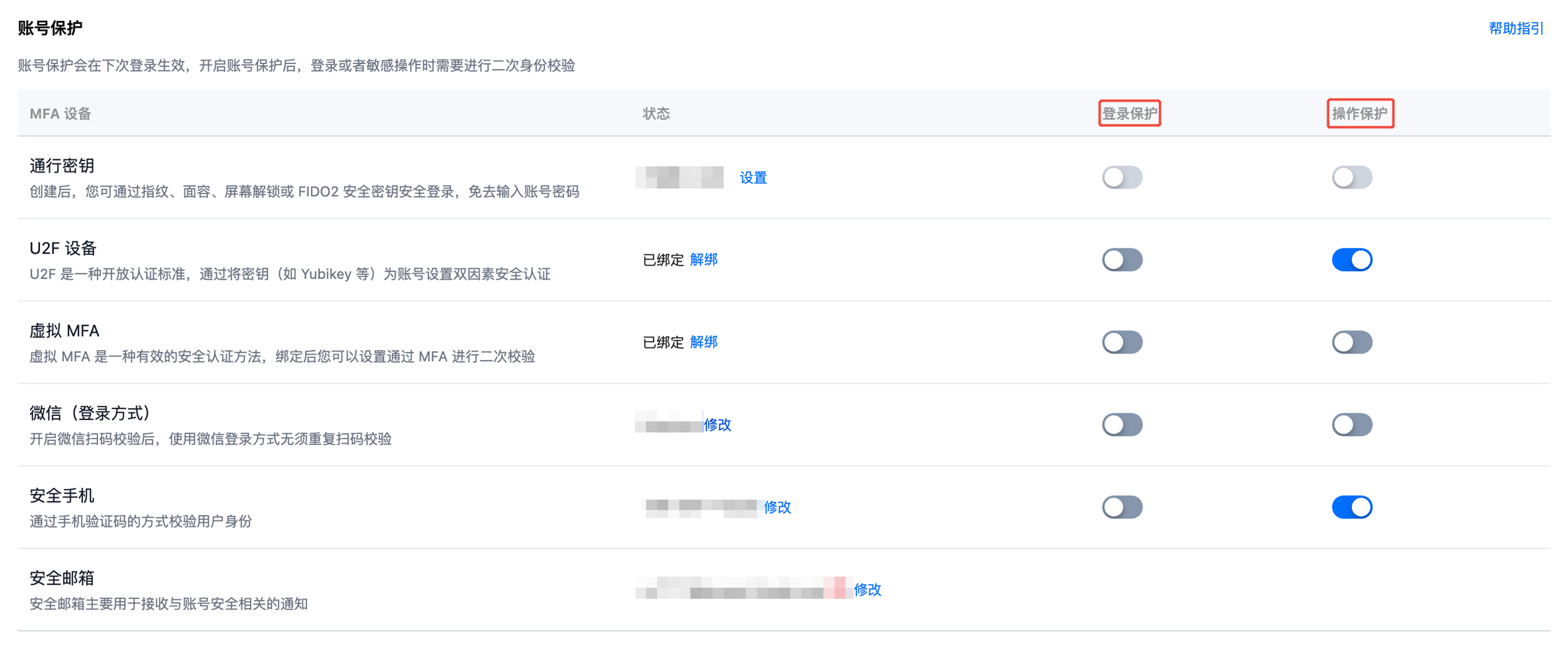
3. 选择您需要关闭的保护类型,单击
4. 在弹出的验证窗口中,根据页面指引进行操作,验证通过即可成功关闭。
说明:
如果当前身份验证方式不可用,可以单击使用备选校验方式,通过备选校验方式验证身份。
若您未绑定其他备选校验方式,请拨打 4009100100 / 95716 联系客服处理。
账号保护验证顺序
账号可以同时开启多种设备的登录保护和操作保护,优先校验排序靠前的设备,剩余开启的设备可在备选校验中选择,也可在备选校验中将当前备选校验方式设置为默认校验方式。
1. 如果您同时绑定了多种 MFA 设备,且开启了多种设备的登录保护。
2. 在身份校验页面,会优先校验排序靠前的设备或者您选择的默认校验方式。如果您想更换其他校验方式并将其设为默认校验方式,可以单击备选校验方式选择其他开启的 MFA 设备并勾选设为默认校验方式,将本次身份验证方式设置为默认的校验方式,后续触发身份验证时,都会优先采用该方式进行身份校验。
登录保护示例
操作保护示例