For users with local IDCs, Cloud Object Storage (COS) supports the following migration methods across various migration types, assisting users in quickly transferring massive amounts of data from their local IDCs to COS.
Cloud Data Migration (CDM) is a migration method that utilizes Tencent Cloud's dedicated offline migration devices to help users transfer their local data to the cloud. This approach addresses the issues of lengthy transfer times, high costs, and low security associated with transferring data from local data centers to the cloud via network transmission.
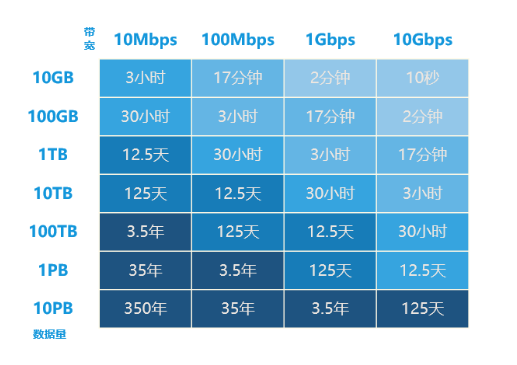
Users can consider how to choose a migration method based on factors such as data migration volume, IDC outbound bandwidth, IDC available space resources, and acceptable migration completion time. The following figure shows the estimated time consumption when using online migration. As can be seen, if the migration cycle exceeds 10 days or the migration data volume is more than 50 TB, we recommend you choose CDM for offline migration. Otherwise, please opt for online migration.
Note
A large number of small files under 1MB and insufficient disk I/O performance can also affect the data migration progress.
Here describes how to configure COS Migration to maximize the migration speed:
1. Adjust the threshold for distinguishing between large and small files and the migration concurrency according to your network environment, achieving the optimal migration method with large file segmentation and small file concurrent transmission. Modify the tool execution time and set bandwidth limits to ensure that your business operations are not affected by the bandwidth occupied by migration data. The above adjustments can be made in the [common] section of the config.ini configuration file by modifying the following parameters:
Parameter name
Description
smallFileThreshold
Threshold for small files. If the size of a file is higher than or equal to this threshold, multipart upload will be used; The default value is 5 MB.
bigFileExecutorNum
Concurrence of large files, which is 8 by default. If COS is connected to over the public network with low bandwidth, reduce this value.
smallFileExecutorNum
Concurrence of small files, which is 64 by default.If COS is connected to over the public network with low bandwidth, reduce this value.
executeTimeWindow
This parameter defines the time range when the migration tool will execute a task every day, which will enter sleep mode at other times. In sleep mode, the migration will be paused and the migration progress will be retained until the next time window when the migration will be resumed automatically.
2. Distributed parallel transfer can further speed up the migration. You can install COS Migration on multiple machines and performing separate migration tasks for different sources.
Cloud Data Migration (CDM)
The steps are as follows:
1. Go to the CDM Console to submit an application.
2. After the application is approved, you can wait to receive the device.
3. After receiving the device, copy the data to it according to the migration device manual.
4. After completing the data copy, submit a return request through the console and wait for Tencent Cloud to migrate the data to COS.
The following section explains how to efficiently and securely migrate data to Tencent Cloud COS using offline migration.
1. Configure a 10 Gbps network connection for your IDC. To remove potential constraints of the local data environment on data transfer, you can use a high-performance server as a mount point to maximize the replication speed.
2. Parallel transfer is the fastest way to transfer data in CDM. The CPU and memory usage of the device are monitored. If the current migration speed is lower than expected, you can select the following methods:
Multiple devices connect to the same CDM device through different network interfaces.
Multiple devices connect to several CDM devices through different network interfaces.