Help & Documentation>Cloud Object Storage>Best Practice>Data Security>Introduction to COS Data Security Solution

Introduction to COS Data Security Solution

Last updated: 2023-09-20 11:21:48

Pre-Event Protection

1. Permission Isolation

An in-cloud enterprise should pay attention to account security and resource authorization to protect the security system. To manage in-cloud resources properly, the following risks should be avoided:
Using the Tencent Cloud root account for daily operations.
Creating sub-accounts for employees, but granting excessive permissions.
Lack of access condition control for high-privilege sub-account users and high-risk operations.
Failing to regularly audit user permissions and login information.
No regulation for permission management
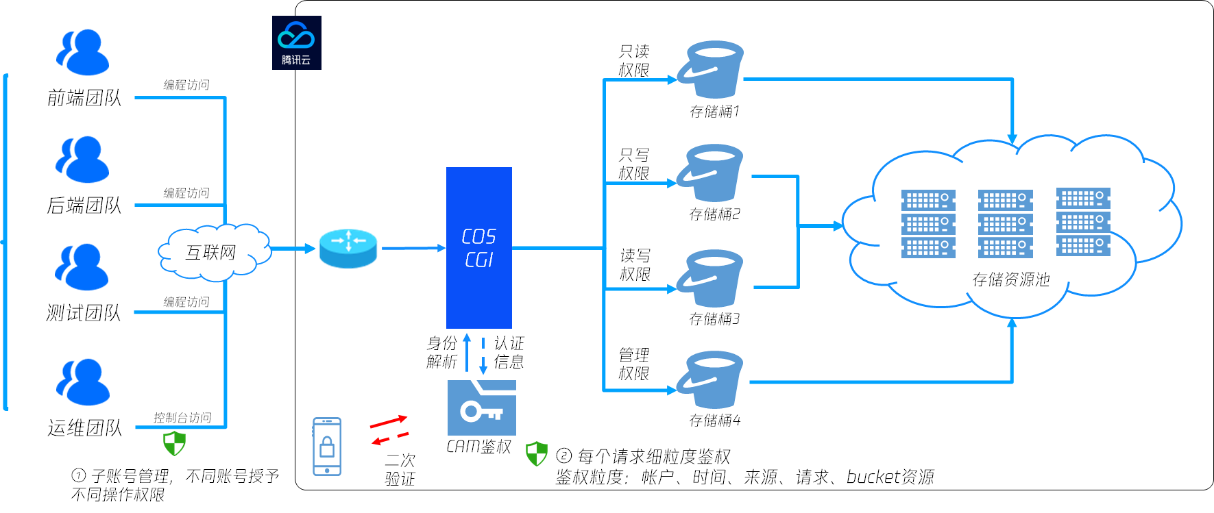
Tencent Cloud Access Management (CAM) ensures clear, secure, and controllable permissions through various measures such as account hierarchy and permission hierarchy. In terms of account hierarchy, the root account can grant different access permissions, such as programmatic access and console access, to all legitimate CAM users, including sub-accounts and collaborators. In terms of permission hierarchy, different levels of authorization, such as service level, interface level, and resource level, are used to specify under what conditions, through which methods, and which resources can be accessed by CAM users.
For example, you can create sub-accounts within the root account and assign resource management permissions to these sub-accounts without sharing the root account's credentials. Additionally, you can grant different access permissions to different personnel for various resources. For instance, you can allow certain sub-accounts to have read access to a Cloud Object Storage (COS) bucket, while other sub-accounts or the root account can have write access to a specific COS object. Resources, access permissions, and users can be bundled in bulk, enabling fine-grained permission management.
For high-risk operations (such as data deletion), permissions can be separated and granted, allowing users to perform actions only through the console while enabling multi-factor authentication (MFA) for secondary verification. When MFA is enabled, users will be prompted to verify via a text message code when executing such high-risk operations.


2. Object Locking

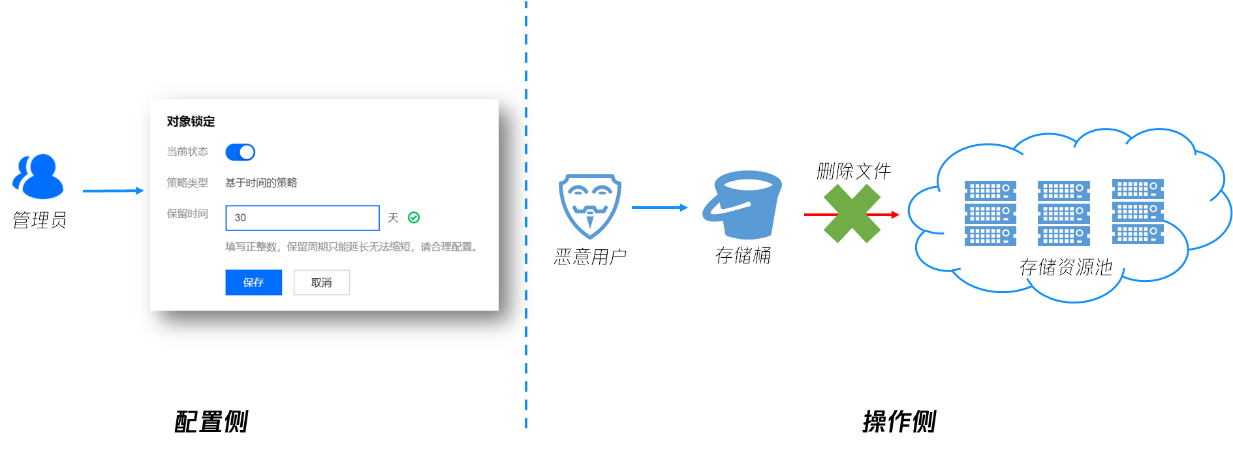
Users can enable the object locking feature for sensitive and essential data (e.g., financial transaction data and medical image data) to prevent them from being deleted or modified. After the object locking feature is enabled, all data in the bucket can only be read and cannot be overwritten or deleted during the effective period. This setting applies to all CAM users (including the root account) and anonymous users.


3. Data Disaster Recovery

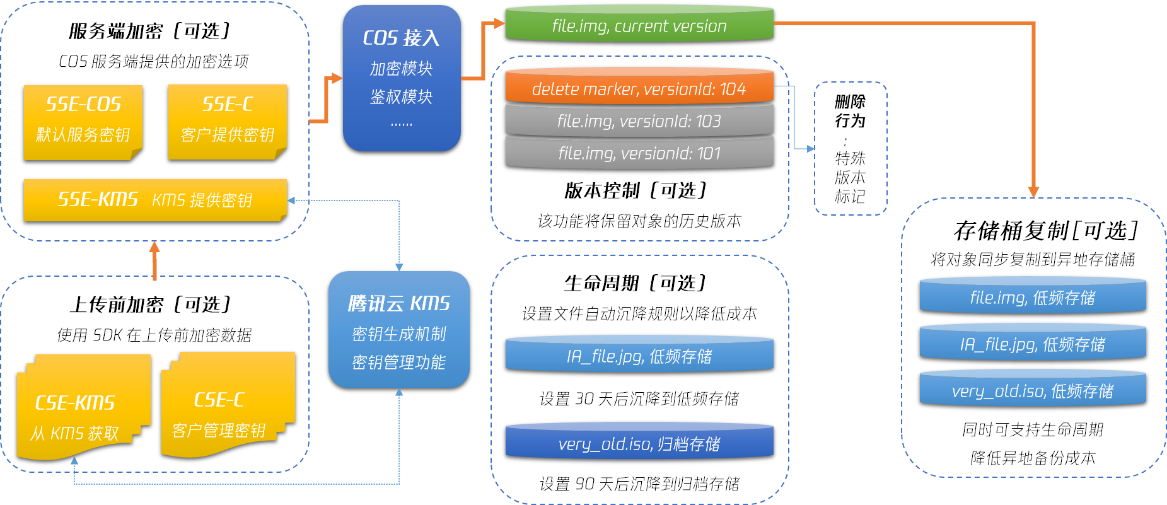
Tencent Cloud COS offers a wide range of data management capabilities, including data encryption, version control, bucket replication, and lifecycle management. Sensitive files can be protected through encryption to ensure secure data read and write operations. Version control and bucket replication enable disaster recovery across different locations, further ensuring data durability and allowing data recovery from backup sites in case of accidental or malicious deletion. Lifecycle management helps in data archiving and deletion, reducing storage costs.
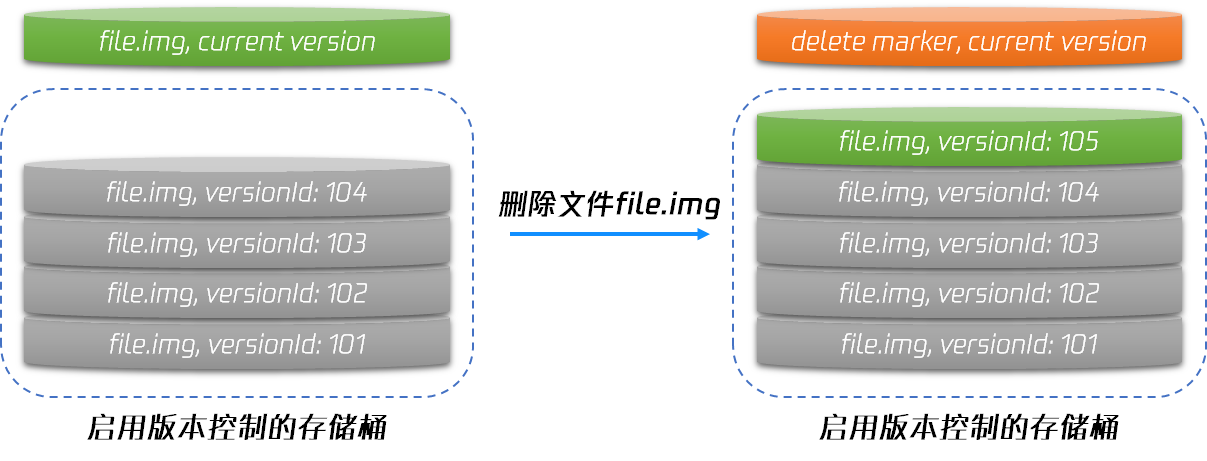
The version control feature ensures that user files are not overwritten or deleted. Once version control is enabled, all write operations on files with the same name are treated as adding new versions of the same file, while delete operations are equivalent to adding a delete marker. You can access any past version of the data by specifying the version number, enabling data rollback and mitigating the risks of accidental deletion and overwriting.


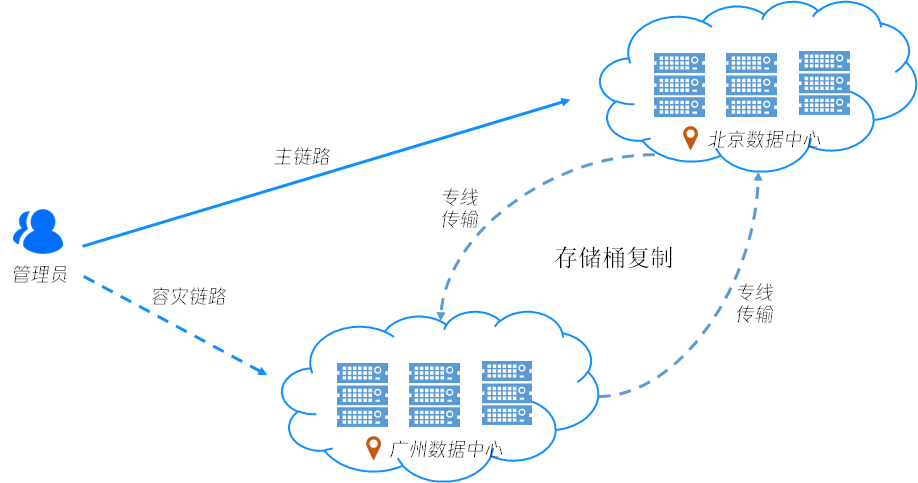
Additionally, object storage offers bucket replication functionality, which helps users replicate incremental files to data centers in other cities via dedicated lines, achieving offsite disaster recovery. When data in the primary bucket is deleted, it can be restored from the backup bucket using batch copying.


Considering that version control and bucket replication may increase the number of files, users can also use the lifecycle feature to transition backup data to lower-cost storage types, such as infrequent access or archival storage, to achieve cost-effective cold backups. By integrating data encryption, version control, bucket replication, and lifecycle features, Tencent Cloud Object Storage provides a comprehensive cold backup solution, as shown in the following diagram.


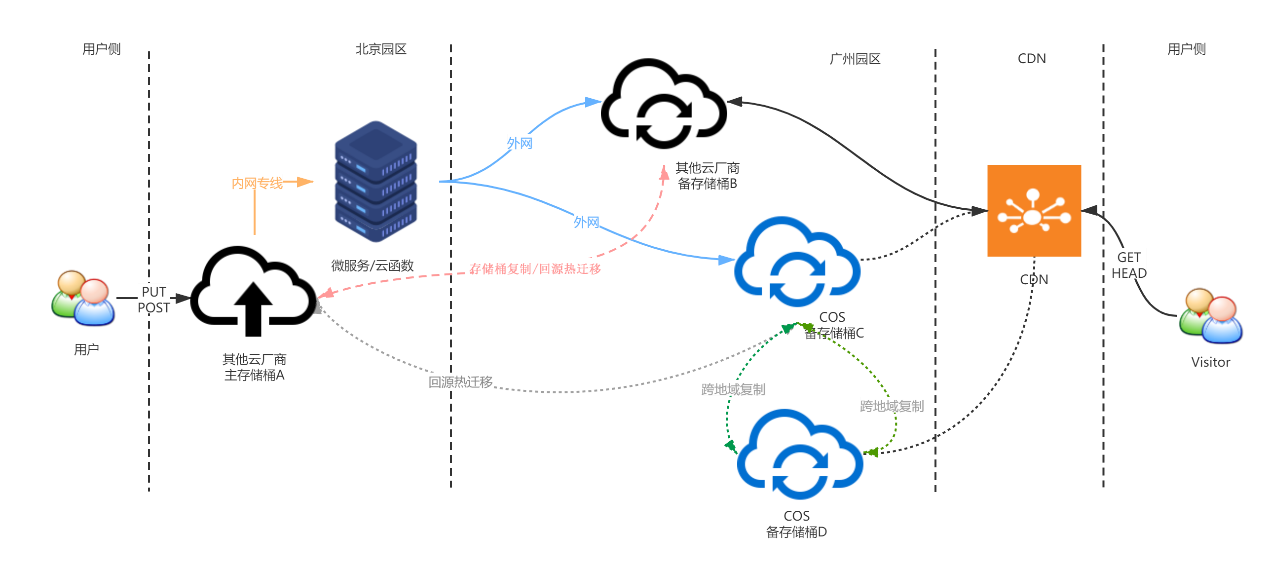
For customers who primarily store data with other cloud providers (such as AWS or OSS) and have stringent requirements for data persistence, COS also offers a multi-cloud disaster recovery solution based on cloud functions. First, data is stored with other cloud providers, and customers can trigger data synchronization or bucket replication through cloud functions to achieve offsite disaster recovery and ensure data persistence. Simultaneously, data migration is triggered through cloud functions to back up core data to Tencent Cloud's object storage service, and offsite disaster recovery is achieved through Tencent Cloud's bucket replication feature. Finally, Tencent Cloud's permission control manages data access rights for COS, ensuring that data can be restored from Tencent Cloud COS in extreme situations.


Mid-Event Monitoring

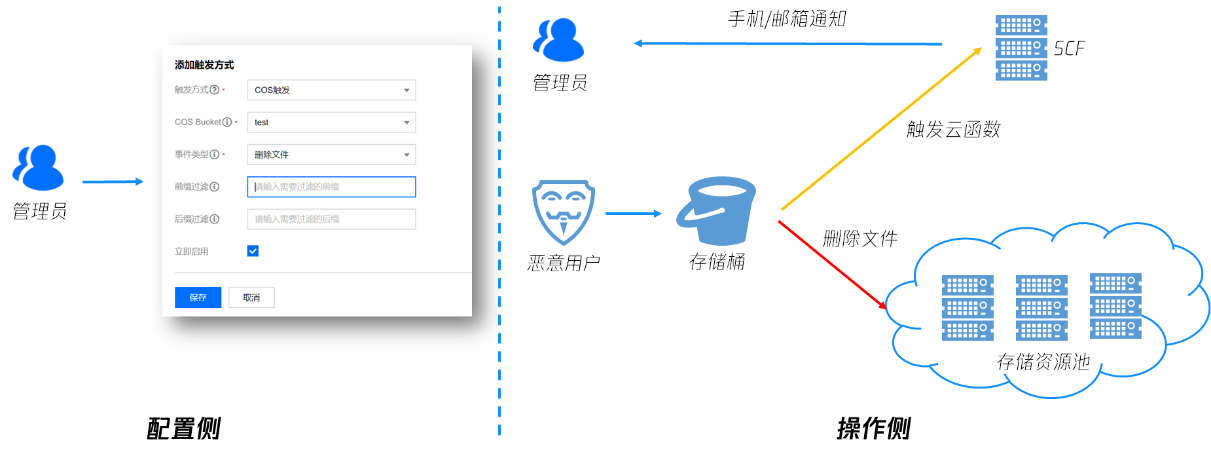
Tencent Cloud COS provides event notification features based on cloud functions. For high-risk operations such as file deletion, you can configure SCF for DeleteObject and other high-risk operations. When a high-risk operation occurs, notifications will be sent immediately to your email or mobile phone, ensuring timely detection of high-risk behavior and taking measures to stop it.


Post-Event Tracing

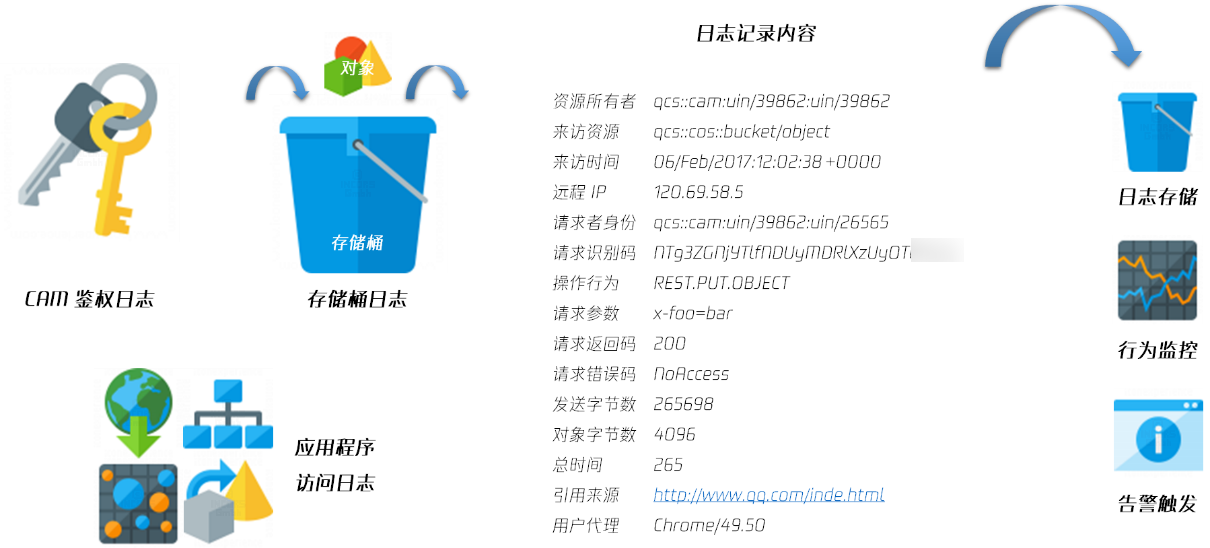
Tencent Cloud COS provides users with accessible log monitoring and auditing features through multiple channels. For user access logs of storage buckets, operations such as deleting files (DeleteObject), overwriting files (PutObjectCopy), and modifying file permissions (PutObjectACL) can be tracked using the bucket access log feature, making high-risk actions like deletions traceable and verifiable. For storage bucket configuration management actions, such as deleting a bucket (DeleteBucket), modifying a bucket access control list (PutBucketACL), and modifying a bucket policy (PutBucketPolicy), these operations can be tracked through CloudAudit logs, making permission configuration changes traceable and verifiable as well.