After a domain name is connected to Content Delivery Network (CDN), users’ resource requests will be scheduled to CDN nodes. If a CDN node has the resource cached, it returns the resource directly. Otherwise, the request will be passed through to the origin server to pull the requested resource.
CDN nodes respond to most of the user requests. To facilitate access analysis, CDN packages access logs of the entire network at an hourly granularity.
COS introduces the SCF-based CDN Log Backup feature for users to dump CDN logs to COS, so that they can analyze access behaviors, monitor service quality, and do more.
After you configure a log backup rule for a bucket, SCF will dump the CDN logs to the bucket according to the time granularity configured.
Supports and Limits
If you have previously added a CDN log backup rule for a bucket in the COS console, you can see the created CDN log backup function in the SCF console. Please do not delete this function, as it may cause your rule to become ineffective.
SCF-available regions support backing up CDN logs to COS, including Guangzhou, Shanghai, Hong Kong (China), Beijing, Chengdu, Singapore, Mumbai, Toronto, Silicon Valley, and more. For more supported regions, please see SCF Documentation.
2. In the left sidebar, click Application Integration > Data Backup and find CDN Log Backup.
3. Click Configure Backup Rule to go to the rule configuration page.
4. Click Add Function.
Note
If you have not activated the SCF service, please go to the SCF console to activate it and follow the instructions to complete the service authorization.
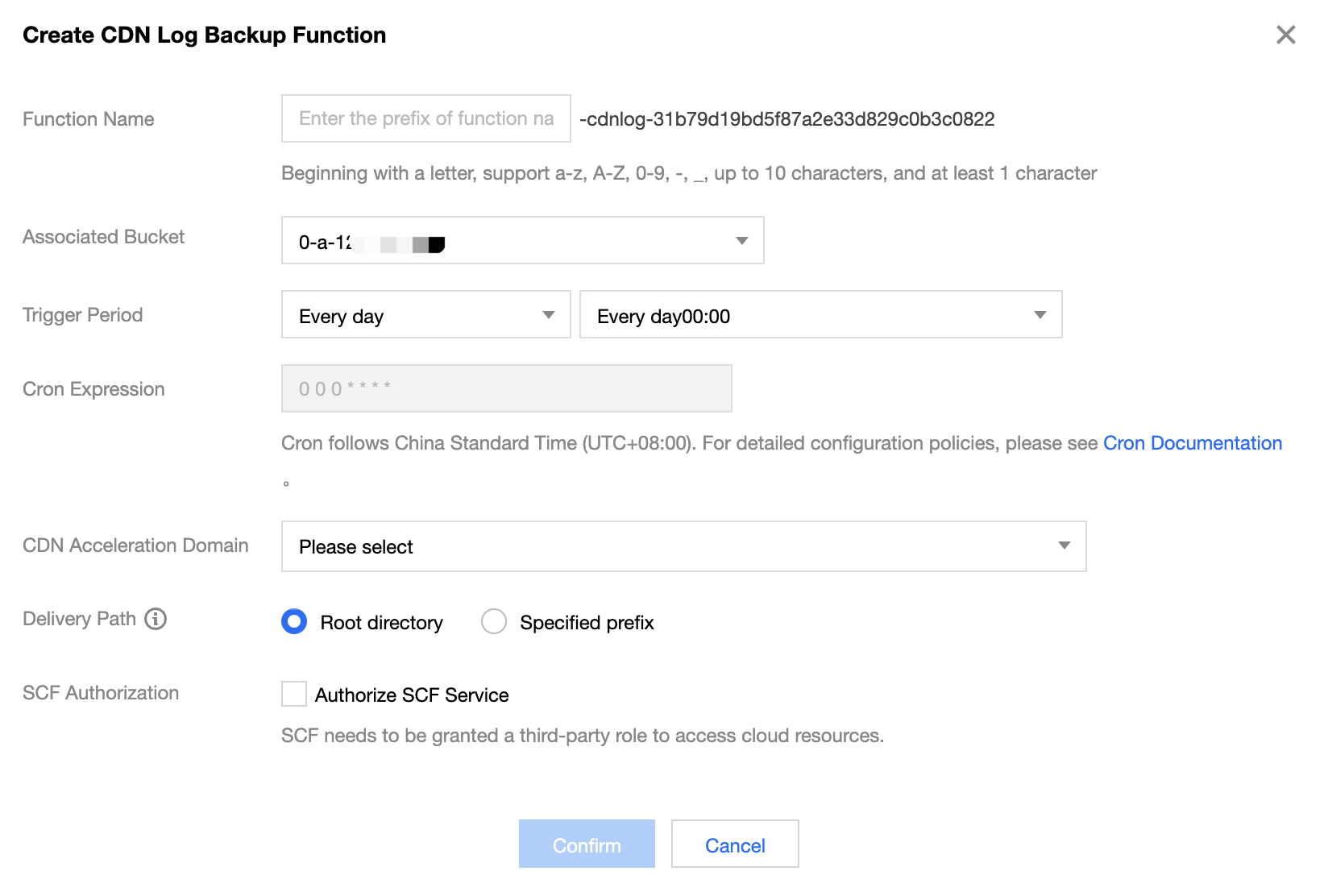
5. In the pop-up window, enter the following information:
Function Name: Uniquely identifies a function and cannot be modified after being set. You can view the function in the SCF console.
Associated Bucket: a COS bucket that stores the CDN logs
Trigger Period: a period to trigger the CDN log backup (a timer is used). Every day and custom periods are supported.
Cron Expression: If you use a custom period, you can use Cron to specify the trigger period rule. Cron follows China Standard Time (UTC+8:00). For detailed configuration policies, see Cron Documentation.
CDN Acceleration Domain: one or multiple domains whose logs are to dump
Delivery Path: a path to deliver the logs. You can deliver logs to the root directory or specify a path prefix.
SCF Authorization: (required) SCF needs to be authorized to read CDN logs and dump them to the specified bucket.
6. After adding the configuration, click Confirm and wait for the CDN log backup rule to be created. Once created, you can view the rule on the list page.
You can perform the following operations on the newly created CDN log backup rule:
Click Log to view the historical running status of CDN log backup. If an error is reported, you can click Log to quickly redirect to the SCF console for viewing the error log details.
Click More > Edit to modify the CDN log backup rule.
Click More > Delete to remove unused CDN log backup rules.