What does the "Privileged" option mean when I am creating a service?
If this option is enabled, applications in the container will have true root permission. We recommend you enable it when you need to perform higher-level system operations on applications in the container, such as building an NFS server.
Can I create a load balancer with a monthly subscription billing mode for my service?
Load balancers with a monthly subscription billing mode cannot be deleted synchronously when a service is deleted, resulting in wasted resources and user load balancer waste. Load balancers automatically created by services use the pay-as-you-go billing mode. Users can utilize existing monthly-subscribed load balancers by using the existing CLB option. For more information, please refer to Using Existing CLB with Services and Service Working Principles.
Can I specify the security group for a CLB instance when creating it?
Yes. Currently, you can use the following two options to specify the security group for a CLB instance when a service uses it:
Use an existing CLB. You can create a CLB and configure the security group, and then mount it to the service. For more information, see Using Existing CLBs.
You can configure a security group in the service using TkeServiceConfig. The corresponding security group will be used when creating the load balancer based on the configuration. To use this feature, please contact us online to apply.
Note
When accessing services within a cluster, it is recommended not to use the load balancer IP to avoid connectivity issues. Generally, a layer-4 load balancer binds multiple nodes as real servers (RS). To ensure proper functionality, clients and RS should not be on the same CVM instance, as this may cause packet loopback failure.
When a Pod accesses the load balancer, the Pod's IP is the source IP. The load balancer does not perform SNAT to convert the source IP to the Node IP when transmitting within the private network. As a result, the load balancer cannot determine which Node sent the packet, rendering the loopback avoidance policy ineffective, and all RS may be forwarded. If the packet is forwarded to the Node where the client is located, the load balancer will not receive the response, leading to connectivity issues.
FAQs About Updating the Number of Service Containers
What should I pay attention to when I update the number of containers?
Confirm whether CPU and memory resources are sufficient. If the resources are insufficient, a container may fail to be created.
Can I set the number of containers to 0?
Yes. You can set the number of containers to 0 to release the resources while retaining service configurations.
FAQs About Service Configuration Update
Is rolling update supported?
Both rolling update and quick update are supported.
Can I switch from a public network CLB instance to a private network CLB instance?
Yes, you can switch public network to VPC private network, or switch VPC private network to public network, and switch between different subnets of a VPC. For more information, see Service lifecycle management.
Note
If the service is responsible for lifecycle management of the CLB instance, the CLB instance and its public network IP will be released.
The process of switching from the public network to the private network is not instantaneous. It takes a certain amount of time to deactivate the public network CLB instance and activate the private network CLB instance. We recommend you configure a private network service resource in the cluster, conduct a test, and delete the original public network service resource after the traffic switch is completed.
FAQs About Service Deletion
Will the CLB instance auto-created by a service be terminated after I delete the service?
When a service is deleted, the CLB instance auto-created at the time of the service creation will be deleted simultaneously. If an existing CLB instance is selected at the time of service creation, the CLB instance will not be affected at all.
Is business data affected by deleting a service?
The business container will not be deleted and business data will not be affected if the service is deleted. No need to back up data in this regard.
FAQs About Service Running
How do I set the container system time to UTC+8 time?
The container uses UTC time by default. Users often encounter the problem of 8 hours difference between the container system time and UTC+8 time. You can create a time zone file in dockerfile to solve this issue. For more information, see solve the inconsistent time zone problem in the container.
What should I do when some Docker Hub images, such as Ubuntu, PHP, and BusyBox, encounter exceptions in TKE?
If no start command is set or the default start command is bash, the container will exit after start. To keep the container running, make sure that the process whose PID is 1 in the container is a resident process; otherwise, the container will exit when this process ends. For some images such as CentOS, you can create services by using /bin/bash as the running command and -c sleep 800000 as the running parameter. -c and sleep 800000 must be entered in different rows in the console.
Currently, images that cannot be started when default parameters are used include Clear Linux, ROS, Mageia, Amazon Linux, Ubuntu, Clojure, CRUX, GCC, Photon, Java, Debian, Oracle Linux, Mono, Bash, buildpack-deps, Go, Source Mage, Swift, OpenJDK, CentOS, BusyBox, Docker, Alpine, IBM Java, PHP, and Python.
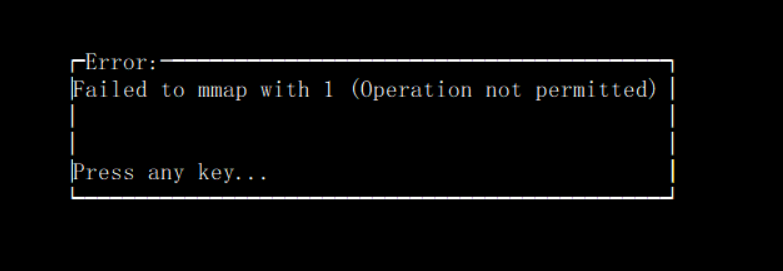
What should I do if an error message "Operation not permitted" appears when a container is executing perf top -p to check the process CPU status?
When running perf top -p in a container to view the CPU usage of a process, an "Operation not permitted" message appears, as shown below:
Docker's default configuration blocks critical system calls, as perf_event_open may leak a significant amount of information on the host and is therefore prohibited. If you need to use this call, please configure a privileged container or modify the Pod YAML field privileged to true. Be sure to assess the security risks involved.